
 本文主要解决原生localStorage无法设置过期时间的问题,并通过封装,来实现一个操作便捷,功能强大的localStorage库,关于库封装的一些基本思路和模式,我将采用之前写的如何用不到200行代码写一款属于自己的js类库中类似的方法,感兴趣的朋友可以学习,交流。
设计思路
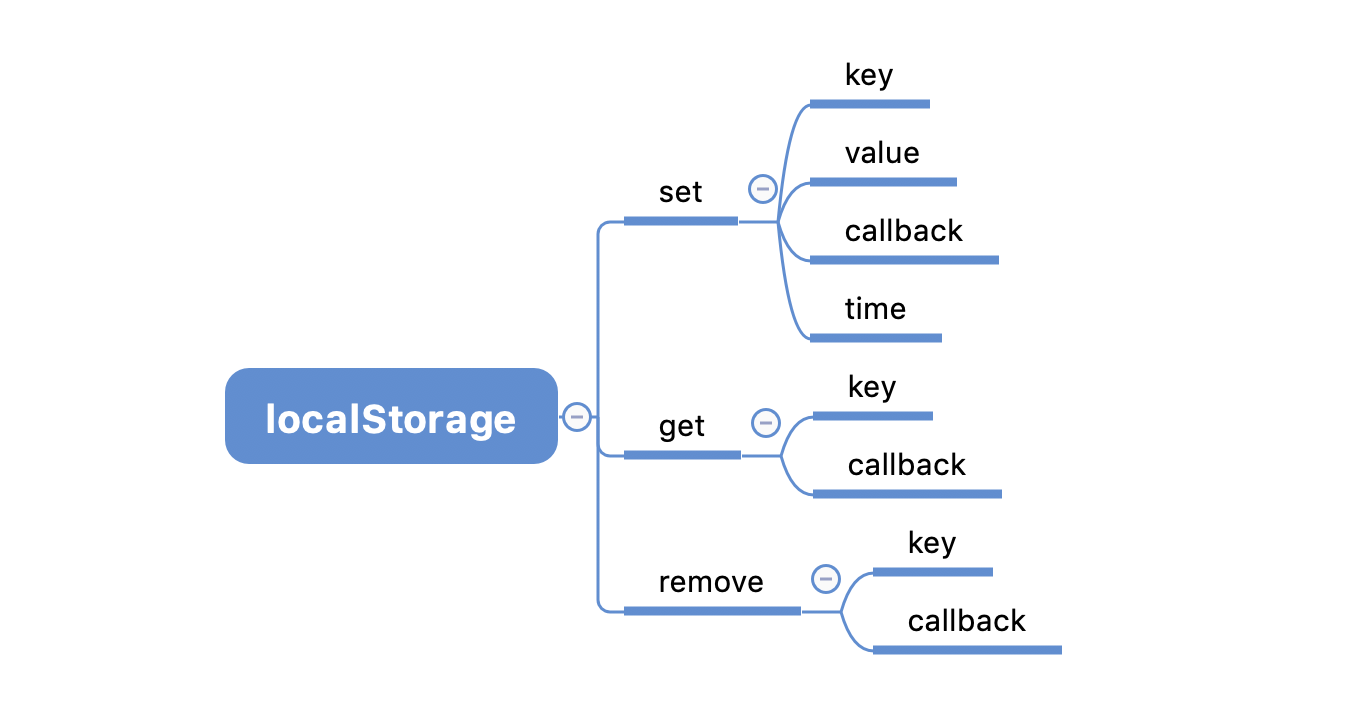
我们将基于localStorage原始api进行扩展,让其支持失效时间,操作完成后的回调。在文章的最后,我将给出库的完成代码,接下来我们就一步步实现吧。
正文
- 首先,我们来设计库的基本框架:
1 const BaseStorage = function(preId, timeSign){
2   // 初始化一些操作
3 }
4
5 BaseStorage.prototype = {
6   storage: localStorage || window.localStorage,
7   set: function(key, value, cb, time){
8
9   },
10   get: function(key, cb){
11
12   },
13   // 删除storage,如果删除成功,返回删除的内容
14   remove: function(key, cb){
15
16   }
17 }
如上可以发现,我们的storage会有三个核心api,分别为set,get,remove,我们使用localStorage作为基础库支持,当然你也可以将上面的库换成sessionStorage或者其他。
- 有了基本骨架,我们就可以实现基本功能的封装,这里我们先在原型中加一个属性,来列出数据操作中的各个状态。
1status: {
2 SUCCESS: 0, // 成功
3 FAILURE: 1, // 失败
4 OVERFLOW: 2, // 数据溢出
5 TIMEOUT: 3  // 超时
6},
为了实现过期时间,我们有两种思路,第一种是先将一个过期时间存到storage中,每次操作都检查一遍是否过期,但是这种方案意味着对不同的键就要设置不同的过期时间的storage与之对应,这样会占用额外的库内存,维护起来也不方便。另一种方法就是将过期时间存放到键值中,将时间和值通过标识符分隔,每次取的时候从值中截取过期时间,再将真实的值取出来返回,这种方案不会添加额外的键值对存储,维护起来也相对简单,所以我们采用这种方案。 为了区分不同的库对象,我们还可以添加键前缀,如下:
1const BaseLocalStorage = function(preId, timeSign){
2   this.preId = preId; // 键前缀
3   this.timeSign = timeSign || '|-|';  // 过期时间和值的分隔符
4 }
基于这个思想,我们就可以接下来的实现了。
- getKey——修饰key的方法,不影响用户对真实key的影响
1getKey: function(key){
2     return this.preId + key
3   },
- set实现
1set: function(key, value, cb, time){
2     var status = this.status.SUCCESS,
3     key = this.getKey(key);
4     // 设置失效时间,未设置时间默认为一个月
5     try{
6       time = new Date(time).getTime() || time.getTime();
7     }catch(e){
8       time = new Date().getTime() + 1000*60*60*24*31
9     }
10     try{
11       this.storage.setItem(key, time + this.timeSign + value);
12     }catch(e){
13       status = this.status.OVERFLOW;
14     }
15     // 操作完成后的回调
16     cb && cb.call(this, status, key, value)
17   }
- get实现
1get: function(key, cb){
2     var status = this.status.SUCCESS,
3     key = this.getKey(key),
4     value = null,
5     timeSignLen = this.timeSign.length,
6     that = this,
7     index,
8     time,
9     result;
10     try{
11       value = that.storage.getItem(key);
12     }catch(e){
13       result = {
14         status: that.status.FAILURE,
15         value: null
16       }
17       cb && cb.call(this, result.status, result.value);
18       return result
19     }
20     if(value) {
21       index = value.indexOf(that.timeSign);
22       time = +value.slice(0, index);
23       // 判断是否过期,过期则清除
24       if(time > new Date().getTime() || time == 0){
25         value = value.slice(index+timeSignLen);
26       }else{
27         value = null,
28         status = that.status.TIMEOUT;
29         that.remove(key);
30       }
31     }else{
32       status = that.status.FAILURE;
33     }
34     result = {
35       status: status,
36       value: value
37     };
38     cb && cb.call(this, result.status, result.value);
39     return result
40   }
- remove实现
1// 删除storage,如果删除成功,返回删除的内容
2   remove: function(key, cb){
3     var status = this.status.FAILURE,
4     key = this.getKey(key),
5     value = null;
6     try{
7       value = this.storage.getItem(key);
8     }catch(e){
9       // dosomething
10     }
11     if(value){
12       try{
13         this.storage.removeItem(key);
14         status = this.status.SUCCESS;
15       }catch(e){
16         // dosomething
17       }
18     }
19     cb && cb.call(this, status, status > 0 ? null : value.slice(value.indexOf(this.timeSign) + this.timeSign.length))
20   }
在api的实现过程中,由于某种误操作很可能导致storage报错,所以建议最好用trycatch包裹,这样可以避免影响后面的逻辑。
接下来我们可以这么使用:
1let a = new BaseStorage('_', '@');
2a.set('name', '123')
3a.get('name') // {status: 0, value: "123"}
4// 设置失效时间
5a.set('name', '123', null, new Date().getTime() + 1000*60*60*24*31)
6// 移除
7a.remove('name')
完整源码
1/**
2 * 数据管理器
3 */
4(function(win){
5  const BaseStorage = function(preId, timeSign){
6    this.preId = preId;
7    this.timeSign = timeSign || '|-|';
8  }
9
10  BaseStorage.prototype = {
11    status: {
12      SUCCESS: 0,
13      FAILURE: 1,
14      OVERFLOW: 2,
15      TIMEOUT: 3
16    },
17    storage: localStorage || window.localStorage,
18    getKey: function(key){
19      return this.preId + key
20    },
21    set: function(key, value, cb, time){
22      var status = this.status.SUCCESS,
23      key = this.getKey(key);
24      // 设置失效时间,未设置时间默认为一个月
25      try{
26        time = new Date(time).getTime() || time.getTime();
27      }catch(e){
28        time = new Date().getTime() + 1000*60*60*24*31
29      }
30      try{
31        this.storage.setItem(key, time + this.timeSign + value);
32      }catch(e){
33        status = this.status.OVERFLOW;
34      }
35      cb && cb.call(this, status, key, value)
36    },
37    get: function(key, cb){
38      var status = this.status.SUCCESS,
39      key = this.getKey(key),
40      value = null,
41      timeSignLen = this.timeSign.length,
42      that = this,
43      index,
44      time,
45      result;
46      try{
47        value = that.storage.getItem(key);
48      }catch(e){
49        result = {
50          status: that.status.FAILURE,
51          value: null
52        }
53        cb && cb.call(this, result.status, result.value);
54        return result
55      }
56      if(value) {
57        index = value.indexOf(that.timeSign);
58        time = +value.slice(0, index);
59        if(time > new Date().getTime() || time == 0){
60          value = value.slice(index+timeSignLen);
61        }else{
62          value = null,
63          status = that.status.TIMEOUT;
64          that.remove(key);
65        }
66      }else{
67        status = that.status.FAILURE;
68      }
69      result = {
70        status: status,
71        value: value
72      };
73      cb && cb.call(this, result.status, result.value);
74      return result
75    },
76    // 删除storage,如果删除成功,返回删除的内容
77    remove: function(key, cb){
78      var status = this.status.FAILURE,
79      key = this.getKey(key),
80      value = null;
81      try{
82        value = this.storage.getItem(key);
83      }catch(e){
84        // dosomething
85      }
86      if(value){
87        try{
88          this.storage.removeItem(key);
89          status = this.status.SUCCESS;
90        }catch(e){
91          // dosomething
92        }
93      }
94      cb && cb.call(this, status, status > 0 ? null : value.slice(value.indexOf(this.timeSign) + this.timeSign.length))
95    }
96  }
97
98  win.BS = BaseStorage;
99})(window)
100
大家也可以基于此扩展更强大的功能,如果有更好的想法,欢迎交流,探讨。