
写在前面:FreeSWITCH作为服务器,通过SIP协议,Web端使用jssip+webrtc和其他软电话进行通信
一、先配置FreeSWITCH(用的版本1.6.20)的配置:
1 、修改vars.xml文件,找到下面字段,并设置
1<X-PRE-PROCESS cmd="set" data="internal_ssl_enable=true"/>
2<X-PRE-PROCESS cmd="set" data="external_auth_calls=true"/>
3<X-PRE-PROCESS cmd="set" data="external_ssl_enable=true"/>
2、修改 autoload_configs/acl.conf.xml文件,增加acl选项
1    <list name="wan" default="allow">
2        <node type="allow" cidr="10.10.21.0/22"/>
3        <node type="allow" cidr="10.250.250.0/24"/>
4    </list>
在配置文件 sip_profiles/internal.xml 增加如下配置
<param name="apply-candidate-acl" value="wan"/>
默认情况下建立连接失败,提示下面错误,并呼叫失败
1a21d347d-5622-451b-a1db-d241ca823e4d 2018-08-09 20:28:15.217384 [WARNING] switch_core_media.c:3451 NO candidate ACL defined, Defaulting to wan.auto
2a21d347d-5622-451b-a1db-d241ca823e4d 2018-08-09 20:28:15.217384 [DEBUG] switch_core_media.c:3481 Save audio Candidate cid: 1 proto: udp type: host addr: 10.10.21.32:52786
3a21d347d-5622-451b-a1db-d241ca823e4d 2018-08-09 20:28:15.217384 [DEBUG] switch_core_media.c:3523 Searching for rtp candidate.
4a21d347d-5622-451b-a1db-d241ca823e4d 2018-08-09 20:28:15.217384 [DEBUG] switch_core_media.c:3523 Searching for rtcp candidate.
5a21d347d-5622-451b-a1db-d241ca823e4d 2018-08-09 20:28:15.217384 [DEBUG] switch_core_media.c:3567 sofia/internal/82s6ps5e@80ug9oo63ltj.invalid no suitable candidates found.
6a21d347d-5622-451b-a1db-d241ca823e4d 2018-08-09 20:28:15.217384 [DEBUG] switch_core_media.c:4767
7a21d347d-5622-451b-a1db-d241ca823e4d 2018-08-09 20:28:15.217384 [NOTICE] sofia.c:8240 Hangup sofia/internal/82s6ps5e@80ug9oo63ltj.invalid [CS_CONSUME_MEDIA] [INCOMPATIBLE_DESTINATION]
85fe89e1d-bb0c-473b-8877-d3648acd4076 2018-08-09 20:28:15.217384 [DEBUG] switch_core_codec.c:248 sofia/internal/1009@192.168.20.78 Restore previous codec PCMA:8.
9a21d347d-5622-451b-a1db-d241ca823e4d 2018-08-09 20:28:15.217384 [DEBUG] sofia.c:1453 Channel is already hungup.
在配置文件 sip_profiles/internal.xml 增加如下配置,解决这个问题
1<param name="apply-candidate-acl" value="localnet.auto"/>
2<param name="apply-candidate-acl" value="rfc1918.auto"/>
二、编写Web客户端
样式如下: 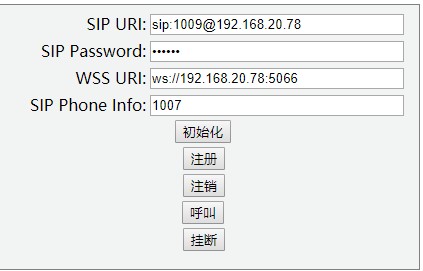 不是专业前端,没有做布局
启动之后,就和正常的SIP软终端一致了,通过FreSWITCH拨打其他软终端,测试正常。
源代码:基于JsSIP的客户端,参考网上,并自己修改并调试通过
1<!DOCTYPE html>
2<html>
3<head>
4    <title>JsSIP 对接 FreeSWITCH</title>
5    <meta http-equiv="Content-Type" content="text/html; charset=utf-8"/>
6    <meta name="Author" content="wangweichao"/>
7    <meta name="description" content="JsSIP based example web application."/>
8    <script src="js/jssip-3.0.13.min.js" type="text/javascript"></script>
9    <style type="text/css">
10    </style>
11</head>
12
13
14<body>
15<div id="login-page"
16     style="width: 424px; height: 260px; background-color: #f2f4f4; border: 1px solid grey; padding-top: 4px">
17    <table border="0" frame="void" width="418px">
18        <tr>
19            <td class="td_label" width="160px" align="right"><label for="sip_uri">SIP URI:</label></td>
20            <td width="258px"><input style="width:250px" id="sip_uri" type="text" value="sip:1009@192.168.20.78"/></td>
21        </tr>
22        <tr>
23            <td class="td_label" align="right"><label for="sip_password">SIP Password:</label></td>
24            <td><input style="width:250px" id="sip_password" type="password" value="654321"/></td>
25        </tr>
26        <tr>
27            <td class="td_label" align="right"><label for="ws_uri">WSS URI:</label></td>
28            <td><input style="width:250px" id="ws_uri" class="last unset" type="text" value="ws://192.168.20.78:5066"/>
29            </td>
30        </tr>
31        <tr>
32            <td class="td_label" align="right"><label class="input_label" for="sip_phone_number">SIP Phone Info:</label>
33            </td>
34            <td><input style="width:250px" id="sip_phone_number" type="text" value="1007"></td>
35        </tr>
36        <tr>
37            <td colspan="2" align="center">
38                <button onclick="testStart()"> 初始化</button>
39            </td>
40        </tr>
41
42        <tr>
43            <td colspan="5" align="center">
44                <button onclick="reg()"> 注册</button>
45            </td>
46        </tr>
47
48        <tr>
49            <td colspan="5" align="center">
50                <button onclick="unReg()"> 注销</button>
51            </td>
52        </tr>
53
54        <tr>
55            <td colspan="2" align="center">
56                <button onclick="testCall()"> 呼叫</button>
57            </td>
58        </tr>
59
60        <tr>
61            <td colspan="5" align="center">
62                <button onclick="hangup()"> 挂断</button>
63            </td>
64        </tr>
65    </table>
66</div>
67
68<video id="videoView" width="420px" height="320px" autoplay></video>
69
70</body>
71<script type="text/javascript">
72    var outgoingSession = null;
73    var incomingSession = null;
74    var currentSession = null;
75    var videoView = document.getElementById('videoView');
76
77    var constraints = {
78        audio: true,
79        video: false,
80        mandatory: {
81            maxWidth: 640,
82            maxHeight: 360
83        }
84    };
85    URL = window.URL || window.webkitURL;
86
87    var localStream = null;
88    var userAgent = null;
89
90
91    function testStart() {
92
93        var sip_uri_ = document.getElementById("sip_uri").value.toString();
94        var sip_password_ = document.getElementById("sip_password").value.toString();
95        var ws_uri_ = document.getElementById("ws_uri").value.toString();
96
97        console.info("get input info: sip_uri = ", sip_uri_, " sip_password = ", sip_password_, " ws_uri = ", ws_uri_);
98
99        var socket = new JsSIP.WebSocketInterface(ws_uri_);
100        var configuration = {
101            sockets: [socket],
102            outbound_proxy_set: ws_uri_,
103            uri: sip_uri_,
104            password: sip_password_,
105            register: true,
106            session_timers: false
107        };
108
109        userAgent = new JsSIP.UA(configuration);
110
111        //注册成功
112        userAgent.on('registered', function (data) {
113            console.info("registered: ", data.response.status_code, ",", data.response.reason_phrase);
114        });
115
116        //注册失败
117        userAgent.on('registrationFailed', function (data) {
118            console.log("registrationFailed, ", data);
119            //console.warn("registrationFailed, ", data.response.status_code, ",", data.response.reason_phrase, " cause - ", data.cause);
120        });
121
122        //注册超时
123        userAgent.on('registrationExpiring', function () {
124            console.warn("registrationExpiring");
125        });
126
127        userAgent.on('newRTCSession', function (data) {
128            console.info('onNewRTCSession: ', data);
129
130            //通话呼入
131            if (data.originator == 'remote') {
132                console.info("incomingSession, answer the call----------------------");
133                incomingSession = data.session;
134                data.session.answer({
135                    'mediaConstraints': {
136                        'audio': true,
137                        'video': false,
138                        mandatory: {maxWidth: 640, maxHeight: 360}
139                    }, 'mediaStream': localStream
140                });
141            } else {
142                console.info("outgoingSession");
143                outgoingSession = data.session;
144                outgoingSession.on('connecting', function (data) {
145                    console.info('onConnecting - ', data.request);
146                    currentSession = outgoingSession;
147                    outgoingSession = null;
148                });
149            }
150            data.session.on('accepted', function (data) {
151                console.info('onAccepted - ', data);
152                if (data.originator == 'remote' && currentSession == null) {
153                    currentSession = incomingSession;
154                    incomingSession = null;
155                    console.info("setCurrentSession - ", currentSession);
156                }
157            });
158            data.session.on('confirmed', function (data) {
159                console.info('onConfirmed - ', data);
160                if (data.originator == 'remote' && currentSession == null) {
161                    currentSession = incomingSession;
162                    incomingSession = null;
163                    console.info("setCurrentSession - ", currentSession);
164                }
165            });
166            data.session.on('sdp', function (data) {
167                console.info('onSDP, type - ', data.type, ' sdp - ', data.sdp);
168            });
169
170            data.session.on('progress', function (data) {
171                console.info('onProgress - ', data.originator);
172                if (data.originator == 'remote') {
173                    console.info('onProgress, response - ', data.response);
174                }
175            });
176            data.session.on('peerconnection', function (data) {
177                console.info('onPeerconnection - ', data.peerconnection);
178                data.peerconnection.onaddstream = function (ev) {
179                    console.info('onaddstream from remote ----------- ', ev);
180                    videoView.src = URL.createObjectURL(ev.stream);
181                };
182            });
183        });
184
185        userAgent.on('newMessage', function (data) {
186            if (data.originator == 'local') {
187                console.info('onNewMessage , OutgoingRequest - ', data.request);
188            } else {
189                console.info('onNewMessage , IncomingRequest - ', data.request);
190            }
191        });
192
193        console.info("call register");
194
195        userAgent.start();
196    }
197
198    // Register callbacks to desired call events
199    var eventHandlers = {
200        'progress': function (e) {
201            console.log('call is in progress');
202        },
203        'failed': function (e) {
204            console.log('call failed: ', e);
205        },
206        'ended': function (e) {
207            console.log('call ended : ', e);
208        },
209        'confirmed': function (e) {
210            console.log('call confirmed');
211        }
212    };
213
214    function testCall() {
215        var sip_phone_number_ = document.getElementById("sip_phone_number").value.toString();
216
217        var options = {
218            'eventHandlers': eventHandlers,
219            'mediaConstraints': {
220                'audio': true, 'video': false,
221                mandatory: {maxWidth: 640, maxHeight: 360}
222            },
223            'mediaStream': localStream
224        };
225
226        outgoingSession = userAgent.call(sip_phone_number_, options);
227    }
228    function reg() {
229        console.log('register----------->');
230        userAgent.register();
231    }
232
233    function unReg() {
234        console.log('unregister----------->');
235        userAgent.unregister(true);
236    }
237
238    function hangup() {
239        console.log('hangup----------->');
240        userAgent.terminateSessions();
241    }
242
243</script>
244</html>