
什么是WebSocket?
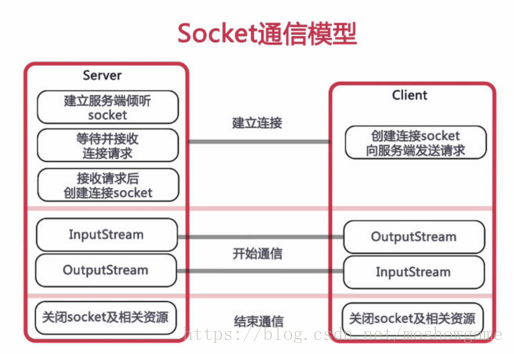
WebSocket协议是基于TCP的一种新的网络协议。它实现了浏览器与服务器全双工(full-duplex)通信——允许服务器主动发送信息给客户端。
为什么需要 WebSocket?
初次接触 WebSocket 的人,都会问同样的问题:我们已经有了 HTTP 协议,为什么还需要另一个协议?它能带来什么好处?
- 答案很简单,因为 HTTP 协议有一个缺陷:通信只能由客户端发起,HTTP 协议做不到服务器主动向客户端推送信息。
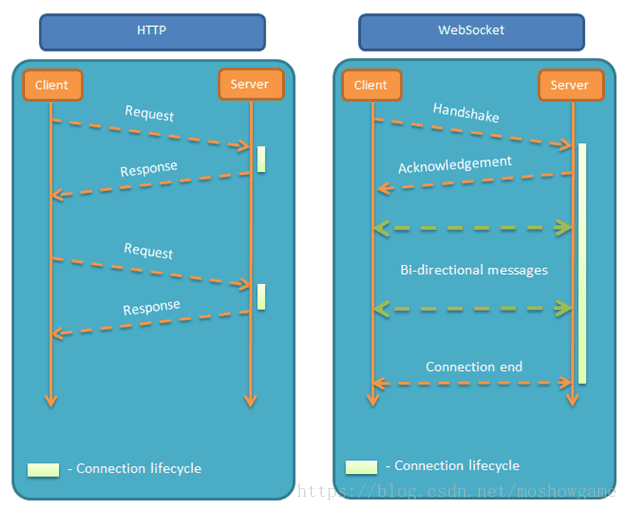
举例来说,我们想要查询当前的排队情况,只能是页面轮询向服务器发出请求,服务器返回查询结果。轮询的效率低,非常浪费资源(因为必须不停连接,或者 HTTP 连接始终打开)。因此WebSocket 就是这样发明的。
话不多说,马上进入干货时刻。
maven依赖
SpringBoot2.0对WebSocket的支持简直太棒了,直接就有包可以引入
1<dependency>
2     <groupId>org.springframework.boot</groupId>
3     <artifactId>spring-boot-starter-websocket</artifactId>
4</dependency>
WebSocketConfig
启用WebSocket的支持也是很简单,几句代码搞定
1import org.springframework.context.annotation.Bean;
2import org.springframework.context.annotation.Configuration;
3import org.springframework.web.socket.server.standard.ServerEndpointExporter;
4
5/**
6 * 开启WebSocket支持
7 * @author zhengkai
8 */
9@Configuration
10public class WebSocketConfig {
11
12    @Bean
13    public ServerEndpointExporter serverEndpointExporter() {
14        return new ServerEndpointExporter();
15    }
16
17}
WebSocketServer
因为WebSocket是类似客户端服务端的形式(采用ws协议),那么这里的WebSocketServer其实就相当于一个ws协议的Controller
直接@ServerEndpoint("/websocket")@Component启用即可,然后在里面实现@OnOpen,@onClose,@onMessage等方法
1import java.io.IOException;
2import java.util.concurrent.CopyOnWriteArraySet;
3
4import javax.websocket.OnClose;
5import javax.websocket.OnError;
6import javax.websocket.OnMessage;
7import javax.websocket.OnOpen;
8import javax.websocket.Session;
9import javax.websocket.server.ServerEndpoint;
10import org.springframework.stereotype.Component;
11import cn.hutool.log.Log;
12import cn.hutool.log.LogFactory;
13import lombok.extern.slf4j.Slf4j;
14
15
16@ServerEndpoint("/websocket/{sid}")
17@Component
18public class WebSocketServer {
19
20    static Log log=LogFactory.get(WebSocketServer.class);
21    //静态变量,用来记录当前在线连接数。应该把它设计成线程安全的。
22    private static int onlineCount = 0;
23    //concurrent包的线程安全Set,用来存放每个客户端对应的MyWebSocket对象。
24    private static CopyOnWriteArraySet<WebSocketServer> webSocketSet = new CopyOnWriteArraySet<WebSocketServer>();
25
26    //与某个客户端的连接会话,需要通过它来给客户端发送数据
27    private Session session;
28
29    //接收sid
30    private String sid="";
31    /**
32     * 连接建立成功调用的方法*/
33    @OnOpen
34    public void onOpen(Session session,@PathParam("sid") String sid) {
35        this.session = session;
36        webSocketSet.add(this);     //加入set中
37        addOnlineCount();           //在线数加1
38        log.info("有新窗口开始监听:"+sid+",当前在线人数为" + getOnlineCount());
39        this.sid=sid;
40        try {
41             sendMessage("连接成功");
42        } catch (IOException e) {
43            log.error("websocket IO异常");
44        }
45    }
46
47    /**
48     * 连接关闭调用的方法
49     */
50    @OnClose
51    public void onClose() {
52        webSocketSet.remove(this);  //从set中删除
53        subOnlineCount();           //在线数减1
54        log.info("有一连接关闭!当前在线人数为" + getOnlineCount());
55    }
56
57    /**
58     * 收到客户端消息后调用的方法
59     *
60     * @param message 客户端发送过来的消息*/
61    @OnMessage
62    public void onMessage(String message, Session session) {
63        log.info("收到来自窗口"+sid+"的信息:"+message);
64        //群发消息
65        for (WebSocketServer item : webSocketSet) {
66            try {
67                item.sendMessage(message);
68            } catch (IOException e) {
69                e.printStackTrace();
70            }
71        }
72    }
73
74    /**
75     *
76     * @param session
77     * @param error
78     */
79    @OnError
80    public void onError(Session session, Throwable error) {
81        log.error("发生错误");
82        error.printStackTrace();
83    }
84    /**
85     * 实现服务器主动推送
86     */
87    public void sendMessage(String message) throws IOException {
88        this.session.getBasicRemote().sendText(message);
89    }
90
91
92    /**
93     * 群发自定义消息
94     * */
95    public static void sendInfo(String message,@PathParam("sid") String sid) throws IOException {
96        log.info("推送消息到窗口"+sid+",推送内容:"+message);
97        for (WebSocketServer item : webSocketSet) {
98            try {
99                //这里可以设定只推送给这个sid的,为null则全部推送
100                if(sid==null) {
101                    item.sendMessage(message);
102                }else if(item.sid.equals(sid)){
103                    item.sendMessage(message);
104                }
105            } catch (IOException e) {
106                continue;
107            }
108        }
109    }
110
111    public static synchronized int getOnlineCount() {
112        return onlineCount;
113    }
114
115    public static synchronized void addOnlineCount() {
116        WebSocketServer.onlineCount++;
117    }
118
119    public static synchronized void subOnlineCount() {
120        WebSocketServer.onlineCount--;
121    }
122}
消息推送
至于推送新信息,可以再自己的Controller写个方法调用WebSocketServer.sendInfo();即可
1@Controller
2@RequestMapping("/checkcenter")
3public class CheckCenterController {
4
5    //页面请求
6    @GetMapping("/socket/{cid}")
7    public ModelAndView socket(@PathVariable String cid) {
8        ModelAndView mav=new ModelAndView("/socket");
9        mav.addObject("cid", cid);
10        return mav;
11    }
12    //推送数据接口
13    @ResponseBody
14    @RequestMapping("/socket/push/{cid}")
15    public ApiReturnObject pushToWeb(@PathVariable String cid,String message) {
16        try {
17            WebSocketServer.sendInfo(message,cid);
18        } catch (IOException e) {
19            e.printStackTrace();
20            return ApiReturnUtil.error(cid+"#"+e.getMessage());
21        }
22        return ApiReturnUtil.success(cid);
23    }
24}
页面发起socket请求
然后在页面用js代码调用socket,当然,太古老的浏览器是不行的,一般新的浏览器或者谷歌浏览器是没问题的。还有一点,记得协议是ws的哦,如果像我这样封装了一些basePath的路径类,可以replace(“http”,“ws”)来替换协议
1<script>
2    var socket;
3    if(typeof(WebSocket) == "undefined") {
4        console.log("您的浏览器不支持WebSocket");
5    }else{
6        console.log("您的浏览器支持WebSocket");
7            //实现化WebSocket对象,指定要连接的服务器地址与端口  建立连接
8            //等同于socket = new WebSocket("ws://localhost:8083/checkcentersys/websocket/20");
9            socket = new WebSocket("${basePath}websocket/${cid}".replace("http","ws"));
10            //打开事件
11            socket.onopen = function() {
12                console.log("Socket 已打开");
13                //socket.send("这是来自客户端的消息" + location.href + new Date());
14            };
15            //获得消息事件
16            socket.onmessage = function(msg) {
17                console.log(msg.data);
18                //发现消息进入    开始处理前端触发逻辑
19            };
20            //关闭事件
21            socket.onclose = function() {
22                console.log("Socket已关闭");
23            };
24            //发生了错误事件
25            socket.onerror = function() {
26                alert("Socket发生了错误");
27                //此时可以尝试刷新页面
28            }
29            //离开页面时,关闭socket
30            //jquery1.8中已经被废弃,3.0中已经移除
31            // $(window).unload(function(){
32            //     socket.close();
33            //});
34    }
35    </script>
————————————————
版权声明:本文为CSDN博主「Moshow郑锴」的原创文章,遵循 CC 4.0 BY-SA 版权协议,转载请附上原文出处链接及本声明。
原文链接:https://blog.csdn.net/moshowgame/article/details/80275084