
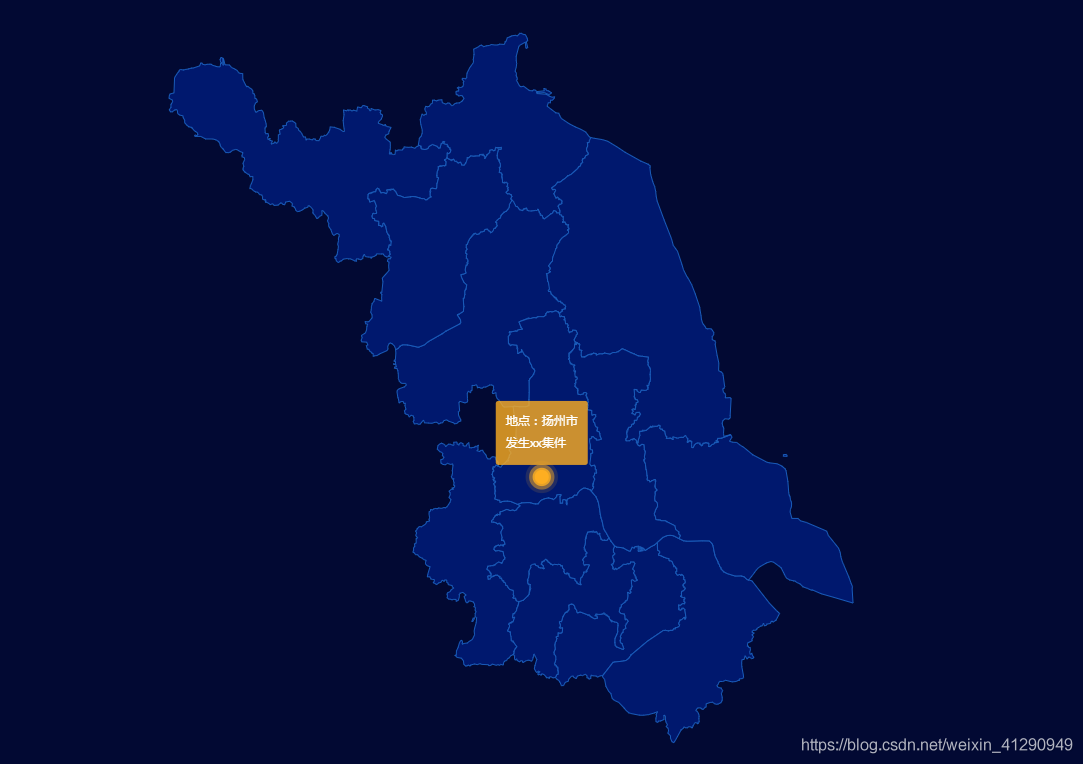
场景使用:适用于定时显示区域信息、区域警报提醒。
设置城市中心点
1var center = {
2
3
4
5    "南京市":[118.767413,32.041544],
6    "无锡市":[120.301663,31.574729],
7    "徐州市":[117.184811,34.261792],
8    "常州市":[119.946973,31.772752],
9    "苏州市":[120.619585,31.299379],
10    "南通市":[120.864608,32.016212],
11    "连云港市":[119.178821,34.600018],
12    "淮安市":[119.021265,33.597506],
13    "盐城市":[120.139998,33.377631],
14    "扬州市":[119.421003,32.393159],
15    "镇江市":[119.452753,32.204402],
16    "泰州市":[119.915176,32.484882],
17    "宿迁市":[118.275162,33.963008]}
注册地图,并渲染map
1$.get(uploadedDataURL, function(json) {
2
3
4
5    echarts.registerMap('lockdatav', json);
6    var option = {
7
8
9
10        backgroundColor: '#020933',
11        geo: [{
12
13
14
15            map: 'lockdatav',
16            roam: false, //是否允许缩放
17            zoom: 1.1, //默认显示级别
18            itemStyle: {
19
20
21
22                normal: {
23
24
25
26                    areaColor: '#00186E',
27                    borderColor: '#195BB9',
28                    borderWidth: 1,
29                },
30                emphasis: {
31
32
33
34                    areaColor: '#195BB9'
35                }
36            },
37        }],
38        series: [{
39
40
41
42                type: 'effectScatter',
43                coordinateSystem: 'geo',
44                z: 5,
45                data: [],
46                symbolSize: 14,
47                label: {
48
49
50
51                    normal: {
52
53
54
55                        show: true,
56                        formatter: function(params) {
57
58
59
60                            return '{fline|地点:'+ params.data.city +'}\n{tline|'+ (params.data.info || '发生xx集件') +'}';
61                        },
62                        position: 'top',
63                        backgroundColor: 'rgba(254,174,33,.8)',
64                        padding: [0, 0],
65                        borderRadius: 3,
66                        lineHeight: 32,
67                        color: '#f7fafb',
68                        rich: {
69
70
71
72                            fline: {
73
74
75
76                                padding: [0, 10, 10, 10],
77                                color: '#ffffff'
78                            },
79                            tline: {
80
81
82
83                                padding: [10, 10, 0, 10],
84                                color: '#ffffff'
85                            }
86                        }
87                    },
88                    emphasis: {
89
90
91
92                        show: true
93                    }
94                },
95                itemStyle: {
96
97
98
99                    color: '#feae21',
100                }
101            }
102        ]
103    };
104    myChart.setOption(option);
105});
设置定时器,推送option.series[0].data
1var timer = setInterval(() => {
2
3
4
5    var cityIndex = Math.floor(Math.random() * 13);
6    var runidx = Math.floor(Math.random() * 3);
7    var coordCity = Object.keys(center)[cityIndex];
8    var coord = center[coordCity];
9    option.series[0].data = [{
10
11
12
13        city: coordCity,
14        value: coord
15    }];
16    myChart.setOption(option, true);
17},2000);
Done!
本文同步分享在 博客“漏刻有时”(CSDN)。
如有侵权,请联系 support@oschina.cn 删除。
本文参与“OSC源创计划”,欢迎正在阅读的你也加入,一起分享。