
今天在Linux下源码安装好MySQL后,将mysql添加到系统的服务的过程引起了我的兴趣,我能不能自己写一个简单的脚本,也添加为系统的服务呢?
于是开干:
1su
2vi myservice
然后模仿着mysql在里面开写:
1#!/bin/bash
2
3start() {
4    echo 'This is my service, start command'
5    echo ''
6}
7stop() {
8    echo 'This is my service, stop command'
9    echo ''
10}
11restart() {
12    echo 'This is my service, restart command'
13    echo ''
14}
15status() {
16    echo 'This is my service, status command'
17    echo ''
18}
19case "$1" in
20    start)
21        start
22        ;;
23    stop)
24        stop
25        ;;
26    restart)
27        restart
28        ;;
29    status)
30        status
31        ;;
32    *)
33        echo 'Usage: service myservice {start|status|stop|restart}'
34        echo ''
35        exit 1
36esac
37exit 0
很简单,myservice脚本执行时需要接受一个参数,这个参数可以是start, status, stop, restart中间的一个,收到参数后,仅仅做回显使用。写好之后,在拷贝到/etc/init.d/下面去,增加可执行权限,并添加到系统服务:
1cp myservice /etc/init.d/myservice
2chmod +x /etc/init.d/myservice
3chkconfig --add myservice
然后就报错了:

google之,发现是chkconfig的注释不能少:
The script must have 2 lines:
1# chkconfig: <levels> <start> <stop>
2# description: <some description>
之后再打开/etc/init.d/mysql,看看哪里不对,结果发现里面真有这个注释:
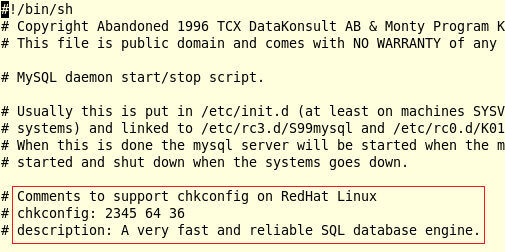
然后自己也跟着写了个这样的注释,于是脚本就变成了:
1#!/bin/bash
2
3# For example: following config would generate link
4# S51myservice in rc2.d, rc3.d, rc4.d, rc5.d and
5# K49myservice in rc0.d, rc1.d, rc6.d
6
7# Comments to support chkconfig on RedHat Linux
8# run level, start order, stop order
9
10# chkconfig: 2345 51 49
11# description: Customized service written by Alvis.
12
13start() {
14    echo 'This is my service, start command'
15    echo ''
16}
17stop() {
18    echo 'This is my service, stop command'
19    echo ''
20}
21restart() {
22    echo 'This is my service, restart command'
23    echo ''
24}
25status() {
26    echo 'This is my service, status command'
27    echo ''
28}
29case "$1" in
30    start)
31        start
32        ;;
33    stop)
34        stop
35        ;;
36    restart)
37        restart
38        ;;
39    status)
40        status
41        ;;
42    *)
43        echo 'Usage: service myservice {start|status|stop|restart}'
44        echo ''
45        exit 1
46esac
47exit 0
这下好了,再次执行chkconfig:

去看看/etc/rc.d/rc2.d,/etc/rc.d/rc3.d,/etc/rc.d/rc4.d,/etc/rc.d/rc5.d下面都生成了什么:

可以看到,在rc2.d和rc3.d目录下都生成了一个链接S51myservice,S代表在该运行级别启动,51代表该服务的启动优先级。同理可推,在rc0.d、rc1.d和rc6.d这三个文件夹下会生成K49myservice链接:

接下来,可以测试刚刚编写的service 了:
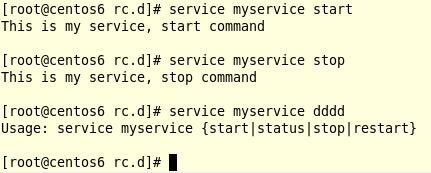
到这里,简单的service就算是编写完成了。真正的service只是包含了更多的逻辑而已,本质上和这个例子没什么区别。
参考: