
webpack5手撸vue
相信工作个1-2年的小伙伴们在面试的时候多多少少怕被问到关于webpack方面的知识,本菜鸟最近闲来无事,就尝试了手撸了下vue2的脚手架,第一次发帖实在是没有经验,望海涵。
1{
2    "name": "vue-cli-version2",
3    "version": "1.0.0",
4    "description": "",
5    "main": "index.js",
6    "scripts": {
7        "test": "echo \"Error: no test specified\" && exit 1",
8        "dev": "webpack-dev-server"
9    },
10    "author": "",
11    "license": "ISC",
12    "dependencies": {
13        "clean-webpack-plugin": "^4.0.0-alpha.0",
14        "css-loader": "^5.2.6",
15        "element-ui": "^2.15.2",
16        "eslint": "^7.28.0",
17        "file-loader": "^6.2.0",
18        "html-loader": "^2.1.2",
19        "html-webpack-plugin": "^5.3.1",
20        "html-withimg-loader": "^0.1.16",
21        "less": "^4.1.1",
22        "less-loader": "^9.0.0",
23        "mini-css-extract-plugin": "^1.6.0",
24        "optimize-css-assets-webpack-plugin": "^6.0.0",
25        "speed-measure-webpack-plugin": "^1.5.0",
26        "style-loader": "^2.0.0",
27        "url-loader": "^4.1.1",
28        "vue": "^2.6.14",
29        "vue-loader": "^15.9.7",
30        "vue-router": "^3.5.1",
31        "vue-style-loader": "^4.1.3",
32        "vue-template-compiler": "^2.6.14",
33        "webpack": "^5.38.1",
34        "webpack-cli": "^4.7.2",
35        "webpack-dev-server": "^3.11.2",
36    }
37}
38
因为笔者在撸的时候,发现兼容性经常出现一些问题,所以先贴上json文件,以便各位读者大佬可以省点时间。
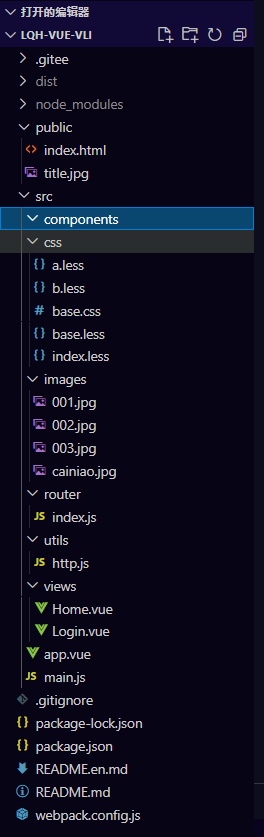 以上是我的工作目录,大家如果有自己的设置习惯,也可以按照自己的习惯来。
1// 每次打包的时候清除之前dist里面的文件
2const { CleanWebpackPlugin } = require('clean-webpack-plugin')
3    // 设置html模板
4const HtmlWebpackPlugin = require('html-webpack-plugin')
5    // 用于提取js中的css代码
6const MiniCssExtractPlugin = require('mini-css-extract-plugin')
7    // 这是因为在15.x.x版本之后,如果要使用vue-loader,需要在webpack种使用vue-loader自带的插件,不然没法使用vue-loader
8const VueLoaderPlugin = require('vue-loader/lib/plugin')
9    // 分析各个阶段打包时长
10const SpeedMeasurePlugin = require("speed-measure-webpack-plugin");
11const { resolve } = require('path')
12    // const webpack = require('webpack')
13    // console.log(webpack);
14
15const CommonCssLoader = [{
16        loader: MiniCssExtractPlugin.loader,
17        options: {
18            // css分包后处理背景图
19            publicPath: '../'
20        }
21    },
22    // "style-loader",
23    "css-loader",
24]
25module.exports = {
26    mode: "development",
27    entry: './src/main.js',
28    output: {
29        path: resolve(__dirname, './dist'),
30        filename: '[name].js',
31        // publicPath: '../dist/images'
32    },
33    module: {
34        rules: [
35            // {
36            //     test: /\.js$/,
37            //     exclude: /(node_modules|bower_components)/,
38            //     use: {
39            //         loader: 'babel-loader',
40            //         options: {
41            //             presets: ['@babel/preset-env']
42            //         }
43            //     }
44            // },
45            {
46                test: /\.vue$/,
47                use: ['vue-loader']
48            },
49            {
50                test: /\.css$/,
51                use: [
52                    ...CommonCssLoader
53                ]
54            },
55            {
56                test: /\.less$/,
57                use: [
58                    ...CommonCssLoader, "less-loader"
59                ]
60            },
61            {
62                // test: /\.svg$/,
63                // exclue 这里可以解引入element css的问题
64                exclude: /\.(jpg|jpeg|png|gif|css|less|html|js|vue)/,
65                loader: "file-loader"
66            },
67            {
68                test: /\.(jpg|jpeg|png|gif)$/,
69                use: [{
70                    loader: "url-loader",
71                    options: {
72                        // 图片大小小于8kb就打包成base64格式
73                        limit: 8 * 1024,
74                        name: '[hash:10].[ext]',
75                        outputPath: "images",
76                        // publicPath: './images',
77                        // esModule: false
78                    }
79                }]
80            },
81            // {
82            //     test: /\.html$/,
83            //     // loader: "html-loader",   //webpack4好使,5用下面的,可以解决html里面img引入不仅图片的问题
84            //     loader: 'html-withimg-loader'
85            // }
86        ]
87    },
88    plugins: [
89        // 用于设置html模板
90        new HtmlWebpackPlugin({
91            title: "My App",
92            template: 'public/index.html',
93        }),
94        new CleanWebpackPlugin(),
95        // 提取js中的css,并重命名
96        new MiniCssExtractPlugin({
97            filename: "css/[contenthash:10].css"
98        }),
99        new VueLoaderPlugin(),
100        new SpeedMeasurePlugin(),
101    ],
102    // 将node_modules里面代码分割出来
103    optimization: {
104        splitChunks: {
105            chunks: 'all',
106        },
107    },
108    // 用webpack serve启动
109    devServer: {
110        // 设置开发服务器的启动目录
111        contentBase: resolve(__dirname, "dist"),
112        compress: true,
113        port: 3000,
114        open: true,
115        hot: true,
116        // 让浏览器里面的log变得干净
117        clientLogLevel: "none",
118        // 除去终端的一些输出内容
119        quiet: true
120    },
121}
相信大家可能会觉得我这里为什么没有配置babel,其实我也纳闷,我尝试过,就算不用的话,甚至可以解析ES10的代码,所以我认为webpack5里应该是已经配置好了,无需我们再去配置。
1import ElementUI from 'element-ui';
2import 'element-ui/lib/theme-chalk/index.css';
3
4import less from 'less'
5Vue.use(less)
6Vue.use(ElementUI);
7import "./css/index.less"
8// import "./css/base.less"
9import "./css/base.css"
10import Vue from 'vue'
11import App from './app.vue'
12import router from "./router"
13console.log(222222222);
14new Vue({
15    router,
16    render: h => h(App)
17}).$mount('#app')
以上是我main.js的配置
1import Vue from "vue"
2import Router from "vue-router"
3
4Vue.use(Router)
5
6export default new Router({
7    mode: 'hash',
8    routes: [{
9            path: '/',
10            redirect: '/login'
11        },
12
13        {
14            path: '/home',
15            name: 'home',
16            component: () =>
17                import ( /* webpackChunkName: "home" */ "../views/Home.vue"),
18        },
19        {
20            path: '/login',
21            name: 'Login',
22            component: () =>
23                import ( /* webpackChunkName: "login" */ "../views/Login.vue"),
24        },
25
26    ]
27})
以上是我router.js的配置 这两个我就不过多解释了,这两个跟我们平时用的vue脚手架搭的是一样的。 以上基本就是我目前撸的所有配置了,希望各位大佬们给我指点指点,一起进步。 后续我还会添加一些新的配置进来,逐渐完善。 以下是项目的地址,需要的话大家可以拉下来看看,感谢各位 https://gitee.com/lv_qi_hang_admin/lqh-vue-vli.git