
记录SpringBoot 集成Mybatis 连接数据库 防止后面忘记
1.添加Mybatis和Mysql依赖
<dependency>
<groupId>org.mybatis.spring.boot</groupId>
<artifactId>mybatis-spring-boot-starter</artifactId>
<version>1.1.1</version>
</dependency>
<dependency>
<groupId>mysql</groupId>
<artifactId>mysql-connector-java</artifactId>
</dependency>
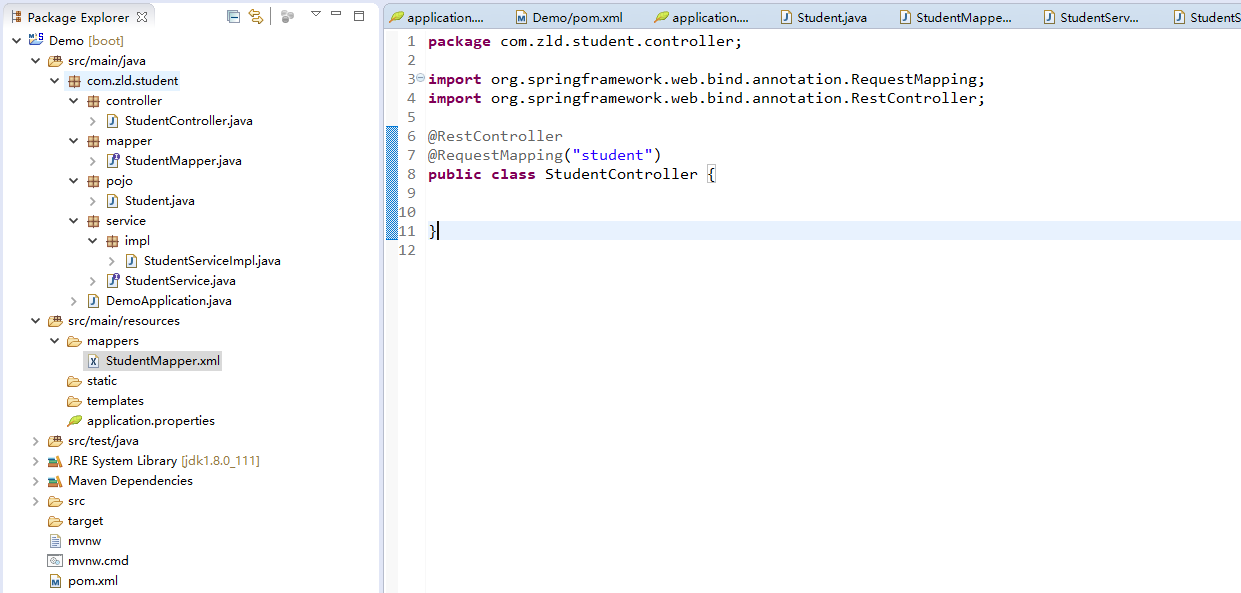
2.创建pojo,mapper,service,controller
此时项目结构
3.配置application配置文件
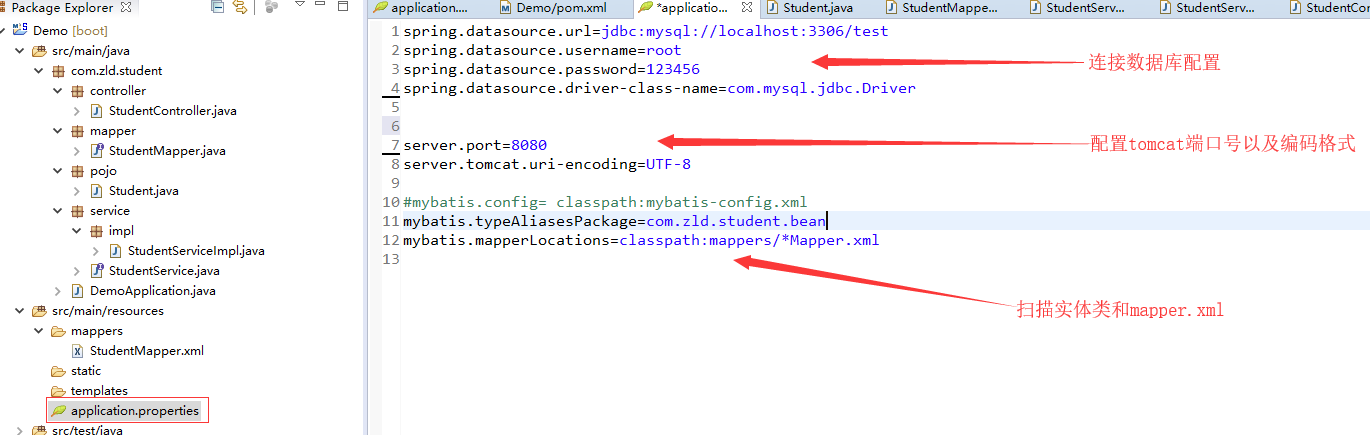
1spring.datasource.url=jdbc:mysql://localhost:3306/test
2spring.datasource.username=root
3spring.datasource.password=123456
4spring.datasource.driver-class-name=com.mysql.jdbc.Driver
5
6
7server.port=8080
8server.tomcat.uri-encoding=UTF-8
9
10#mybatis.config= classpath:mybatis-config.xml
11mybatis.typeAliasesPackage=com.zld.student.bean
12mybatis.mapperLocations=classpath:mappers/*Mapper.xml
4.添加接口
package com.zld.student.controller;
import java.util.HashMap;
import java.util.List;
import java.util.Map;
import org.springframework.beans.factory.annotation.Autowired;
import org.springframework.util.StringUtils;
import org.springframework.web.bind.annotation.RequestMapping;
import org.springframework.web.bind.annotation.RequestMethod;
import org.springframework.web.bind.annotation.RequestParam;
import org.springframework.web.bind.annotation.RestController;
import com.zld.student.pojo.Student;
import com.zld.student.service.StudentService;
@RestController
@RequestMapping("student")
public class StudentController {
@Autowired
StudentService studentService;
@RequestMapping(value = "/add", method = { RequestMethod.GET, RequestMethod.POST })
public String add(Student student) {
return studentService.add(student);
}
@RequestMapping(value = "/delete", method = { RequestMethod.GET, RequestMethod.POST })
public String delete(
@RequestParam(value = "ids", required = false) String[] ids) {
if (ids != null && ids.length <= 0) {
return "Ids不能为空";
}
return studentService.delete(ids);
}
@RequestMapping(value = "/update", method = { RequestMethod.GET, RequestMethod.POST })
public String update(Student student) {
return studentService.update(student);
}
@RequestMapping(value = "/findList", method = { RequestMethod.GET, RequestMethod.POST })
public Map<String, Object> findEqList(
) {
Map<String, Object> data = new HashMap<String, Object>();
List<Student> list=studentService.findEqList();
if (list.isEmpty()) {
data.put("msg", "无数据");
return data;
}
data.put("list", list);
return data;
}
@RequestMapping(value = "/findById", method = { RequestMethod.GET, RequestMethod.POST })
public Student findByIds(
@RequestParam(value = "id", required = false) Integer id) {
return studentService.findById(id);
}
}


1package com.zld.student.service;
2
3import java.util.List;
4
5import com.zld.student.pojo.Student;
6
7public interface StudentService {
8
9    String add(Student student);
10
11    String delete(String[] ids);
12
13    String update(Student student);
14
15    List<Student> findEqList();
16
17    Student findById(Integer id);
18
19}
StudentService


1package com.zld.student.service.impl;
2
3import java.util.List;
4
5import org.springframework.beans.factory.annotation.Autowired;
6import org.springframework.stereotype.Service;
7
8import com.zld.student.mapper.StudentMapper;
9import com.zld.student.pojo.Student;
10import com.zld.student.service.StudentService;
11
12@Service
13public class StudentServiceImpl implements  StudentService{
14
15    @Autowired
16    private StudentMapper studentMapper;
17
18    @Override
19    public String add(Student student) {
20        try {
21            int addCount = studentMapper.insertSelective(student);
22            if(addCount>0){
23                return "添加成功";
24            }
25        } catch (Exception e) {
26            e.printStackTrace();
27            System.err.println("数据添加失败");
28        }
29        return "添加失败";
30    }
31
32    @Override
33    public String delete(String[] ids) {
34        try {
35            int deleteCount = studentMapper.deleteAll(ids);
36            if(deleteCount>0){
37                return "删除成功";
38            }
39        } catch (Exception e) {
40            e.printStackTrace();
41            System.err.println("数据删除失败");
42        }
43        return "删除失败";
44    }
45
46    @Override
47    public String update(Student student) {
48        try {
49            int updateCount = studentMapper.updateByPrimaryKeySelective(student);
50            if(updateCount>0){
51                return "修改成功";
52            }
53        } catch (Exception e) {
54            e.printStackTrace();
55            System.err.println("数据修改失败");
56        }
57        return "数据失败";
58    }
59
60    @Override
61    public List<Student> findEqList() {
62        List<Student> data=null;
63        try {
64            data= studentMapper.findList();
65            return data;
66        } catch (Exception e) {
67            System.err.println("数据修改失败");
68            e.printStackTrace();
69            return data;
70        }
71
72    }
73    @Override
74    public Student findById(Integer id) {
75        // TODO Auto-generated method stub
76        return id==null ? new Student(): studentMapper.selectByPrimaryKey(id);
77    }
78
79}
StudentServiceImpl


1package com.zld.student.mapper;
2
3import java.util.List;
4
5import com.zld.student.pojo.Student;
6
7public interface StudentMapper {
8    int deleteByPrimaryKey(Integer sno);
9
10    int insert(Student record);
11
12    int insertSelective(Student record);
13
14    Student selectByPrimaryKey(Integer sno);
15
16    int updateByPrimaryKeySelective(Student record);
17
18    int updateByPrimaryKey(Student record);
19
20    int deleteAll(String[] ids);
21
22    List<Student> findList();
23}
StudentMapper.java


1<?xml version="1.0" encoding="UTF-8" ?>
2<!DOCTYPE mapper PUBLIC "-//mybatis.org//DTD Mapper 3.0//EN" "http://mybatis.org/dtd/mybatis-3-mapper.dtd" >
3<mapper namespace="com.zld.student.mapper.StudentMapper" >
4  <resultMap id="BaseResultMap" type="com.zld.student.pojo.Student" >
5    <id column="sno" property="sno" jdbcType="INTEGER" />
6    <result column="sname" property="sname" jdbcType="VARCHAR" />
7    <result column="sage" property="sage" jdbcType="TIMESTAMP" />
8    <result column="ssex" property="ssex" jdbcType="CHAR" />
9  </resultMap>
10  <sql id="Base_Column_List" >
11    sno, sname, sage, ssex
12  </sql>
13  <select id="selectByPrimaryKey" resultMap="BaseResultMap" parameterType="java.lang.Integer" >
14    select
15    <include refid="Base_Column_List" />
16    from student
17    where sno = #{sno,jdbcType=INTEGER}
18  </select>
19  <delete id="deleteByPrimaryKey" parameterType="java.lang.Integer" >
20    delete from student
21    where sno = #{sno,jdbcType=INTEGER}
22  </delete>
23  <insert id="insert" parameterType="com.zld.student.pojo.Student" >
24    insert into student (sno, sname, sage,
25      ssex)
26    values (#{sno,jdbcType=INTEGER}, #{sname,jdbcType=VARCHAR}, #{sage,jdbcType=TIMESTAMP},
27      #{ssex,jdbcType=CHAR})
28  </insert>
29  <insert id="insertSelective" parameterType="com.zld.student.pojo.Student" >
30    insert into student
31    <trim prefix="(" suffix=")" suffixOverrides="," >
32      <if test="sno != null" >
33        sno,
34      </if>
35      <if test="sname != null" >
36        sname,
37      </if>
38      <if test="sage != null" >
39        sage,
40      </if>
41      <if test="ssex != null" >
42        ssex,
43      </if>
44    </trim>
45    <trim prefix="values (" suffix=")" suffixOverrides="," >
46      <if test="sno != null" >
47        #{sno,jdbcType=INTEGER},
48      </if>
49      <if test="sname != null" >
50        #{sname,jdbcType=VARCHAR},
51      </if>
52      <if test="sage != null" >
53        #{sage,jdbcType=TIMESTAMP},
54      </if>
55      <if test="ssex != null" >
56        #{ssex,jdbcType=CHAR},
57      </if>
58    </trim>
59  </insert>
60  <update id="updateByPrimaryKeySelective" parameterType="com.zld.student.pojo.Student" >
61    update student
62    <set >
63      <if test="sname != null" >
64        sname = #{sname,jdbcType=VARCHAR},
65      </if>
66      <if test="sage != null" >
67        sage = #{sage,jdbcType=TIMESTAMP},
68      </if>
69      <if test="ssex != null" >
70        ssex = #{ssex,jdbcType=CHAR},
71      </if>
72    </set>
73    where sno = #{sno,jdbcType=INTEGER}
74  </update>
75  <update id="updateByPrimaryKey" parameterType="com.zld.student.pojo.Student" >
76    update student
77    set sname = #{sname,jdbcType=VARCHAR},
78      sage = #{sage,jdbcType=TIMESTAMP},
79      ssex = #{ssex,jdbcType=CHAR}
80    where sno = #{sno,jdbcType=INTEGER}
81  </update>
82
83   <delete id="deleteAll" parameterType="java.lang.String" >
84    delete from student
85    where sno in <foreach item="id" collection="array" open="(" separator=","
86            close=")">
87            #{id}
88        </foreach>
89  </delete>
90
91    <select id="findList" resultMap="BaseResultMap" >
92    select
93    <include refid="Base_Column_List" />
94    from student
95  </select>
96</mapper>
StudentMapper.xml


1package com.zld.student.pojo;
2
3import java.util.Date;
4
5public class Student {
6    private Integer sno;
7
8    private String sname;
9
10    private Date sage;
11
12    private String ssex;
13
14    public Integer getSno() {
15        return sno;
16    }
17
18    public void setSno(Integer sno) {
19        this.sno = sno;
20    }
21
22    public String getSname() {
23        return sname;
24    }
25
26    public void setSname(String sname) {
27        this.sname = sname == null ? null : sname.trim();
28    }
29
30    public Date getSage() {
31        return sage;
32    }
33
34    public void setSage(Date sage) {
35        this.sage = sage;
36    }
37
38    public String getSsex() {
39        return ssex;
40    }
41
42    public void setSsex(String ssex) {
43        this.ssex = ssex == null ? null : ssex.trim();
44    }
45}
Student


1package com.zld.student;
2
3import org.mybatis.spring.annotation.MapperScan;
4import org.springframework.boot.SpringApplication;
5import org.springframework.boot.autoconfigure.SpringBootApplication;
6
7@SpringBootApplication
8@MapperScan(basePackages = {"com.zld.student.mapper"})
9public class DemoApplication {
10
11    public static void main(String[] args) {
12        SpringApplication.run(DemoApplication.class, args);
13    }
14}
DemoApplication
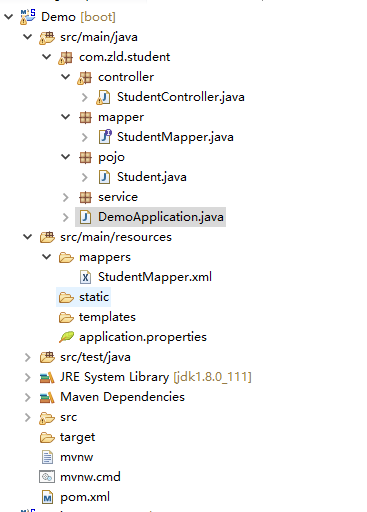
最后项目结构
最近一直忙于前端写篇文章记录下来,免得以后捡起来的时候需要重新翻资料
-----只有用尽全力,才能看起来毫不费劲