
一、properties类读取配置文件
1、从项目中读取properties配置文件,新建一个main程序,对应位置建立一个名称为config.properties配置文件,随意放置一些键值对。IDEA建立配置文件,对应package鼠标右键,点击New,再点击Resource Bundle,弹出对话框输入名称保存即可。
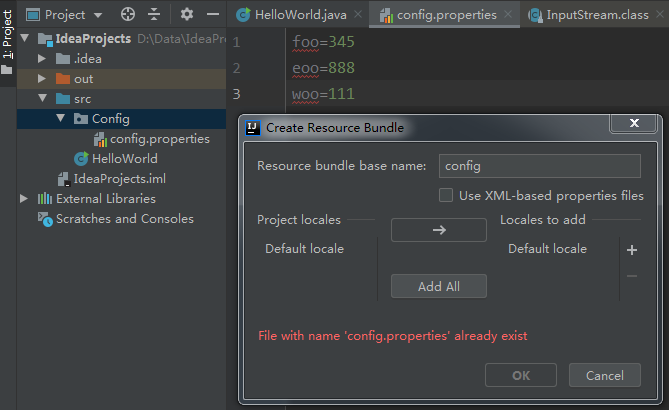
2、以下实例,读取配置文件,然后遍历key值和value值,采用此种方式读取项目中配置文件,将不依赖具体环境。
1 1 public class HelloWorld {
2 2     public static void main(String[] args) {
3 3         Properties properties=new Properties();
4 4         InputStream in=HelloWorld.class.getClassLoader().getResourceAsStream("Config/config.properties");
5 5         try{
6 6             properties.load(in);
7 7             Enumeration enumeration=properties.propertyNames();
8 8             while (enumeration.hasMoreElements()){
9 9                 String strKey=(String)enumeration.nextElement();
1010                 String strValue=properties.getProperty(strKey);
1111                 System.out.println("key:"+strKey+";Value:"+strValue);
1212             }
1313         }catch(Exception e){
1414             System.out.println("There is An IO error!");
1515         }
1616     }
1717 }
(1)读取后另一种遍历方式
11     InputStream in = new BufferedInputStream(new FileInputStream("D:/b.properties"));
22     properties.load(in);
33     Iterator<String> it = properties.stringPropertyNames().iterator();
44             while (it.hasNext()) {
55                 String key = it.next();
66                 System.out.println(key + ":" + properties.getProperty(key));
77             }
3、一些其它读取配置文件的方法
(1)从环境固定位置读取配置文件,配置文件放在某个磁盘下几种方式。
11    FileInputStream in=new FileInputStream("D:/config.properties");
22    properties.load(in);
或
11    InputStream in= new BufferedInputStream(newFileInputStream("D:/config.properties"));
22    properties.load(in);
或
11    BufferedReader bufferedReader = new BufferedReader(new FileReader("D:/config.properties"));
22    properties.load(bufferedReader);
4、配置文件添加新的键值对,然后将保存成一个新文件并存储。
11    FileOutputStream oFile = new FileOutputStream("D:/b.properties", true);//true表示追加打开
22    properties.setProperty("移动", "10086");
33    properties.store(oFile, "The New properties file has Created");
44    oFile.close();
二、java.util.ResourceBundle类读取properties配置文件,这种方式来获取properties属性文件不需要加.properties后缀名,只需要文件名即可。
11    ResourceBundle resource = ResourceBundle.getBundle("Config/config");
22    String key = resource.getString("foo");
33    System.out.println(key);
三、XML配置文件读取
使用dom4j解析xml,下载地址:https://dom4j.github.io/
1、xml文件内容
1 1 <?xml version="1.0" encoding="UTF-8"?>
2 2 <CONFIG>
3 3     <VALUE>
4 4         <!-- mysql连接设置 -->
5 5         <server>127.0.0.1</server>
6 6         <dbname>users</dbname>
7 7         <user>root</user>
8 8         <pass>pass</pass>
9 9         <port>3306</port>
1010     </VALUE>
1111 </CONFIG>
2、XML项目中所在位置
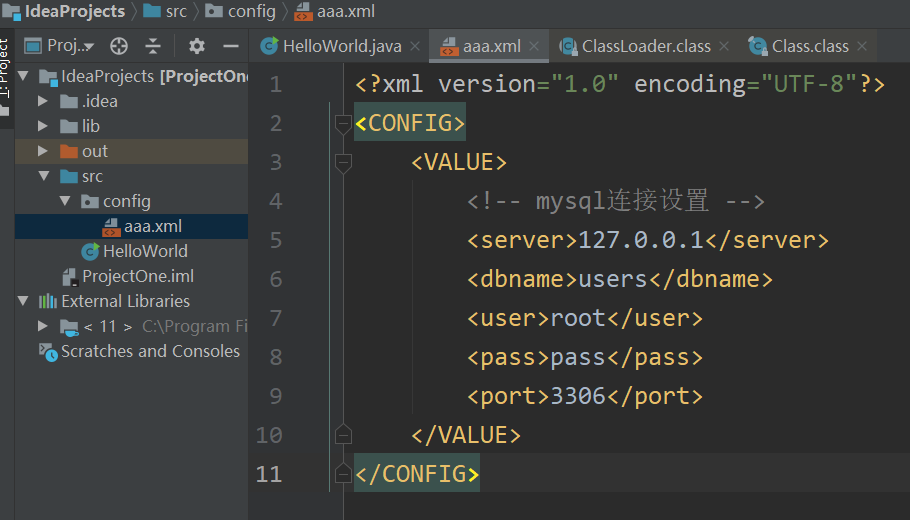
3、测试代码
1 1 import org.dom4j.Document;
2 2 import org.dom4j.Element;
3 3 import org.dom4j.io.SAXReader;
4 4 import java.io.File;
5 5 import java.net.URL;
6 6 import java.util.Iterator;
7 7
8 8 try {
9 9             URL filePath=null;
1010             filePath = HelloWorld.class.getClassLoader().getResource("config/aaa.xml");
1111             File f =new File(filePath.getPath());
1212             if (!f.exists()) {
1313                 System.out.println("  Error : Config file doesn't exist!");
1414                 System.exit(1);
1515             }
1616             SAXReader reader = new SAXReader();
1717             Document doc;
1818             doc = reader.read(f);
1919             Element root = doc.getRootElement();
2020             Element data;
2121             Iterator<?> itr = root.elementIterator("VALUE");
2222             data = (Element) itr.next();
2323             String server = data.elementText("server").trim();
2424             String user = data.elementText("user").trim();
2525             String pass = data.elementText("pass").trim();
2626             String port = data.elementText("port").trim();
2727             String dbname = data.elementText("dbname").trim();
2828             System.out.println(server);
2929             System.out.println(user);
3030             System.out.println(pass);
3131             System.out.println(port);
3232             System.out.println(dbname);
3333         } catch (Exception ex) {
3434             System.out.println("Error : " + ex.toString());
3535         }
4、注意事项:以上的获取XML配置资源,主要依赖第三方包dom4j,下载地址在上面已经给出。将第三方jar包引用到当前项目可以参考:https://blog.csdn.net/MAOZEXIJR/article/details/88966876
四、尊重原创,以上有些内容参考了以下链接内容。
https://www.cnblogs.com/mengxiangqihang/p/4150450.html
https://www.cnblogs.com/xudong-bupt/p/3758136.html