
上次和大家分享了关于Notification的基础应用,包括简单的通知和自定义视图的通知。今天和大家分享一下如何实现一个可更新进度的通知。
我们将会模拟一个下载任务,先启动一个线程负责模拟下载工作,在这个过程中更新进度信息,然后下载线程把最新的进度信息以消息的形式,发送到UI线程的消息队列中,最后UI线程负责根据最新的进度信息来更新进度通知的UI界面。
好,大概就是这个步骤。接下来我们根据具体的实例来演示一下这个过程。
我们新建一个notification项目,然后修改/res/layout/main.xml布局文件,代码如下:
[html] view plain copy
- <?xml version\="1.0" encoding\="utf-8"?>
- <LinearLayout xmlns:android="http://schemas.android.com/apk/res/android"
- android:orientation="vertical"
- android:layout_width="fill_parent"
- android:layout_height="fill_parent">
- <Button
- android:id="@+id/download"
- android:layout_width="fill_parent"
- android:layout_height="wrap_content"
- android:text="download"
- android:onClick="download"/>
- <Button
- android:id="@+id/cancel"
- android:layout_width="fill_parent"
- android:layout_height="wrap_content"
- android:text="cancel"
- android:onClick="cancel"/>
- </LinearLayout>
注意,为了使示例中的Java代码看起来结构更加清晰,我们将按钮的点击事件都定义在布局文件中。
然后再来看一下MainActivity.java的代码:
[java] view plain copy
-
package com.scott.notification;
-
import android.app.Activity;
-
import android.app.Notification;
-
import android.app.NotificationManager;
-
import android.app.PendingIntent;
-
import android.content.Context;
-
import android.content.Intent;
-
import android.os.Bundle;
-
import android.os.Handler;
-
import android.os.Message;
-
import android.view.View;
-
import android.widget.RemoteViews;
-
public class MainActivity extends Activity {
-
private static final int NOTIFY_ID = 0;
-
private boolean cancelled;
-
private NotificationManager mNotificationManager;
-
private Notification mNotification;
-
private Context mContext = this;
-
private Handler handler = new Handler() {
-
public void handleMessage(android.os.Message msg) {
-
switch (msg.what) {
-
case 1:
-
int rate = msg.arg1;
-
if (rate < 100) {
-
// 更新进度
-
RemoteViews contentView = mNotification.contentView;
-
contentView.setTextViewText(R.id.rate, rate + "%");
-
contentView.setProgressBar(R.id.progress, 100, rate, false);
-
} else {
-
// 下载完毕后变换通知形式
-
mNotification.flags = Notification.FLAG_AUTO_CANCEL;
-
mNotification.contentView = null;
-
Intent intent = new Intent(mContext, FileMgrActivity.class);
-
PendingIntent contentIntent = PendingIntent.getActivity(mContext, 0, intent, 0);
-
mNotification.setLatestEventInfo(mContext, "下载完成", "文件已下载完毕", contentIntent);
-
}
-
// 最后别忘了通知一下,否则不会更新
-
mNotificationManager.notify(NOTIFY_ID, mNotification);
-
break;
-
case 0:
-
// 取消通知
-
mNotificationManager.cancel(NOTIFY_ID);
-
break;
-
}
-
};
-
};
-
@Override
-
public void onCreate(Bundle savedInstanceState) {
-
super.onCreate(savedInstanceState);
-
setContentView(R.layout.main);
-
}
-
public void download(View view) {
-
mNotificationManager = (NotificationManager) getSystemService(Context.NOTIFICATION_SERVICE);
-
int icon = R.drawable.down;
-
CharSequence tickerText = "开始下载";
-
long when = System.currentTimeMillis();
-
mNotification = new Notification(icon, tickerText, when);
-
// 放置在"正在运行"栏目中
-
mNotification.flags = Notification.FLAG_ONGOING_EVENT;
-
RemoteViews contentView = new RemoteViews(mContext.getPackageName(), R.layout.download_notification_layout);
-
contentView.setTextViewText(R.id.fileName, "AngryBird.apk");
-
// 指定个性化视图
-
mNotification.contentView = contentView;
-
// intent为null,表示点击通知时不跳转
-
PendingIntent contentIntent = PendingIntent.getActivity(mContext, 0, null, 0);
-
// 指定内容意图
-
mNotification.contentIntent = contentIntent;
-
mNotificationManager.notify(NOTIFY_ID, mNotification);
-
new Thread() {
-
public void run() {
-
startDownload();
-
};
-
}.start();
-
}
-
public void cancel(View view) {
-
cancelled = true;
-
}
-
private void startDownload() {
-
cancelled = false;
-
int rate = 0;
-
while (!cancelled && rate < 100) {
-
try {
-
// 模拟下载进度
-
Thread.sleep(500);
-
rate = rate + 5;
-
} catch (InterruptedException e) {
-
e.printStackTrace();
-
}
-
Message msg = handler.obtainMessage();
-
msg.what = 1;
-
msg.arg1 = rate;
-
handler.sendMessage(msg);
-
}
-
if (cancelled) {
-
Message msg = handler.obtainMessage();
-
msg.what = 0;
-
handler.sendMessage(msg);
-
}
-
}
-
}
值 得注意的是,在控制下载线程时使用了cancelled这个boolean值标志变量,对于线程的控制更好一些,不建议使用 Thread.interrupt()去中断一个线程。另外,对于更新通知的UI界面时,要记住调用 NotificationManager.notify(int id, Notification notification)方法通知一下,否则即使设置了新值,也不会起作用的。
程序中用到的带进度的通知布局/res/layout/download_notification_layout.xml布局文件代码如下:
[html] view plain copy
- <?xml version\="1.0" encoding\="utf-8"?>
- <RelativeLayout xmlns:android="http://schemas.android.com/apk/res/android"
- android:layout_width="fill_parent"
- android:layout_height="fill_parent"
- android:padding="3dp">
- <ImageView
- android:id="@+id/imageView"
- android:layout_width="wrap_content"
- android:layout_height="wrap_content"
- android:layout_margin="3dp"
- android:src="@drawable/down"/>
- <TextView
- android:id="@+id/fileName"
- android:layout_width="fill_parent"
- android:layout_height="fill_parent"
- android:layout_toRightOf="@id/imageView"
- android:layout_alignBottom="@id/imageView"
- android:gravity="center_vertical"
- android:textColor="#000"/>
- <TextView
- android:id="@+id/rate"
- android:layout_width="fill_parent"
- android:layout_height="wrap_content"
- android:layout_below="@id/imageView"
- android:layout_alignRight="@id/imageView"
- android:gravity="center"
- android:text="0%"
- android:textColor="#000"/>
- <ProgressBar
- android:id="@+id/progress"
- style="?android:attr/progressBarStyleHorizontal"
- android:layout_width="fill_parent"
- android:layout_height="wrap_content"
- android:layout_below="@id/fileName"
- android:layout_alignLeft="@id/fileName"
- android:max="100"
- android:progress="0"/>
- </RelativeLayout>
该通知的布局使用了相对布局,更加灵活易用,所以推荐大家多使用相对布局。
对于MainActivity.java中涉及到的FileMgrActivity,它是一个简单的界面,这里就不在介绍了,that's not the point。
最后我们跑一下程序,看看效果如何:

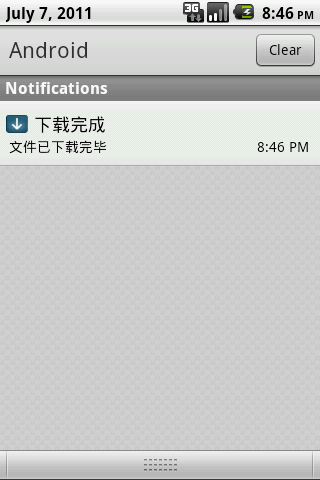
貌似还不错,好了,今天先到这里,下次再找机会分享。