
js1k.com收集了小于1k的javascript小例子,里面有很多很炫很酷的游戏和特效,今年规则又增加了新花样,传统的classic类型基础上又增加了WebGL类型,以及允许增加到2K的++类型,多次想尝试提交个小游戏但总无法写出让自己满意还能控制在这么小的字节范围。
自己写不出来,站在巨人肩膀总是有机会吧,想起《基于HTML5的电信网管3D机房监控应用》这篇提到的threejs,babylonjs和Hightopo的几种基于WebGL的3D引擎,突然想挑战下自己实现个100行JS的3D小游戏,折腾了一番最终采用Hightopo搞了个3D贪吃蛇游戏,算了算JS代码还只有90来行,终于满足了自己的小小心愿写完这篇可以满意去睡觉了。
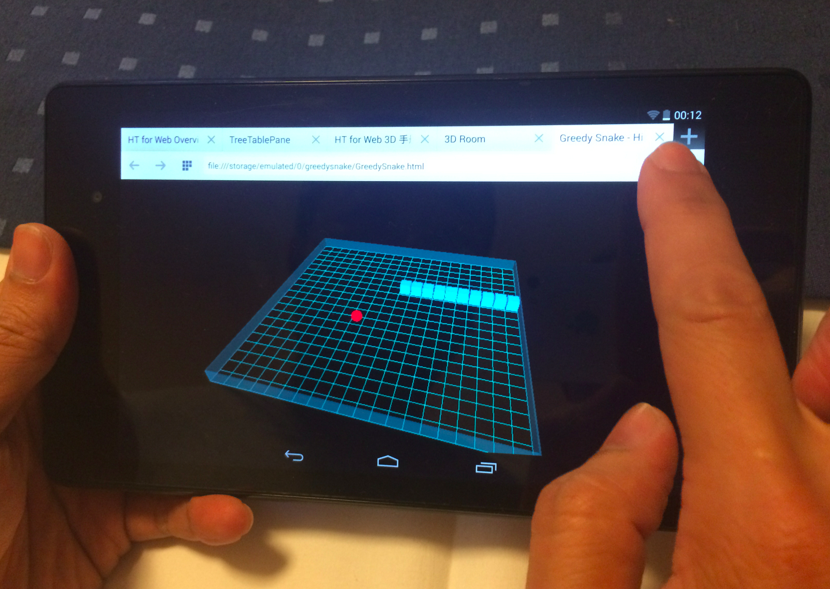
以下先上一段最终3D游戏在平板上的运行交互视频效果:
http://v.youku.com/v_show/id_XNjgxMzIxOTcy.html
传统2D的贪吃蛇游戏一般通过方向键盘控制蛇的前进方向,我一开始就想定位可运行在平板上的Touch交互,所以不考虑键盘的操作交互方式,采用完全用点击的方式来控制,通过HT的g3d.getHitPosition(e)函数我能得到鼠标点击所在的平面位置,这样与蛇头的位置做比较就能判断出新的前进方向,如果点击位置超出了贪吃蛇的运行矩阵范围我就不做处理,这时候留给HT的标准orbit旋转操作方式,通过ht.Default.isDoubleClick(e)监听双击事件重启游戏。所谓的可移动化方面也没太多需要考虑的设计,仅在添加点击时需要考虑touch的情况 view.addEventListener(ht.Default.isTouchable ? 'touchstart' : 'mousedown'。
90来行所有JS源代码如下,各位游戏高手不要喷我,肯定很多人可以写得更精炼,但我只想通过这个玩一玩3D,HTML5和WebGL,包括给整天搞企业应用的自己换换脑子思考些新元素。
1function init() {
2	w = 40; m = 20; d = w * m / 2; food = null;
3	dm = new ht.DataModel();
4	g3d = new ht.graph3d.Graph3dView(dm);
5	g3d.setGridVisible(true);
6	g3d.setGridColor('#29B098');
7	g3d.setGridSize(m);
8	g3d.setGridGap(w);
9	view = g3d.getView();
10	view.className = 'main';
11	document.body.appendChild(view);
12	window.addEventListener('resize', function (e) {  g3d.invalidate(); }, false);
13	g3d.sm().setSelectionMode('none');
14	view.addEventListener(ht.Default.isTouchable ? 'touchstart' : 'mousedown', function(e){
15		if(isRunning){
16			var p = g3d.getHitPosition(e);
17			if(Math.abs(p[0]) < d && Math.abs(p[2]) < d){
18				if(direction === 'up' || direction === 'down'){
19					direction = p[0] > snake[0].p3()[0] ? 'right' : 'left';
20				}
21				else if(direction === 'left' || direction === 'right'){
22					direction = p[2] > snake[0].p3()[2] ? 'down' : 'up';
23				}
24			}
25		}else if(ht.Default.isDoubleClick(e)){
26			start();
27		}
28	}, false);
29	start();
30	setInterval(function(){ if(isRunning){ isRunning = next(); } }, 200);
31}
32function start(){
33	dm.clear(); snake = []; score = 0; direction = 'up'; isRunning = true;
34	shape = new ht.Shape();
35	shape.setPoints(new ht.List([
36		{x: -d, y: d},
37		{x: d, y: d},
38		{x: d, y: -d},
39		{x: -d, y: -d},
40		{x: -d, y: d}
41	]));
42	shape.setThickness(4);
43	shape.setTall(w);
44	shape.setElevation(w/2);
45	shape.s({'all.color': 'rgba(20, 120, 120, 0.5)', 'all.transparent': true, 'all.reverse.cull': true});
46	dm.add(shape);
47	for(var i=0; i<m/2; i++) { snake.push(createNode(m/2 + i, m/2)); }
48	createFood();
49}
50function createNode(x, y){
51	var node = new ht.Node();
52	node.a({ x: x,  y: y });
53	node.s3(w*0.9, w*0.9, w*0.9);
54	node.p3(-w*m/2+w*x+w/2, w/2, -w*m/2+w*y+w/2);
55	dm.add(node);
56	return node;
57}
58function getRandom(){
59	return parseInt(Math.random() * m);
60}
61function createFood(){
62	var x = getRandom(), y = getRandom();
63	while(touchFood(x, y) || touchSnake(x, y)){ x = getRandom(); y = getRandom(); }
64	if(food) dm.remove(food);
65	food = createNode(x, y);
66	food.s({'shape3d': 'sphere',  'shape3d.color': 'red'});
67}
68function touchSnake(x, y){
69	for(var i=0; i<snake.length; i++){
70		if(snake[i].a('x') === x && snake[i].a('y') === y){ return true; }
71	}
72	return false;
73}
74function touchFood(x, y){
75	return food && food.a('x') === x && food.a('y') === y;
76}
77function next(){
78	var node = snake[0], x = node.a('x'), y = node.a('y');
79	if(direction === 'up') y--;
80	if(direction === 'down') y++;
81	if(direction === 'left') x--;
82	if(direction === 'right') x++;
83	if(x < 0 || x >= m || y < 0 || y >= m || touchSnake(x, y)){ return false; }
84	if(touchFood(x, y)){
85		score++;
86		snake.splice(0, 0, createNode(x, y));
87		createFood();
88	}else{
89		snake.splice(0, 0, createNode(x, y));
90		dm.remove(snake.pop());
91	}
92	return true;
93}