
git的代码量大多数都是根据命令行统计,或者根据第三方插件统计。但是都不满足我的需求,因为我们代码都由gitlab管理,于是想到了通过gitlab暴露出来的接口获取数据。
第一步,生成私钥
登录你的gitlab申请私钥private_token
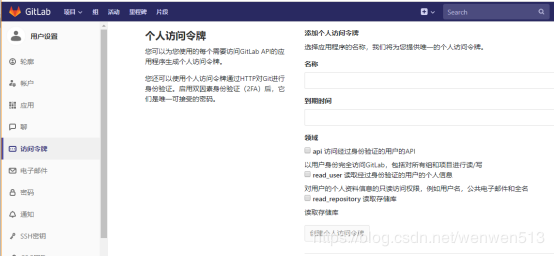
第二步,获取当前用户可见的所有项目(即使用户不是成员)
接口地址:gitlab的地址/api/v4/projects/?private_token=xxx
返回参数:
1[{
2        "id":219,
3        "description":"",
4        "name":"share-5.2.3.8",
5        "name_with_namespace":"develop / share-5.2.3.8",
6        "path":"share-5.2.3.8",
7        "path_with_namespace":"develop/share-5.2.3.8",
8        "created_at":"2019-07-10T19:59:29.855+08:00",
9        "default_branch":"master",
10        "tag_list":[
11
12        ],
13        "ssh_url_to_repo":"git@127.0.0.1:develop/share-5.2.3.8.git",
14        "http_url_to_repo":"http://127.0.0.1/develop/share-5.2.3.8.git",
15        "web_url":"http://127.0.0.1/develop/share-5.2.3.8",
16        "readme_url":"http://127.0.0.1/develop/share-5.2.3.8/blob/master/README.md",
17        "avatar_url":null,
18        "star_count":0,
19        "forks_count":0,
20        "last_activity_at":"2019-07-11T02:53:44.831+08:00",
21        "_links":{
22            "self":"http://127.0.0.1/api/v4/projects/219",
23            "issues":"http://127.0.0.1/api/v4/projects/219/issues",
24            "merge_requests":"http://127.0.0.1/api/v4/projects/219/merge_requests",
25            "repo_branches":"http://127.0.0.1/api/v4/projects/219/repository/branches",
26            "labels":"http://127.0.0.1/api/v4/projects/219/labels",
27            "events":"http://127.0.0.1/api/v4/projects/219/events",
28            "members":"http://127.0.0.1/api/v4/projects/219/members"
29        },
30        "archived":false,
31        "visibility":"private",
32        "resolve_outdated_diff_discussions":false,
33        "container_registry_enabled":true,
34        "issues_enabled":true,
35        "merge_requests_enabled":true,
36        "wiki_enabled":true,
37        "jobs_enabled":true,
38        "snippets_enabled":true,
39        "shared_runners_enabled":true,
40        "lfs_enabled":true,
41        "creator_id":14,
42        "namespace":{
43            "id":17,
44            "name":"develop",
45            "path":"develop",
46            "kind":"group",
47            "full_path":"develop",
48            "parent_id":null
49        },
50        "import_status":"none",
51        "open_issues_count":0,
52        "public_jobs":true,
53        "ci_config_path":null,
54        "shared_with_groups":[
55
56        ],
57        "only_allow_merge_if_pipeline_succeeds":false,
58        "request_access_enabled":false,
59        "only_allow_merge_if_all_discussions_are_resolved":false,
60        "printing_merge_request_link_enabled":true,
61        "merge_method":"merge",
62        "permissions":{
63            "project_access":null,
64            "group_access":{
65                "access_level":40,
66                "notification_level":3
67            }
68        }
69    },...]
参数这么多我们从中抽取出需要的部分
1[{
2        "id":219,
3        "name":"share-5.2.3.8",
4        "name_with_namespace":"develop / share-5.2.3.8",
5        "path_with_namespace":"develop/share-5.2.3.8",
6        "http_url_to_repo":"http://127.0.0.1/develop/share-5.2.3.8.git",
7        "created_at":"2019-07-10T19:59:29.855+08:00",
8         "_links":{
9            "repo_branches":"http://127.0.0.1/api/v4/projects/219/repository/branches",
10        },
11    },...]
第三步,遍历项目,根据项目id获取分支列表
接口地址:http://gitlab地址/api/v4/projects/项目id/repository/branches?private_token=xxx
传入参数:无
返回参数:
1[{
2        "name":"master",
3        "commit":{
4            "id":"d1b9747ba994f19fb6afb069b3751bd3cf21rrrr",
5            "short_id":"d1b974123",
6            "title":"添加仓库",
7            "created_at":"2019-07-11T02:53:32.000+08:00",
8            "message":"添加仓库",
9            "author_name":"admin",
10            "author_email":"admin@gmail.com",
11            "authored_date":"2019-07-11T02:53:32.000+08:00",
12            "committer_name":"admin",
13            "committer_email":"admin@gmail.com",
14            "committed_date":"2019-07-11T02:53:32.000+08:00",
15            "parent_ids":[
16                "25cf5c94b9ddc762bd2be73e1e542ebd26adadf"
17            ]
18        },
19        "merged":false,
20        "protected":true,
21        "developers_can_push":false,
22        "developers_can_merge":false
23    },...]
第四步,遍历分支,根据分支name获取commits
注意,当title和message
接口地址:
http://gitlab地址/api/v4/projects/项目id/repository/commits?ref_name=master&private_token=xxx
1[{
2"id":"d1b9747ba994f19fb6afb069b3751bd3cf21ag32",
3        "author_name":"admin",
4        "authored_date":"2019-07-11T02:53:32.000+08:00",
5        "committer_email":"admin@gmail.com",
6        "committed_date":"2019-07-11T02:53:32.000+08:00",
7        "created_at":"2019-07-11T02:53:32.000+08:00",
8        "author_email":"admin@gmail.com",
9        "short_id":"d1b9747b",
10        "title":"添加仓库",
11        "parent_ids":[
12            "25cf5c94b9ddc762bd2be73e1e542ebd26aafd"
13        ],
14        "message":"添加仓库 ",
15        "committer_name":"admin"
16    },...]
第五步,根据commits的id获取代码量
接口地址:
http://gitlab地址/api/v4/projects/项目id/repository/commits/commits的id?private_token=xxx
返回参数:
1[{
2    "id":"d1b9747ba994f19fb6afb069b3751bd3cf21334d",
3    "short_id":"d1b9747b",
4    "title":"添加仓库",
5    "created_at":"2019-07-11T02:53:32.000+08:00",
6    "parent_ids":[
7        "25cf5c94b9ddc762bd2be73e1e542ebd26ad7sdf"
8    ],
9    "message":"添加仓库 ",
10    "author_name":"admin",
11    "author_email":"admin@gmail.com",
12    "authored_date":"2019-07-11T02:53:32.000+08:00",
13    "committer_name":"admin",
14    "committer_email":"admin@gmail.com",
15    "committed_date":"2019-07-11T02:53:32.000+08:00",
16    "stats":{
17        "additions":21,
18        "deletions":8,
19        "total":29
20    },
21    "status":null,
22    "last_pipeline":null,
23    "project_id":219
24},...]
stats里面就是我们想要的代码量了,additions为新增,deletions为删除,total为总量。修改操作实际上是删除之后再新增。
需要注意的是,这里统计出来的代码量是代码行数。
小结
拿到这些数据之后,不管你是存数据库,还是存excel都很方便,完全可以让系统每天定时去跑,不需要手动执行任何命令。
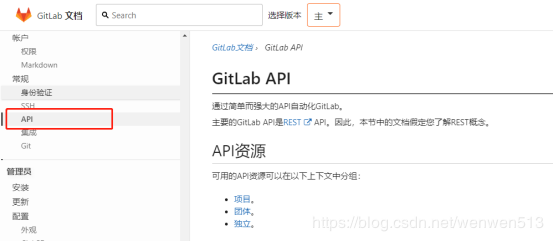
Gitlab文档:https://docs.gitlab.com/ee/api/README.html
原文链接:https://blog.csdn.net/wenwen513/article/details/95647364