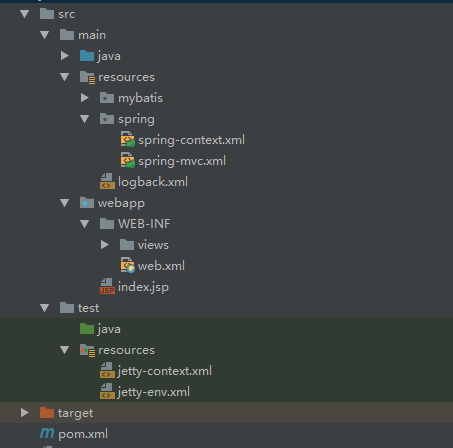
maven项目pom.xml配置
1、配置druid的jar依赖:
1        <dependency>
2            <groupId>com.alibaba</groupId>
3            <artifactId>druid</artifactId>
4            <version>${druid.version}</version>
5        </dependency>
2、配置jetty插件:
1            <plugin>
2                <groupId>org.eclipse.jetty</groupId>
3                <artifactId>jetty-maven-plugin</artifactId>
4                <version>${jetty.version}</version>
5                <configuration>
6                    <contextXml>${project.basedir}/src/test/resources/jetty-context.xml</contextXml>
7                    <scanIntervalSeconds>10</scanIntervalSeconds>
8                    <webAppConfig>
9                        <!--<contextPath>/example</contextPath>-->
10                        <jettyEnvXml>${basedir}/src/test/resources/jetty-env.xml</jettyEnvXml>
11                    </webAppConfig>
12                    <httpConnector>
13                        <port>8888</port>
14                    </httpConnector>
15                </configuration>
16            </plugin>
jetty-context.xml配置
1<?xml version="1.0" encoding="UTF-8"?>
2<!DOCTYPE Configure PUBLIC "-//Mort Bay Consulting//DTD Configure//EN" "http://www.eclipse.org/jetty/configure.dtd">
3<Configure class="org.eclipse.jetty.webapp.WebAppContext">
4
5</Configure>
jetty-env.xml配置
1 <New id="exampleDataSource" class="org.eclipse.jetty.plus.jndi.Resource">
2    	<Arg></Arg>
3        <Arg>jdbc/EXAMPLE_DS</Arg>
4        <Arg>
5            <New class="com.alibaba.druid.pool.DruidDataSource">
6                <Set name="driverClassName">com.mysql.jdbc.Driver</Set>
7                <Set name="url">jdbc:mysql://localhost:3306/dev_demo</Set>
8                <Set name="username">root</Set>
9                <Set name="password">root</Set>
10                <Set name="initialSize">1</Set>
11                <Set name="maxActive">1</Set>
12                <Set name="maxWait">60000</Set>
13                <Set name="minEvictableIdleTimeMillis">300000</Set>
14            </New>
15        </Arg>
16	     <Call name="bindToENC">
17	        <Arg>jdbc/EXAMPLE_DS</Arg>  <!-- binds jdbc/myds to java:comp/env/jdbc/myfoo for this webapp -->
18	    </Call>
19    </New>
spring的applicationContext.xml配置
1   <bean id="dataSource" class="org.springframework.jndi.JndiObjectFactoryBean">
2        <property name="jndiName">
3            <!--EXAMPLE_DSwei为数据源名称-->
4            <value>java:comp/env/jdbc/EXAMPLE_DS</value>
5        </property>
6    </bean>
7
8    <bean id="dataSourceProxy" class="org.springframework.jdbc.datasource.TransactionAwareDataSourceProxy">
9        <property name="targetDataSource" ref="dataSource" />
10    </bean>
项目结构: