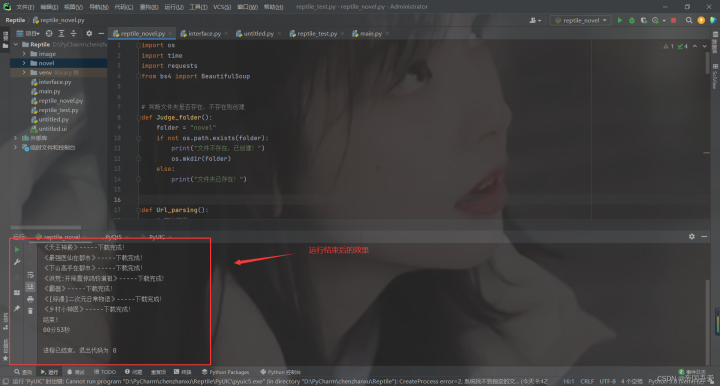
一、创建文件夹
(1)、创建指定文件夹
1# 判断文件夹是否存在,不存在则创建
2def Judge_folder():
3    folder = "novel"
4    if not os.path.exists(folder):
5        print("文件不存在,已创建!")
6        os.mkdir(folder)
7    else:
8        print("文件夹已存在!")
二、获取小说网址,解析需要信息
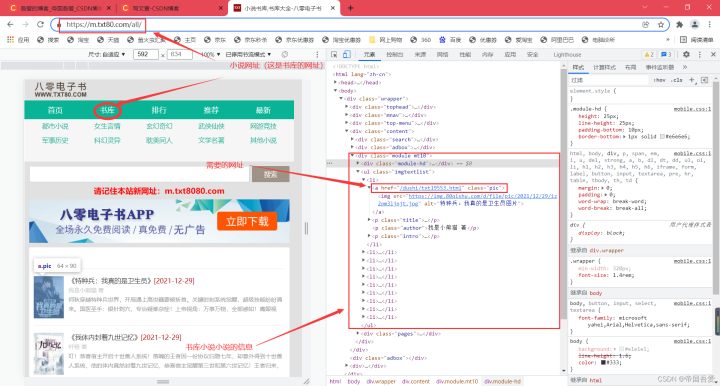
思路:进入小说书库的网址----->获取每本小说的网址----->获取每本小说下载的网址
(1)、进入小说书库的网址,解析网页,获取对应的数据信息
1def Url_parsing():
2    # 定义数组
3    int_href = []
4    # 页数
5    for i in range(1):
6        str_value = str(i+1)
7        # url-网址https://m.txt80.com/all/index_3.html
8        if i + 1 > 1:
9            url = "https://m.txt80.com/all/index_" + str_value + ".html"
10        else:
11            url = "https://m.txt80.com/all/index.html"
12        # 浏览器类型-搜狗
13        Search_engine = {"User-Agent": "Mozilla/5.0 (compatible; Googlebot/2.1; +http://www.google.com/bot.html)"}
14        # 发送请求,获取网址HTML,转为text
15        Type_conversion = requests.get(url=url, headers=Search_engine, timeout=None).text.encode('iso-8859-1').decode(
16            'utf-8')
17        # 定义BeautifulSoup,解析网址HTML
18        bs = BeautifulSoup(Type_conversion, 'html.parser')
19        # 获取指定div
20        scope_div = bs.find('ul', attrs={'class': 'imgtextlist'})
21        if scope_div is not None:
22            # print(scope_div)
23            # 获取class为pic的a标签
24            scope_div_a = scope_div.findAll("a", attrs={'class': 'pic'})
25            # print(scope_div_a)
26            # 循环打印a标签
27            for int_i in scope_div_a:
28                # 获取a标签对应的数据,拼接添加到数组中
29                int_href.append("https://m.txt80.com/" + int_i.get("href"))
30    # 返回获取到小说网址的信息
31    return int_href
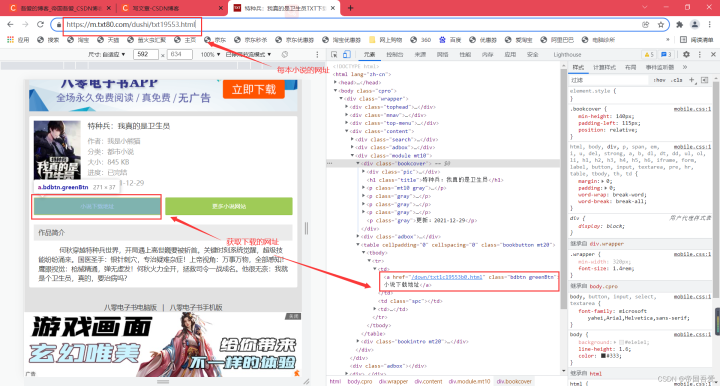
(2)、进入每本小说的页面中,解析对应的数据信息
1def Url_parsing1(): 2 # https://www.txt80.com/ 3 int_href1 = [] 4 # 循环获取Url_parsing的值(返回每本小说的网址) 5 for city in Url_parsing(): 6 url = city 7 # 浏览器类型-搜狗 8 Search_engine1 = {"User-Agent": "Mozilla/5.0 (compatible; Googlebot/2.1; +http://www.google.com/bot.html)"} 9 # 发送请求,获取网址HTML,转为text 10 Type_conversion = requests.get(url=url, headers=Search_engine1, timeout=None).text.encode('iso-8859-1').decode( 11 'utf-8') 12 # 定义BeautifulSoup,解析网址HTML 13 bs = BeautifulSoup(Type_conversion, 'html.parser') 14 # 获取指定div 15 scope_div = bs.find('a', attrs={'class': 'bdbtn greenBtn'}) 16 # print(scope_div.get("href")) 17 # 获取指定div中的所有a标签 18 int_href1.append("https://m.txt80.com/" + scope_div.get("href")) 19 # 返回int_href1数组 20 return int_href1
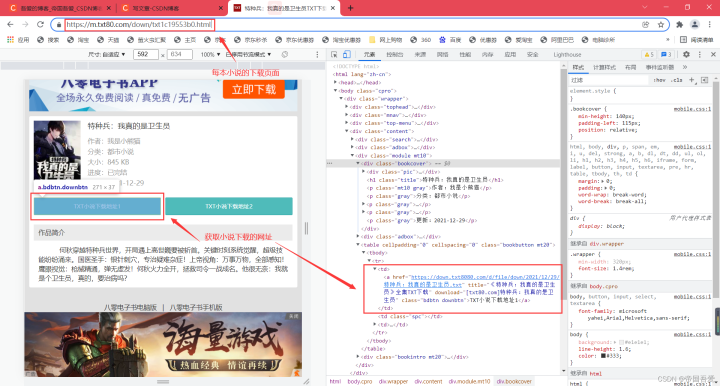
(3)、进入每本小说的下载页面,解析对应的数据信息
1def Url_parsing2(): 2 for city in Url_parsing1(): 3 url = city 4 # 浏览器类型-搜狗 5 Search_engine = {"User-Agent": "Mozilla/5.0 (compatible; Googlebot/2.1; +http://www.google.com/bot.html)"} 6 # 发送请求,获取网址HTML,转为text 7 Type_conversion = requests.get(url=url, headers=Search_engine, timeout=None).text.encode("utf-8").decode("utf-8") 8 # 定义BeautifulSoup,解析网址HTML 9 bs = BeautifulSoup(Type_conversion, 'html.parser') 10 # 获取指定div 11 scope_div = bs.find('a', attrs={'class': 'bdbtn downbtn'}) 12 # print(scope_div) 13 requests_href = scope_div.get("href") 14 requests_title = scope_div.get("title")[0:-7] 15 # print(requests_href, requests_title)
三、下载小说
(1)、循环下载小说
1# 定义要下载的内容
2        download = requests.get(requests_href)
3        # 循环打开文件创建jpg
4        with open("novel/" + requests_title + ".txt", mode="wb") as f:
5            f.write(download.content)
6            print(requests_title + "-----下载完成!")
四、附上完整代码
1import os
2import time
3import requests
4from bs4 import BeautifulSoup
5
6
7# 判断文件夹是否存在,不存在则创建
8def Judge_folder():
9    folder = "novel"
10    if not os.path.exists(folder):
11        print("文件不存在,已创建!")
12        os.mkdir(folder)
13    else:
14        print("文件夹已存在!")
15
16
17def Url_parsing():
18    # 定义数组
19    int_href = []
20    # 页数
21    for i in range(1):
22        str_value = str(i+1)
23        # url-网址https://m.txt80.com/all/index_3.html
24        if i + 1 > 1:
25            url = "https://m.txt80.com/all/index_" + str_value + ".html"
26        else:
27            url = "https://m.txt80.com/all/index.html"
28        # 浏览器类型-搜狗
29        Search_engine = {"User-Agent": "Mozilla/5.0 (compatible; Googlebot/2.1; +http://www.google.com/bot.html)"}
30        # 发送请求,获取网址HTML,转为text
31        Type_conversion = requests.get(url=url, headers=Search_engine, timeout=None).text.encode('iso-8859-1').decode(
32            'utf-8')
33        # 定义BeautifulSoup,解析网址HTML
34        bs = BeautifulSoup(Type_conversion, 'html.parser')
35        # 获取指定div
36        scope_div = bs.find('ul', attrs={'class': 'imgtextlist'})
37        if scope_div is not None:
38            # print(scope_div)
39            # 获取class为pic的a标签
40            scope_div_a = scope_div.findAll("a", attrs={'class': 'pic'})
41            # print(scope_div_a)
42            # 循环打印a标签
43            for int_i in scope_div_a:
44                # 获取a标签对应的数据,拼接添加到数组中
45                int_href.append("https://m.txt80.com/" + int_i.get("href"))
46    # 返回获取到小说网址的信息
47    return int_href
48
49
50def Url_parsing1():
51    # https://www.txt80.com/
52    int_href1 = []
53    # 循环获取Url_parsing的值(返回每本小说的网址)
54    for city in Url_parsing():
55        url = city
56        # 浏览器类型-搜狗
57        Search_engine1 = {"User-Agent": "Mozilla/5.0 (compatible; Googlebot/2.1; +http://www.google.com/bot.html)"}
58        # 发送请求,获取网址HTML,转为text
59        Type_conversion = requests.get(url=url, headers=Search_engine1, timeout=None).text.encode('iso-8859-1').decode(
60            'utf-8')
61        # 定义BeautifulSoup,解析网址HTML
62        bs = BeautifulSoup(Type_conversion, 'html.parser')
63        # 获取指定div
64        scope_div = bs.find('a', attrs={'class': 'bdbtn greenBtn'})
65        # print(scope_div.get("href"))
66        # 获取指定div中的所有a标签
67        int_href1.append("https://m.txt80.com/" + scope_div.get("href"))
68    # 返回int_href1数组
69    return int_href1
70
71
72def Url_parsing2():
73    for city in Url_parsing1():
74        url = city
75        # 浏览器类型-搜狗
76        Search_engine = {"User-Agent": "Mozilla/5.0 (compatible; Googlebot/2.1; +http://www.google.com/bot.html)"}
77        # 发送请求,获取网址HTML,转为text
78        Type_conversion = requests.get(url=url, headers=Search_engine, timeout=None).text.encode("utf-8").decode("utf-8")
79        # 定义BeautifulSoup,解析网址HTML
80        bs = BeautifulSoup(Type_conversion, 'html.parser')
81        # 获取指定div
82        scope_div = bs.find('a', attrs={'class': 'bdbtn downbtn'})
83        # print(scope_div)
84        requests_href = scope_div.get("href")
85        requests_title = scope_div.get("title")[0:-7]
86        # print(requests_href, requests_title)
87        # 定义要下载的内容
88        download = requests.get(requests_href)
89        # 循环打开文件创建jpg
90        with open("novel/" + requests_title + ".txt", mode="wb") as f:
91            f.write(download.content)
92            print(requests_title + "-----下载完成!")
93
94
95def Exception_error():
96    Judge_folder()
97    try:
98        Url_parsing2()
99    except KeyboardInterrupt:
100        print('\n程序已终止. . . . .')
101    print('结束!')
102
103
104def Time():
105    # 记录程序开始运行时间
106    start_time = time.time()
107    s = 0
108    Exception_error()
109    # 记录程序结束运行时间
110    end_time = time.time()
111    ts = end_time - start_time
112    dt = time.strftime("%M分%S秒", time.localtime(ts))
113    print(dt)
114    return s
115
116
117def Start():
118    Time()
119
120
121if __name__ == '__main__':
122    Start()
123