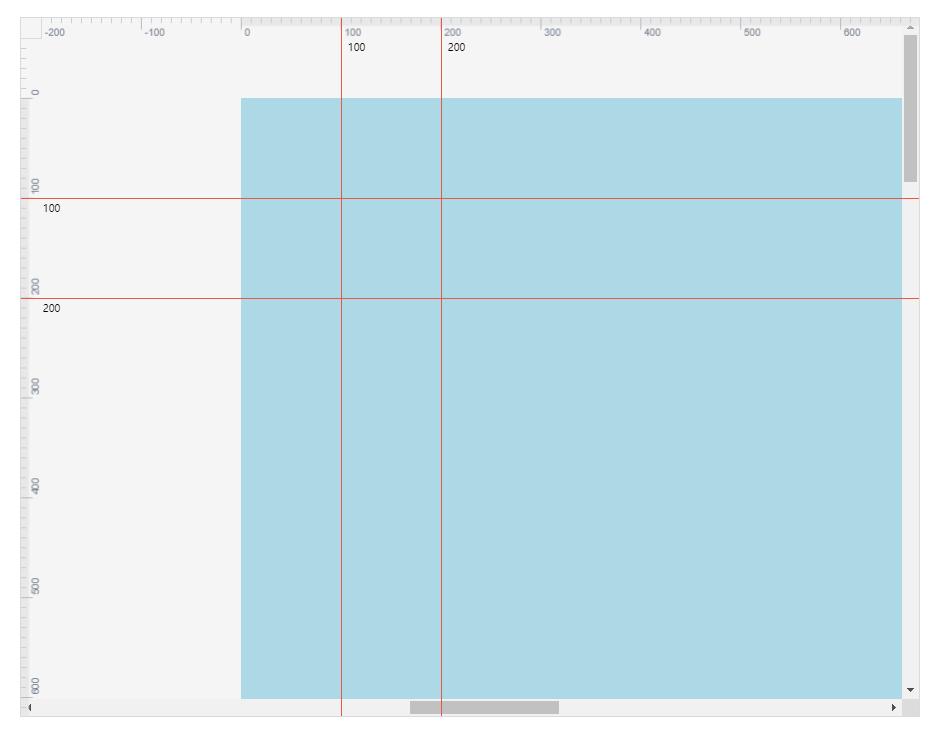
安装 npm install --save vue-sketch-ruler 示例
1<template>
2  <div class="wrapper" id="wrapper">
3    <SketchRule
4      :lang="lang"
5      :thick="thick"
6      :scale="scale"
7      :width="width"
8      :height="height"
9      :startX="startX"
10      :startY="startY"
11      :shadow="shadow"
12      :horLineArr="lines.h"
13      :verLineArr="lines.v"
14      :cornerActive="true"
15      @handleLine="handleLine"
16      @onCornerClick="handleCornerClick"
17    ></SketchRule>
18    <div ref="screensRef" id="screens" @wheel="handleWheel" @scroll="handleScroll">
19      <div ref="containerRef" class="screen-container">
20        <div id="canvas" :style="canvasStyle" />
21      </div>
22    </div>
23  </div>
24</template>
25<script>
26import Vue from 'vue'
27import SketchRule from 'vue-sketch-ruler'
28
29const rectWidth = 960
30const rectHeight = 720
31export default Vue.extend({
32    data() {
33        return {
34            scale: 1,
35            startX: 0,
36            startY: 0,
37            lines: {
38                h: [100, 200],
39                v: [100, 200],
40            },
41            thick: 20,
42            width: 500,
43            height: 400,
44            lang: 'zh-CN', // 中英文
45            isShowRuler: true, // 显示标尺
46            isShowReferLine: false, // 显示参考线
47        }
48    },
49    components: {
50        SketchRule,
51    },
52    computed: {
53        shadow() {
54            return {
55                x: 0,
56                y: 0,
57                width: rectWidth,
58                height: rectHeight,
59            }
60        },
61        canvasStyle() {
62            return {
63                width: rectWidth + 'px',
64                height: rectHeight + 'px',
65                transform: `scale(${this.scale})`,
66            }
67        },
68    },
69    methods: {
70        handleLine(lines) {
71            this.lines = lines
72        },
73        handleCornerClick() {
74
75        },
76        handleScroll() {
77            const screensRect = document
78            .querySelector('#screens')
79            .getBoundingClientRect()
80            const canvasRect = document
81            .querySelector('#canvas')
82            .getBoundingClientRect()
83
84            // 标尺开始的刻度
85            const startX = (screensRect.left + this.thick - canvasRect.left) / this.scale
86            const startY = (screensRect.top + this.thick - canvasRect.top) / this.scale
87
88            this.startX = startX >> 0
89            this.startY = startY >> 0
90        },
91        // 控制缩放值
92        handleWheel(e) {
93            if (e.ctrlKey || e.metaKey) {
94                e.preventDefault()
95                const nextScale = parseFloat(
96                    Math.max(0.2, this.scale - e.deltaY / 500).toFixed(2),
97                )
98                this.scale = nextScale
99            }
100            this.$nextTick(() => {
101                this.handleScroll()
102            })
103        },
104        initSize() {
105            const wrapperRect = document
106            .querySelector('#wrapper')
107            .getBoundingClientRect()
108            const borderWidth = 1
109            this.width = wrapperRect.width - this.thick - borderWidth
110            this.height = wrapperRect.height - this.thick - borderWidth
111        },
112    },
113    mounted() {
114        // 滚动居中
115        this.$refs.screensRef.scrollLeft = this.$refs.containerRef.getBoundingClientRect().width / 2 - 300 // 300 = #screens.width / 2
116        this.$nextTick(() => {
117            this.initSize()
118        })
119    },
120})
121</script>
122<style>
123body {
124  margin: 0;
125  padding: 0;
126  font-family: sans-serif;
127  overflow: hidden;
128}
129
130body * {
131  box-sizing: border-box;
132  user-select: none;
133}
134
135.wrapper {
136  background-color: #f5f5f5;
137  position: absolute;
138  top: 100px;
139  left: 100px;
140  width: 900px;
141  height: 700px;
142  border: 1px solid #dadadc;
143}
144
145#screens {
146  position: absolute;
147  width: 100%;
148  height: 100%;
149  overflow: auto;
150}
151
152.line {
153}
154
155.screen-container {
156  position: absolute;
157  width: 5000px;
158  height: 3000px;
159}
160
161.scale-value {
162  position: absolute;
163  left: 0;
164  bottom: 100%;
165}
166
167.button {
168  position: absolute;
169  left: 100px;
170  bottom: 100%;
171}
172
173.button-ch {
174  position: absolute;
175  left: 200px;
176  bottom: 100%;
177}
178
179.button-en {
180  position: absolute;
181  left: 230px;
182  bottom: 100%;
183}
184
185#canvas {
186  position: absolute;
187  top: 80px;
188  left: 50%;
189  margin-left: -80px;
190  width: 160px;
191  height: 200px;
192  background: lightblue;
193  transform-origin: 50% 0;
194}
195</style>
效果图