1<template>
2  <div>
3    <div class="cropper-content">
4      <div class="cropper">
5        <vueCropper ref="cropper" :img="option.img" :outputSize="option.size" :outputType="option.outputType" :info="true" :full="option.full" :canMove="option.canMove" :canMoveBox="option.canMoveBox" :original="option.original" :autoCrop="option.autoCrop" :autoCropWidth="option.autoCropWidth" :autoCropHeight="option.autoCropHeight" :fixedBox="option.fixedBox" @realTime="realTime" @imgLoad="imgLoad"></vueCropper>
6      </div>
7      <div class="show-preview" :style="{'width': previews.w + 'px', 'height': previews.h + 'px',  'overflow': 'hidden', 'margin': '5px'}">
8        <div :style="previews.div" class="preview">
9          <img :src="previews.url" :style="previews.img">
10        </div>
11      </div>
12    </div>
13
14    <div class="footer-btn">
15      <div class="scope-btn">
16        <label class="btn" for="uploads">选择图片</label>
17        <input type="file" id="uploads" style="position:absolute; clip:rect(0 0 0 0);" accept="image/png, image/jpeg, image/gif, image/jpg" @change="uploadImg($event, 1)">
18        <Button type="ghost" @click="changeScale(1)" icon="plus-round"></Button>
19        <Button type="ghost" @click="changeScale(-1)" icon="minus-round"></Button>
20        <Button type="ghost" @click="rotateLeft"><span style="font-weight: 600;">↺</span></Button>
21        <Button type="ghost" @click="rotateRight"><span style="font-weight: 600;">↻</span></Button>
22      </div>
23      <div class="upload-btn">
24        <Button type="primary" style="margin-left: 46px;"  @click="down('base64')">上传头像</Button>
25      </div>
26    </div>
27  </div>
28</template>
29
30<script>
31import VueCropper from 'vue-cropper'
32export default {
33  data() {
34    return {
35      crap: false,
36      previews: {},
37      option: {
38        img:
39          'http:img1.vued.vanthink.cn/vued751d13a9cb5376b89cb6719e86f591f3.png',
40        size: 1,
41        full: false, // 输出原图比例截图 props名full
42        outputType: 'png',
43        canMove: true,
44        original: false,
45        canMoveBox: true,
46        autoCrop: true,
47        autoCropWidth: 200,
48        autoCropHeight: 200,
49        fixedBox: true
50      },
51      downImg: '#'
52    }
53  },
54  components: { VueCropper },
55  methods: {
56    changeScale(num) {
57      num = num || 1
58      this.$refs.cropper.changeScale(num)
59    },
60    rotateLeft() {
61      this.$refs.cropper.rotateLeft()
62    },
63    rotateRight() {
64      this.$refs.cropper.rotateRight()
65    },
66    finish(type) {
67      // 输出
68      // var test = window.open('about:blank')
69      // test.document.body.innerHTML = '图片生成中..'
70      if (type === 'blob') {
71        this.$refs.cropper.getCropBlob(data => {
72          var img = window.URL.createObjectURL(data)
73          this.model = true
74          this.modelSrc = img
75        })
76      } else {
77        this.$refs.cropper.getCropData(data => {
78          this.model = true
79          this.modelSrc = data
80        })
81      }
82    },
83    // 实时预览函数
84    realTime(data) {
85      this.previews = data
86    },
87    down(type) {
88      // event.preventDefault()
89      var aLink = document.createElement('a')
90      aLink.download = 'author-img'
91      // 输出
92      if (type === 'blob') {
93        this.$refs.cropper.getCropBlob(data => {
94          console.log(data)
95          this.downImg = window.URL.createObjectURL(data)
96          //            aLink.download = this.downImg;
97          console.log(this.downImg)
98          aLink.href = window.URL.createObjectURL(data)
99          aLink.click()
100        })
101      } else {
102        this.$refs.cropper.getCropData(data => {
103          this.downImg = data
104          // aLink.href = data
105          // aLink.click()
106          // 将头像图片数据发送给后台
107        })
108      }
109    },
110    uploadImg(e, num) {
111      //上传图片
112      // this.option.img
113      var file = e.target.files[0]
114      if (!/\.(gif|jpg|jpeg|png|bmp|GIF|JPG|PNG)$/.test(e.target.value)) {
115        alert('图片类型必须是.gif,jpeg,jpg,png,bmp中的一种')
116        return false
117      }
118      var reader = new FileReader()
119      reader.onload = e => {
120        let data
121        if (typeof e.target.result === 'object') {
122          // 把Array Buffer转化为blob 如果是base64不需要
123          data = window.URL.createObjectURL(new Blob([e.target.result]))
124        } else {
125          data = e.target.result
126        }
127        if (num === 1) {
128          this.option.img = data
129        } else if (num === 2) {
130          this.example2.img = data
131        }
132      }
133      // 转化为base64
134      reader.readAsDataURL(file)
135      // 转化为blob
136      // reader.readAsArrayBuffer(file)
137    },
138    imgLoad(msg) {
139      console.log(msg)
140    }
141  }
142}
143</script>
144
145<style lang="less">
146.cropper-content {
147  display: flex;
148  display: -webkit-flex;
149  justify-content: flex-end;
150  -webkit-justify-content: flex-end;
151  .cropper {
152    width: 350px;
153    height: 300px;
154  }
155  .show-preview {
156    flex: 1;
157    -webkit-flex: 1;
158    display: flex;
159    display: -webkit-flex;
160    justify-content: center;
161    -webkit-justify-content: center;
162    .preview {
163      overflow: hidden;
164      border-radius: 50%;
165      border: 1px solid #cccccc;
166      background: #cccccc;
167      margin-left: 40px;
168    }
169  }
170}
171.footer-btn {
172  margin-top: 30px;
173  display: flex;
174  display: -webkit-flex;
175  justify-content: flex-end;
176  -webkit-justify-content: flex-end;
177  .scope-btn {
178    width: 350px;
179    display: flex;
180    display: -webkit-flex;
181    justify-content: space-between;
182    -webkit-justify-content: space-between;
183  }
184  .upload-btn {
185    flex: 1;
186    -webkit-flex: 1;
187    display: flex;
188    display: -webkit-flex;
189    justify-content: center;
190    -webkit-justify-content: center;
191  }
192  .btn {
193    outline: none;
194    display: inline-block;
195    line-height: 1;
196    white-space: nowrap;
197    cursor: pointer;
198    -webkit-appearance: none;
199    text-align: center;
200    -webkit-box-sizing: border-box;
201    box-sizing: border-box;
202    outline: 0;
203    margin: 0;
204    -webkit-transition: 0.1s;
205    transition: 0.1s;
206    font-weight: 500;
207    padding: 10px 15px;
208    font-size: 12px;
209    border-radius: 3px;
210    color: #fff;
211    background-color: #67c23a;
212    border-color: #67c23a;
213  }
214}
215</style>
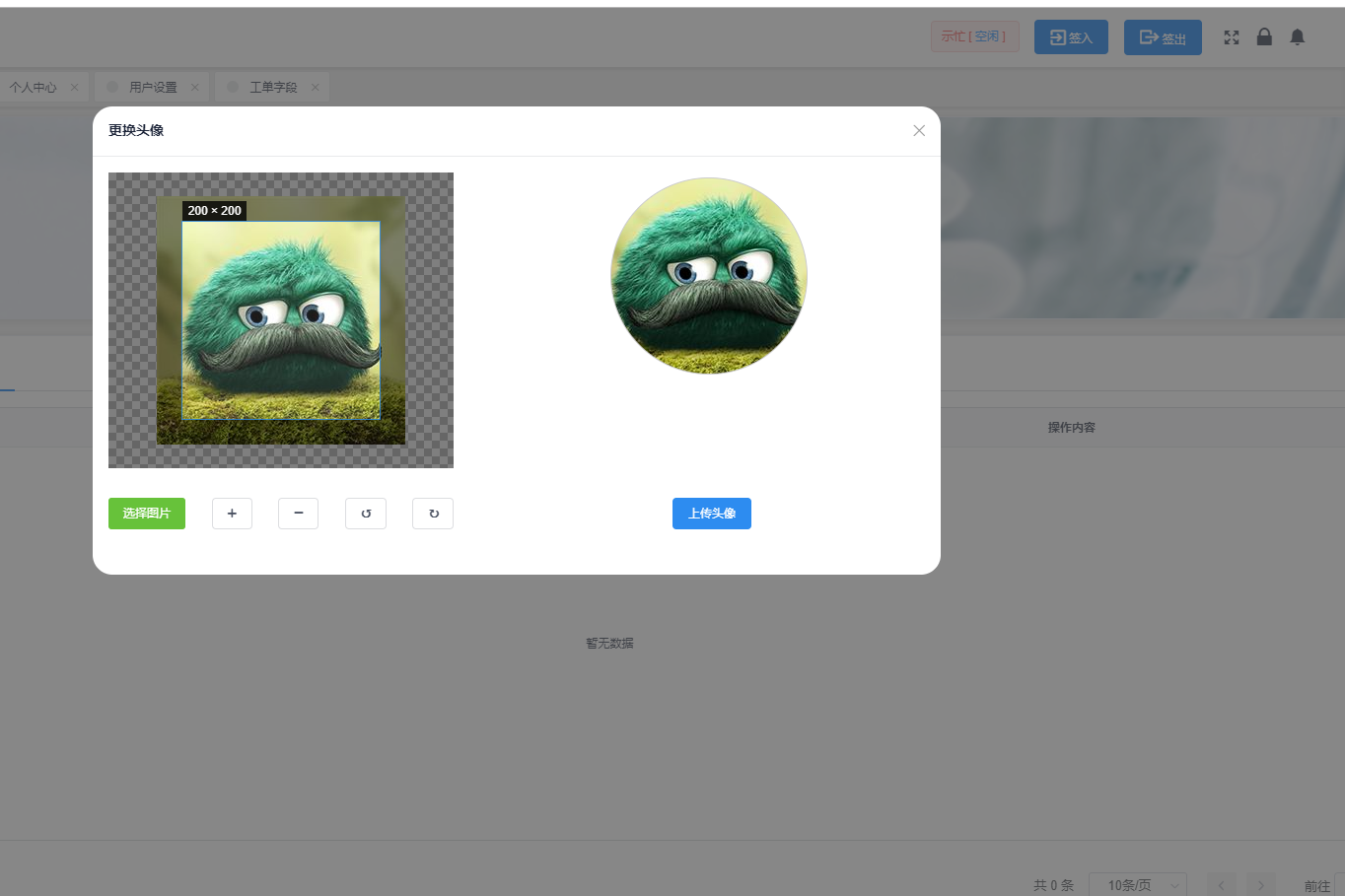
vue-cropper的GitHub项目地址:https://github.com/xyxiao001/vue-cropper。有兴趣的可以更深入的研究其他功能,这里只做参考用,最终效果如下
注意:当前功能是在使用了iview的基础上实现的效果,如果不是在iview下实现的项目,注意修改下组件中buttton的实现方式