springboot+idea+jsp 404问题

我是这么解决的

对于单一项目,加入以下jar包即可。

1<!--前台页面的支持--> 2 <dependency> 3 <groupId>javax.servlet</groupId> 4 <artifactId>javax.servlet-api</artifactId> 5 </dependency> 6 <dependency> 7 <groupId>javax.servlet</groupId> 8 <artifactId>jstl</artifactId> 9 </dependency> 10 <dependency> 11 <groupId>org.apache.tomcat.embed</groupId> 12 <artifactId>tomcat-embed-jasper</artifactId> 13 </dependency> 14 <dependency> 15 <groupId>org.apache.tomcat</groupId> 16 <artifactId>tomcat-jsp-api</artifactId> 17 </dependency>

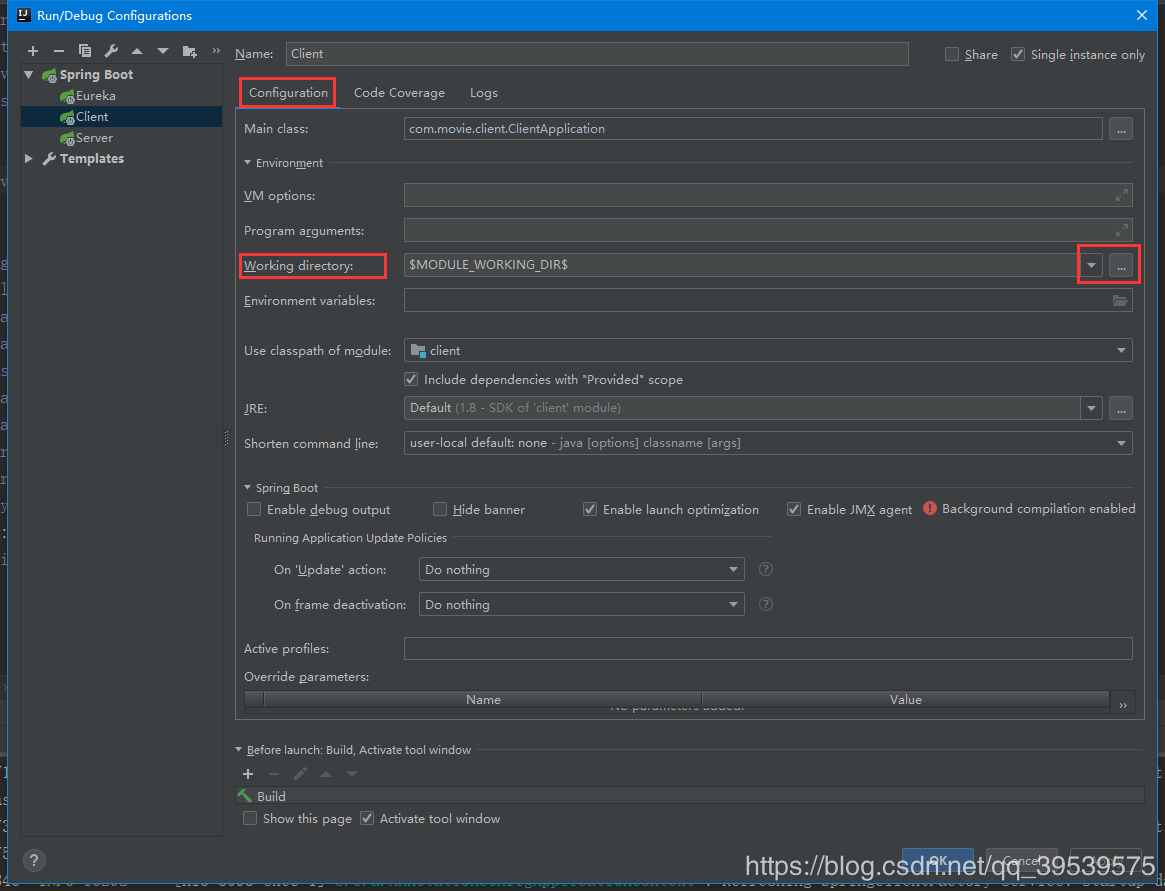
对于多模块的项目,上面这种方法就不能解决了。多模块解决方法如下:
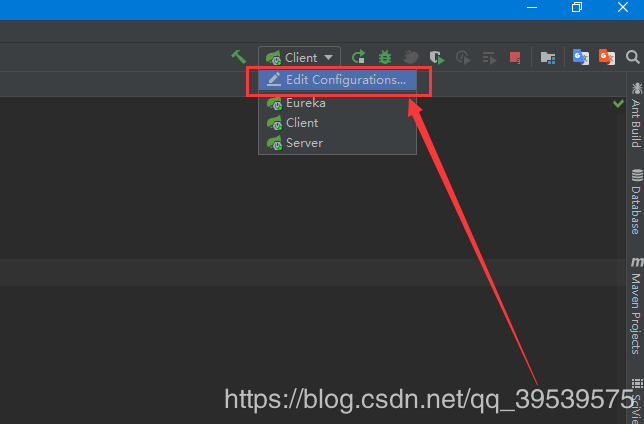


如此便可解决!如果有更好的方法请联系我,共同学习,分享!

点赞
收藏

评论区

加载中...

相关推荐

手写Java HashMap源码

HashMap的使用教程HashMap的使用教程HashMap的使用教程HashMap的使用教程HashMap的使用教程22

springBoot配置activeMq点对点模式消费信息以及独占模式消费如何设置

1、在pom文件中引入对应jar包<!activeMQstart<dependency<groupIdorg.springframework.boot</groupId<artifactIdspringbootstarteractivemq</artifactId

spring集成kafka

1、引入依赖jar包<dependency<groupIdorg.springframework.kafka</groupId<artifactIdspringkafka</artifactId</dependency2、配置kafka信息

thymeleaf在工作中常用的属性及表达式使用详解(二)

1.1 在SpringBoot中引入Thymeleaf第一步:在Maven中引入thymeleaf的依赖,加入以下代码即可引入需要的Jar包。<dependency<groupIdorg.springframework.boot</groupId

Spring Test 整合 JUnit 4 使用总结

1\.加入依赖包<dependency<groupIdjunit</groupId<artifactIdjunit</artifactId<version4.9</version

1.WebSocket编程—Hello World

1.引入jar包<dependencies<!servlet<dependency<groupIdjavax.servlet</groupId<artifactIdjavax.servletapi</artifactId<ve