
1.概述
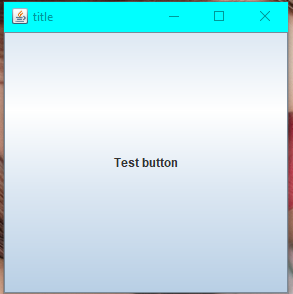
一个简单的java swing程序hello world,只有一个button
2.源码
1import javax.swing.*;
2public class server
3{
4    public static void main(String[] args) {
5        JFrame jFrame = new JFrame("title");
6        JButton button = new JButton("Test button");
7
8        jFrame.add(button);//把button添加到JFrame中
9        jFrame.setSize(300,300);//设置JFrame大小
10        jFrame.setVisible(true);//设置可见,不然的话看不到
11    }
12}
3.第一次修改
有没有觉得有点奇怪,整个button占满了窗口? 没错,少了一个JPanel:
1import javax.swing.*;
2public class server
3{
4    public static void main(String[] args) {
5        JFrame jFrame = new JFrame("title");
6        JPanel jPanel = new JPanel();
7        JButton button = new JButton("Test button");
8
9        jPanel.add(button);
10        jFrame.setContentPane(jPanel);
11        jFrame.setSize(300,300);
12        jFrame.setVisible(true);
13    }
14}
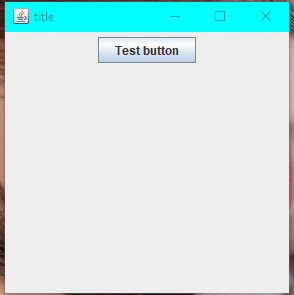
添加一个JPanel,把Button添加到JPanel中,然后设置JFrame的contenPane.
效果如下:
4.第二次修改
嗯,有点hello world的样子了,但是你有没有点击过左上角的x按钮?
点了之后,这个东西是"消失"了,但是在后台还在运行着,所以...
jFrame.setDefaultCloseOperation(JFrame.EXIT_ON_CLOSE);
需要这样设置它的默认关闭操作.
另一个修改就是对它居中显示,要不然的话总是启动的时候在左上角.
很简单,一行就可以了.
jFrame.setDefaultCloseOperation(JFrame.EXIT_ON_CLOSE);
完整代码:
1import javax.swing.*;
2public class server
3{
4    public static void main(String[] args) {
5        JFrame jFrame = new JFrame("title");
6        JPanel jPanel = new JPanel();
7        JButton button = new JButton("Test button");
8
9        jPanel.add(button);
10        jFrame.setContentPane(jPanel);
11        jFrame.setSize(300,300);
12        jFrame.setLocationRelativeTo(null);
13        jFrame.setVisible(true);
14        jFrame.setDefaultCloseOperation(JFrame.EXIT_ON_CLOSE);
15    }
16}