
一、下载 https://ueditor.baidu.com/website/index.html
将ueditor放到项目中合适的位置
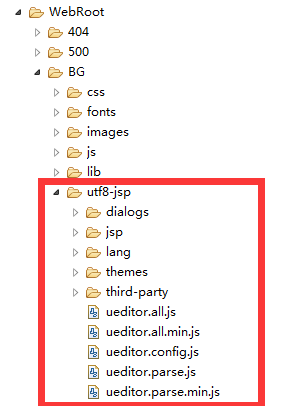
二 、 配置文件上传路径
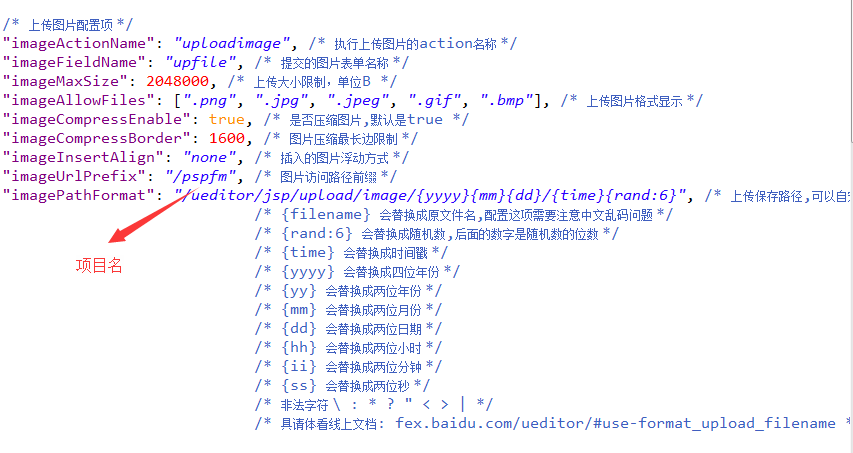
在utf8-jsp/jsp/config.json文件中更改文件长传路径
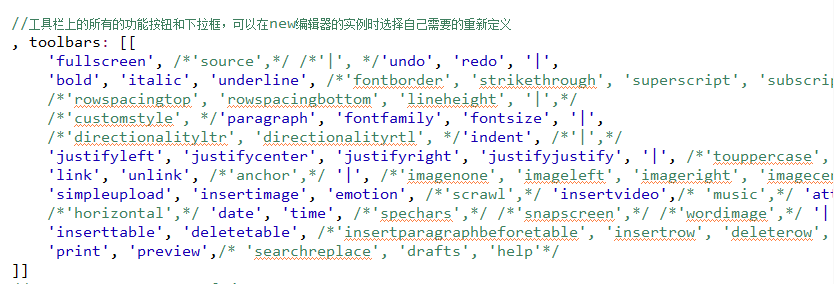
三 、自定义工具类
在utf8-jsp/ueditor.config.js中自定义工具类
四、 前端使用
1// 引用
2<script type="text/javascript" charset="utf-8" src="${pageContext.request.contextPath }/BG/utf8-jsp/ueditor.config.js"></script>
3	<script type="text/javascript" charset="utf-8" src="${pageContext.request.contextPath }/BG/utf8-jsp/ueditor.all.min.js"></script>
4	<script type="text/javascript" charset="utf-8" src="${pageContext.request.contextPath }/BG/utf8-jsp/lang/zh-cn/zh-cn.js"></script>
5
6// 使用
7<div class="layui-form-item">
8				    <label for="L_answer" class="layui-form-label">内容</label>
9				<div class="layui-input-inline" style="width:340px;">
10					<!-- <textarea name="answer" id="L_answer" class="layui-textarea"></textarea> -->
11					<script id="hdxy" type="text/plain"style="width:800px;height:210px;">${notice.content}</script>
12				</div>
13			</div>
14
15// 初始化
16<!--富文本编辑器  -->
17	<script type="text/javascript">
18		//实例化编辑器
19		//建议使用工厂方法getEditor创建和引用编辑器实例,如果在某个闭包下引用该编辑器,直接调用UE.getEditor('editor')就能拿到相关的实例
20		var ue = UE.getEditor('hdxy');
21		/* ue.addListener("ready", function () {
22	        // editor准备好之后才可以使用
23	    	ue.setContent("${faq.answer}", false);
24	    }); */
25	</script>
五、后台使用
1try {
2			notice.setContent(editorValue); // 获取富文本编辑器中的所有内容
3
4			Matcher m = Pattern.compile("<a[^>]*>([^<]*)</a>").matcher(editorValue);
5			while (m.find()) {
6				// System.out.println(m.group(1));  // 获取a标签内的内容
7				String filepath = m.group(0);	// 获取整个a标签
8				notice.setFilepath(filepath);
9			}
10			noticeService.updateNotice(notice);
11			response.getWriter().println(1);
12		} catch (Exception e) {
13			response.getWriter().println(0);
14		}