
Unity中制作游戏的快照游戏支持玩家拍快照
有些游戏支持玩家“拍快照”,也就是将游戏的精彩瞬间以图片的形式记录下来的功能。这个功能比较有趣,而且以后的用途也会很广,为此本节打算介绍:截取矩形区域内游戏视图,并将其显示在视图其它区域的方法。具体的操作步骤如下本文选自Unity游戏开发技巧集锦:
(1)在Project视图里,创建一个C#脚本文件,并命名为ScreenTexture。在此脚本中编写如下的代码:
-
01 using UnityEngine;
-
02 using System.Collections;
-
03
-
04 public class ScreenTexture : MonoBehaviour
-
05 {
-
06 //公有成员
-
07 public int photoWidth = 50; //矩形的宽度
-
08 public int photoHeight = 50; //矩形的高度
-
09 public int thumbProportion = 25; //截图的显示比例
-
10 public Color borderColor = Color.white; //矩形框架的颜色
-
11 public int borderWidth = 2; //矩形框的宽度
-
12 //私有成员
-
13 private Texture2D texture;
-
14 private Texture2D border;
-
15 private int screenWidth;
-
16 private int screenHeight;
-
17 private int frameWidth;
-
18 private int frameHeight;
-
19 private bool shoot = false;
-
20 // 脚本初始化时,调用此函数
-
21 void Start ()
-
22 {
-
23 screenWidth = Screen.width;
-
24 screenHeight = Screen.height;
-
25 frameWidth = Mathf.RoundToInt(screenWidth * photoWidth * 0.01f);
-
26 frameHeight = Mathf.RoundToInt(screenHeight * photoHeight * 0.01f);
-
27 texture = new Texture2D (frameWidth,frameHeight,TextureFormat.RGB24,false);
-
28 border = new Texture2D (1,1,TextureFormat.ARGB32, false);
-
29 border.SetPixel(0,0,borderColor);
-
30 border.Apply();
-
31 }
-
32 // 运行游戏时,每帧都调用此函数
-
33 void Update ()
-
34 {
-
35 //鼠标左键按下的时候
-
36 if (Input.GetKeyUp(KeyCode.Mouse0))
-
37 StartCoroutine(CaptureScreen());
-
38 }
-
39 //在Game视图上,绘制纹理
-
40 void OnGUI ()
-
41 {
-
42 //绘制矩形框的四个边
-
43 GUI.DrawTexture(
-
44 new Rect(
-
45 (screenWidth*0.5f)-(frameWidth*0.5f) - borderWidth*2,
-
46 ((screenHeight*0.5f)-(frameHeight*0.5f)) - borderWidth,
-
47 frameWidth + borderWidth*2,
-
48 borderWidth),
-
49 border,ScaleMode.StretchToFill);
-
50 GUI.DrawTexture(
-
51 new Rect(
-
52 (screenWidth*0.5f)-(frameWidth*0.5f) - borderWidth*2,
-
53 (screenHeight*0.5f)+(frameHeight*0.5f),
-
54 frameWidth + borderWidth*2,
-
55 borderWidth),
-
56 border,ScaleMode.StretchToFill);
-
57 GUI.DrawTexture(
-
58 new Rect(
-
59 (screenWidth*0.5f)-(frameWidth*0.5f)- borderWidth*2,
-
60 (screenHeight*0.5f)-(frameHeight*0.5f),
-
61 borderWidth,
-
62 frameHeight),
-
63 border,ScaleMode.StretchToFill);
-
64 GUI.DrawTexture(
-
65 new Rect(
-
66 (screenWidth*0.5f)+(frameWidth*0.5f),
-
67 (screenHeight*0.5f)-(frameHeight*0.5f),
-
68 borderWidth,
-
69 frameHeight),
-
70 border,ScaleMode.StretchToFill);
-
71 //绘制矩形框中截取到的Game视图
-
72 if(shoot)
-
73 {
-
74 GUI.DrawTexture(
-
75 new Rect (
-
76 10,
-
77 10,
-
78 frameWidth*thumbProportion*0.01f,
-
79 frameHeight*thumbProportion* 0.01f),
-
80 texture,ScaleMode.StretchToFill);
-
81 }
-
82 }
-
83 //截取矩形框里的Game视图
-
84 IEnumerator CaptureScreen ()
-
85 {
-
86 yield return new WaitForEndOfFrame();
-
87 texture.ReadPixels(
-
88 new Rect(
-
89 (screenWidth*0.5f)-(frameWidth*0.5f),
-
90 (screenHeight*0.5f)-(frameHeight*0.5f),
-
91 frameWidth,
-
92 frameHeight),
-
93 0,0);
-
94 texture.Apply();
-
95 shoot = true;
-
96 }
-
97 }
脚本代码中,40行的OnGUI()函数,使用GUI.DrawTexture()绘制了矩形框,以及矩形框中截取到的游戏视图;84行的CaptureScreen()函数,使用texture.ReadPixels()读取矩形框中的所有像素点,然后存储到texture中。触发“拍照”功能的操作是,在Game视图中的任意位置,单击鼠标左键,即36行代码实现的功能。
(2)将脚本ScreenTexture赋予Main Camera,然后选中Main Camera,在Inspector视图里可以设置脚本组件的一些属性,如图2-19所示本文选自Unity游戏开发技巧集锦。
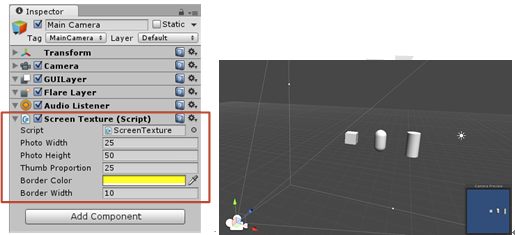
图2-19 Main Camera上ScreenTexture脚本组件的各属性 图2-20 当前的Scene视图
(3)为游戏的场景添加一些几何体,并调整它们各自的位置,如图2-20所示。
(4)运行游戏,当在Game视图中的任意位置,单击鼠标左键的时候,可在视图的左上角看到矩形框中截取到的游戏视图,如图2-21所示本文选自Unity游戏开发技巧集锦。
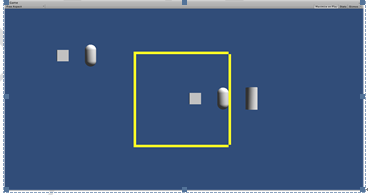
图2-21 运行游戏,查看截图的效果