
简介
在Spring 5中,Spring MVC引入了webFlux的概念,webFlux的底层是基于reactor-netty来的,而reactor-netty又使用了Reactor库。
本文将会介绍在Spring Boot中reactive在WebFlux中的使用。
Reactive in Spring
前面我们讲到了,webFlux的基础是Reactor。 于是Spring Boot其实拥有了两套不同的web框架,第一套框架是基于传统的Servlet API和Spring MVC,第二套是基于最新的reactive框架,包括 Spring WebFlux 和Spring Data的reactive repositories。
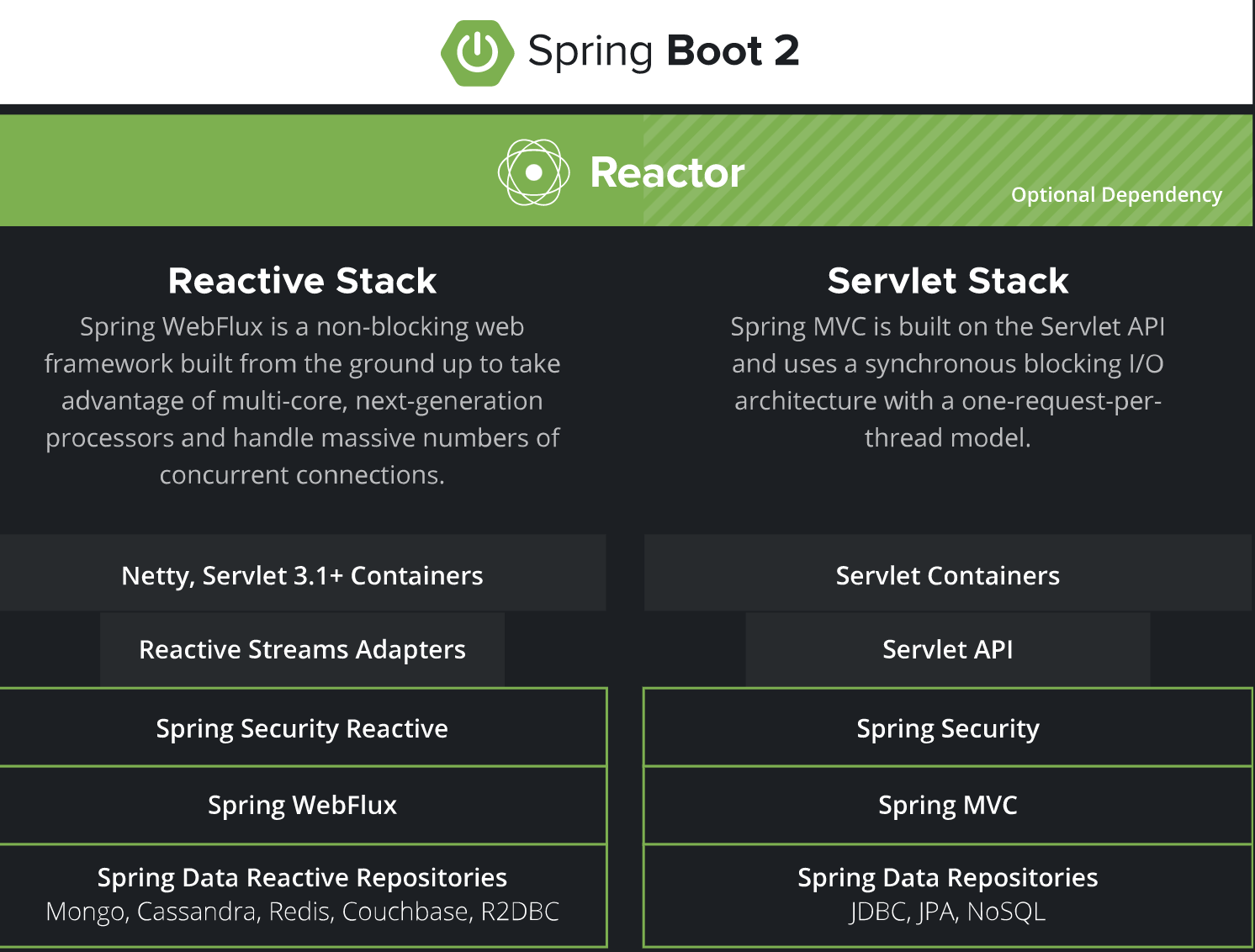
我们用上面的一张图可以清晰的看到两套体系的不同。
对于底层的数据源来说,MongoDB, Redis, 和 Cassandra 可以直接以reactive的方式支持Spring Data。而其他很多关系型数据库比如Postgres, Microsoft SQL Server, MySQL, H2 和 Google Spanner 则可以通过使用R2DBC 来实现对reactive的支持。
而Spring Cloud Stream甚至可以支持RabbitMQ和Kafka的reactive模型。
下面我们将会介绍一个具体的Spring Boot中使用Spring WebFlux的例子,希望大家能够喜欢。
注解方式使用WebFlux
要使用Spring WebFlux,我们需要添加如下的依赖:
1<dependency>
2            <groupId>org.springframework.boot</groupId>
3            <artifactId>spring-boot-starter-webflux</artifactId>
4        </dependency>
只用注解的方式和普通的Spring MVC的方式很类似,我们可以使用@RestController表示是一个rest服务,可以使用 @GetMapping("/hello") 来表示一个get请求。
不同之处在于,我们请求的产生方式和返回值。
熟悉Reactor的朋友可能都知道,在Reactor中有两种产生序列的方式,一种是Flux一种是Mono,其中Flux表示1或者多,而Mono表示0或者1。
看一下我们的Controller该怎么写:
1[@RestController](https://my.oschina.net/u/4486326)
2public class WelcomeController {
3
4    @GetMapping("/hello")
5    public Mono<String> hello() {
6        return Mono.just("www.flydean.com");
7    }
8
9    @GetMapping("/hellos")
10    public Flux<String> getAll() {
11        //使用lambda表达式
12        return Flux.fromStream(Stream.of("www.flydean.com","flydean").map(String::toLowerCase));
13    }
14
15}
这个例子中,我们提供了两个get方法,第一个是hello,直接使用Mono.just返回一个Mono。
第二个方法是hellos,通过Flux的一系列操作,最后返回一个Flux对象。
有了Mono对象,我们怎么取出里面的数据呢?
1public class WelcomeWebClient {
2	private WebClient client = WebClient.create("http://localhost:8080");
3
4	private final Mono<ClientResponse> result = client.get()
5			.uri("/hello")
6			.accept(MediaType.TEXT_PLAIN)
7			.exchange();
8
9	public String getResult() {
10		return " result = " + result.flatMap(res -> res.bodyToMono(String.class)).block();
11	}
12}
我们通过WebClient来获取get的结果,通过exchange将其转换为ClientResponse。
然后提供了一个getResult方法从result中获取最终的返回结果。
这里,我们先调用FlatMap对ClientResponse进行转换,然后再调用block方法,产生一个新的subscription。
最后,我们看一下Spring Boot的启动类:
1@Slf4j
2@SpringBootApplication
3public class Application {
4
5    public static void main(String[] args) {
6        SpringApplication.run(Application.class, args);
7
8        WelcomeWebClient welcomeWebClient = new WelcomeWebClient();
9        log.info("react result is {}",welcomeWebClient.getResult());
10    }
11}
编程方式使用webFlux
刚刚的注解方式其实跟我们常用的Spring MVC基本上是一样的。
接下来,我们看一下,如果是以编程的方式来编写上面的逻辑应该怎么处理。
首先,我们定义一个处理hello请求的处理器:
1@Component
2public class WelcomeHandler {
3
4	public Mono<ServerResponse> hello(ServerRequest request) {
5		return ServerResponse.ok().contentType(MediaType.TEXT_PLAIN)
6			.body(BodyInserters.fromValue("www.flydean.com!"));
7	}
8}
和普通的处理一样,我们需要返回一个Mono对象。
注意,这里是ServerRequest,因为WebFlux中没有Servlet。
有了处理器,我们需要写一个Router来配置路由:
1@Configuration
2public class WelcomeRouter {
3
4	@Bean
5	public RouterFunction<ServerResponse> route(WelcomeHandler welcomeHandler) {
6
7		return RouterFunctions
8			.route(RequestPredicates.GET("/hello").
9					and(RequestPredicates.accept(MediaType.TEXT_PLAIN)), welcomeHandler::hello);
10	}
11}
上面的代码将/hello和welcomeHandler::hello进行了绑定。
WelcomeWebClient和Application是和第一种方式是一样的。
1public class WelcomeWebClient {
2	private WebClient client = WebClient.create("http://localhost:8080");
3
4	private Mono<ClientResponse> result = client.get()
5			.uri("/hello")
6			.accept(MediaType.TEXT_PLAIN)
7			.exchange();
8
9	public String getResult() {
10		return " result = " + result.flatMap(res -> res.bodyToMono(String.class)).block();
11	}
12}
13
14
15public class Application {
16
17    public static void main(String[] args) {
18        SpringApplication.run(Application.class, args);
19
20        WelcomeWebClient welcomeWebClient = new WelcomeWebClient();
21        log.info("react result is {}",welcomeWebClient.getResult());
22    }
23}
Spring WebFlux的测试
怎么对webFlux代码进行测试呢?
本质上是和WelcomeWebClient的实现是一样的,我们去请求对应的对象,然后检测其返回值,最后判断返回值是否我们所期待的内容。
如下所示:
1@ExtendWith(SpringExtension.class)
2@SpringBootTest(webEnvironment = SpringBootTest.WebEnvironment.RANDOM_PORT)
3public class WelcomeRouterTest {
4    @Autowired
5    private WebTestClient webTestClient;
6
7    @Test
8    public void testHello() {
9        webTestClient
10                .get().uri("/hello")
11                .accept(MediaType.TEXT_PLAIN)
12                .exchange()
13                .expectStatus().isOk()
14                .expectBody(String.class).isEqualTo("www.flydean.com!");
15    }
16}
总结
webFlux使用了Reactor作为底层的实现,和通常我们习惯的web请求方式是有很大不同的,但是通过我们的Spring框架,可以尽量保证原有的代码编写风格和习惯。
只需要在个别部分做微调。希望大家能够通过这个简单的例子,熟悉Reactive的基本编码实现。
本文的例子可以参考:springboot-reactive-web
本文作者:flydean程序那些事
本文链接:http://www.flydean.com/springboot-reactive-web/
本文来源:flydean的博客
欢迎关注我的公众号:「程序那些事」最通俗的解读,最深刻的干货,最简洁的教程,众多你不知道的小技巧等你来发现!