
SSM-spring+springmvc+mybatis实现图书管理系统登录和增删改查以及加入购
物车
在整合之前,首先在MySQL数据库中创建好用户表和书籍表
用户表
CREATE TABLE `tb_users` (
`username` varchar(10) NOT NULL,
`password` varchar(18) NOT NULL,
`email` varchar(18) NOT NULL,
`sex` varchar(2) NOT NULL,
`likes` varchar(100) DEFAULT NULL,
PRIMARY KEY (`username`)
) ENGINE=InnoDB DEFAULT CHARSET=utf8
书籍表
CREATE TABLE `tb_books` (
`id` varchar(10) NOT NULL,
`name` varchar(20) NOT NULL,
`author` varchar(20) NOT NULL,
____`publish`
varchar(20) NOT NULL,
___`price` double NOT NULL,
`des` varchar
(200) DEFAULT NULL,
PRIMARY KEY (`id`)
) ENGINE=InnoDB DEFAULT
CHARSET=utf8
1、导入jar包
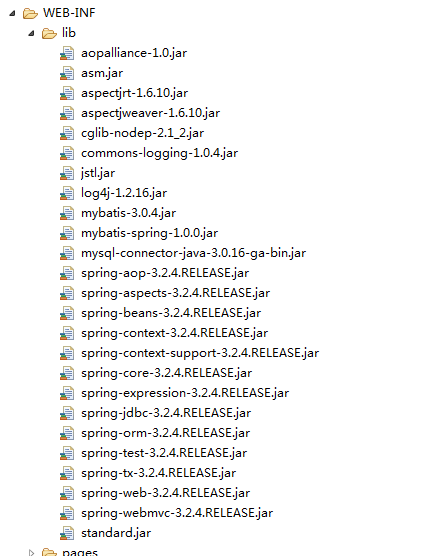
2、创建mybatis核心配置文件SqlMapConfig.xml
1 1 <?xml version="1.0" encoding="UTF-8" ?>
2 2 <!DOCTYPE configuration
3 3 PUBLIC "-//mybatis.org//DTD Config 3.0//EN"
4 4 "http://mybatis.org/dtd/mybatis-3-config.dtd">
5 5 <configuration>
6 6     <!-- 设置别名 -->
7 7     <typeAliases>
8 8         <typeAlias type="com.lq.model.User" alias="user"/>
9 9         <typeAlias type="com.lq.model.Book" alias="book"/>
1010     </typeAliases>
1111
1212     <!-- 配置mapper映射文件 -->
1313     <mappers>
1414         <mapper resource="com/lq/model/UserMapper.xml"/>
1515         <mapper resource="com/lq/model/BookMapper.xml"/>
1616     </mappers>
1717 </configuration>
3、创建spring配置文件applicationContext.xml
1 1 <?xml version="1.0" encoding="UTF-8"?>
2 2 <beans xmlns="http://www.springframework.org/schema/beans"
3 3     xmlns:xsi="http://www.w3.org/2001/XMLSchema-instance" xmlns:tx="http://www.springframework.org/schema/tx"
4 4     xmlns:context="http://www.springframework.org/schema/context"
5 5     xmlns:aop="http://www.springframework.org/schema/aop"
6 6     xsi:schemaLocation="http://www.springframework.org/schema/beans
7 7                 http://www.springframework.org/schema/beans/spring-beans-3.2.xsd
8 8                 http://www.springframework.org/schema/context
9 9                 http://www.springframework.org/schema/context/spring-context-3.2.xsd
1010                 http://www.springframework.org/schema/tx
1111                 http://www.springframework.org/schema/tx/spring-tx-3.2.xsd
1212                 http://www.springframework.org/schema/aop
1313                 http://www.springframework.org/schema/aop/spring-aop.xsd
1414                 ">
1515
1616
1717   <!-- 数据源 -->
1818   <bean id="dataSource" class="org.springframework.jdbc.datasource.DriverManagerDataSource">
1919       <property name="driverClassName" value="com.mysql.jdbc.Driver"></property>
2020       <property name="url" value="jdbc:mysql://localhost:3306/test"></property>
2121       <property name="username" value="root"></property>
2222       <property name="password" value="root"></property>
2323   </bean>
2424   <!-- 事务管理器 -->
2525   <bean id="txManager" class="org.springframework.jdbc.datasource.DataSourceTransactionManager">
2626   <property name="dataSource" ref="dataSource"/>
2727   </bean>
2828
2929   <!-- 通知 -->
3030   <tx:advice id="txAdvice" transaction-manager="txManager">
3131       <!-- 配置事务属性    隔离界别    传播机制 -->
3232       <tx:attributes>
3333           <!-- *代表连接点匹配的所有方法      rollback-for 遇到任何异常都进行事务回滚-->
3434         <tx:method name="insert*" isolation="READ_COMMITTED" propagation="REQUIRED" rollback-for="java.lang.Exception"/>
3535         <tx:method name="delete*" isolation="READ_COMMITTED" propagation="REQUIRED" rollback-for="java.lang.Exception"/>
3636         <tx:method name="update*" isolation="READ_COMMITTED" propagation="REQUIRED" rollback-for="java.lang.Exception"/>
3737         <tx:method name="select*" read-only="true" isolation="READ_COMMITTED" propagation="REQUIRED" rollback-for="java.lang.Exception"/>
3838       </tx:attributes>
3939   </tx:advice>
4040
4141    <aop:config>
4242        <!-- 连接点表达式 匹配所有的 切入点 -->
4343       <aop:pointcut id="fooServiceOperation" expression="execution(* com.lq.dao.*.*(..))"/>
4444       <!-- 通知加入到切入点 -->
4545       <aop:advisor advice-ref="txAdvice" pointcut-ref="fooServiceOperation"/>
4646
4747   </aop:config>
4848
4949
5050
5151       <!-- 配置sqlSessionFactory -->
5252     <bean id="sqlSessionFactory" class="org.mybatis.spring.SqlSessionFactoryBean">
5353         <!-- mybatis配置文件路径 -->
5454         <property name="configLocation" value="classpath:config/SqlMapConfig.xml" />
5555         <property name="dataSource" ref="dataSource" />
5656     </bean>
5757
5858     <!-- 配置sqlsession 产生这个实例就是通过 sqlsessionTemplate来实现的 -->
5959     <bean id="sqlSession" class="org.mybatis.spring.SqlSessionTemplate">
6060         <constructor-arg index="0">
6161             <ref bean="sqlSessionFactory" />
6262         </constructor-arg>
6363     </bean>
6464
6565
6666       <!-- <bean id="userDao" class="com.lq.dao.UserDao">
6767           <property name="sqlSession" ref="sqlSession"></property>
6868       </bean> -->
6969
7070
7171 </beans>
4、创建springMVC配置文件spring-servlet.xml
1 1 <?xml version="1.0" encoding="UTF-8"?>
2 2 <beans xmlns="http://www.springframework.org/schema/beans"
3 3     xmlns:xsi="http://www.w3.org/2001/XMLSchema-instance"
4 4     xmlns:p="http://www.springframework.org/schema/p"
5 5     xmlns:mvc="http://www.springframework.org/schema/mvc"
6 6     xmlns:context="http://www.springframework.org/schema/context"
7 7     xsi:schemaLocation="
8 8         http://www.springframework.org/schema/beans
9 9         http://www.springframework.org/schema/beans/spring-beans.xsd
1010         http://www.springframework.org/schema/context
1111         http://www.springframework.org/schema/context/spring-context.xsd
1212         http://www.springframework.org/schema/mvc
1313         http://www.springframework.org/schema/mvc/spring-mvc.xsd
1414         ">
1515
1616
1717     <!-- 设置扫描包 -->
1818     <context:component-scan base-package="com.lq"/>
1919     <!-- 开启spring mvc的注解功能 -->
2020     <mvc:annotation-driven />
2121
2222     <!-- 视图解析器 -->
2323     <bean class="org.springframework.web.servlet.view.InternalResourceViewResolver">
2424         <!-- 视图后缀,controller中的方法返回的url字符串会添加该后缀 -->
2525         <property name="suffix" value=".jsp"/>
2626         <!-- 视图前缀controller中的方法返回的url字符串会添加该前缀 -->
2727         <property name="prefix" value="/WEB-INF/pages/"/>
2828     </bean>
2929
3030
3131 </beans>
5、在web.xml中配置spring监听器、前端控制器,并配置需要启动就要加载的配
置文件
1 1 <?xml version="1.0" encoding="UTF-8"?>
2 2 <web-app xmlns:xsi="http://www.w3.org/2001/XMLSchema-instance" xmlns="http://java.sun.com/xml/ns/javaee" xsi:schemaLocation="http://java.sun.com/xml/ns/javaee http://java.sun.com/xml/ns/javaee/web-app_3_0.xsd" version="3.0">
3 3   <display-name>SSM_case1_library</display-name>
4 4   <listener>
5 5     <listener-class>org.springframework.web.context.ContextLoaderListener</listener-class>
6 6   </listener>
7 7   <context-param>
8 8     <param-name>contextConfigLocation</param-name>
9 9     <param-value>
1010          classpath:config/applicationContext.xml
1111        </param-value>
1212   </context-param>
1313   <filter>
1414     <filter-name>encodingFilter</filter-name>
1515     <filter-class>org.springframework.web.filter.CharacterEncodingFilter</filter-class>
1616     <init-param>
1717       <param-name>encoding</param-name>
1818       <param-value>utf-8</param-value>
1919     </init-param>
2020     <init-param>
2121       <param-name>forceEncoding</param-name>
2222       <param-value>true</param-value>
2323     </init-param>
2424   </filter>
2525   <filter-mapping>
2626     <filter-name>encodingFilter</filter-name>
2727     <url-pattern>*.do</url-pattern>
2828   </filter-mapping>
2929   <servlet>
3030     <servlet-name>springmvc</servlet-name>
3131     <servlet-class>org.springframework.web.servlet.DispatcherServlet</servlet-class>
3232     <init-param>
3333       <param-name>contextConfigLocation</param-name>
3434       <param-value>classpath:config/spring-servlet.xml</param-value>
3535     </init-param>
3636     <load-on-startup>1</load-on-startup>
3737   </servlet>
3838   <servlet-mapping>
3939     <servlet-name>springmvc</servlet-name>
4040     <url-pattern>*.do</url-pattern>
4141   </servlet-mapping>
4242 </web-app>
6、在src下导入log4j.properties
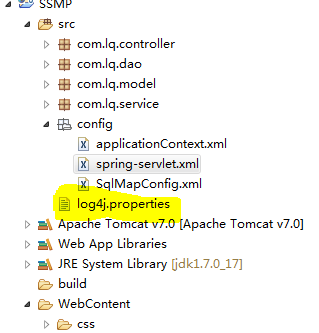
前期工作基本完成,下面是主要代码:
1、用户登录
(1)创建模型
User
1 1 package com.lq.model;
2 2
3 3 public class User {
4 4     private String username;
5 5     private String password;
6 6     private String email;
7 7     private String sex;
8 8     private String likes;
9 9     public String getUsername() {
1010         return username;
1111     }
1212     public void setUsername(String username) {
1313         this.username = username;
1414     }
1515     public String getPassword() {
1616         return password;
1717     }
1818     public void setPassword(String password) {
1919         this.password = password;
2020     }
2121     public String getEmail() {
2222         return email;
2323     }
2424     public void setEmail(String email) {
2525         this.email = email;
2626     }
2727
2828     public String getSex() {
2929         return sex;
3030     }
3131     public void setSex(String sex) {
3232         this.sex = sex;
3333     }
3434     public String getLikes() {
3535         return likes;
3636     }
3737     public void setLikes(String likes) {
3838         this.likes = likes;
3939     }
4040     public User(String username, String password, String email,String sex, String likes) {
4141         super();
4242         this.username = username;
4343         this.password = password;
4444         this.email = email;
4545         this.likes = likes;
4646         this.sex = sex;
4747     }
4848     public User() {
4949         super();
5050     }
5151
5252 }
UserMapper.xml
1 1 <?xml version="1.0" encoding="UTF-8" ?>
2 2 <!DOCTYPE mapper
3 3 PUBLIC "-//mybatis.org//DTD Mapper 3.0//EN"
4 4 "http://mybatis.org/dtd/mybatis-3-mapper.dtd">
5 5 <mapper namespace="com.lq.model.UserMapper">
6 6     <select id="doLogin" parameterType="user" resultType="user">
7 7         select * from tb_users where username=#{username} and password=#{password}
8 8     </select>
9 9
1010 </mapper>
(2)创建数据交互层Dao
BaseDao(这里通过BaseDao来实现sqlsessionTemplate)
1 1 package com.lq.dao;
2 2
3 3 import org.mybatis.spring.SqlSessionTemplate;
4 4 import org.springframework.beans.factory.annotation.Autowired;
5 5
6 6 public class BaseDao {
7 7     @Autowired
8 8
9 9     //@Qualifier("sqlSession")
1010     protected  SqlSessionTemplate sqlSession;
1111
1212     public SqlSessionTemplate getSqlSession() {
1313         return sqlSession;
1414     }
1515
1616     public void setSqlSession(SqlSessionTemplate sqlSession) {
1717         this.sqlSession = sqlSession;
1818     }
1919
2020 }
UserDao
1 1 package com.lq.dao;
2 2
3 3 import org.mybatis.spring.SqlSessionTemplate;
4 4 import org.springframework.beans.factory.annotation.Autowired;
5 5 import org.springframework.stereotype.Repository;
6 6
7 7 import com.lq.model.User;
8 8
9 9 @Repository
1010 public class UserDao extends BaseDao {
1111
1212
1313     public User doLogin(User user){
1414         return (User)sqlSession.selectOne("com.lq.model.UserMapper.doLogin",user);
1515     }
1616
1717
1818
1919
2020 }
(3)创建业务逻辑层Service
IUService
1 1 package com.lq.service;
2 2
3 3 import java.util.List;
4 4
5 5 import com.lq.model.User;
6 6
7 7 public interface IUserService {
8 8     public User doLogin(User user);
9 9
1010
1111
1212 }
UserServiceImpl
1 1 package com.lq.service;
2 2
3 3 import org.springframework.beans.factory.annotation.Autowired;
4 4 import org.springframework.stereotype.Service;
5 5
6 6 import com.lq.dao.UserDao;
7 7 import com.lq.model.User;
8 8
9 9 @Service
1010 public class UserServiceImpl implements IUserService {
1111     @Autowired
1212     private UserDao userDao;
1313
1414     @Override
1515     public User doLogin(User user) {
1616         return userDao.doLogin(user);
1717     }
1818
1919     public UserDao getUserDao() {
2020         return userDao;
2121     }
2222
2323     public void setUserDao(UserDao userDao) {
2424         this.userDao = userDao;
2525     }
2626
2727
2828
2929
3030
3131 }
(4)创建控制层Controller
UserController
1 1 package com.lq.controller;
2 2
3 3 import java.util.List;
4 4
5 5 import org.springframework.beans.factory.annotation.Autowired;
6 6 import org.springframework.stereotype.Controller;
7 7 import org.springframework.ui.Model;
8 8 import org.springframework.web.bind.annotation.ModelAttribute;
9 9 import org.springframework.web.bind.annotation.RequestMapping;
1010 import org.springframework.web.servlet.ModelAndView;
1111
1212 import com.lq.model.User;
1313 import com.lq.service.IBookService;
1414 import com.lq.service.IUserService;
1515
1616 @Controller
1717 @RequestMapping("/user")
1818 public class UserController {
1919
2020     @Autowired
2121     private IUserService userService;
2222
2323     @Autowired
2424     private IBookService bookService;
2525
2626     //实现用户登录功能
2727     @RequestMapping("dologin.do")
2828     public ModelAndView doLogin(ModelAndView mv,User user){
2929
3030         User u=userService.doLogin(user);
3131         if(u!=null){
3232             List books=bookService.selectBook(null);
3333             mv.addObject("books",books);
3434             mv.setViewName("book");
3535         }else{
3636             mv.setViewName("login");
3737             mv.addObject("flag","用户名或密码错误,请重新输入!");
3838         }
3939         return mv;
4040
4141     }
4242
4343     public IBookService getBookService() {
4444         return bookService;
4545     }
4646     public void setBookService(IBookService bookService) {
4747         this.bookService = bookService;
4848     }
4949
5050     public IUserService getUserService() {
5151         return userService;
5252     }
5353
5454     public void setUserService(IUserService userService) {
5555         this.userService = userService;
5656     }
5757
5858 }
前端页面部分
login.jsp
1 1 <%@ page language="java" contentType="text/html; charset=UTF-8" 2 2 pageEncoding="UTF-8"%> 3 3 <!DOCTYPE html> 4 4 <html lang="zh-CN"> 5 5 <head> 6 6 <meta charset="UTF-8"> 7 7 8 8 <link rel="stylesheet" href="css/login.css"> 9 9 <script type="text/javascript" src="js/jquery.min.js"></script> 1010 <title>后台登陆</title> 1111 </head> 1212 <body> 1313 <div id="login_top"> 1414 <div id="welcome"> 1515 欢迎使用郑航图书管理系统 1616 </div> 1717 <div id="back"> 1818 <a href="#">返回首页</a> | 1919 <a href="#">帮助</a> 2020 </div> 2121 </div> 2222 <div id="login_center"> 2323 <div id="login_area"> 2424 <div id="login_form"> 2525 <form action="user/dologin.do" method="post"> 2626 <div id="login_tip"> 2727 用户登录 UserLogin 2828 </div> 2929 <div><input type="text" class="username" name="username"></div> 3030 <div><input type="text" class="pwd" name="password"></div> 3131 <div id="btn_area"> 3232 <input type="hidden" name="method" value="login"/> 3333 <input type="submit" name="submit" id="sub_btn" value="登 录"> 3434 <input type="text" class="verify"> 3535 <img src="images/login/verify.png" alt="" width="80" height="40"> 3636 </div> 3737 </form> 3838 </div> 3939 </div> 4040 </div> 4141 <div id="login_bottom"> 4242 蓝旗班版权所有2018-1028 4343 </div> 4444 </body> 4545 </html>
book.jsp
1  1 <%@ page language="java" contentType="text/html; charset=UTF-8"
2  2     pageEncoding="UTF-8" import="java.util.*,com.lq.model.*" %>
3  3     <%@taglib uri="http://java.sun.com/jsp/jstl/core"   prefix="c"%>
4  4
5  5  <%
6  6 String path = request.getContextPath();
7  7 String basePath = request.getScheme()+"://"+request.getServerName()+":"+request.getServerPort()+path+"/";
8  8 %>
9  9 <!DOCTYPE html PUBLIC "-//W3C//DTD HTML 4.01 Transitional//EN" "http://www.w3.org/TR/html4/loose.dtd">
10 10 <html>
11 11 <head>
12 12 <!-- 设置请求服务器的基准路径 -->
13 13     <base href="<%=basePath%>">
14 14 <meta http-equiv="Content-Type" content="text/html; charset=UTF-8">
15 15 <title>Insert title here</title>
16 16 <link rel="stylesheet" href="css/common.css">
17 17    <link rel="stylesheet" href="css/main.css">
18 18    <script type="text/javascript" src="js/jquery.min.js"></script>
19 19    <script type="text/javascript" src="js/colResizable-1.3.min.js"></script>
20 20    <script type="text/javascript" src="js/common.js"></script>
21 21     <style type="text/css">
22 22         .main{
23 23             width: 800px;
24 24             height:780px;
25 25             margin:  0  auto;
26 26             background: url('img/1.jpg')no-repeat;
27 27         }
28 28         .top{
29 29             height:100px;
30 30             background-color: skyblue;
31 31             font-size: 90px;
32 32             font-family: "隶书";
33 33             line-height: 100px ;
34 34         }
35 35     </style>
36 36 </head>
37 37 <body>
38 38     <div class="main" >
39 39
40 40         <div class="top">
41 41                 郑航图书管理系统
42 42         </div>
43 43         <div class="box_top"><b class="pl15">搜索图书</b></div>
44 44         <!-- 搜索开始 -->
45 45         <div class="box_center pt10 pb10">
46 46         <form action="book/selectBook.do"  method="post">
47 47               <table class="form_table" border="0" cellpadding="0" cellspacing="0">
48 48                 <tbody>
49 49                  <tr>
50 50                       <td>图书名称</td>
51 51                       <td><input type="text" name="name" value="${book.name }" class="input-text lh25" size="20"></td>
52 52
53 53                       <td>图书编号</td>
54 54                       <td><input type="text" name="id" value="${book.id }" class="input-text lh25" size="20"></td>
55 55                       <td>
56 56                       <input type="hidden" name="method" value="query">
57 57                       <input type="submit" name="button" class="btn btn82 btn_search" value="查询">
58 58                       <input type="button" name="button" class="btn btn82 btn_add" value="返回">
59 59                       </td>
60 60                     </tr>
61 61                </tbody>
62 62               </table>
63 63               </form>
64 64               </div>
65 65             <div class="box_top">
66 66             <input id="add" type="button" name="button" class="btn btn82 btn_add" value="新增">
67 67             </div>
68 68
69 69             </div>
70 70            <!-- 列表开始 -->
71 71               <div id="table" class="mt10">
72 72         <div class="box span10 oh">
73 73               <div class="CRC" style="width: 1007px;">
74 74               <div class="CRG" style="left: 32px; height: 326px;">
75 75               <div class="grip"></div>
76 76               <div class="CRZ" style="cursor:e-resize"></div>
77 77               </div><div class="CRG" style="left: 134px; height: 326px;">
78 78               <div class="grip"></div>
79 79               <div class="CRZ" style="cursor:e-resize"></div>
80 80               </div>
81 81               <div class="CRG" style="left: 235px; height: 326px;">
82 82               <div class="grip"></div>
83 83               <div class="CRZ" style="cursor:e-resize"></div>
84 84               </div>
85 85               <div class="CRL" style="left: 1008px; height: 326px;"></div>
86 86               </div>
87 87               <table style="text-align: center" width="100%" border="0" cellpadding="0" cellspacing="0" class="list_table CRZ" id="CRZ0">
88 88                 <tbody><tr>
89 89
90 90                    <th style="width: 50%;">图书编号</th>
91 91                    <th style="width: 50%;">图书名称</th>
92 92                    <th style="width: 50%;">图书作者</th>
93 93                    <th style="width: 50%;">图书出版社</th>
94 94                    <th style="width: 50%;">图书价格</th>
95 95                    <th style="width: 90%;">操作</th>
96 96                     </tr>
97 97
98 98                   <c:forEach items="${books }" var="book" begin="0" step="1" varStatus="stat">
99 99                 <tr class="tr" style="background-color: rgb(255, 255, 255);">
100100                     <td>${book.id }</td>
101101                    <td>${book.name }</td>
102102                    <td>${book.author}</td>
103103                    <td>${book.publish}</td>
104104                    <td> ${book.price}</td>
105105                     <td>
106106                        <a href="book/${book.id}/delete.do"  class="ext_btn ext_btn_submit"> 删除</a>
107107                        <a href="book/${book.id}/toUpdate.do"  class="ext_btn ext_btn_submit"> 修改</a>
108108                        <a href="book/${book.id}/addCart.do"  class="ext_btn ext_btn_submit"> 加入购物车</a>
109109                        </td>
110110                  </tr>
111111                  </c:forEach>
112112                </tbody></table>
113113
114114                <!-- 分页 -->
115115               <div class="page mt10">
116116                 <div class="pagination">
117117
118118                   <ul>
119119                 <c:if test="${pageindex!=null && pageindex!=1 }">
120120                       <li class="first-child"><a href="BookServlet?method=queryBook&pageindex=1">首页</a></li>
121121                       <li ><a href="BookServlet?method=queryBook&pageindex=${pageindex-1 }">上一页</a></li>
122122                       </c:if>
123123                       <c:if test="${pageindex!=null && pageindex!=totalPage}">
124124                       <li><a href="BookServlet?method=queryBook&pageindex=${pageindex+1 }">下一页</a></li>
125125                       <li class="last-child"><a href="BookServlet?method=queryBook&pageindex=${totalPage }">末页</a></li>
126126                   </c:if>
127127                   </ul>
128128                 </div>
129129
130130               </div>
131131         </div>
132132      </div>
133133     </div>
134134 </body>
135135 <script type="text/javascript">
136136     $(function(){
137137         $("#add").click(function(){
138138             window.location.href="book/addBook.do";
139139         })
140140     })
141141
142142     $(function(){
143143         $("#btn btn82 btn_add").click(function(){
144144             window.location.href="book.jsp";
145145         })
146146     })
147147 </script>
148148
149149 </html>
2、实现图书的增删改查
(1)创建模型
Book
1 1 package com.lq.model;
2 2
3 3 public class Book {
4 4         private String id ;
5 5         private String name ;
6 6         private String author;
7 7         private String publish;
8 8         private Double price;
9 9         private String des;
1010         private Integer count=1;
1111         private int pageindex;
1212
1313         public Book() {
1414             super();
1515         }
1616         public String getId() {
1717             return id;
1818         }
1919         public void setId(String id) {
2020             this.id = id;
2121         }
2222         public String getName() {
2323             return name;
2424         }
2525         public void setName(String name) {
2626             this.name = name;
2727         }
2828         public String getAuthor() {
2929             return author;
3030         }
3131         public void setAuthor(String author) {
3232             this.author = author;
3333         }
3434         public String getPublish() {
3535             return publish;
3636         }
3737         public void setPublish(String publish) {
3838             this.publish = publish;
3939         }
4040
4141         public Double getPrice() {
4242             return price;
4343         }
4444         public void setPrice(Double price) {
4545             this.price = price;
4646         }
4747         public String getDes() {
4848             return des;
4949         }
5050         public void setDes(String des) {
5151             this.des = des;
5252         }
5353
5454         public Integer getCount() {
5555             return count;
5656         }
5757         public void setCount(Integer count) {
5858             this.count = count;
5959         }
6060         public int getPageindex() {
6161             return pageindex;
6262         }
6363         public void setPageindex(int pageindex) {
6464             this.pageindex = pageindex;
6565         }
6666
6767
6868
6969 }
BookMapper.xml
1 1 <?xml version="1.0" encoding="UTF-8" ?>
2 2 <!DOCTYPE mapper
3 3 PUBLIC "-//mybatis.org//DTD Mapper 3.0//EN"
4 4 "http://mybatis.org/dtd/mybatis-3-mapper.dtd">
5 5 <mapper namespace="com.lq.model.BookMapper">
6 6     <select id="selectBook" parameterType="book" resultType="book">
7 7         select * from tb_books
8 8         <where>
9 9             <if test="name!=null and name!=''">
1010                 name like concat('%',#{name},'%')
1111             </if>
1212             <if test="id!=null and id!=''">
1313                 id =#{id}
1414             </if>
1515         </where>
1616     </select>
1717     <delete id="deleteBookById" parameterType="string">
1818         delete from tb_books where id={bookId}
1919     </delete>
2020     <insert id="insertBook" parameterType="book">
2121         insert into tb_books values(#{id},#{name},#{author},#{publish},#{price},#{des})
2222     </insert>
2323     <update id="updateBook" parameterType="book">
2424         update tb_books set name=#{name},author=#{author},publish=#{publish},price=#{price},des=#{des} where id=#{id}
2525     </update>
2626     <select id="selectBookById" parameterType="book" resultType="book">
2727         select * from tb_books where id=#{bookId}
2828
2929     </select>
3030 </mapper>
(2)创建数据交互层Dao
BookDao
1 1 package com.lq.dao;
2 2
3 3 import java.util.List;
4 4
5 5 import org.springframework.stereotype.Repository;
6 6
7 7 import com.lq.model.Book;
8 8
9 9 @Repository//把dao注入到spring容器中
1010 public class BookDao extends BaseDao {
1111
1212     public List selectBook(Book book){
1313         return sqlSession.selectList("com.lq.model.BookMapper.selectBook",book);
1414
1515     }
1616
1717     public void deleteBookById(String bookId) {
1818         sqlSession.delete("com.lq.model.BookMapper.deleteBookById",bookId);
1919
2020     }
2121
2222     public void insertBook(Book book) {
2323         sqlSession.insert("com.lq.model.BookMapper.insertBook",book);
2424
2525     }
2626
2727     public void updateBook(Book book) {
2828         sqlSession.update("com.lq.model.BookMapper.updateBook",book);
2929     }
3030
3131     public Book selectBookById(String bookId) {
3232         return (Book)sqlSession.selectOne("com.lq.model.BookMapper.selectBookById",bookId);
3333
3434     }
3535
3636
3737 }
(3)创建业务逻辑层Service
IBookService
1 1 package com.lq.service;
2 2
3 3
4 4 import java.util.List;
5 5
6 6 import com.lq.model.Book;
7 7
8 8 public interface IBookService {
9 9     //查询
1010     public List selectBook(Book book);
1111     //删除
1212     public void deleteBookById(String bookId);
1313     //新增
1414     public void insertBook(Book book);
1515     //修改
1616     public void updateBook(Book book);
1717     //购物车查询图书
1818     public Book selectBookById(String bookId);
1919 }
BookService
1 1 package com.lq.service;
2 2
3 3 import java.util.List;
4 4
5 5 import org.springframework.beans.factory.annotation.Autowired;
6 6 import org.springframework.stereotype.Service;
7 7
8 8 import com.lq.dao.BookDao;
9 9 import com.lq.model.Book;
1010
1111 @Service
1212 public class BookService implements IBookService{
1313
1414     @Autowired
1515     private BookDao bookDao;
1616
1717     public BookDao getBookDao() {
1818         return bookDao;
1919     }
2020
2121     public void setBookDao(BookDao bookDao) {
2222         this.bookDao = bookDao;
2323     }
2424
2525     @Override
2626     public List selectBook(Book book) {
2727
2828         return bookDao.selectBook(book);
2929     }
3030
3131     @Override
3232     public void deleteBookById(String bookId) {
3333         bookDao.deleteBookById(bookId);
3434     }
3535
3636     @Override
3737     public void insertBook(Book book) {
3838         bookDao.insertBook(book);
3939     }
4040
4141     @Override
4242     public void updateBook(Book book) {
4343         bookDao.updateBook(book);
4444     }
4545
4646     @Override
4747     public Book selectBookById(String bookId) {
4848         return bookDao.selectBookById(bookId);
4949     }
5050
5151 }
(4)创建控制层Controller
BookController
1  1 package com.lq.controller;
2  2
3  3 import java.util.HashMap;
4  4 import java.util.List;
5  5 import java.util.Map;
6  6
7  7 import javax.servlet.http.HttpSession;
8  8
9  9 import org.springframework.beans.factory.annotation.Autowired;
10 10 import org.springframework.stereotype.Controller;
11 11 import org.springframework.ui.Model;
12 12 import org.springframework.web.bind.annotation.PathVariable;
13 13 import org.springframework.web.bind.annotation.RequestMapping;
14 14 import org.springframework.web.servlet.ModelAndView;
15 15
16 16 import com.lq.model.Book;
17 17 import com.lq.service.IBookService;
18 18
19 19 @Controller
20 20 @RequestMapping("/book")
21 21 public class BookController {
22 22     @Autowired
23 23     private IBookService bookService;
24 24
25 25     @RequestMapping("/selectBook.do")
26 26     public ModelAndView selectBook(ModelAndView mv,Book book){
27 27         List books=bookService.selectBook(book);
28 28         mv.addObject("books",books);
29 29         mv.setViewName("book");
30 30         return mv;
31 31     }
32 32
33 33     @RequestMapping("/{bookId}/delete.do")
34 34     public ModelAndView deleteBook(@PathVariable("bookId")String bookId,ModelAndView mv){
35 35         //删除
36 36         bookService.deleteBookById(bookId);
37 37         //查询所有图书
38 38         List books=bookService.selectBook(null);
39 39         mv.addObject("books",books);
40 40         mv.setViewName("book");
41 41         return mv;
42 42     }
43 43
44 44     @RequestMapping("/toAddBook.do")
45 45     public String toAddBook(){
46 46         return "addbook";
47 47     }
48 48     @RequestMapping("/addBook.do")
49 49     public ModelAndView addBook(ModelAndView mv,Book book){
50 50         //新增图书
51 51         bookService.insertBook(book);
52 52         //置空book对象
53 53
54 54         //查询
55 55         List books=bookService.selectBook(null);
56 56         mv.addObject("books",books);
57 57         mv.setViewName("book");
58 58         return mv;
59 59     }
60 60     @RequestMapping("/{bookId}/toUpdate.do")
61 61     public String toUpdate(@PathVariable String bookId,Model model){
62 62         Book book=new Book();
63 63         book.setId(bookId);
64 64         List<Book>books=bookService.selectBook(book);
65 65         if(books!=null){
66 66             book=books.get(0);
67 67         }
68 68         model.addAttribute("book",book);
69 69         return "updatebook";
70 70     }
71 71
72 72     @RequestMapping("/update.do")
73 73     public ModelAndView updateBook(Book book,ModelAndView mv){
74 74         //修改
75 75         bookService.updateBook(book);
76 76         //置空book对象
77 77
78 78         //查询所有图书
79 79         List books=bookService.selectBook(null);
80 80         mv.addObject("books",books);
81 81         mv.setViewName("book");
82 82         return mv;
83 83     }
84 84
85 85     @RequestMapping("/{bookId}/addCart.do")
86 86     public ModelAndView addCart(@PathVariable("bookId")String bookId,ModelAndView mv,HttpSession session){
87 87         //添加购物车
88 88         Book book=bookService.selectBookById(bookId);
89 89         //先从session中获取购物车
90 90         Object obj=session.getAttribute("cart");
91 91         //第一次加入购物车
92 92         if(obj==null){
93 93             Map<String,Book>cart=new HashMap<String,Book>();
94 94             //向购物车添加一本书
95 95             cart.put(bookId, book);
96 96             //把购物车放入session
97 97             session.setAttribute("cart", cart);
98 98         }else{
99 99             Map<String,Book>cart=(Map<String,Book>)obj;
100100             Book bk=cart.get(bookId);
101101             if(bk==null){
102102                 cart.put(bookId, book);
103103             }else{
104104                 bk.setCount(bk.getCount()+1);
105105             }
106106             cart.put(bookId, book);
107107         }
108108         mv.setViewName("cart");
109109         return mv;
110110     }
111111
112112     public IBookService getBookService() {
113113         return bookService;
114114     }
115115
116116     public void setBookService(IBookService bookService) {
117117         this.bookService = bookService;
118118     }
119119
120120 }
前端页面部分
book.jsp
1  1 <%@ page language="java" contentType="text/html; charset=UTF-8"
2  2     pageEncoding="UTF-8" import="java.util.*,com.lq.model.*" %>
3  3     <%@taglib uri="http://java.sun.com/jsp/jstl/core"   prefix="c"%>
4  4
5  5  <%
6  6 String path = request.getContextPath();
7  7 String basePath = request.getScheme()+"://"+request.getServerName()+":"+request.getServerPort()+path+"/";
8  8 %>
9  9 <!DOCTYPE html PUBLIC "-//W3C//DTD HTML 4.01 Transitional//EN" "http://www.w3.org/TR/html4/loose.dtd">
10 10 <html>
11 11 <head>
12 12 <!-- 设置请求服务器的基准路径 -->
13 13     <base href="<%=basePath%>">
14 14 <meta http-equiv="Content-Type" content="text/html; charset=UTF-8">
15 15 <title>Insert title here</title>
16 16 <link rel="stylesheet" href="css/common.css">
17 17    <link rel="stylesheet" href="css/main.css">
18 18    <script type="text/javascript" src="js/jquery.min.js"></script>
19 19    <script type="text/javascript" src="js/colResizable-1.3.min.js"></script>
20 20    <script type="text/javascript" src="js/common.js"></script>
21 21     <style type="text/css">
22 22         .main{
23 23             width: 800px;
24 24             height:780px;
25 25             margin:  0  auto;
26 26             background: url('img/1.jpg')no-repeat;
27 27         }
28 28         .top{
29 29             height:100px;
30 30             background-color: skyblue;
31 31             font-size: 90px;
32 32             font-family: "隶书";
33 33             line-height: 100px ;
34 34         }
35 35     </style>
36 36 </head>
37 37 <body>
38 38     <div class="main" >
39 39
40 40         <div class="top">
41 41                 郑航图书管理系统
42 42         </div>
43 43         <div class="box_top"><b class="pl15">搜索图书</b></div>
44 44         <!-- 搜索开始 -->
45 45         <div class="box_center pt10 pb10">
46 46         <form action="book/selectBook.do"  method="post">
47 47               <table class="form_table" border="0" cellpadding="0" cellspacing="0">
48 48                 <tbody>
49 49                  <tr>
50 50                       <td>图书名称</td>
51 51                       <td><input type="text" name="name" value="${book.name }" class="input-text lh25" size="20"></td>
52 52
53 53                       <td>图书编号</td>
54 54                       <td><input type="text" name="id" value="${book.id }" class="input-text lh25" size="20"></td>
55 55                       <td>
56 56                       <input type="hidden" name="method" value="query">
57 57                       <input type="submit" name="button" class="btn btn82 btn_search" value="查询">
58 58                       <input type="button" name="button" class="btn btn82 btn_add" value="返回">
59 59                       </td>
60 60                     </tr>
61 61                </tbody>
62 62               </table>
63 63               </form>
64 64
65 65             <div class="box_top">
66 66             <input id="add" type="button" name="button" class="btn btn82 btn_add" value="新增">
67 67
68 68
69 69             </div>
70 70            <!-- 列表开始 -->
71 71               <div id="table" class="mt10">
72 72         <div class="box span10 oh">
73 73               <div class="CRC" style="width: 1007px;">
74 74               <div class="CRG" style="left: 32px; height: 326px;">
75 75               <div class="grip"></div>
76 76               <div class="CRZ" style="cursor:e-resize"></div>
77 77               </div><div class="CRG" style="left: 134px; height: 326px;">
78 78               <div class="grip"></div>
79 79               <div class="CRZ" style="cursor:e-resize"></div>
80 80               </div>
81 81               <div class="CRG" style="left: 235px; height: 326px;">
82 82               <div class="grip"></div>
83 83               <div class="CRZ" style="cursor:e-resize"></div>
84 84               </div>
85 85               <div class="CRL" style="left: 1008px; height: 326px;"></div>
86 86               </div>
87 87               <table style="text-align: center" width="100%" border="0" cellpadding="0" cellspacing="0" class="list_table CRZ" id="CRZ0">
88 88                 <tbody><tr>
89 89
90 90                    <th style="width: 50%;">图书编号</th>
91 91                    <th style="width: 50%;">图书名称</th>
92 92                    <th style="width: 50%;">图书作者</th>
93 93                    <th style="width: 50%;">图书出版社</th>
94 94                    <th style="width: 50%;">图书价格</th>
95 95                    <th style="width: 90%;">操作</th>
96 96                     </tr>
97 97
98 98                   <c:forEach items="${books }" var="book" begin="0" step="1" varStatus="stat">
99 99                 <tr class="tr" style="background-color: rgb(255, 255, 255);">
100100                     <td>${book.id }</td>
101101                    <td>${book.name }</td>
102102                    <td>${book.author}</td>
103103                    <td>${book.publish}</td>
104104                    <td> ${book.price}</td>
105105                     <td>
106106                        <a href="book/${book.id}/delete.do"  class="ext_btn ext_btn_submit"> 删除</a>
107107                        <a href="book/${book.id}/toUpdate.do"  class="ext_btn ext_btn_submit"> 修改</a>
108108                        <a href="book/${book.id}/addCart.do"  class="ext_btn ext_btn_submit"> 加入购物车</a>
109109                        </td>
110110                  </tr>
111111                  </c:forEach>
112112                </tbody></table>
113113
114114                <!-- 分页 -->
115115               <div class="page mt10">
116116                 <div class="pagination">
117117
118118                   <ul>
119119                 <c:if test="${pageindex!=null && pageindex!=1 }">
120120                       <li class="first-child"><a href="BookServlet?method=queryBook&pageindex=1">首页</a></li>
121121                       <li ><a href="BookServlet?method=queryBook&pageindex=${pageindex-1 }">上一页</a></li>
122122                       </c:if>
123123                       <c:if test="${pageindex!=null && pageindex!=totalPage}">
124124                       <li><a href="BookServlet?method=queryBook&pageindex=${pageindex+1 }">下一页</a></li>
125125                       <li class="last-child"><a href="BookServlet?method=queryBook&pageindex=${totalPage }">末页</a></li>
126126                   </c:if>
127127                   </ul>
128128                 </div>
129129
130130               </div>
131131         </div>
132132      </div>
133133     </div>
134134 </body>
135135 <script type="text/javascript">
136136     $(function(){
137137         $("#add").click(function(){
138138             window.location.href="book/addBook.do";
139139         })
140140     })
141141
142142     $(function(){
143143         $("#btn btn82 btn_add").click(function(){
144144             window.location.href="book.jsp";
145145         })
146146     })
147147 </script>
148148
149149 </html>
addbook.jsp
1 1 <%@ page language="java" contentType="text/html; charset=UTF-8" 2 2 pageEncoding="UTF-8"%> 3 3 4 4 <% 5 5 String path = request.getContextPath(); 6 6 String basePath = request.getScheme()+"://"+request.getServerName()+":"+request.getServerPort()+path+"/"; 7 7 %> 8 8 <!DOCTYPE html PUBLIC "-//W3C//DTD HTML 4.01 Transitional//EN" "http://www.w3.org/TR/html4/loose.dtd"> 9 9 <html> 10 10 <head> 11 11 <!-- 设置请求服务器的基准路径 --> 12 12 <base href="<%=basePath%>"> 13 13 <meta http-equiv="Content-Type" content="text/html; charset=UTF-8"> 14 14 <title>Insert title here</title> 15 15 <link rel="stylesheet" href="css/common.css"> 16 16 <link rel="stylesheet" href="css/main.css"> 17 17 <script type="text/javascript" src="js/jquery.min.js"></script> 18 18 <script type="text/javascript" src="js/colResizable-1.3.min.js"></script> 19 19 <script type="text/javascript" src="js/common.js"></script> 20 20 <style type="text/css"> 21 21 .main{ 22 22 width: 800px; 23 23 height:780px; 24 24 margin: 0 auto; 25 25 background-image: url("img/1.jpg"); 26 26 } 27 27 .top{ 28 28 height:100px; 29 29 background-color: skyblue; 30 30 font-size: 90px; 31 31 font-family: "隶书"; 32 32 line-height: 100px 33 33 } 34 34 </style> 35 35 </head> 36 36 <body > 37 37 <div class="main" style="background: url('img/1.jpg')no-repeat;"> 38 38 39 39 <div class="top"> 40 40 郑航图书管理系统 41 41 </div> 42 42 <div id="forms" class="mt10"> 43 43 <div class="box"> 44 44 <div class="box_border"> 45 45 <div class="box_top"><b class="pl15">新增图书</b></div> 46 46 <div class="box_center"> 47 47 <form action="book/addBook.do" method="post" class="jqtransform"> 48 48 <table class="form_table pt15 pb15" width="100%" border="0" cellpadding="0" cellspacing="0"> 49 49 <tbody> 50 50 <tr> 51 51 <td class="td_right">图书编号:</td> 52 52 <td class=""> 53 53 <input type="text" name="id" class="input-text lh30" size="50"> 54 54 </td> 55 55 </tr> 56 56 <tr> 57 57 <td class="td_right">图书名称:</td> 58 58 <td> 59 59 <input type="text" name="name" class="input-text lh30" size="50"> 60 60 </td> 61 61 </tr> 62 62 <tr> 63 63 <td class="td_right">图书作者:</td> 64 64 <td> 65 65 <input type="text" name="author" class="input-text lh30" size="50"> 66 66 </td> 67 67 </tr> 68 68 <tr> 69 69 <td class="td_right">图书出版社:</td> 70 70 <td> 71 71 <input type="text" name="publish" class="input-text lh30" size="50"> 72 72 </td> 73 73 </tr> 74 74 <tr> 75 75 <td class="td_right">图书价钱:</td> 76 76 <td> 77 77 <input type="text" name="price" class="input-text lh30" size="50"> 78 78 </td> 79 79 </tr> 80 80 <tr> 81 81 <td class="td_right">图书描述:</td> 82 82 <td class=""> 83 83 <textarea name="des" cols="30" rows="10" class="textarea"></textarea> 84 84 </td> 85 85 </tr> 86 86 <tr> 87 87 <td class="td_right"> </td> 88 88 <td class=""> 89 89 <input type="hidden" name="method" value="insertBook"> 90 90 <input id="keep" type="submit" name="button" class="btn btn82 btn_save2" value="保存"> 91 91 <input type="reset" name="reset" class="btn btn82 btn_res" value="重置"> 92 92 </td> 93 93 </tr> 94 94 </tbody></table> 95 95 </form> 96 96 </div> 97 97 </div> 98 98 </div> 99 99 </div> 100100 </div> 101101 </body> 102102 103103 104104 </html>
updatebook.jsp
1 1 <%@ page language="java" contentType="text/html; charset=UTF-8" 2 2 pageEncoding="UTF-8" import="com.lq.model.*"%> 3 3 4 4 <% 5 5 String path = request.getContextPath(); 6 6 String basePath = request.getScheme()+"://"+request.getServerName()+":"+request.getServerPort()+path+"/"; 7 7 %> 8 8 <!DOCTYPE html PUBLIC "-//W3C//DTD HTML 4.01 Transitional//EN" "http://www.w3.org/TR/html4/loose.dtd"> 9 9 <html> 10 10 <head> 11 11 <!-- 设置请求服务器的基准路径 --> 12 12 <base href="<%=basePath%>"> 13 13 <meta http-equiv="Content-Type" content="text/html; charset=UTF-8"> 14 14 <title>Insert title here</title> 15 15 <link rel="stylesheet" href="css/common.css"> 16 16 <link rel="stylesheet" href="css/main.css"> 17 17 <script type="text/javascript" src="js/jquery.min.js"></script> 18 18 <script type="text/javascript" src="js/colResizable-1.3.min.js"></script> 19 19 <script type="text/javascript" src="js/common.js"></script> 20 20 <style type="text/css"> 21 21 .main{ 22 22 width: 800px; 23 23 height:780px; 24 24 margin: 0 auto; 25 25 background-image: url("img/1.jpg"); 26 26 } 27 27 .top{ 28 28 height:100px; 29 29 background-color: skyblue; 30 30 font-size: 90px; 31 31 font-family: "隶书"; 32 32 line-height: 100px 33 33 } 34 34 </style> 35 35 </head> 36 36 <body > 37 37 <div class="main" style="background: url('img/1.jpg')no-repeat;"> 38 38 39 39 <div class="top"> 40 40 郑航图书管理系统 41 41 </div> 42 42 <% 43 43 Book book=(Book)request.getAttribute("book"); 44 44 %> 45 45 <div id="forms" class="mt10"> 46 46 <div class="box"> 47 47 <div class="box_border"> 48 48 <div class="box_top"><b class="pl15">新增图书</b></div> 49 49 <div class="box_center"> 50 50 <form action="book/update.do" method="post" class="jqtransform"> 51 51 <table class="form_table pt15 pb15" width="100%" border="0" cellpadding="0" cellspacing="0"> 52 52 <tbody> 53 53 <tr> 54 54 <td class="td_right">图书编号:</td> 55 55 <td class=""> 56 56 <input type="text" name="id" readonly class="input-text lh30" size="50"value="<%=book.getId()%>"> 57 57 </td> 58 58 </tr> 59 59 <tr> 60 60 <td class="td_right">图书名称:</td> 61 61 <td> 62 62 <input type="text" name="name" class="input-text lh30" size="50"value="<%=book.getName()%>"> 63 63 </td> 64 64 </tr> 65 65 <tr> 66 66 <td class="td_right">图书作者:</td> 67 67 <td> 68 68 <input type="text" name="author" class="input-text lh30" size="50"value="<%=book.getAuthor()%>"> 69 69 </td> 70 70 </tr> 71 71 <tr> 72 72 <td class="td_right">图书出版社:</td> 73 73 <td> 74 74 <input type="text" name="publish" class="input-text lh30" size="50"value="<%=book.getPublish()%>"> 75 75 </td> 76 76 </tr> 77 77 <tr> 78 78 <td class="td_right">图书价钱:</td> 79 79 <td> 80 80 <input type="text" name="price" class="input-text lh30" size="50"value="<%=book.getPrice()%>"> 81 81 </td> 82 82 </tr> 83 83 <tr> 84 84 <td class="td_right">图书描述:</td> 85 85 <td class=""> 86 86 <textarea name="des" cols="30" rows="10" class="textarea"><%=book.getDes()%></textarea> 87 87 </td> 88 88 </tr> 89 89 <tr> 90 90 <td class="td_right"> </td> 91 91 <td class=""> 92 92 <input type="hidden" name="method" value="updateBook"> 93 93 <input id="keep" type="submit" name="button" class="btn btn82 btn_save2" value="保存"> 94 94 <input type="reset" name="reset" class="btn btn82 btn_res" value="重置"> 95 95 </td> 96 96 </tr> 97 97 </tbody></table> 98 98 </form> 99 99 </div> 100100 </div> 101101 </div> 102102 </div> 103103 </div> 104104 </body> 105105 106106 107107 </html>
cart.jsp
1 1 <%@ page language="java" contentType="text/html; charset=UTF-8"
2 2     pageEncoding="UTF-8" import="java.util.*,com.lq.model.*" %>
3 3     <%@taglib uri="http://java.sun.com/jsp/jstl/core"   prefix="c"%>
4 4
5 5  <%
6 6 String path = request.getContextPath();
7 7 String basePath = request.getScheme()+"://"+request.getServerName()+":"+request.getServerPort()+path+"/";
8 8 %>
9 9 <!DOCTYPE html PUBLIC "-//W3C//DTD HTML 4.01 Transitional//EN" "http://www.w3.org/TR/html4/loose.dtd">
1010 <html>
1111 <head>
1212 <!-- 设置请求服务器的基准路径 -->
1313     <base href="<%=basePath%>">
1414 <meta http-equiv="Content-Type" content="text/html; charset=UTF-8">
1515 <title>Insert title here</title>
1616 <link rel="stylesheet" href="css/common.css">
1717    <link rel="stylesheet" href="css/main.css">
1818    <script type="text/javascript" src="js/jquery.min.js"></script>
1919    <script type="text/javascript" src="js/colResizable-1.3.min.js"></script>
2020    <script type="text/javascript" src="js/common.js"></script>
2121     <style type="text/css">
2222         .main{
2323             width: 800px;
2424             height:780px;
2525             margin:  0  auto;
2626             background: url('img/1.jpg')no-repeat;
2727         }
2828         .top{
2929             height:100px;
3030             background-color: skyblue;
3131             font-size: 90px;
3232             font-family: "隶书";
3333             line-height: 100px ;
3434         }
3535     </style>
3636 </head>
3737 <body>
3838     <div class="main" >
3939
4040         <div class="top">
4141                 郑航图书管理系统
4242         </div>
4343
4444            <!-- 列表开始 -->
4545               <div id="table" class="mt10">
4646         <div class="box span10 oh">
4747               <div class="CRC" style="width: 1007px;">
4848               <div class="CRG" style="left: 32px; height: 326px;">
4949               <div class="grip"></div>
5050               <div class="CRZ" style="cursor:e-resize"></div>
5151               </div><div class="CRG" style="left: 134px; height: 326px;">
5252               <div class="grip"></div>
5353               <div class="CRZ" style="cursor:e-resize"></div>
5454               </div>
5555               <div class="CRG" style="left: 235px; height: 326px;">
5656               <div class="grip"></div>
5757               <div class="CRZ" style="cursor:e-resize"></div>
5858               </div>
5959               <div class="CRL" style="left: 1008px; height: 326px;"></div>
6060               </div>
6161               <table style="text-align: center" width="100%" border="0" cellpadding="0" cellspacing="0" class="list_table CRZ" id="CRZ0">
6262                 <tbody><tr>
6363
6464                    <th style="width: 50%;">图书编号</th>
6565                    <th style="width: 50%;">图书名称</th>
6666                    <th style="width: 50%;">图书作者</th>
6767                    <th style="width: 50%;">图书出版社</th>
6868                    <th style="width: 50%;">图书价格</th>
6969                    <th style="width: 50%;">数量</th>
7070                    <th style="width: 70%;">操作</th>
7171                     </tr>
7272
7373                   <c:forEach items="${cart }" var="book" begin="0" step="1" varStatus="stat">
7474                 <tr class="tr" style="background-color: rgb(255, 255, 255);">
7575                     <td>${book.value.id }</td>
7676                    <td>${book.value.name }</td>
7777                    <td>${book.value.author}</td>
7878                    <td>${book.value.publish}</td>
7979                    <td> ${book.value.price}</td>
8080                    <td> ${book.value.count}</td>
8181                    <td>
8282                    <a href="book/${book.value.id}/delete.do">删除</a>
8383                    </td>
8484                    </td>
8585                  </tr>
8686                  </c:forEach>
8787                </tbody></table>
8888
8989
9090         </div>
9191      </div>
9292     </div>
9393 </body>
9494
9595
9696 </html>
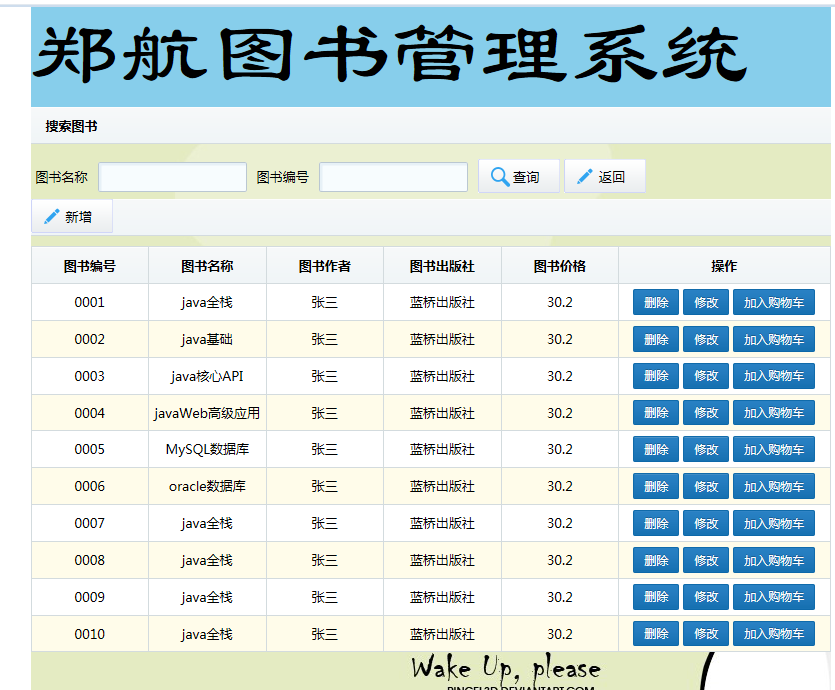
所呈现的页面展示图

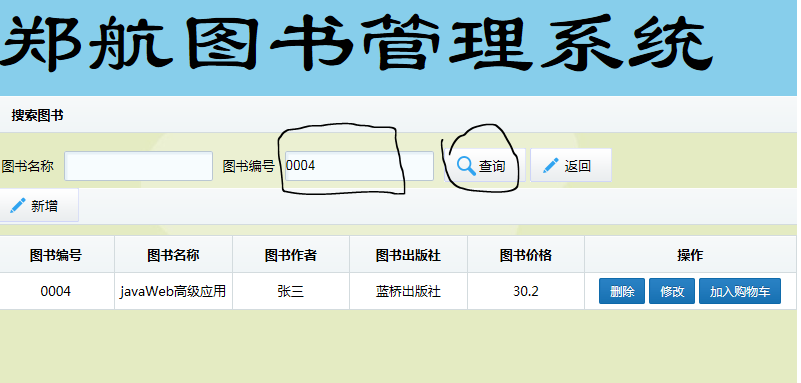
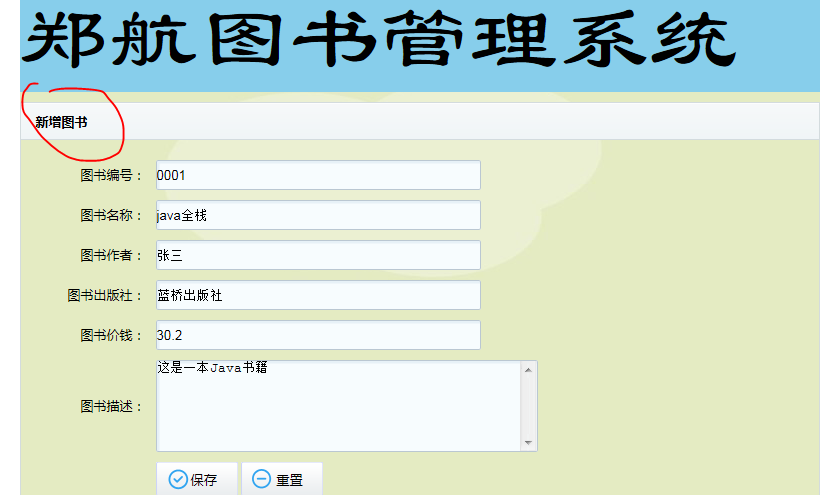
至此,图书管理系统的增删改查就完成了,新手不足,还有很多地方有待改善。。。。。