
浏览器模式下验证码存储策略
浏览器模式下,生成的短信验证码或者图形验证码是存在session里的,用户接收到验证码后携带过来做校验。

APP模式下验证码存储策略
在app场景下里是没有cookie信息的,请求里也就没有JSESSIONID,所以即使生成了验证码存在session里,你也接收到了验证码,但是没有JSEESIONID,校验你带过来的验证码时,会找不到对应的session,所以不能用session来存储验证码。
解决:在 生成 和 校验验证码的时候多带一个参数 ,设备id,生成验证码时,把生成的验证码和设备id一起存在外部存储里(数据库或redis里),校验的时候拿着设备id去找对应的验证码即可。
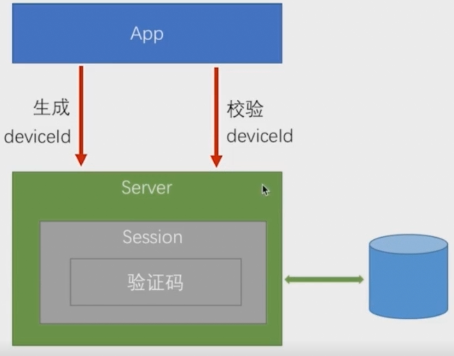
将验证码的存取策略代码抽取成接口,app和浏览器分别实现这个接口:
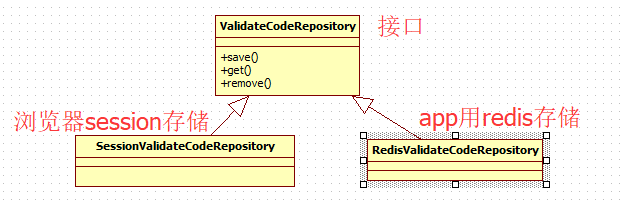
接口ValidateCodeRepository:
app的实现:
1package com.imooc.security.app.validate.code.impl;
2
3import java.util.concurrent.TimeUnit;
4
5import org.apache.commons.lang.StringUtils;
6import org.slf4j.Logger;
7import org.slf4j.LoggerFactory;
8import org.springframework.beans.factory.annotation.Autowired;
9import org.springframework.data.redis.core.RedisTemplate;
10import org.springframework.stereotype.Component;
11import org.springframework.web.context.request.ServletWebRequest;
12
13import com.imooc.security.core.validate.code.ValidateCode;
14import com.imooc.security.core.validate.code.ValidateCodeException;
15import com.imooc.security.core.validate.code.ValidateCodeRepository;
16import com.imooc.security.core.validate.code.ValidateCodeType;
17
18/**
19 * redis验证码存取策略
20 * ClassName: RedisValidateCodeRepository
21 * @Description: redis验证码存取策略
22 * @author lihaoyang
23 * @date 2018年3月14日
24 */
25@Component
26public class RedisValidateCodeRepository implements ValidateCodeRepository{
27
28    private Logger logger = LoggerFactory.getLogger(getClass());
29
30    @Autowired
31    private RedisTemplate<Object, Object> redisTemplate;
32
33
34
35    @Override
36    public void save(ServletWebRequest request, ValidateCode code, ValidateCodeType validateCodeType) {
37        String key = buildKey(request, validateCodeType);
38        logger.info("--------->redis存进去了一个新的key:"+key+",value:"+code+"<-----------");
39        redisTemplate.opsForValue().set(key, code, 30, TimeUnit.MINUTES);
40    }
41
42    @Override
43    public ValidateCode get(ServletWebRequest request, ValidateCodeType validateCodeType) {
44        Object value = redisTemplate.opsForValue().get(buildKey(request, validateCodeType));
45        if(value == null){
46            return null;
47        }
48        return (ValidateCode) value;
49    }
50
51    @Override
52    public void remove(ServletWebRequest request, ValidateCodeType validateCodeType) {
53        String key = buildKey(request, validateCodeType);
54        logger.info("--------->redis删除了一个key:"+key+"<-----------");
55        redisTemplate.delete(key);
56    }
57
58    /**
59     * 构建验证码在redis中的key
60     * @Description: 构建验证码在redis中的key
61     * @param @return
62     * @return String  验证码在redis中的key
63     * @throws
64     * @author lihaoyang
65     * @date 2018年3月14日
66     */
67    private String buildKey(ServletWebRequest request , ValidateCodeType validateCodeType){
68        //获取设备id
69        String deviceId = request.getHeader("deviceId");
70        if(StringUtils.isBlank(deviceId)){
71            throw new ValidateCodeException("deviceId为空,请求头中未携带deviceId参数");
72        }
73        return "code:" + validateCodeType.toString().toLowerCase()+":"+deviceId;
74    }
75
76
77}
application.properties里配置上redis:
1#redis
2# Redis数据库索引(默认为0)
3spring.redis.database=0
4# Redis服务器地址
5spring.redis.host=127.0.0.1
6# Redis服务器连接端口
7spring.redis.port=6379
8# Redis服务器连接密码(默认为空)
9spring.redis.password=
10# 连接池最大连接数(使用负值表示没有限制)
11spring.redis.pool.max-active=8
12# 连接池最大阻塞等待时间(使用负值表示没有限制)
13spring.redis.pool.max-wait=-1
14# 连接池中的最大空闲连接
15spring.redis.pool.max-idle=8
16# 连接池中的最小空闲连接
17spring.redis.pool.min-idle=0
18# 连接超时时间(毫秒)
19spring.redis.timeout=0
我是在windows上装了个redis,简单省事。
controller里生成验证码的地方,也换成了用 接口,具体的实现 看你引用app模块还是browser模块:
1@GetMapping(SecurityConstants.DEFAULT_VALIDATE_CODE_URL_PREFIX+"/sms")
2    public void createSmsCode(HttpServletRequest request,HttpServletResponse response) throws Exception{
3
4        //调验证码生成接口方式
5        ValidateCode smsCode = smsCodeGenerator.generator(new ServletWebRequest(request));
6
7        /**
8         * 不能把验证码存在session了,调接口,app和browser不同实现
9         */
10//        sessionStrategy.setAttribute(new ServletWebRequest(request), SESSION_KEY_SMS, smsCode);
11
12        validateCodeRepository.save(new ServletWebRequest(request) , smsCode, ValidateCodeType.SMS);
13
14        //获取手机号
15        String mobile = ServletRequestUtils.getRequiredStringParameter(request, "mobile");
16        //发送短信验证码
17        smsCodeSender.send(mobile, smsCode.getCode());
18    }
验证码过滤器也换了:
1/**
2 * 短信验证码过滤器
3 * ClassName: ValidateCodeFilter
4 * @Description:
5 *  继承OncePerRequestFilter:spring提供的工具,保证过滤器每次只会被调用一次
6 *  实现 InitializingBean接口的目的:
7 *      在其他参数都组装完毕的时候,初始化需要拦截的urls的值
8 * @author lihaoyang
9 * @date 2018年3月2日
10 */
11public class SmsCodeFilter extends OncePerRequestFilter implements InitializingBean{
12
13    private Logger logger = LoggerFactory.getLogger(getClass());
14
15    //认证失败处理器
16    private AuthenticationFailureHandler authenticationFailureHandler;
17
18    //获取session工具类
19    private SessionStrategy sessionStrategy = new HttpSessionSessionStrategy();
20
21    private ValidateCodeRepository validateCodeRepository;
22
23
24    //需要拦截的url集合
25    private Set<String> urls = new HashSet<>();
26    //读取配置
27    private SecurityProperties securityProperties;
28    //spring工具类
29    private AntPathMatcher antPathMatcher = new AntPathMatcher();
30
31    /**
32     * 重写InitializingBean的方法,设置需要拦截的urls
33     */
34    @Override
35    public void afterPropertiesSet() throws ServletException {
36        super.afterPropertiesSet();
37        //读取配置的拦截的urls
38        String[] configUrls = StringUtils.splitByWholeSeparatorPreserveAllTokens(securityProperties.getCode().getSms().getUrl(), ",");
39        //如果配置了需要验证码拦截的url,不判断,如果没有配置会空指针
40        if(configUrls != null && configUrls.length > 0){
41            for (String configUrl : configUrls) {
42                logger.info("ValidateCodeFilter.afterPropertiesSet()--->配置了验证码拦截接口:"+configUrl);
43                urls.add(configUrl);
44            }
45        }else{
46            logger.info("----->没有配置拦验证码拦截接口<-------");
47        }
48        //短信验证码登录一定拦截
49        urls.add(SecurityConstants.DEFAULT_LOGIN_PROCESSING_URL_MOBILE);
50    }
51
52    @Override
53    protected void doFilterInternal(HttpServletRequest request, HttpServletResponse response, FilterChain filterChain)
54            throws ServletException, IOException {
55        //如果是 登录请求 则执行
56//        if(StringUtils.equals("/authentication/form", request.getRequestURI())
57//                &&StringUtils.equalsIgnoreCase(request.getMethod(), "post")){
58//            try {
59//                validate(new ServletWebRequest(request));
60//            } catch (ValidateCodeException e) {
61//                //调用错误处理器,最终调用自己的
62//                authenticationFailureHandler.onAuthenticationFailure(request, response, e);
63//                return ;//结束方法,不再调用过滤器链
64//            }
65//        }
66
67
68        /**
69         * 可配置的验证码校验
70         * 判断请求的url和配置的是否有匹配的,匹配上了就过滤
71         */
72        boolean action = false;
73        for(String url:urls){
74            if(antPathMatcher.match(url, request.getRequestURI())){
75                action = true;
76            }
77        }
78        if(action){
79            try {
80                validate(new ServletWebRequest(request));
81            } catch (ValidateCodeException e) {
82                //调用错误处理器,最终调用自己的
83                authenticationFailureHandler.onAuthenticationFailure(request, response, e);
84                return ;//结束方法,不再调用过滤器链
85            }
86        }
87
88        //不是登录请求,调用其它过滤器链
89        filterChain.doFilter(request, response);
90    }
91
92    /**
93     * 校验验证码
94     * @Description: 校验验证码
95     * @param @param request
96     * @param @throws ServletRequestBindingException
97     * @return void
98     * @throws ValidateCodeException
99     * @author lihaoyang
100     * @date 2018年3月2日
101     */
102    private void validate(ServletWebRequest request) throws ServletRequestBindingException {
103        //拿出session中的ImageCode对象
104//        ValidateCode smsCodeInSession = (ValidateCode) sessionStrategy.getAttribute(request, ValidateCodeController.SESSION_KEY_SMS);
105        //根据不同的存储策略调用不同的获取方式
106        ValidateCode validateCode = validateCodeRepository.get(request, ValidateCodeType.SMS);
107
108        //拿出请求中的验证码
109        String imageCodeInRequest = ServletRequestUtils.getStringParameter(request.getRequest(), SecurityConstants.DEFAULT_PARAMETER_NAME_CODE_SMS);
110        //校验
111        if(StringUtils.isBlank(imageCodeInRequest)){
112            throw new ValidateCodeException("验证码不能为空");
113        }
114        if(validateCode == null){
115            throw new ValidateCodeException("验证码不存在,请刷新验证码");
116        }
117        if(validateCode.isExpired()){
118            //从session移除过期的验证码
119//            sessionStrategy.removeAttribute(request, ValidateCodeController.SESSION_KEY_SMS);
120            validateCodeRepository.remove(request, ValidateCodeType.SMS);
121            throw new ValidateCodeException("验证码已过期,请刷新验证码");
122        }
123        if(!StringUtils.equalsIgnoreCase(validateCode.getCode(), imageCodeInRequest)){
124            throw new ValidateCodeException("验证码错误");
125        }
126        //验证通过,移除session中验证码
127//        sessionStrategy.removeAttribute(request, ValidateCodeController.SESSION_KEY_SMS);
128        validateCodeRepository.remove(request, ValidateCodeType.SMS);
129    }
130
131    public AuthenticationFailureHandler getAuthenticationFailureHandler() {
132        return authenticationFailureHandler;
133    }
134
135    public void setAuthenticationFailureHandler(AuthenticationFailureHandler authenticationFailureHandler) {
136        this.authenticationFailureHandler = authenticationFailureHandler;
137    }
138
139    public SecurityProperties getSecurityProperties() {
140        return securityProperties;
141    }
142
143    public void setSecurityProperties(SecurityProperties securityProperties) {
144        this.securityProperties = securityProperties;
145    }
146
147    public ValidateCodeRepository getValidateCodeRepository() {
148        return validateCodeRepository;
149    }
150
151    public void setValidateCodeRepository(ValidateCodeRepository validateCodeRepository) {
152        this.validateCodeRepository = validateCodeRepository;
153    }
154
155
156}
注意SmsCodeFilter 这个类里,由于这个类不是由Spring管理的,所以这里边不能注入 ValidateCodeRepository ,只能将其作为成员变量,生成get、set,在new SmsCodeFilter 的类里,再注入ValidateCodeRepository为成员变量,再给SmsCodeFilter set进去
1/**
2 * 资源服务器,和认证服务器在物理上可以在一起也可以分开
3 * ClassName: ImoocResourceServerConfig
4 * @Description: TODO
5 * @author lihaoyang
6 * @date 2018年3月13日
7 */
8@Configuration
9@EnableResourceServer
10public class ImoocResourceServerConfig extends ResourceServerConfigurerAdapter{
11
12    //自定义的登录成功后的处理器
13    @Autowired
14    private AuthenticationSuccessHandler imoocAuthenticationSuccessHandler;
15
16    //自定义的认证失败后的处理器
17    @Autowired
18    private AuthenticationFailureHandler imoocAuthenticationFailureHandler;
19
20    //读取用户配置的登录页配置
21    @Autowired
22    private SecurityProperties securityProperties;
23
24    @Autowired
25    private SmsCodeAuthenticationSecurityConfig smsCodeAuthenticationSecurityConfig;
26
27    @Autowired
28    private ValidateCodeRepository validateCodeRepository;
29
30    @Override
31    public void configure(HttpSecurity http) throws Exception {
32
33        //~~~-------------> 图片验证码过滤器 <------------------
34        ValidateCodeFilter validateCodeFilter = new ValidateCodeFilter();
35        validateCodeFilter.setValidateCodeRepository(validateCodeRepository);
36        //验证码过滤器中使用自己的错误处理
37        validateCodeFilter.setAuthenticationFailureHandler(imoocAuthenticationFailureHandler);
38        //配置的验证码过滤url
39        validateCodeFilter.setSecurityProperties(securityProperties);
40        validateCodeFilter.afterPropertiesSet();
41
42        //~~~-------------> 短信验证码过滤器 <------------------
43        SmsCodeFilter smsCodeFilter = new SmsCodeFilter();
44        smsCodeFilter.setValidateCodeRepository(validateCodeRepository);
45        //验证码过滤器中使用自己的错误处理
46        smsCodeFilter.setAuthenticationFailureHandler(imoocAuthenticationFailureHandler);
47        //配置的验证码过滤url
48        smsCodeFilter.setSecurityProperties(securityProperties);
49        smsCodeFilter.afterPropertiesSet();
50
51        http
52        .addFilterBefore(smsCodeFilter, UsernamePasswordAuthenticationFilter.class)
53//        .apply(imoocSocialSecurityConfig)//社交登录
54//        .and()
55        //把验证码过滤器加载登录过滤器前边
56        .addFilterBefore(validateCodeFilter, UsernamePasswordAuthenticationFilter.class)
57
58        //----------表单认证相关配置---------------
59        .formLogin()
60            .loginPage(SecurityConstants.DEFAULT_UNAUTHENTICATION_URL) //处理用户认证BrowserSecurityController
61            .loginProcessingUrl(SecurityConstants.DEFAULT_LOGIN_PROCESSING_URL_FORM)
62            .successHandler(imoocAuthenticationSuccessHandler)//自定义的认证后处理器
63            .failureHandler(imoocAuthenticationFailureHandler) //登录失败后的处理
64            .and()
65        //-----------授权相关的配置 ---------------------
66        .authorizeRequests()
67            // /authentication/require:处理登录,securityProperties.getBrowser().getLoginPage():用户配置的登录页
68            .antMatchers(SecurityConstants.DEFAULT_UNAUTHENTICATION_URL,
69            securityProperties.getBrowser().getLoginPage(),//放过登录页不过滤,否则报错
70            SecurityConstants.DEFAULT_LOGIN_PROCESSING_URL_MOBILE,
71            SecurityConstants.SESSION_INVALID_PAGE,
72            SecurityConstants.DEFAULT_VALIDATE_CODE_URL_PREFIX+"/*").permitAll() //验证码
73            .anyRequest()        //任何请求
74            .authenticated()    //都需要身份认证
75        .and()
76            .csrf().disable() //关闭csrf防护
77        .apply(smsCodeAuthenticationSecurityConfig);//把短信验证码配置应用上
78
79    }
80
81
82}
启动demo项目,获取验证码,注意需要在请求头里带上设备id
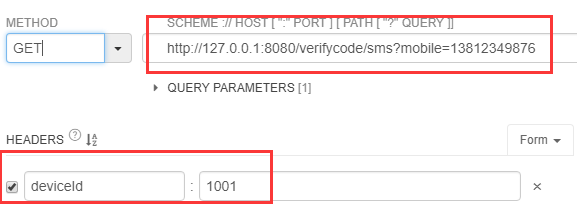
生成验证码:

redis:

登录:
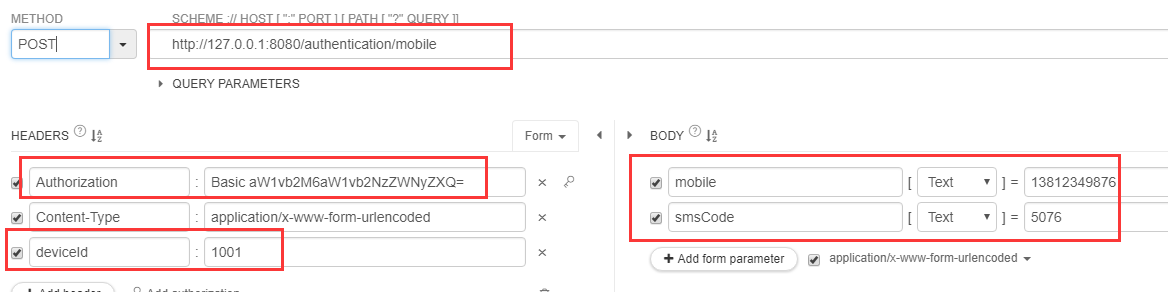
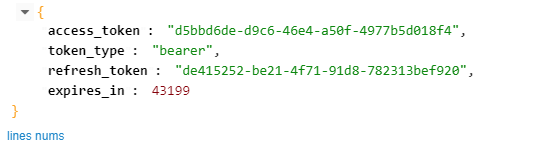
响应token:
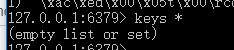
登录成功,redis清除验证码
就能拿着token访问controller了:
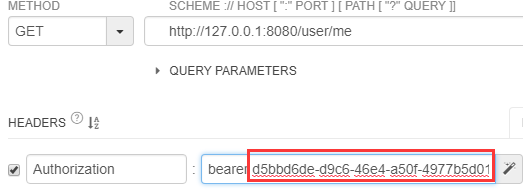
1{
2"password": null,
3"username": "13812349876",
4"authorities":[
5{
6"authority": "ROLE_USER"
7},
8{
9"authority": "admin"
10}
11],
12"accountNonExpired": true,
13"accountNonLocked": true,
14"credentialsNonExpired": true,
15"enabled": true,
16"userId": "13812349876"
17}
代码在github :https://github.com/lhy1234/spring-security