SpringBoot2.0集成FastDFS
前两篇整体上介绍了通过 Nginx 和 FastDFS 的整合来实现文件服务器。但是,在实际开发中对图片或文件的操作都是通过应用程序来完成的,因此,本篇将介绍 Spring Boot 整合 FastDFS 客户端来实现对图片/文件服务器的访问。
如果有不了解 FastDFS 的读者可以先浏览《CentOS7 安装FastDFS分布式文件系统》或是另行查阅网上相关资料。
一、整合编码
项目整体的代码结构图如下:
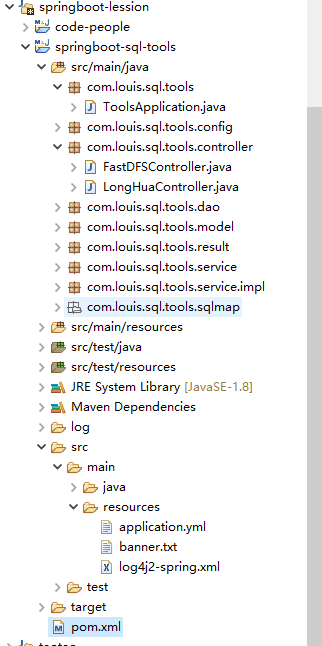
添加依赖
1<project xmlns="http://maven.apache.org/POM/4.0.0" xmlns:xsi="http://www.w3.org/2001/XMLSchema-instance" xsi:schemaLocation="http://maven.apache.org/POM/4.0.0 http://maven.apache.org/xsd/maven-4.0.0.xsd">
2  <modelVersion>4.0.0</modelVersion>
3  <parent>
4        <groupId>org.springframework.boot</groupId>
5        <artifactId>spring-boot-starter-parent</artifactId>
6        <version>2.0.4.RELEASE</version>
7        <relativePath /> <!-- lookup parent from repository -->
8    </parent>
9  <groupId>com.sql.tools</groupId>
10  <artifactId>springboot-sql-tools</artifactId>
11  <version>0.0.1-SNAPSHOT</version>
12
13  <properties>
14        <project.build.sourceEncoding>UTF-8</project.build.sourceEncoding>
15        <project.reporting.outputEncoding>UTF-8</project.reporting.outputEncoding>
16        <java.version>1.8</java.version>
17        <mybatis.spring.version>1.3.2</mybatis.spring.version>
18        <com.alibaba.druid.version>1.1.10</com.alibaba.druid.version>
19        <log4j.version>1.2.17</log4j.version>
20        <pagehelper.version>1.2.5</pagehelper.version>
21        <docker.image.prefix>kitty</docker.image.prefix>
22        <fastjson.version>1.2.48</fastjson.version>
23        <commons-lang3>3.4</commons-lang3>
24        <oracle.version>11.2.0.4.0</oracle.version>
25        <spring.boot.admin.version>2.0.0</spring.boot.admin.version>
26    </properties>
27    <dependencies>
28        <!-- spring boot -->
29        <dependency>
30            <groupId>org.springframework.boot</groupId>
31            <artifactId>spring-boot-starter-web</artifactId>
32            <exclusions>
33                <exclusion>
34                    <groupId>org.springframework.boot</groupId>
35                    <artifactId>spring-boot-starter-logging</artifactId>
36                </exclusion>
37            </exclusions>
38        </dependency>
39        <!-- https://mvnrepository.com/artifact/org.springframework.boot/spring-boot-starter-log4j2 -->
40        <dependency>
41            <groupId>org.springframework.boot</groupId>
42            <artifactId>spring-boot-starter-log4j2</artifactId>
43        </dependency>
44        <dependency>
45            <groupId>org.springframework.boot</groupId>
46            <artifactId>spring-boot-starter-test</artifactId>
47            <scope>test</scope>
48        </dependency>
49        <!-- spring aop -->
50        <dependency>
51            <groupId>org.springframework.boot</groupId>
52            <artifactId>spring-boot-starter-aop</artifactId>
53        </dependency>
54        <!-- mybatis -->
55        <dependency>
56            <groupId>org.mybatis.spring.boot</groupId>
57            <artifactId>mybatis-spring-boot-starter</artifactId>
58            <version>${mybatis.spring.version}</version>
59        </dependency>
60        <!-- mysql -->
61        <dependency>
62            <groupId>mysql</groupId>
63            <artifactId>mysql-connector-java</artifactId>
64        </dependency>
65        <!-- https://mvnrepository.com/artifact/com.oracle/ojdbc6 -->
66        <dependency>
67            <groupId>com.oracle</groupId>
68            <artifactId>ojdbc6</artifactId>
69            <version>${oracle.version}</version>
70        </dependency>
71
72        <dependency>
73           <groupId>com.alibaba</groupId>
74           <artifactId>druid-spring-boot-starter</artifactId>
75           <version>${com.alibaba.druid.version}</version>
76        </dependency>
77        <!-- log4j -->
78        <dependency>
79            <groupId>log4j</groupId>
80            <artifactId>log4j</artifactId>
81            <version>${log4j.version}</version>
82        </dependency>
83        <!-- swagger -->
84        <dependency>
85            <groupId>io.springfox</groupId>
86            <artifactId>springfox-swagger2</artifactId>
87            <version>2.8.0</version>
88        </dependency>
89        <dependency>
90            <groupId>io.springfox</groupId>
91            <artifactId>springfox-swagger-ui</artifactId>
92            <version>2.8.0</version>
93        </dependency>
94        <!-- pagehelper -->
95        <dependency>
96            <groupId>com.github.pagehelper</groupId>
97            <artifactId>pagehelper-spring-boot-starter</artifactId>
98            <version>${pagehelper.version}</version>
99        </dependency>
100        <!-- fastjson -->
101        <dependency>
102            <groupId>com.alibaba</groupId>
103            <artifactId>fastjson</artifactId>
104            <version>${fastjson.version}</version>
105        </dependency>
106        <dependency>
107            <groupId>org.apache.commons</groupId>
108            <artifactId>commons-lang3</artifactId>
109        </dependency>
110        <!-- https://mvnrepository.com/artifact/net.oschina.zcx7878/fastdfs-client-java -->
111        <!-- fastdfs-client-java -->
112        <dependency>
113            <groupId>com.github.tobato</groupId>
114            <artifactId>fastdfs-client</artifactId>
115            <version>1.26.5</version>
116            <exclusions>
117                <exclusion>
118                    <groupId>ch.qos.logback</groupId>
119                    <artifactId>logback-classic</artifactId>
120                </exclusion>
121            </exclusions>
122        </dependency>
123    </dependencies>
124
125    <build>
126        <plugins>
127            <plugin>
128                <groupId>org.springframework.boot</groupId>
129                <artifactId>spring-boot-maven-plugin</artifactId>
130            </plugin>
131        </plugins>
132        <!-- 打包时拷贝MyBatis的映射文件 -->
133        <resources>
134            <resource>
135                <directory>src/main/java</directory>
136                <includes>
137                    <include>**/sqlmap/*.xml</include>
138                </includes>
139                <filtering>false</filtering>
140            </resource>
141            <resource>
142                <directory>src/main/resources</directory>
143                    <includes>
144                        <include>**/*.*</include>
145                    </includes>
146                    <filtering>true</filtering>
147            </resource>
148        </resources>
149    </build>
150</project>
我在里面添加了Mybatis和数据连接驱动,使用的日志系统是Solf4j,log4j2
配置文件如下:
application.yml
1# Tomcat
2server:
3    tomcat:
4        uri-encoding: UTF-8
5        max-threads: 1000
6        min-spare-threads: 30
7    port: 8001
8    session:
9        timeout:7200
10    context-path: /lion-admin
11# DataSource
12spring:
13  datasource:
14    name: druidDataSource
15    type: com.alibaba.druid.pool.DruidDataSource
16    druid:
17      driver-class-name: oracle.jdbc.driver.OracleDriver
18      url: jdbc:oracle:thin:@192.168.0.205:1521:orcl
19      username: gcloud_check
20      password: gcloud_check
21      filters: stat,wall,log4j,config
22      max-active: 100
23      initial-size: 1
24      max-wait: 60000
25      min-idle: 1
26      time-between-eviction-runs-millis: 60000
27      min-evictable-idle-time-millis: 300000
28      validation-query: select 'x' FROM DUAL
29      test-while-idle: true
30      test-on-borrow: false
31      test-on-return: false
32      pool-prepared-statements: true
33      max-open-prepared-statements: 50
34      max-pool-prepared-statement-per-connection-size: 20
35# FastDFS
36# ===================================================================
37# 分布式文件系统FDFS配置
38# ===================================================================
39fdfs:
40  so-timeout: 1501
41  connect-timeout: 601
42  thumb-image:             #缩略图生成参数
43    width: 150
44    height: 150
45  web-server-url: 192.168.0.137/
46  tracker-list: 192.168.0.137:22122
端口:8001
数据使用的是:Oracle
注意: FastDFS的第三方客户端包引入的时候要去除logback的包,不然与log4j2冲突,启动会报错
1<dependency>
2    <groupId>com.github.tobato</groupId>
3    <artifactId>fastdfs-client</artifactId>
4    <version>1.26.5</version>
5    <exclusions>
6        <exclusion>
7          <groupId>ch.qos.logback</groupId>
8          <artifactId>logback-classic</artifactId>
9        </exclusion>
10    </exclusions>
11</dependency>
上边的 fastdfs-client 是并非 FastDFS Client 原作者编写的整合包,具体详情可以访问 https://github.com/tobato/FastDFS_Client
log4j2-spring.xml
1<?xml version="1.0" encoding="UTF-8"?>
2<!--设置log4j2的自身log级别为warn-->
3<!--日志级别以及优先级排序: OFF > FATAL > ERROR > WARN > INFO > DEBUG > TRACE > ALL -->
4<!--Configuration后面的status,这个用于设置log4j2自身内部的信息输出,可以不设置,
5    当设置成trace时,你会看到log4j2内部各种详细输出-->
6<!--monitorInterval:Log4j能够自动检测修改配置 文件和重新配置本身,设置间隔秒数-->
7<configuration status="warn" monitorInterval="30">
8    <!--先定义所有的appender-->
9    <appenders>
10        <!--这个输出控制台的配置-->
11        <console name="Console" target="SYSTEM_OUT">
12            <!--输出日志的格式-->
13            <PatternLayout pattern="[%d{HH:mm:ss:SSS}] [%p] - %l - %m%n"/>
14        </console>
15        <!--文件会打印出所有信息,这个log每次运行程序会自动清空,由append属性决定,这个也挺有用的,适合临时测试用-->
16        <File name="log" fileName="log/test.log" append="false">
17            <PatternLayout pattern="%d{HH:mm:ss.SSS} %-5level %class{36} %L %M - %msg%xEx%n"/>
18        </File>
19        <!-- 这个会打印出所有的info及以下级别的信息,每次大小超过size,
20        则这size大小的日志会自动存入按年份-月份建立的文件夹下面并进行压缩,作为存档-->
21        <RollingFile name="RollingFileInfo" fileName="${sys:user.home}/logs/hpaasvc/info.log"
22                     filePattern="${sys:user.home}/logs/hpaasvc/$${date:yyyy-MM}/info-%d{yyyy-MM-dd}-%i.log">
23            <Filters>
24                <!--控制台只输出level及以上级别的信息(onMatch),其他的直接拒绝(onMismatch)-->
25                <ThresholdFilter level="INFO" onMatch="ACCEPT" onMismatch="DENY"/>
26                <ThresholdFilter level="WARN" onMatch="DENY" onMismatch="NEUTRAL"/>
27            </Filters>
28            <PatternLayout pattern="[%d{HH:mm:ss:SSS}] [%p] - %l - %m%n"/>
29            <Policies>
30                <TimeBasedTriggeringPolicy/>
31                <SizeBasedTriggeringPolicy size="100 MB"/>
32            </Policies>
33        </RollingFile>
34
35        <RollingFile name="RollingFileWarn" fileName="${sys:user.home}/logs/hpaasvc/warn.log"
36                     filePattern="${sys:user.home}/logs/hpaasvc/$${date:yyyy-MM}/warn-%d{yyyy-MM-dd}-%i.log">
37            <Filters>
38                <ThresholdFilter level="WARN" onMatch="ACCEPT" onMismatch="DENY"/>
39                <ThresholdFilter level="ERROR" onMatch="DENY" onMismatch="NEUTRAL"/>
40            </Filters>
41            <PatternLayout pattern="[%d{HH:mm:ss:SSS}] [%p] - %l - %m%n"/>
42            <Policies>
43                <TimeBasedTriggeringPolicy/>
44                <SizeBasedTriggeringPolicy size="100 MB"/>
45            </Policies>
46            <!-- DefaultRolloverStrategy属性如不设置,则默认为最多同一文件夹下7个文件,这里设置了20 -->
47            <DefaultRolloverStrategy max="20"/>
48        </RollingFile>
49
50        <RollingFile name="RollingFileError" fileName="${sys:user.home}/logs/hpaasvc/error.log"
51                     filePattern="${sys:user.home}/logs/hpaasvc/$${date:yyyy-MM}/error-%d{yyyy-MM-dd}-%i.log">
52            <ThresholdFilter level="ERROR"/>
53            <PatternLayout pattern="[%d{HH:mm:ss:SSS}] [%p] - %l - %m%n"/>
54            <Policies>
55                <TimeBasedTriggeringPolicy/>
56                <SizeBasedTriggeringPolicy size="100 MB"/>
57            </Policies>
58        </RollingFile>
59
60    </appenders>
61    <!--然后定义logger,只有定义了logger并引入的appender,appender才会生效-->
62    <loggers>
63        <!--过滤掉spring和hibernate的一些无用的debug信息-->
64        <logger name="org.springframework" level="INFO">
65        </logger>
66        <logger name="org.mybatis" level="INFO">
67        </logger>
68        <root level="INFO">
69            <appender-ref ref="Console"/>
70            <appender-ref ref="RollingFileInfo"/>
71            <appender-ref ref="RollingFileWarn"/>
72            <appender-ref ref="RollingFileError"/>
73        </root>
74    </loggers>
75
76</configuration>
或者看这边配置log4j2的整合文章SpringBoot 2.0 的Log4j2日志信息配置
代码
1/**
2 * @author lr
3 * @date 2018年12月26日 下午4:28:14
4 * @version V1.0.0
5 */
6package com.louis.sql.tools;
7
8import org.springframework.boot.SpringApplication;
9import org.springframework.boot.autoconfigure.SpringBootApplication;
10import org.springframework.context.annotation.ComponentScan;
11import org.springframework.context.annotation.Configuration;
12import org.springframework.context.annotation.EnableMBeanExport;
13import org.springframework.jmx.support.RegistrationPolicy;
14
15@Configuration
16@ComponentScan
17@EnableMBeanExport(registration = RegistrationPolicy.IGNORE_EXISTING)
18@SpringBootApplication
19public class ToolsApplication {
20
21    public static void main(String[] args) {
22        SpringApplication.run(ToolsApplication.class, args);
23    }
24}
FastDFSClient.java
1/**
2 * @author lr
3 * @date 2019年1月28日 下午1:41:39
4 * @version V1.0.0
5 */
6package com.louis.sql.tools.config;
7
8import java.io.ByteArrayInputStream;
9import java.io.File;
10import java.io.FileInputStream;
11import java.io.IOException;
12import java.nio.charset.Charset;
13
14import org.apache.commons.io.FilenameUtils;
15import org.apache.commons.lang3.StringUtils;
16import org.slf4j.Logger;
17import org.slf4j.LoggerFactory;
18import org.springframework.beans.factory.annotation.Autowired;
19import org.springframework.stereotype.Component;
20import org.springframework.web.multipart.MultipartFile;
21
22import com.github.tobato.fastdfs.domain.conn.FdfsWebServer;
23import com.github.tobato.fastdfs.domain.fdfs.StorePath;
24import com.github.tobato.fastdfs.domain.proto.storage.DownloadByteArray;
25import com.github.tobato.fastdfs.exception.FdfsUnsupportStorePathException;
26import com.github.tobato.fastdfs.service.FastFileStorageClient;
27
28@Component
29public class FastDFSClient {
30
31    private final Logger logger = LoggerFactory.getLogger(FastDFSClient.class);
32
33    @Autowired
34    private FastFileStorageClient storageClient;
35
36    @Autowired
37    private FdfsWebServer fdfsWebServer;
38
39    /**
40     * 上传文件
41     * @param file 文件对象
42     * @return 文件访问地址
43     * @throws IOException
44     */
45    public String uploadFile(MultipartFile file) throws IOException {
46        StorePath storePath = storageClient.uploadFile(file.getInputStream(),file.getSize(), FilenameUtils.getExtension(file.getOriginalFilename()),null);
47        return getResAccessUrl(storePath);
48    }
49
50    /**
51     * 上传文件
52     * @param file 文件对象
53     * @return 文件访问地址
54     * @throws IOException
55     */
56    public String uploadFile(File file) throws IOException {
57        FileInputStream inputStream = new FileInputStream (file);
58        StorePath storePath = storageClient.uploadFile(inputStream,file.length(), FilenameUtils.getExtension(file.getName()),null);
59        return getResAccessUrl(storePath);
60    }
61
62    /**
63     * 将一段字符串生成一个文件上传
64     * @param content 文件内容
65     * @param fileExtension
66     * @return
67     */
68    public String uploadFile(String content, String fileExtension) {
69        byte[] buff = content.getBytes(Charset.forName("UTF-8"));
70        ByteArrayInputStream stream = new ByteArrayInputStream(buff);
71        StorePath storePath = storageClient.uploadFile(stream,buff.length, fileExtension,null);
72        return getResAccessUrl(storePath);
73    }
74
75    // 封装图片完整URL地址
76    private String getResAccessUrl(StorePath storePath) {
77        String fileUrl = fdfsWebServer.getWebServerUrl() + storePath.getFullPath();
78        return fileUrl;
79    }
80
81    /**
82     * 下载文件
83     * @param fileUrl 文件url
84     * @return
85     */
86    public byte[]  download(String fileUrl) {
87         String group = fileUrl.substring(0, fileUrl.indexOf("/"));
88         String path = fileUrl.substring(fileUrl.indexOf("/") + 1);
89         byte[] bytes = storageClient.downloadFile(group, path, new DownloadByteArray());
90         return bytes;
91    }
92
93    /**
94     * 删除文件
95     * @param fileUrl 文件访问地址
96     * @return
97     */
98    public void deleteFile(String fileUrl) {
99        if (StringUtils.isEmpty(fileUrl)) {
100            return;
101        }
102        try {
103            StorePath storePath = StorePath.parseFromUrl(fileUrl);
104            storageClient.deleteFile(storePath.getGroup(), storePath.getPath());
105        } catch (FdfsUnsupportStorePathException e) {
106            logger.warn(e.getMessage());
107        }
108    }
109
110}
controller
1/**
2 * @author lr
3 * @date 2019年1月28日 下午1:50:47
4 * @version V1.0.0
5 */
6package com.louis.sql.tools.controller;
7
8import java.net.URLEncoder;
9import java.util.HashMap;
10import java.util.Map;
11
12import javax.servlet.ServletOutputStream;
13import javax.servlet.http.HttpServletResponse;
14
15import org.apache.commons.io.IOUtils;
16import org.springframework.beans.factory.annotation.Autowired;
17import org.springframework.web.bind.annotation.RequestMapping;
18import org.springframework.web.bind.annotation.RestController;
19import org.springframework.web.multipart.MultipartFile;
20
21import com.louis.sql.tools.config.FastDFSClient;
22
23@RestController
24@RequestMapping("/fdfs")
25public class FastDFSController {
26
27        @Autowired
28        private FastDFSClient fdfsClient;
29
30        /**
31         * 文件上传
32         * @param file
33         * @return
34         * @throws Exception
35         */
36        @RequestMapping("/upload")
37        public Map<String,Object> upload(MultipartFile file) throws Exception{
38
39                String url = fdfsClient.uploadFile(file);
40
41                Map<String,Object> result = new HashMap<>();
42                result.put("code", 200);
43                result.put("msg", "上传成功");
44                result.put("url", url);
45
46                return result;
47        }
48
49        /**
50         * 文件下载
51         * @param fileUrl  url 开头从组名开始
52         * @param response
53         * @throws Exception
54         */
55        @RequestMapping("/download")
56        public void  download(String fileUrl, HttpServletResponse response) throws Exception{
57
58                byte[] data = fdfsClient.download(fileUrl);
59
60                response.setCharacterEncoding("UTF-8");
61                response.setHeader("Content-disposition", "attachment;filename=" + URLEncoder.encode("test.jpg", "UTF-8"));
62
63                // 写出
64                ServletOutputStream outputStream = response.getOutputStream();
65                IOUtils.write(data, outputStream);
66        }
67}
测试效果
然后通过swagger-ui的接口直接测试文件上传功能
访问地址:[swagger-ui首页]http://localhost:8001/swagger-ui.html#
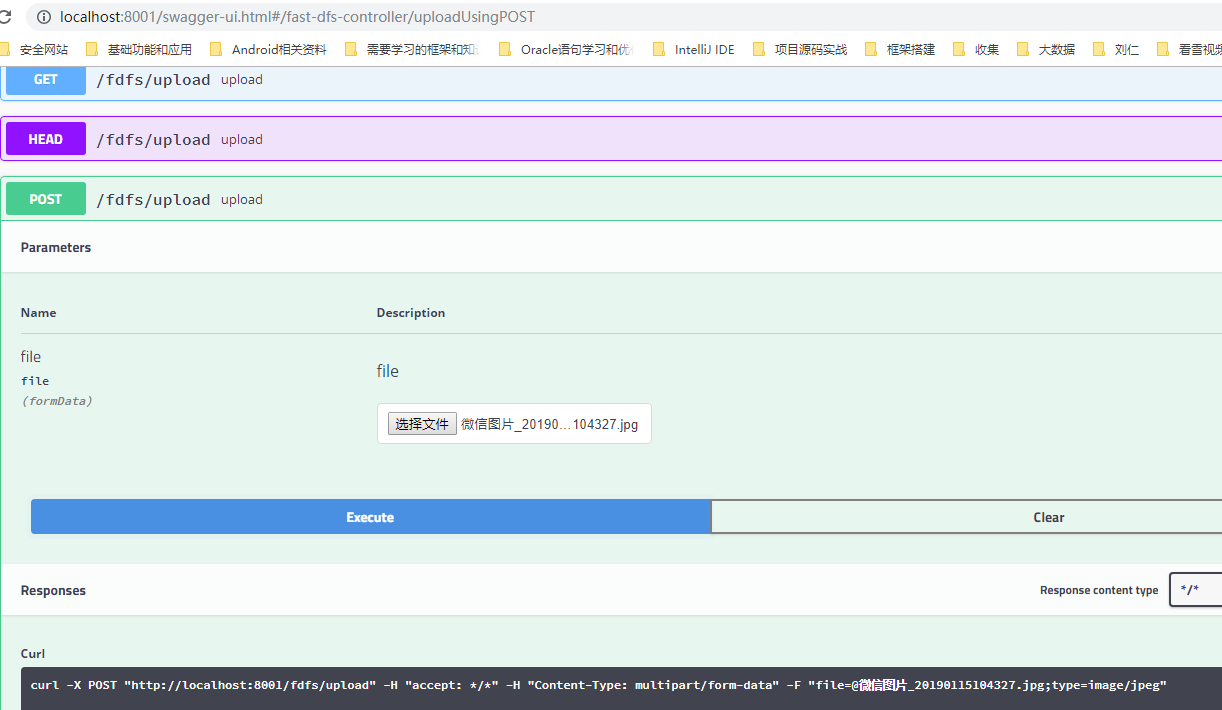
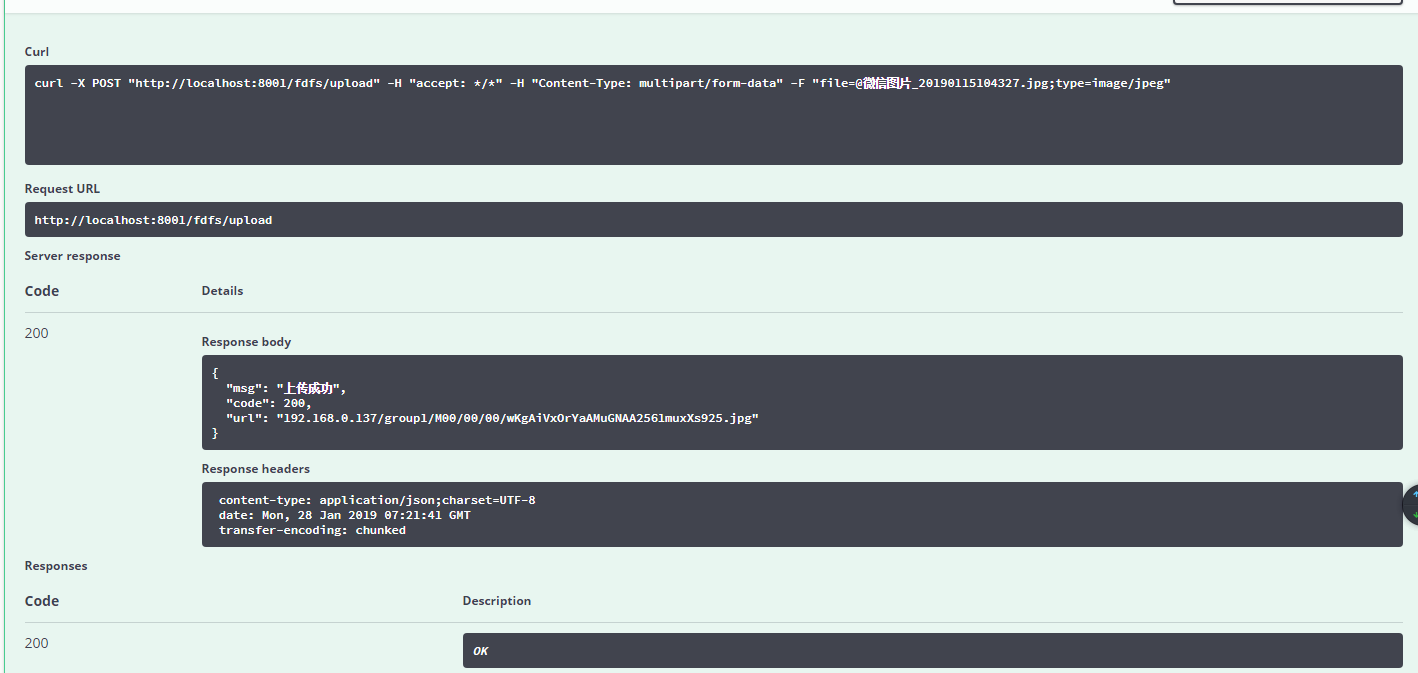
如果需要看源码:https://github.com/PlayTaoist/SpringBoot2-FastDFS
新博客地址:https://www.codepeople.cn/
=======================================================================================
微信公众号: