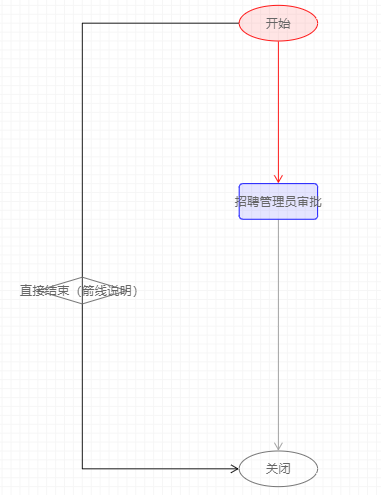
- 下面代码可以直接贴到html文件中运行看效果。
- 代码说明
- js中data是一个json变量,里面有两个关键对象“nodes、edges”,分别来描述节点、节点间箭线。
- 更多“nodes、edges”信息见代码中说明部分。
- 最新版见官网Demo、G6-API。
1<!DOCTYPE html>
2<html>
3  <head>
4    <meta charset="utf-8">
5<script src="https://cdn.staticfile.org/jquery/1.10.2/jquery.min.js"></script>
6    <script src="https://gw.alipayobjects.com/as/g/datavis/g6/1.1.6/index.js"></script>
7  </head>
8  <body>
9    <div id="c1"></div>
10    <script type="text/javascript">
11
12      var Util = G6.Util;
13      // 设置数据
14      var data = {
15        "source": {
16            "nodes": [
17                {
18                  "shape": "circle",//节点形状,默认矩形, circle圆形,rhombus菱形,可放图片url
19                  "label": "开始",//节点名称
20                  color:'red',//设置节点背景色
21                  "size": [88,40],//节点框大小(长宽)
22                  "x": 720,//水平坐标,浏览器右上角起到左边距离
23                  "y": 100,//垂直坐标,浏览器右上角起到下边距离
24                  "id": "开始"//本节点id
25                },
26                {
27                  "shape": "square",
28                  "label": "招聘管理员审批",
29                  color:'blue',
30                  "size": [88,40],
31                  "x": 720,
32                  "y": 300,
33                  "id": "招聘管理员审批"
34                },
35                {
36                    shape: 'circle',
37                  "label": "关闭",
38                  "size": [88,40],
39                  "x": 720,
40                  "y": 600,
41                  "id": "关闭"
42                },
43                {
44                  "shape": "rhombus",
45                  "label": "直接结束(箭线说明)",
46                  "size": [100,30],
47                  "x": 500,
48                  "y": 400,
49                  "id": "左侧线"
50                }
51            ],
52            "edges": [
53                {
54                    "shape": "arrow",
55                    "source": "开始",//源节点id
56                    "target": "关闭",//目标节点id
57                    color:'black',//设置箭线背景色
58                    "id": "huixian7",//箭线id
59                    "controlPoints": [
60                        {
61                            "x": 0,
62                            "y": 0
63                        },
64                        {
65                            "x": 500,//箭线 第1个折点x坐标
66                            "y": 100//箭线 第1个折点y坐标
67                        },
68                        {
69                            "x": 500,//箭线 第2个折点坐标
70                            "y": 600//箭线 第2个折点y坐标
71                        },
72                        {
73                            "x": 0,
74                            "y": 0
75                        }
76                    ]
77                },
78                {
79                    "shape": "arrow",
80                    "source": "开始",
81                    "target": "招聘管理员审批",
82                    color:'red',
83                    "id": "huixian1",
84                    "controlPoints": [
85                        {
86                            "x": 720,
87                            "y": 240
88                        },
89                        {
90                            "x": 720,
91                            "y": 140
92                        }
93                    ]
94                },
95                {
96                    "shape": "arrow",
97                    "source": "招聘管理员审批",
98                    "target": "关闭",
99                    "id": "huixian2",
100                    "controlPoints": [
101                        {
102                            "x": 0,
103                            "y": 0
104                        },
105                        {
106                            "x": 720,
107                            "y": 440
108                        },
109                        {
110                            "x": 0,
111                            "y": 0
112                        }
113                    ]
114                }
115            ]
116        }
117    };
118      // 配置G6画布
119      var net = new G6.Net({
120        id: 'c1',      // 容器ID
121        fitView: 'autoZoom',
122        mode: 'none',
123        width: 500,    // 画布宽
124        height: 500    // 画布高
125      });
126      // 载入数据
127      net.read(Util.clone(data));
128      // 渲染关系图
129      net.render();
130
131    </script>
132<br>
133○ js中data是一个json变量,里面有两个关键对象“nodes、edges”,分别来描述节点、节点间剪线。<br>
134○ 更多“nodes、edges”信息见代码中说明部分。
135
136
137  </body>
138</html>
