
swagger-bootstrap-ui是国内的一个swagger开源项目,从发起到现在已经有三年了。
初次体验了一下,觉得还是挺不错的,就如当初使用mybatis-plus那样,因为有了mybatis的基础,所以过渡到mybatis-plus很没有压力。
现在由swagger2到swagger-bootstrap-ui也是没有压力的,基本上参考官方文档就能弄好了。
目前我应用在我个人的博客项目上,效果如图:

关于如何搭建步骤,我主要是参考官方文档,我本次写的就作为官方文档的一点补充:
一、添加Maven依赖
1<dependency>
2       <groupId>com.github.xiaoymin</groupId>
3       <artifactId>swagger-bootstrap-ui</artifactId>
4       <version>1.9.3</version>
5</dependency>
6
7   <dependency>
8        <groupId>io.springfox</groupId>
9        <artifactId>springfox-swagger2</artifactId>
10        <version>2.9.2</version>
11</dependency>
二、编写配置类
1import org.springframework.context.annotation.Bean;
2import org.springframework.context.annotation.Configuration;
3import com.github.xiaoymin.swaggerbootstrapui.annotations.EnableSwaggerBootstrapUI;
4import springfox.documentation.builders.ApiInfoBuilder;
5import springfox.documentation.builders.PathSelectors;
6import springfox.documentation.builders.RequestHandlerSelectors;
7import springfox.documentation.service.ApiInfo;
8import springfox.documentation.spi.DocumentationType;
9import springfox.documentation.spring.web.plugins.Docket;
10import springfox.documentation.swagger2.annotations.EnableSwagger2;
11
12@Configuration
13@EnableSwagger2
14@EnableSwaggerBootstrapUI
15public class SwaggerConfiguration {
16
17 @Bean
18 public Docket createRestApi() {
19     return new Docket(DocumentationType.SWAGGER_2)
20     .apiInfo(apiInfo())
21     .select()
22     .apis(RequestHandlerSelectors.basePackage("com.blog.springboot"))
23     .paths(PathSelectors.any())
24     .build();
25 }
26
27 private ApiInfo apiInfo() {
28     return new ApiInfoBuilder()
29     .title("swagger-bootstrap-ui RESTful APIs")
30     .description("swagger-bootstrap-ui")
31     .termsOfServiceUrl("http://www.youcongtech.com")
32     .contact("developer@mail.com")
33     .version("1.1")
34     .build();
35 }
36}
三、去下载对应的前端资源
下载地址为:https://github.com/xiaoymin/Swagger-Bootstrap-UI/tags ,如下图所示:

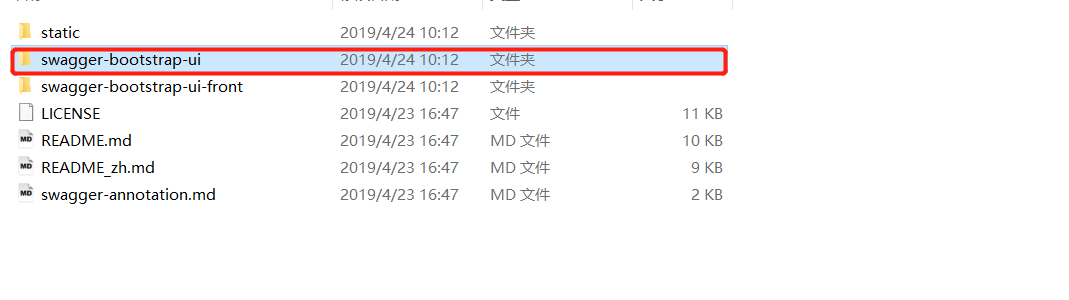
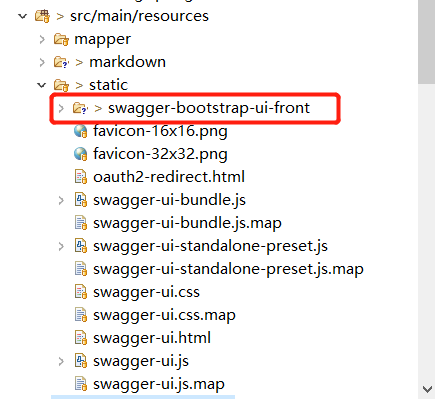
四、下载完毕后解压并将swagger-bootstrap-ui放到springboot项目职工的src/main/resources目录下
步骤如图:
找到这个文件夹
并将其迁移到springboot对应的目录
五、整个流程完成后,启动应用,访问地址为http://IP:Port//doc.html
参考资料如下:
swagger-bootstrap-ui文档:http://doc.xiaominfo.com