
之前ASP.NET中使用的HTTP Modules及HTTP Handlers,在ASP.NET Core中已不复存在,取而代之的是Middleware。Middleware除了简化了HTTP Modules/Handlers的使用方式,还带入了Pipeline的概念。
本篇将介绍ASP.NET Core的Middleware概念及用法。
Middleware 概念
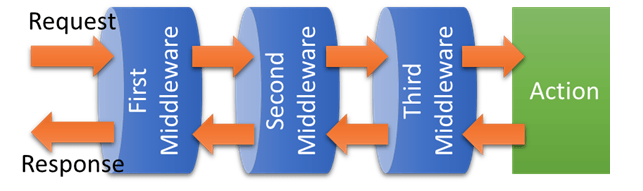
ASP.NET Core在Middleware的官方说明中,使用了Pipeline这个名词,意指Middleware像水管一样可以串联在一起,所有的Request及Response都会层层经过这些水管。
用图例可以很容易理解,如下图:
App.Use
Middleware的注册方式是在_Startup.cs_的Configure对IApplicationBuilder使用Use方法注册。
大部分扩展的Middleware也都是以Use开头的方法注册,例如:
- UseMvc():MVC的Middleware
- UseRewriter():URL rewriting的Middleware
一个简单的Middleware 范例。如下:
Startup.cs
1using System;
2using System.Collections.Generic;
3using System.Linq;
4using System.Threading.Tasks;
5using Microsoft.AspNetCore.Builder;
6using Microsoft.AspNetCore.Hosting;
7using Microsoft.AspNetCore.Http;
8using Microsoft.Extensions.DependencyInjection;
9
10namespace MyWebsite
11{
12    public class Startup
13    {
14        // This method gets called by the runtime. Use this method to add services to the container.
15        // For more information on how to configure your application, visit https://go.microsoft.com/fwlink/?LinkID=398940
16        public void ConfigureServices(IServiceCollection services)
17        {
18        }
19
20        // This method gets called by the runtime. Use this method to configure the HTTP request pipeline.
21        public void Configure(IApplicationBuilder app, IHostingEnvironment env)
22        {
23            if (env.IsDevelopment())
24            {
25                app.UseDeveloperExceptionPage();
26            }
27
28            app.Use(async (context, next) =>
29            {
30                await context.Response.WriteAsync("First Middleware in. \r\n");
31                await next.Invoke();
32                await context.Response.WriteAsync("First Middleware out. \r\n");
33            });
34
35            app.Use(async (context, next) =>
36            {
37                await context.Response.WriteAsync("Second Middleware in. \r\n");
38                await next.Invoke();
39                await context.Response.WriteAsync("Second Middleware out. \r\n");
40            });
41
42            app.Use(async (context, next) =>
43            {
44                await context.Response.WriteAsync("Third Middleware in. \r\n");
45                await next.Invoke();
46                await context.Response.WriteAsync("Third Middleware out. \r\n");
47            });
48
49            app.Run(async (context) =>
50            {
51                await context.Response.WriteAsync("Hello World! \r\n");
52            });
53        }
54    }
55}
用浏览器打开网站任意连结,输出结果:
1First Middleware in.
2Second Middleware in.
3Third Middleware in.
4Hello World!
5Third Middleware out.
6Second Middleware out.
7First Middleware out.
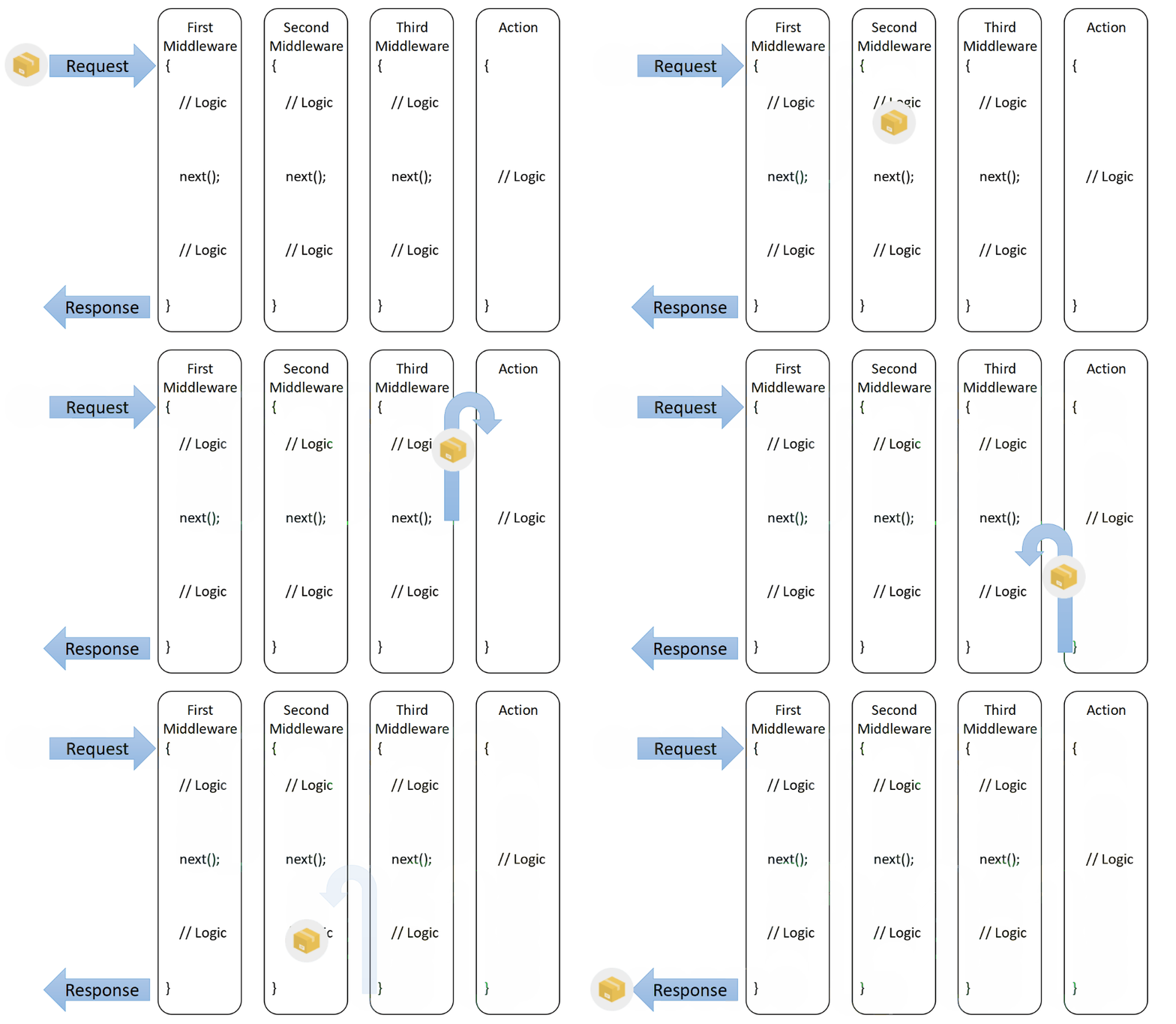
在Pipeline的概念中,注册顺序是很重要的事情。请求经过的顺序一定是先进后出。
Request 流程如下图:
Middleware 也可以作为拦截使用,如下:
Startup.cs
1using System;
2using System.Collections.Generic;
3using System.Linq;
4using System.Threading.Tasks;
5using Microsoft.AspNetCore.Builder;
6using Microsoft.AspNetCore.Hosting;
7using Microsoft.AspNetCore.Http;
8using Microsoft.Extensions.DependencyInjection;
9
10namespace MyWebsite
11{
12    public class Startup
13    {
14        // This method gets called by the runtime. Use this method to add services to the container.
15        // For more information on how to configure your application, visit https://go.microsoft.com/fwlink/?LinkID=398940
16        public void ConfigureServices(IServiceCollection services)
17        {
18        }
19
20        // This method gets called by the runtime. Use this method to configure the HTTP request pipeline.
21        public void Configure(IApplicationBuilder app, IHostingEnvironment env)
22        {
23            if (env.IsDevelopment())
24            {
25                app.UseDeveloperExceptionPage();
26            }
27
28            app.Use(async (context, next) =>
29            {
30                await context.Response.WriteAsync("First Middleware in. \r\n");
31                await next.Invoke();
32                await context.Response.WriteAsync("First Middleware out. \r\n");
33            });
34
35            app.Use(async (context, next) =>
36            {
37                await context.Response.WriteAsync("Second Middleware in. \r\n");
38
39                // 水管阻塞,封包不往后送
40                var condition = false;
41                if (condition)
42                {
43                    await next.Invoke();
44                }
45                await context.Response.WriteAsync("Second Middleware out. \r\n");
46            });
47
48            app.Use(async (context, next) =>
49            {
50                await context.Response.WriteAsync("Third Middleware in. \r\n");
51                await next.Invoke();
52                await context.Response.WriteAsync("Third Middleware out. \r\n");
53            });
54
55            app.Run(async (context) =>
56            {
57                await context.Response.WriteAsync("Hello World! \r\n");
58            });
59        }
60    }
61}
输出结果:
1First Middleware in.
2Second Middleware in.
3Second Middleware out.
4First Middleware out.
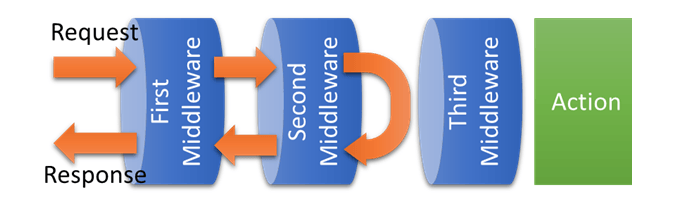
在Second Middleware 中,因为没有达成条件,所以封包也就不在往后面的水管传送。流程如图:
App.Run
Run是Middleware的最后一个行为,以上面图例来说,就是最末端的Action。
它不像Use能串联其他Middleware,但Run还是能完整的使用Request及Response。
App.Map
Map是能用来处理一些简单路由的Middleware,可依照不同的URL指向不同的Run及注册不同的Use。
新增一个路由如下:
Startup.cs
1using System;
2using System.Collections.Generic;
3using System.Linq;
4using System.Threading.Tasks;
5using Microsoft.AspNetCore.Builder;
6using Microsoft.AspNetCore.Hosting;
7using Microsoft.AspNetCore.Http;
8using Microsoft.Extensions.DependencyInjection;
9
10namespace MyWebsite
11{
12    public class Startup
13    {
14        // This method gets called by the runtime. Use this method to add services to the container.
15        // For more information on how to configure your application, visit https://go.microsoft.com/fwlink/?LinkID=398940
16        public void ConfigureServices(IServiceCollection services)
17        {
18        }
19
20        // This method gets called by the runtime. Use this method to configure the HTTP request pipeline.
21        public void Configure(IApplicationBuilder app, IHostingEnvironment env)
22        {
23            if (env.IsDevelopment())
24            {
25                app.UseDeveloperExceptionPage();
26            }
27
28            app.Use(async (context, next) =>
29            {
30                await context.Response.WriteAsync("First Middleware in. \r\n");
31                await next.Invoke();
32                await context.Response.WriteAsync("First Middleware out. \r\n");
33            });
34
35            // app.Use(async (context, next) =>
36            // {
37            //     await context.Response.WriteAsync("Second Middleware in. \r\n");
38
39            //     // 水管阻塞,封包不往后送
40            //     var condition = false;
41            //     if (condition)
42            //     {
43            //         await next.Invoke();
44            //     }
45            //     await context.Response.WriteAsync("Second Middleware out. \r\n");
46            // });
47
48            app.Map("/second", mapApp =>
49            {
50                mapApp.Use(async (context, next) =>
51                {
52                    await context.Response.WriteAsync("Second Middleware in. \r\n");
53                    await next.Invoke();
54                    await context.Response.WriteAsync("Second Middleware out. \r\n");
55                });
56                mapApp.Run(async context =>
57                {
58                    await context.Response.WriteAsync("Second. \r\n");
59                });
60            });
61
62
63            app.Use(async (context, next) =>
64            {
65                await context.Response.WriteAsync("Third Middleware in. \r\n");
66                await next.Invoke();
67                await context.Response.WriteAsync("Third Middleware out. \r\n");
68            });
69
70            app.Run(async (context) =>
71            {
72                await context.Response.WriteAsync("Hello World! \r\n");
73            });
74        }
75    }
76}
开启网站任意连结,会显示:
1First Middleware in.
2Third Middleware in.
3Hello World!
4Third Middleware out.
5First Middleware out.
开启网站http://localhost:5000/second,则会显示:
1First Middleware in.
2Second Middleware in.
3Second.
4Second Middleware out.
5First Middleware out.
创建Middleware 类
如果Middleware全部都写在_Startup.cs_,代码将很难维护,所以应该把自定义的Middleware逻辑独立出来。
建立Middleware类不需要额外继承其它类或接口,一般的类即可,例子如下:
FirstMiddleware.cs
1using System.Threading.Tasks;
2using Microsoft.AspNetCore.Http;
3
4namespace MyWebsite
5{
6    public class FirstMiddleware
7    {
8        private readonly RequestDelegate _next;
9
10        public FirstMiddleware(RequestDelegate next)
11        {
12            _next = next;
13        }
14
15        public async Task Invoke(HttpContext context)
16        {
17            await context.Response.WriteAsync($"{nameof(FirstMiddleware)} in. \r\n");
18
19            await _next(context);
20
21            await context.Response.WriteAsync($"{nameof(FirstMiddleware)} out. \r\n");
22        }
23    }
24}
全局注册
在Startup.Configure注册Middleware就可以套用到所有的Request。如下:
Startup.cs
1// ...
2public class Startup
3{
4    // ...
5    public void Configure(IApplicationBuilder app)
6    {
7        app.UseMiddleware<FirstMiddleware>();
8        // ...
9    }
10}
局部注册
Middleware 也可以只套用在特定的Controller 或Action。注册方式如下:
Controllers\HomeController.cs
1// ..
2[MiddlewareFilter(typeof(FirstMiddleware))]
3public class HomeController : Controller
4{
5    // ...
6
7    [MiddlewareFilter(typeof(SecondMiddleware))]
8    public IActionResult Index()
9    {
10        // ...
11    }
12}
Extensions
大部分扩展的Middleware都会用一个静态方法包装,如:UseMvc()、UseRewriter()等。
自定义的Middleware当然也可以透过静态方法包,范例如下:
Extensions\CustomMiddlewareExtensions.cs
1using Microsoft.AspNetCore.Builder;
2
3namespace MyWebsite
4{
5    public static class CustomMiddlewareExtensions
6    {
7        public static IApplicationBuilder UseFirstMiddleware(this IApplicationBuilder builder)
8        {
9            return builder.UseMiddleware<FirstMiddleware>();
10        }
11    }
12}
注册Extension Middleware 的方式如下:
Startup.cs
1// ...
2public class Startup
3{
4    // ...
5    public void Configure(IApplicationBuilder app)
6    {
7        app.UseFirstMiddleware();
8        // ...
9    }
10}
参考
ASP.NET Core Middleware Fundamentals
Creating Custom Middleware In ASP.Net Core
老司机发车啦:https://github.com/SnailDev/SnailDev.NETCore2Learning