
一、库操作
1.1库的增删改查
(1)系统数据库:

performance_schema:用来收集数据库服务器的性能参数,记录处理查询时发生的各种事件、锁等现象
mysql:授权库,主要存储系统用户的权限信息
test:MySQl数据库系统自动创建的测试数据库
(2)数据库操作
创建:create database db1 charset utf8;
(数据库命名规则:可以是字母、数字、下划线等的组合,不能单独使用数字,不能使用关键字例如create select等)
查看:show databases; 或者 show create database db1;
选择数据库:use db1;
删除:drop database db1;
修改:alter database db1 charset utf8;
二、表操作
2.1存储引擎介绍
(1)类似于处理文本用txt类型,图片用png,音乐用mp3类型,数据库的表也有不同类型。表类型(存储和操作此表的类型)又称存储引擎。MySQL数据库提供了多种存储引 擎。
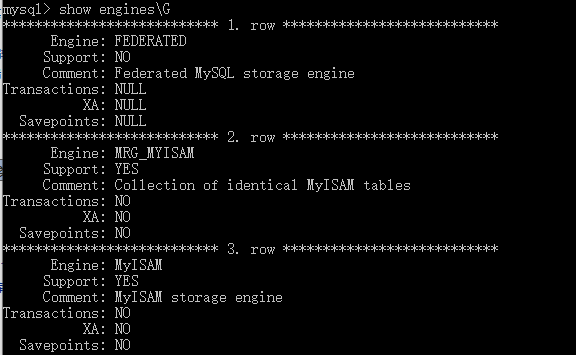
(2)查看MySQL支持的存储引擎:
show engines\G #查看所有支持的存储引擎
show variables like 'storage_engine%'; #查看正在使用的存储引擎
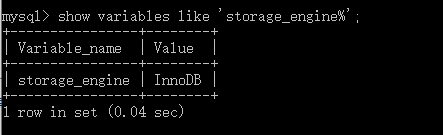
(3)部分存储引擎的简单介绍:有InnoDB、MyISAM、NDB、Memory、Infobright、NTSE、BLACKHOLE等;其中InnoDB是MySQL默认和最常用的一个存储引擎,具备高可用性、高性能以及高可扩展性。其他详情点击:具体介绍
(4)使用存储引擎
建表时指定
create table innodb_t1(id int,name char)engine=innodb;
show create table innodb_t1;
2.2表的增删改查
(1)表介绍
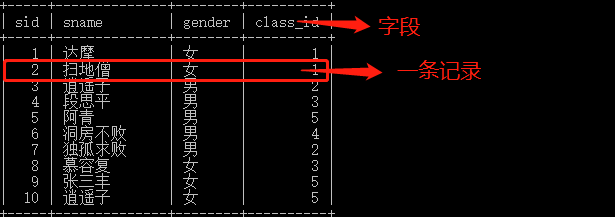
(2)创建表 create table student(sid int(11),sname char(10),gender enum('男','女'),class_id int(11));
查看库下所有表 show tables;
往表中插入数据 insert into student values(10,'nuo','女',5);
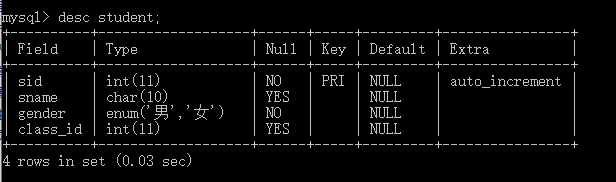
(3)查看表结构 desc student; 或者 show create table student\G; #查看详细表结构,可加\G
(4)修改表结构
(4.1)修改存储引擎 alter table student engine=NDB;
(4.2)添加字段 alter table student add age int not null;
(4.3)删除字段 alter table student drop age;
(4.4)修改字段类型 alter table student modify age int(9) not null primary key;
(4.5)删除主键 alter table student drop primary key;
(5)复制表
`复制表结构+记录 (key不会复制: 主键、外键和索引) mysql> create table new_service select * from service;
只复制表结构
mysql> select * from service where 1=2; //条件为假,查不到任何记录
Empty set (0.00 sec)
mysql> create table new1_service select * from service where 1=2;
Query OK, 0 rows affected (0.00 sec)
Records: 0 Duplicates: 0 Warnings: 0
mysql> create table t4 like employees;
(6)删除表 drop table student;`
2.3数据类型
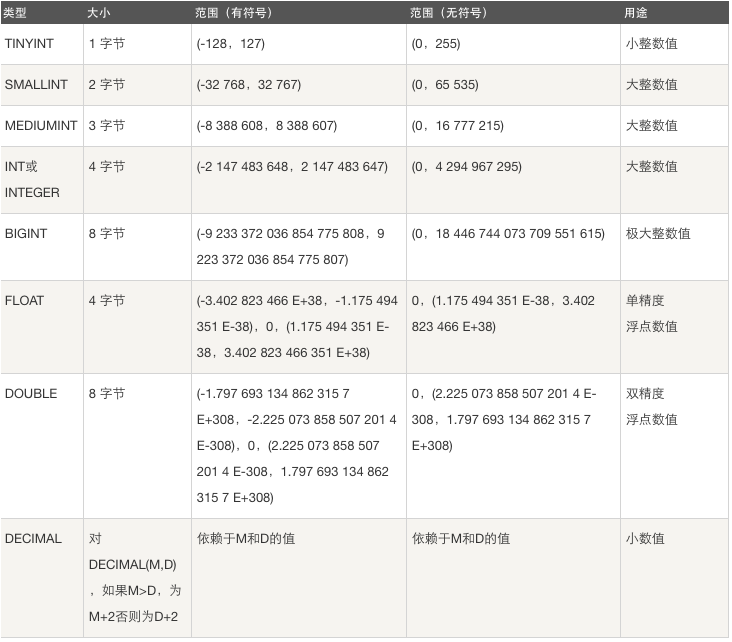
mysql常用数据类型有 数值类型 int , float 等、字符串类型 char varchar 、日期类型 datatime等、枚举类型和集合类型
(1)数值类型
(2)日期类型
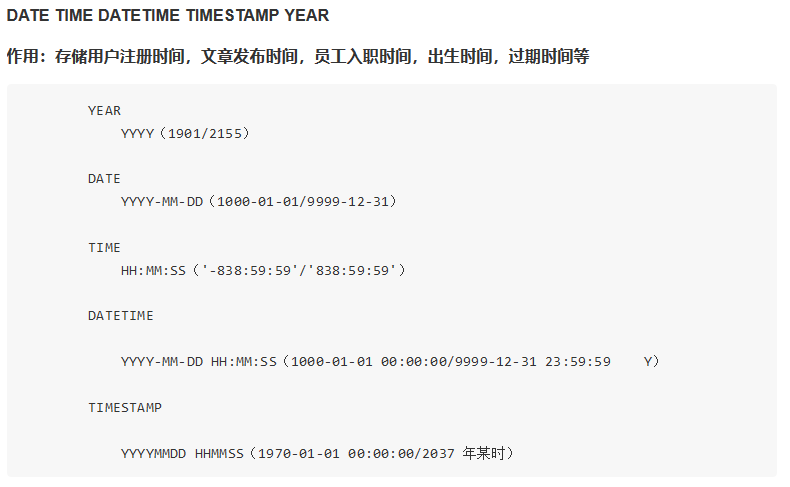

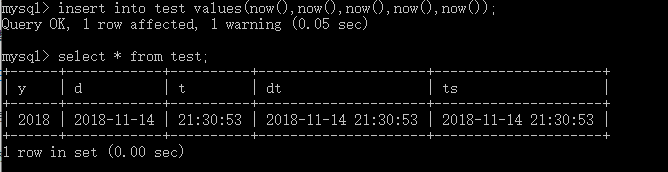
(3)字符串类型 char 和 varchar

(char定长,varchar不定长,虽然varchar使用起来较为灵活,但是从整个系统的性能角度来说,char数据类型的处理速度更快,有时甚至可以超出varchar处理速度的 50%。因此,在选择时,应该综合考虑,以求达到最佳的平衡。)
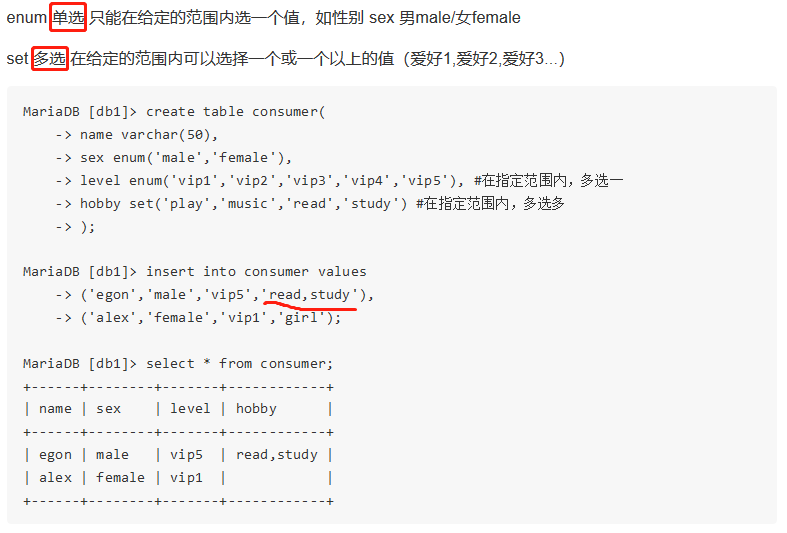
(4)枚举类型和集合类型
枚举enum(),集合set();枚举单选,集合可多选;
2.4完整性约束
not null (非空)、default (默认)、primary key(主键,唯一)、foreign key(外键)、unique(唯一)、auto_increment(自增,整数类型且为主键)
(1)设置唯一约束unique:


1方法一:
2create table department1(
3id int,
4name varchar(20) unique,
5comment varchar(100)
6);
7
8
9方法二:
10create table department2(
11id int,
12name varchar(20),
13comment varchar(100),
14constraint uk_name unique(name)
15);
16
17create table service(
18id int primary key auto_increment,
19name varchar(20),
20host varchar(15) not null,
21port int not null,
22unique(host,port) #联合唯一
23);
View Code
(2)primary key


1 1 # 单列做主键
2 2 #方法一:not null+unique
3 3 create table department1(
4 4 id int not null unique, #主键
5 5 name varchar(20) not null unique,
6 6 comment varchar(100)
7 7 );
8 8
9 9 #方法二:在某一个字段后用primary key
1010 create table department2(
1111 id int primary key, #主键
1212 name varchar(20),
1313 comment varchar(100)
1414 );
1515
1616 #方法三:在所有字段后单独定义primary key
1717 create table department3(
1818 id int,
1919 name varchar(20),
2020 comment varchar(100),
2121 constraint pk_name primary key(id); #创建主键并为其命名pk_name
单列做主键


11 create table service(
22 ip varchar(15),
33 port char(5),
44 service_name varchar(10) not null,
55 primary key(ip,port)
66 );
多列做主键
(3)foreign key


1#表类型必须是innodb存储引擎,且被关联的字段,即references指定的另外一个表的字段,必须保证唯一
2create table department(
3id int primary key,
4name varchar(20) not null
5)engine=innodb;
6
7#dpt_id外键,关联父表(department主键id),同步更新,同步删除
8create table employee(
9id int primary key,
10name varchar(20) not null,
11dpt_id int,
12constraint fk_name foreign key(dpt_id)
13references department(id)
14on delete cascade
15on update cascade
16)engine=innodb;
17
18
19#先往父表department中插入记录
20insert into department values
21(1,'欧德博爱技术有限事业部'),
22(2,'艾利克斯人力资源部'),
23(3,'销售部');
24
25
26#再往子表employee中插入记录
27insert into employee values
28(1,'egon',1),
29(2,'alex1',2),
30(3,'alex2',2),
31(4,'alex3',2),
32(5,'李坦克',3),
33(6,'刘飞机',3),
34(7,'张火箭',3),
35(8,'林子弹',3),
36(9,'加特林',3)
37;
View Code
(4)auto_increment


1#不指定id,则自动增长
2create table student(
3id int primary key auto_increment,
4name varchar(20),
5sex enum('male','female') default 'male'
6);
7
8
9#应该用truncate清空表,比起delete一条一条地删除记录,truncate是直接清空表,在删除大表时用它
10mysql> truncate student;
11Query OK, 0 rows affected (0.01 sec)
12
13
14#设置步长
15sqlserver:自增步长
16    基于表级别
17    create table t1(
18        id int。。。
19    )engine=innodb,auto_increment=2 步长=2 default charset=utf8
20
21mysql自增的步长:
22    show session variables like 'auto_inc%';
23
24    #基于会话级别
25    set session auth_increment_increment=2 #修改会话级别的步长
26
27    #基于全局级别的
28    set global auth_increment_increment=2 #修改全局级别的步长(所有会话都生效)
29
30
31
32清空表:
33
34delete from t1; #如果有自增id,新增的数据,仍然是以删除前的最后一样作为起始。
35
36truncate table t1;数据量大,删除速度比上一条快,且直接从零开始,
View Code
三、数据操作
3.1数据的增删改
假设已经建了一张表student
增加:insert into student values
(值1,值2,值3...),
(值1,值2,值3...),
(值1,值2,值3...);
删除:delete from student
where condition
更新:update student set
字段1=值1,
字段2=值2,
where condition;
3.2单表查询
一、单表查询基本语法
select 字段1,字段2... from 表名
where 条件
group by field
having 筛选
order by field
limit 限制条数
二、关键字在执行中的优先级
重点中的重点:关键字的执行优先级
from
where
group by
having
select
distinct 去重
order by
limit
三、where约束
1、比较运算符:> < >= <= <> !=
2、between 80 and 100 值在10到20之间
3、in(80,90,100) 值是10或20或30
4、like 'egon%'
pattern可以是%或_,
%表示任意多字符
_表示一个字符
5、逻辑运算符:在多个条件直接可以使用逻辑运算符 and or not
四、group by 分组
如果我们用unique的字段作为分组的依据,则每一条记录自成一组,这种分组没有意义 多条记录之间的某个字段值相同,该字段通常用来作为分组的依据
五、聚合函数
#强调:聚合函数聚合的是组的内容,若是没有分组,则默认一组
示例:
SELECT COUNT(*) FROM employee;
SELECT COUNT(*) FROM employee WHERE depart_id=1;
SELECT MAX(salary) FROM employee;
SELECT MIN(salary) FROM employee;
SELECT AVG(salary) FROM employee;
SELECT SUM(salary) FROM employee;
SELECT SUM(salary) FROM employee WHERE depart_id=3;
六、having
having和where不一样的地方在于:
1、执行优先级从高到低 where > group by > having
2、where 在group by 之前,因此where中可以有任意字段,但是绝对不可以使用聚 合函数
3、having发生在分组group by之后,因此可以使用分组的字段,无法直接取到其他 字段,可以使用聚合函数。
七、order by 查询排序
按单列排序:
SELECT * FROM employee ORDER BY salary;
SELECT * FROM employee ORDER BY salary ASC;
SELECT * FROM employee ORDER BY salary DESC;
按多列排序:先按照age排序,如果年纪相同,则按照薪资排序
SELECT * from employee
ORDER BY age, salary DESC;
八、使用正则表达式查询
SELECT * FROM employee WHERE name REGEXP '^ale';
SELECT * FROM employee WHERE name REGEXP 'on$';
SELECT * FROM employee WHERE name REGEXP 'm{2}';
小结:
对字符串匹配的方式
WHERE name = 'egon';
WHERE name LIKE 'yua%';
WHERE name REGEXP 'on$';
3.3多表查询
多表连接查询
符合条件连接查询
子查询
一、多表连接查询
select 字段
from 表一 inner|left|right join 表二
on 表一.字段 = 表二.字段;
(1)交叉连接:不适用任何匹配条件,生成笛卡尔积
假设我们已经生成employee,department两张表
select * from employee,department;
(2) 内连接:只连接匹配的行
select employee.id department.name
from employee inner join department
on employee.id = department.id;
(3)外连接之左连接:优先显示左表全部记录
select employee.id department.name
from employee left join department
on employee.id = department.id;
(4)外连接之右连接:优先显示右表全部记录
right join ,其他参考左连接。
(5)全外连接 :显示左右两个表全部记录
select * from employee left join department on employee.dep_id = department.id
union
select * from employee right join department on employee.dep_id = department.id;
二、符合条件连接查询
#示例:以内连接的方式查询employee和department表,并且以age字段的升序方式显示
select employee.id,employee.name,employee.age,department.name
from employee,department
where employee.dep_id = department.id and age > 25
order by age asc;
三、子查询
# 子查询是将一个查询语句嵌套在另一个查询语句中。
#2:内层查询语句的查询结果,可以为外层查询语句提供查询条件。
#3:子查询中可以包含:IN、NOT IN、ANY、ALL、EXISTS 和 NOT EXISTS等关键字
#4:还可以包含比较运算符:= 、 !=、> 、<等


11 带IN关键字的子查询
2#查询平均年龄在25岁以上的部门名
3select id,name from department
4    where id in
5        (select dep_id from employee group by dep_id having avg(age) > 25);
6
7#查看技术部员工姓名
8select name from employee
9    where dep_id in
10        (select id from department where name='技术');
11
12#查看不足1人的部门名
13select name from department
14    where id in
15        (select dep_id from employee group by dep_id having count(id) <=1);
162 带比较运算符的子查询
17#比较运算符:=、!=、>、>=、<、<=、<>
18#查询大于所有人平均年龄的员工名与年龄
19mysql> select name,age from emp where age > (select avg(age) from emp);
20+---------+------+
21| name | age |
22+---------+------+
23| alex | 48 |
24| wupeiqi | 38 |
25+---------+------+
26rows in set (0.00 sec)
27
28
29#查询大于部门内平均年龄的员工名、年龄
30select t1.name,t1.age from emp t1
31inner join
32(select dep_id,avg(age) avg_age from emp group by dep_id) t2
33on t1.dep_id = t2.dep_id
34where t1.age > t2.avg_age;
353 带EXISTS关键字的子查询
36EXISTS关字键字表示存在。在使用EXISTS关键字时,内层查询语句不返回查询的记录。
37而是返回一个真假值。True或False
38当返回True时,外层查询语句将进行查询;当返回值为False时,外层查询语句不进行查询
39#department表中存在dept_id=203,Ture
40mysql> select * from employee
41    ->     where exists
42    ->         (select id from department where id=200);
43+----+------------+--------+------+--------+
44| id | name       | sex    | age  | dep_id |
45+----+------------+--------+------+--------+
46|  1 | egon       | male   |   18 |    200 |
47|  2 | alex       | female |   48 |    201 |
48|  3 | wupeiqi    | male   |   38 |    201 |
49|  4 | yuanhao    | female |   28 |    202 |
50|  5 | liwenzhou  | male   |   18 |    200 |
51|  6 | jingliyang | female |   18 |    204 |
52+----+------------+--------+------+--------+
53
54#department表中存在dept_id=205,False
55mysql> select * from employee
56    ->     where exists
57    ->         (select id from department where id=204);
58Empty set (0.00 sec)
View Code