一、Eureka基本架构
1、Eureka角色结构图
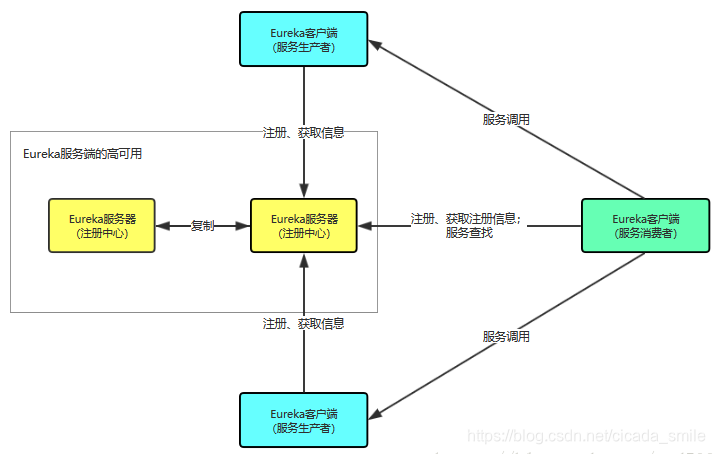
角色职责如下:
1)、Register:服务注册中心,它是一个Eureka Server ,提供服务注册和发现功能。
2)、Provider:服务提供者,它是一个Eureka Client ,提供服务。
3)、Consumer:服务消费者,它是一个Eureka Cient ,消费服务。
2、Eureka中几个核心概念
1)、Registe服务注册
当Client向Server 注册时,Client 提供自身的元数据,比如IP 地址、端口、运行状况指标的Uri 、主页地址等信息。
2)、Renew服务续约
Client 在默认的情况下会每隔30 秒发送一次心跳来进行服务续约。通过服务续约来告知Server该Client仍然可用。正常情况下,如果Server在90 秒内没有收到Client 的心跳,Server会将Client 实例从注册列表中删除。官网建议不要更改服务续约的间隔时间。
3)、Fetch Registries获取服务注册列表信息
Client 从Server 获取服务注册表信息,井将其缓存在本地。Client 会使用服务注册列表信息查找其他服务的信息,从而进行远程调用。该注册列表信息定时(每30 秒) 更新一次。
4)Cancel服务下线
Client 在程序关闭时可以向Eureka Server 发送下线请求。发送请求后,该客户端的实例信息将从Server 的服务注册列表中删除。该下线请求不会自动完成,需要在程序关闭时调用以下代码:
DiscoveryManager.getinstance().shutdownComponent();
5) Eviction服务下线
在默认情况下,当Client 连续90 秒没有向Server 发送服务续约(即心跳〉时,Server 会将该服务实例从服务注册列表删除,即服务下线。
二、Eureka案例代码
1、项目基本结构图
1主要包括两个注册中心(集群)
2node01-eureka-7001
3node01-eureka-7002
4一个服务提供方
5node01-provider-8001
6一个服务消费方
7node01-consume-8002
2、配置本机的Host文件
1# cloud host
2127.0.0.1 registry01.com
3127.0.0.1 registry02.com
4127.0.0.1 provider-8001.com
3、注册中心代码分解
1)Eureka注册中心依赖
1<dependencies>
2    <!--eureka-server服务端 -->
3    <dependency>
4        <groupId>org.springframework.cloud</groupId>
5        <artifactId>spring-cloud-starter-eureka-server</artifactId>
6    </dependency>
7</dependencies>
2)核心配置文件
1server:
2  port: 7001
3spring:
4  application:
5    name: node01-eureka-7001
6eureka:
7  instance:
8    hostname: registry01.com
9    prefer-ip-address: true
10  client:
11    # false表示不向注册中心注册自己
12    register-with-eureka: false
13    # false表示该端就是注册中心,维护服务实例,不去检索服务
14    fetch-registry: false
15    service-url:
16      # 单点注册中心
17      # defaultZone: http://${eureka.instance.hostname}:${server.port}/eureka/
18      # 集群注册中心
19      defaultZone: http://registry02.com:7002/eureka/
这里采用集群的配置,如果有多个集群,逗号分隔,如下写法就好:
1defaultZone:
2http://registry02.com:7002/eureka/,
3http://registry02.com:7002/eureka/
3)启动类注解
1import org.springframework.boot.SpringApplication;
2import org.springframework.boot.autoconfigure.SpringBootApplication;
3import org.springframework.cloud.netflix.eureka.server.EnableEurekaServer;
4@SpringBootApplication
5@EnableEurekaServer // 注册中心注解
6public class Application_7001 {
7    public static void main(String[] args) {
8        SpringApplication.run(Application_7001.class,args) ;
9    }
10}
这样注册中心代码完成。
4)启动项目,如图
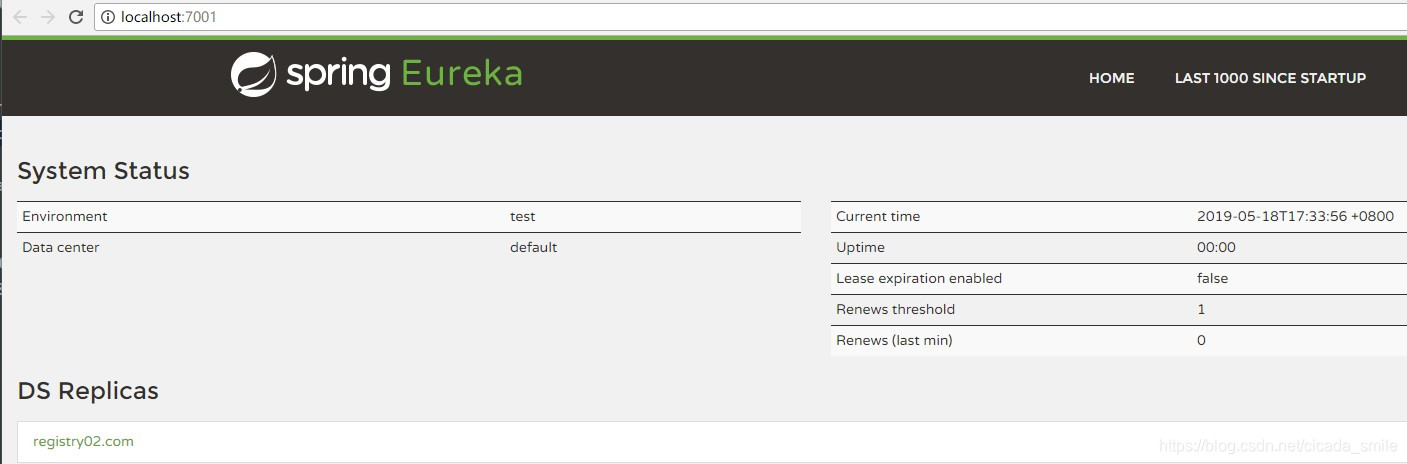
暂时没有服务注册进来。
4、服务提供方代码分解
1)核心依赖
1<dependencies>
2    <!-- 将微服务provider侧注册进eureka -->
3    <dependency>
4        <groupId>org.springframework.cloud</groupId>
5        <artifactId>spring-cloud-starter-eureka</artifactId>
6    </dependency>
7</dependencies>
2)配置文件如下
1server:
2  port: 8003
3spring:
4  application:
5    name: node01-provider-8001
6eureka:
7  instance:
8    hostname: provider-8001
9    prefer-ip-address: true
10  client:
11    service-url:
12      # 集群注册中心
13      defaultZone: http://registry01.com:7001/eureka/,http://registry02.com:7002/eureka/
3)提供一个接口服务
1@RestController
2public class ProviderController {
3    @RequestMapping("/getInfo")
4    public Map<String,String> getInfo (){
5        Map<String,String> infoMap = new HashMap<>() ;
6        infoMap.put("作者:","知了一笑") ;
7        infoMap.put("时间:","2019-05-18") ;
8        infoMap.put("主题:","SpringCloud微服务框架") ;
9        return infoMap ;
10    }
11}
4)启动类上需要注解
1import org.springframework.boot.SpringApplication;
2import org.springframework.boot.autoconfigure.SpringBootApplication;
3import org.springframework.cloud.client.discovery.EnableDiscoveryClient;
4import org.springframework.cloud.netflix.eureka.EnableEurekaClient;
5
6@SpringBootApplication
7@EnableEurekaClient    // 本服务启动后会自动注册进eureka服务中
8@EnableDiscoveryClient
9public class Application_8001 {
10    public static void main(String[] args) {
11        SpringApplication.run(Application_8001.class,args) ;
12    }
13}
5、服务消费方代码分解
服务消费方和提供方的代码逻辑基本一致。 1)配置文件 这里不需要注册自己,只是单纯从注册中心获取服务提供方的消息。
1server:
2  port: 8002
3spring:
4  application:
5    name: node01-consume-8002
6eureka:
7  client:
8    register-with-eureka: false
9    service-url:
10      # 集群注册中心
11      defaultZone: http://registry01.com:7001/eureka/,http://registry02.com:7002/eureka/
2)消费服务代码 注意这里的【server_name】就服务提供方的
1spring:
2  application:
3    name: node01-provider-8001
使用RestTemplate调用服务。
1@RestController
2public class ConsumeController {
3    @Autowired
4    private RestTemplate restTemplate ;
5    String server_name = "node01-provider-8001" ;
6    @RequestMapping("/showInfo")
7    public Map<String,String> showInfo (){
8        return restTemplate.getForObject("http://"+server_name+":8001/getInfo",Map.class) ;
9    }
10}
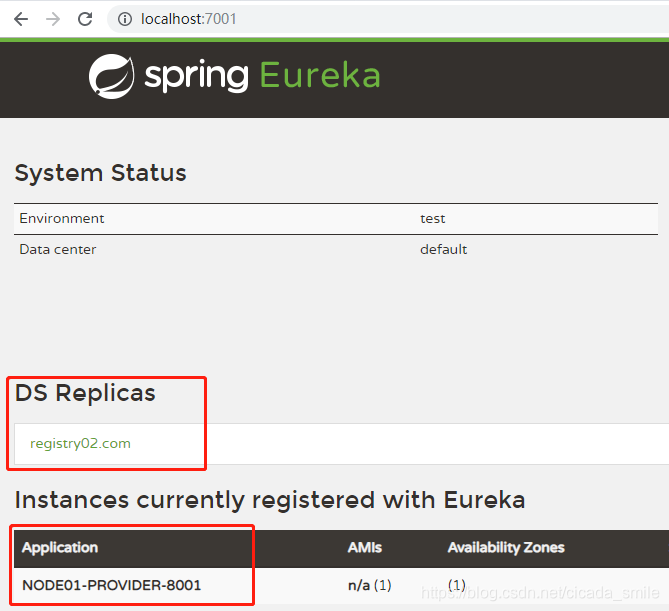
到这里,一个基于Eureka的服务注册与发现就完成了。 3)四个服务全部启动
4)访问如下地址
http://localhost:8002/showInfo
获取服务接口结果
1{
2	"主题:": "SpringCloud微服务框架",
3	"作者:": "知了一笑",
4	"时间:": "2019-05-18"
5}
三、源代码案例
1GitHub地址:知了一笑
2https://github.com/cicadasmile
3码云地址:知了一笑
4https://gitee.com/cicadasmile