
文章目录
- 前言
- 一、连招系统的思路
- 二、连招系统示例(五连招)
-
- 1.Animator设置
- 2.编写脚本
前言
最近课程作业要求按照元神来做一个动作类游戏的小demo其中涉及到连招系统开发,网上找的很多教程都不太让人满意,经过我本人的各种查找与摸索,发现了如下的又简单又快捷的方式,发布出来供大家参考
提示:以下是本篇文章正文内容,下面案例可供参考
一、连招系统的思路
连招系统的思路就是在给定时间间隔内玩家有没有触发攻击,如果有则进入下一个动作,如果没有则返回到idle状态。
二、连招系统示例(五连招)
1.Animator设置
在animator中设置trigger变量作为触发动作状态转换的方法
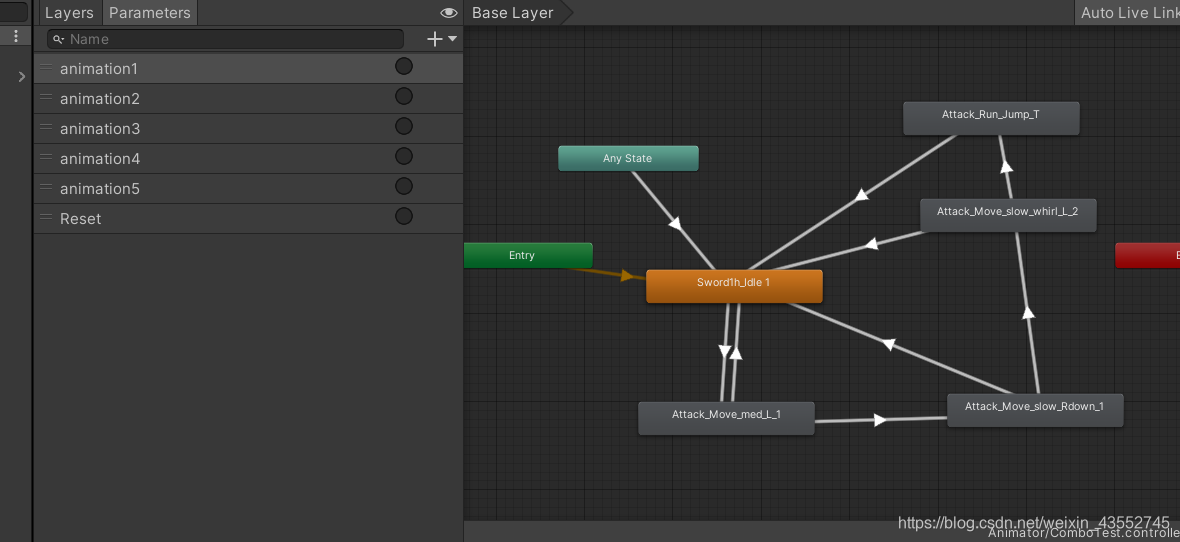
animation1 animation2 animation3 animation4 分别代表不同动画之间转换的trigger 同时设置一个reset代表返回idle状态
2.编写脚本
代码如下(示例):
1using System.Collections;
2using System.Collections.Generic;
3using UnityEngine;
4
5public class Combo : MonoBehaviour
6{
7
8
9    //设置连招需要触发的trigger的数组
10    List<string> animlist = new List<string>(new string[] {
11
12      "animation1", "animation2", "animation3", "animation4" });
13    public Animator animator;
14    public int combonum;//连招计数
15    public float reset;
16    public float resettime;//设置重置时间
17    // Update is called once per frame
18    void Update()
19    {
20
21
22        if(Input.GetMouseButtonDown(0)&& combonum < 4)
23        {
24
25
26            animator.SetTrigger(animlist[combonum]);
27            combonum++;
28            reset = 0f;
29        }
30        if(combonum>0)
31        {
32
33
34            reset += Time.deltaTime;
35            if(reset> resettime)//当超过时间间隔就回到初始状态
36            {
37
38
39                animator.SetTrigger("Reset");
40                combonum = 0;
41            }
42        }
43        if(combonum==4)//当到达最后一个动作的时候重置
44        {
45
46
47            resettime = 2f;
48            combonum = 0;
49        }
50        else
51        {
52
53
54            resettime = 2f;
55        }
56    }
57}