
原文链接: vite2 ts 搭建webgl开发环境
需要引入一个库
<script src="https://cdnjs.cloudflare.com/ajax/libs/gl-matrix/2.8.1/gl-matrix-min.js"></script>
用gl画一个彩色的方块
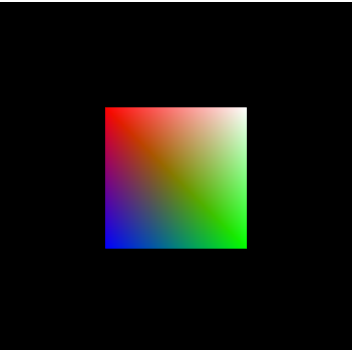
安装插件
1yarn add rollup-plugin-glsl
2
3import glsl from "rollup-plugin-glsl";
4
5
6  glsl({
7    // By default, everything gets included
8    include: "**/*.glsl",
9    // Undefined by default
10    exclude: ["**/index.html"],
11    // Source maps are on by default
12    // sourceMap: false,
13  }),
14
15
16ts.config
17  "include": [
18    "src/**/*.ts",
19    "src/**/*.d.ts",
20    "src/**/*.tsx",
21    "src/**/*.vue",
22    "src/**/*.glsl"
23  ]
添加声明模块
declare module "*.glsl";
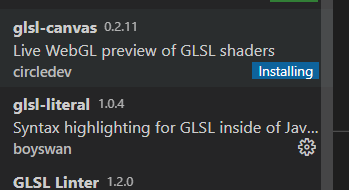
两个插件, 主要是语法高亮, 其实感觉上是可以直接用.c作为后缀的... 这样也就有了格式化能力
编写glsl
vs
1attribute vec4 aVertexPosition;
2attribute vec4 aVertexColor;
3
4uniform mat4 uModelViewMatrix;
5uniform mat4 uProjectionMatrix;
6
7varying lowp vec4 vColor;
8
9void main(void) {
10    gl_Position = uProjectionMatrix * uModelViewMatrix * aVertexPosition;
11    vColor = aVertexColor;
12}
fs
1varying lowp vec4 vColor;
2
3void main(void) {
4    gl_FragColor = vColor;
5}
vue
1<template>
2  <div class="flex-col justify-center align-item-center">
3    <div>webgl</div>
4    <canvas id="glCanvas" class="w-64 h-64" width="640" height="480"></canvas>
5  </div>
6</template>
7
8<script lang="ts" setup>
9import { onMounted } from "vue";
10import vsSource from "./vs.glsl";
11import fsSource from "./fs.glsl";
12console.log("===");
13console.error("test", vsSource, fsSource);
14function loadShader(gl: WebGLRenderingContext, type: number, source: string) {
15  const shader = gl.createShader(type)!;
16  // Send the source to the shader object
17  gl.shaderSource(shader, source);
18  // Compile the shader program
19  gl.compileShader(shader);
20  // See if it compiled successfully
21  if (!gl.getShaderParameter(shader, gl.COMPILE_STATUS)) {
22    alert(
23      "An error occurred compiling the shaders: " + gl.getShaderInfoLog(shader)
24    );
25    gl.deleteShader(shader);
26    return null;
27  }
28  return shader;
29}
30function initShaderProgram(
31  gl: WebGLRenderingContext,
32  vsSource: string,
33  fsSource: string
34) {
35  const vertexShader = loadShader(gl, gl.VERTEX_SHADER, vsSource);
36  const fragmentShader = loadShader(gl, gl.FRAGMENT_SHADER, fsSource);
37  // Create the shader program
38  const shaderProgram = gl.createProgram();
39  if (!shaderProgram || !vertexShader || !fragmentShader) return;
40  gl.attachShader(shaderProgram, vertexShader);
41  gl.attachShader(shaderProgram, fragmentShader);
42  gl.linkProgram(shaderProgram);
43  // If creating the shader program failed, alert
44  if (!gl.getProgramParameter(shaderProgram, gl.LINK_STATUS)) {
45    alert(
46      "Unable to initialize the shader program: " +
47        gl.getProgramInfoLog(shaderProgram)
48    );
49    return null;
50  }
51  return shaderProgram;
52}
53
54function initBuffers(gl) {
55  // Create a buffer for the square's positions.
56
57  const positionBuffer = gl.createBuffer();
58
59  // Select the positionBuffer as the one to apply buffer
60  // operations to from here out.
61
62  gl.bindBuffer(gl.ARRAY_BUFFER, positionBuffer);
63
64  // Now create an array of positions for the square.
65
66  const positions = [1.0, 1.0, -1.0, 1.0, 1.0, -1.0, -1.0, -1.0];
67
68  // Now pass the list of positions into WebGL to build the
69  // shape. We do this by creating a Float32Array from the
70  // JavaScript array, then use it to fill the current buffer.
71
72  gl.bufferData(gl.ARRAY_BUFFER, new Float32Array(positions), gl.STATIC_DRAW);
73
74  // Now set up the colors for the vertices
75
76  var colors = [
77    1.0,
78    1.0,
79    1.0,
80    1.0, // white
81    1.0,
82    0.0,
83    0.0,
84    1.0, // red
85    0.0,
86    1.0,
87    0.0,
88    1.0, // green
89    0.0,
90    0.0,
91    1.0,
92    1.0, // blue
93  ];
94
95  const colorBuffer = gl.createBuffer();
96  gl.bindBuffer(gl.ARRAY_BUFFER, colorBuffer);
97  gl.bufferData(gl.ARRAY_BUFFER, new Float32Array(colors), gl.STATIC_DRAW);
98
99  return {
100    position: positionBuffer,
101    color: colorBuffer,
102  };
103}
104
105const mat4: any = window.mat4;
106function drawScene(gl: any, programInfo: any, buffers: any) {
107  gl.clearColor(0.0, 0.0, 0.0, 1.0); // Clear to black, fully opaque
108  gl.clearDepth(1.0); // Clear everything
109  gl.enable(gl.DEPTH_TEST); // Enable depth testing
110  gl.depthFunc(gl.LEQUAL); // Near things obscure far things
111
112  // Clear the canvas before we start drawing on it.
113
114  gl.clear(gl.COLOR_BUFFER_BIT | gl.DEPTH_BUFFER_BIT);
115
116  // Create a perspective matrix, a special matrix that is
117  // used to simulate the distortion of perspective in a camera.
118  // Our field of view is 45 degrees, with a width/height
119  // ratio that matches the display size of the canvas
120  // and we only want to see objects between 0.1 units
121  // and 100 units away from the camera.
122
123  const fieldOfView = (45 * Math.PI) / 180; // in radians
124  const aspect = gl.canvas.clientWidth / gl.canvas.clientHeight;
125  const zNear = 0.1;
126  const zFar = 100.0;
127  const projectionMatrix = mat4.create();
128
129  // note: glmatrix.js always has the first argument
130  // as the destination to receive the result.
131  mat4.perspective(projectionMatrix, fieldOfView, aspect, zNear, zFar);
132
133  // Set the drawing position to the "identity" point, which is
134  // the center of the scene.
135  const modelViewMatrix = mat4.create();
136
137  // Now move the drawing position a bit to where we want to
138  // start drawing the square.
139
140  mat4.translate(
141    modelViewMatrix, // destination matrix
142    modelViewMatrix, // matrix to translate
143    [-0.0, 0.0, -6.0]
144  ); // amount to translate
145
146  // Tell WebGL how to pull out the positions from the position
147  // buffer into the vertexPosition attribute
148  {
149    const numComponents = 2;
150    const type = gl.FLOAT;
151    const normalize = false;
152    const stride = 0;
153    const offset = 0;
154    gl.bindBuffer(gl.ARRAY_BUFFER, buffers.position);
155    gl.vertexAttribPointer(
156      programInfo.attribLocations.vertexPosition,
157      numComponents,
158      type,
159      normalize,
160      stride,
161      offset
162    );
163    gl.enableVertexAttribArray(programInfo.attribLocations.vertexPosition);
164  }
165
166  // Tell WebGL how to pull out the colors from the color buffer
167  // into the vertexColor attribute.
168  {
169    const numComponents = 4;
170    const type = gl.FLOAT;
171    const normalize = false;
172    const stride = 0;
173    const offset = 0;
174    gl.bindBuffer(gl.ARRAY_BUFFER, buffers.color);
175    gl.vertexAttribPointer(
176      programInfo.attribLocations.vertexColor,
177      numComponents,
178      type,
179      normalize,
180      stride,
181      offset
182    );
183    gl.enableVertexAttribArray(programInfo.attribLocations.vertexColor);
184  }
185
186  // Tell WebGL to use our program when drawing
187
188  gl.useProgram(programInfo.program);
189
190  // Set the shader uniforms
191
192  gl.uniformMatrix4fv(
193    programInfo.uniformLocations.projectionMatrix,
194    false,
195    projectionMatrix
196  );
197  gl.uniformMatrix4fv(
198    programInfo.uniformLocations.modelViewMatrix,
199    false,
200    modelViewMatrix
201  );
202
203  {
204    const offset = 0;
205    const vertexCount = 4;
206    gl.drawArrays(gl.TRIANGLE_STRIP, offset, vertexCount);
207  }
208}
209onMounted(() => {
210  const canvas = document.querySelector<HTMLCanvasElement>("#glCanvas")!;
211  const gl = canvas.getContext("webgl")!;
212  gl.clearColor(0.0, 0.0, 0.0, 1.0);
213  gl.clear(gl.COLOR_BUFFER_BIT);
214  const shaderProgram = initShaderProgram(gl, vsSource, fsSource);
215
216  if (!shaderProgram) {
217    console.error("shaderProgram is empty");
218    return;
219  }
220  const programInfo = {
221    program: shaderProgram,
222    attribLocations: {
223      vertexPosition: gl.getAttribLocation(shaderProgram, "aVertexPosition"),
224      vertexColor: gl.getAttribLocation(shaderProgram, "aVertexColor"),
225    },
226    uniformLocations: {
227      projectionMatrix: gl.getUniformLocation(
228        shaderProgram,
229        "uProjectionMatrix"
230      ),
231      modelViewMatrix: gl.getUniformLocation(shaderProgram, "uModelViewMatrix"),
232    },
233  };
234  const buffers = initBuffers(gl);
235  console.log("gl, programInfo, buffers", gl, programInfo, buffers);
236  drawScene(gl, programInfo, buffers);
237});
238</script>
239
240<style></style>