
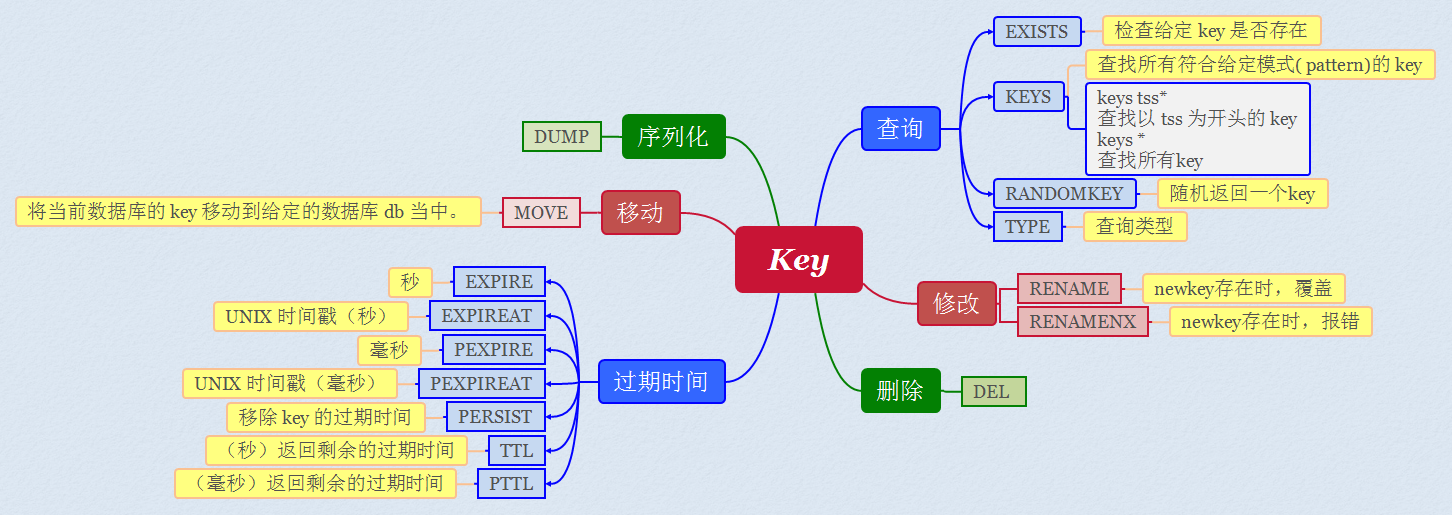
Redis 键(key)
Redis 键命令用于管理 redis 的键。
DEL key
该命令用于在 key 存在时删除 key。
1127.0.0.1:6379> set w3ckey redis
2OK
3127.0.0.1:6379> EXISTS w3ckey
4(integer) 1
5127.0.0.1:6379> del w3ckey
6(integer) 1
7127.0.0.1:6379> EXISTS w3ckey
8(integer) 0
9127.0.0.1:6379>
DUMP
DUMP key 序列化给定 key ,并返回被序列化的值。
返回值 如果 key 不存在,那么返回 nil 。 否则,返回序列化之后的值。
1127.0.0.1:6379> SET greeting "hello, dumping world!"
2OK
3127.0.0.1:6379> dump greeting
4"\x00\x15hello, dumping world!\a\x00,\x7f\xe7\xf1%\xed(W"
5127.0.0.1:6379> DUMP not-exists-key
6(nil)
7127.0.0.1:6379>
EXISTS
EXISTS key 检查给定 key 是否存在。
返回值 若 key 存在返回 1 ,否则返回 0 。
1redis 127.0.0.1:6379> set runoob-new-key newkey
2OK
3redis 127.0.0.1:6379> EXISTS runoob-new-key
4(integer) 1
5redis 127.0.0.1:6379>
EXPIRE
EXPIRE key seconds 为给定 key 设置过期时间,以秒计。
返回值 设置成功返回 1 。 当 key 不存在或者不能为 key 设置过期时间时(比如在低于 2.1.3 版本的 Redis 中你尝试更新 key 的过期时间)返回 0
1redis 127.0.0.1:6379> SET runooobkey redis
2OK
3redis 127.0.0.1:6379> EXPIRE runooobkey 60
4(integer) 1
以上实例中我们为键 runooobkey 设置了过期时间为 1 分钟,1分钟后该键会自动删除。
EXPIREAT
EXPIREAT key timestamp EXPIREAT 的作用和 EXPIRE 类似,都用于为 key 设置过期时间。 不同在于 EXPIREAT 命令接受的时间参数是 UNIX 时间戳(unix timestamp)。
返回值 设置成功返回 1 。 当 key 不存在或者不能为 key 设置过期时间时(比如在低于 2.1.3 版本的 Redis 中你尝试更新 key 的过期时间)返回 0 。
1redis 127.0.0.1:6379> SET runoobkey redis
2OK
3redis 127.0.0.1:6379> EXPIREAT runoobkey 1293840000
4(integer) 1
5redis 127.0.0.1:6379> EXISTS runoobkey
6(integer) 0
PEXPIRE
PEXPIRE key milliseconds 设置 key 的过期时间以毫秒计。
1redis> SET mykey "Hello"
2"OK"
3redis> PEXPIRE mykey 1500
4(integer) 1
5redis> TTL mykey
6(integer) 1
7redis> PTTL mykey
8(integer) 1498
9redis>
PEXPIREAT
PEXPIREAT key milliseconds-timestamp 设置 key 过期时间的时间戳(unix timestamp) 以毫秒计
返回值 设置成功返回 1 。 当 key 不存在或者不能为 key 设置过期时间时(比如在低于 2.1.3 版本的 Redis 中你尝试更新 key 的过期时间)返回 0 。
1redis 127.0.0.1:6379> SET runoobkey redis
2OK
3redis 127.0.0.1:6379> PEXPIREAT runoobkey 1555555555005
4(integer) 1
KEYS
KEYS pattern 查找所有符合给定模式( pattern)的 key 。
首先创建一些 key,并赋上对应值:
1127.0.0.1:6379> SET runoob1 redis
2OK
3127.0.0.1:6379> SET runoob2 mysql
4OK
5127.0.0.1:6379> SET runoob3 mongodb
6OK
查找以 runoob 为开头的 key:
1127.0.0.1:6379> keys runoob*
21) "runoob3"
32) "runoob2"
43) "runoob1"
获取 redis 中所有的 key 可用使用 *。
1 127.0.0.1:6379> KEYS *
21) "runoob3"
32) "runoob1"
43) "runoob2"
MOVE
MOVE key db 将当前数据库的 key 移动到给定的数据库 db 当中。
1# key 存在于当前数据库
2
3redis> SELECT 0                             # redis默认使用数据库 0,为了清晰起见,这里再显式指定一次。
4OK
5
6redis> SET song "secret base - Zone"
7OK
8
9redis> MOVE song 1                          # 将 song 移动到数据库 1
10(integer) 1
11
12redis> EXISTS song                          # song 已经被移走
13(integer) 0
14
15redis> SELECT 1                             # 使用数据库 1
16OK
17
18redis:1> EXISTS song                        # 证实 song 被移到了数据库 1 (注意命令提示符变成了"redis:1",表明正在使用数据库 1)
19(integer) 1
20
21
22# 当 key 不存在的时候
23
24redis:1> EXISTS fake_key
25(integer) 0
26
27redis:1> MOVE fake_key 0                    # 试图从数据库 1 移动一个不存在的 key 到数据库 0,失败
28(integer) 0
29
30redis:1> select 0                           # 使用数据库0
31OK
32
33redis> EXISTS fake_key                      # 证实 fake_key 不存在
34(integer) 0
35
36
37# 当源数据库和目标数据库有相同的 key 时
38
39redis> SELECT 0                             # 使用数据库0
40OK
41redis> SET favorite_fruit "banana"
42OK
43
44redis> SELECT 1                             # 使用数据库1
45OK
46redis:1> SET favorite_fruit "apple"
47OK
48
49redis:1> SELECT 0                           # 使用数据库0,并试图将 favorite_fruit 移动到数据库 1
50OK
51
52redis> MOVE favorite_fruit 1                # 因为两个数据库有相同的 key,MOVE 失败
53(integer) 0
54
55redis> GET favorite_fruit                   # 数据库 0 的 favorite_fruit 没变
56"banana"
57
58redis> SELECT 1
59OK
60
61redis:1> GET favorite_fruit                 # 数据库 1 的 favorite_fruit 也是
62"apple"
PERSIST
PERSIST key 移除 key 的过期时间,key 将持久保持。
1redis> SET mykey "Hello"
2OK
3
4redis> EXPIRE mykey 10  # 为 key 设置生存时间
5(integer) 1
6
7redis> TTL mykey
8(integer) 10
9
10redis> PERSIST mykey    # 移除 key 的生存时间
11(integer) 1
12
13redis> TTL mykey
14(integer) -1
PTTL
PTTL key 以毫秒为单位返回 key 的剩余的过期时间。
返回值 当 key 不存在时,返回 -2 。 当 key 存在但没有设置剩余生存时间时,返回 -1 。 否则,以毫秒为单位,返回 key 的剩余生存时间。 注意:在 Redis 2.8 以前,当 key 不存在,或者 key 没有设置剩余生存时间时,命令都返回 -1 。
1# 不存在的 key
2
3redis> FLUSHDB
4OK
5
6redis> PTTL key
7(integer) -2
8
9
10# key 存在,但没有设置剩余生存时间
11
12redis> SET key value
13OK
14
15redis> PTTL key
16(integer) -1
17
18
19# 有剩余生存时间的 key
20
21redis> PEXPIRE key 10086
22(integer) 1
23
24redis> PTTL key
25(integer) 6179
TTL
TTL key 以秒为单位,返回给定 key 的剩余生存时间(TTL, time to live)。
1# 不存在的 key
2
3redis> FLUSHDB
4OK
5
6redis> TTL key
7(integer) -2
8
9
10# key 存在,但没有设置剩余生存时间
11
12redis> SET key value
13OK
14
15redis> TTL key
16(integer) -1
17
18
19# 有剩余生存时间的 key
20
21redis> EXPIRE key 10086
22(integer) 1
23
24redis> TTL key
25(integer) 10084
RANDOMKEY
RANDOMKEY 从当前数据库中随机返回一个 key 。
1# 数据库不为空
2
3redis> MSET fruit "apple" drink "beer" food "cookies"   # 设置多个 key
4OK
5
6redis> RANDOMKEY
7"fruit"
8
9redis> RANDOMKEY
10"food"
11
12redis> KEYS *    # 查看数据库内所有key,证明 RANDOMKEY 并不删除 key
131) "food"
142) "drink"
153) "fruit"
16
17
18# 数据库为空
19
20redis> FLUSHDB  # 删除当前数据库所有 key
21OK
22
23redis> RANDOMKEY
24(nil)
RENAME
RENAME oldkey newkey 修改 key 的名称
返回值 改名成功时提示 OK ,失败时候返回一个错误。 当 oldkey 和 newkey 相同,或者 oldkey 不存在时,返回一个错误。 当 newkey 已经存在时,
RENAME命令将覆盖旧值。
1# key 存在且 newkey 不存在
2
3redis> SET message "hello world"
4OK
5
6redis> RENAME message greeting
7OK
8
9redis> EXISTS message               # message 不复存在
10(integer) 0
11
12redis> EXISTS greeting              # greeting 取而代之
13(integer) 1
14
15
16# 当 key 不存在时,返回错误
17
18redis> RENAME fake_key never_exists
19(error) ERR no such key
20
21
22# newkey 已存在时, RENAME 会覆盖旧 newkey
23
24redis> SET pc "lenovo"
25OK
26
27redis> SET personal_computer "dell"
28OK
29
30redis> RENAME pc personal_computer
31OK
32
33redis> GET pc
34(nil)
35
36redis:1> GET personal_computer      # 原来的值 dell 被覆盖了
37"lenovo"
RENAMENX
RENAMENX oldkey newkey 仅当 newkey 不存在时,将 oldkey 改名为 newkey 。
1# newkey 不存在,改名成功
2
3redis> SET player "MPlyaer"
4OK
5
6redis> EXISTS best_player
7(integer) 0
8
9redis> RENAMENX player best_player
10(integer) 1
11
12
13# newkey存在时,失败
14
15redis> SET animal "bear"
16OK
17
18redis> SET favorite_animal "butterfly"
19OK
20
21redis> RENAMENX animal favorite_animal
22(integer) 0
23
24redis> get animal
25"bear"
26
27redis> get favorite_animal
28"butterfly"
RENAME 与 RENAMENX 区别
相同: newkey 不存在 RENAME和RENAMENX一样:oldkey删除 不同: newkey 已存在时 RENAME 会覆盖旧 newkey,RENAMENX 失败。
TYPE
TYPE key 返回 key 所储存的值的类型。
1# 字符串
2
3redis> SET weather "sunny"
4OK
5
6redis> TYPE weather
7string
8
9
10# 列表
11
12redis> LPUSH book_list "programming in scala"
13(integer) 1
14
15redis> TYPE book_list
16list
17
18
19# 集合
20
21redis> SADD pat "dog"
22(integer) 1
23
24redis> TYPE pat
25set
参考
runoob,Redis 键(key)