
前端一般通过Ajax来调用,后端调用的方式还是挺多的,比如HttpURLConnection,HttpClient,Spring的RestTemplate
服务端代码如下:
服务端接口请求的URL:http://localhost:8080/rest/user/getUser/xiaoming/18,设定请求方式为GET
1package com.demo.restful.service.impl;
2
3import com.demo.restful.model.User;
4import com.demo.restful.service.UserService;
5
6import javax.ws.rs.GET;
7import javax.ws.rs.Path;
8import javax.ws.rs.PathParam;
9import javax.ws.rs.Produces;
10import javax.ws.rs.core.MediaType;
11
12/**
13 * @Author:
14 * @Date: 2019/1/8 11:37
15 */
16@Path("user")
17public class UserServiceImpl implements UserService {
18
19    @Override
20    @GET
21    @Path("getUser/{name}/{age}")
22    @Produces(MediaType.APPLICATION_JSON)
23    public String getUser(@PathParam("name") String name,@PathParam("age") Integer age) {
24        return new User(name,age).toString();
25    }
26}
客户端的三种请求方式如下:
注:以下demo都是以GET请求为例
1.HttpURLConnection(首先需要引入httpclient包)
1<dependency>
2   <groupId>org.apache.httpcomponents</groupId>
3   <artifactId>httpclient</artifactId>
4   <version>4.5.6</version>
5</dependency>
测试代码
1package com.demo.restful;
2
3import java.io.BufferedReader;
4import java.io.InputStreamReader;
5import java.net.HttpURLConnection;
6import java.net.URL;
7
8/**
9 * @Author:
10 * @Date: 2019/1/9 11:12
11 */
12public class HttpUrlConnectionTest {
13    public static void main(String[] args) throws Exception {
14        String url = "http://localhost:8080/rest/user/getUser/xiaoming/18";
15        URL serverUrl = new URL(url);
16        HttpURLConnection connection = (HttpURLConnection) serverUrl.openConnection();
17        connection.setRequestMethod("GET");
18        if (connection.getResponseCode() != 200) {
19            throw new RuntimeException(
20                    "HTTP GET Request Failed with Error code : "
21                            + connection.getResponseCode());
22        }
23        BufferedReader responseBuffer = new BufferedReader(
24                new InputStreamReader((connection.getInputStream())));
25        String output;
26        System.out.println("Output from Server:  \n");
27        while ((output = responseBuffer.readLine()) != null) {
28            System.out.println(output);
29        }
30        connection.disconnect();
31    }
32}
测试结果
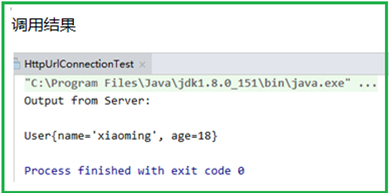
2.HttpClient(首先需要引入httpclient包,POM同上)
测试代码
1package com.demo.restful;
2
3import org.apache.http.HttpEntity;
4import org.apache.http.HttpResponse;
5import org.apache.http.client.HttpClient;
6import org.apache.http.client.methods.HttpGet;
7import org.apache.http.impl.client.HttpClients;
8
9import java.io.BufferedReader;
10import java.io.InputStreamReader;
11import java.util.stream.Collectors;
12
13/**
14 * @Author:
15 * @Date: 2019/1/9 11:42
16 */
17public class HttpClientTest {
18
19    public static void main(String[] args) throws Exception {
20        HttpClient httpClient = HttpClients.createDefault();
21        HttpGet httpGet = new HttpGet("http://localhost:8080/rest/user/getUser/xiaoming/18");
22
23        HttpResponse execute = httpClient.execute(httpGet);
24        HttpEntity entity = execute.getEntity();
25        System.out.println(entity);
26        String result = new BufferedReader(new InputStreamReader(entity.getContent()))
27                .lines().collect(Collectors.joining("\n"));
28        System.out.println(result);
29    }
30}
测试结果
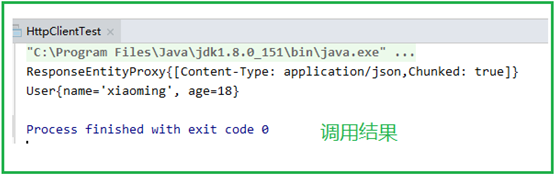
3.RestTemplate(首先需要引入spring-webmvc包)
1<!-- https://mvnrepository.com/artifact/org.springframework/spring-web -->
2<dependency>
3   <groupId>org.springframework</groupId>
4   <artifactId>spring-webmvc</artifactId>
5   <version>5.1.3.RELEASE</version>
6</dependency>
测试代码
第一步:配置web.xml
1<web-app>
2  <display-name>Archetype Created Web Application</display-name>
3  <servlet>
4    <servlet-name>restful-client</servlet-name>
5    <servlet-class>org.springframework.web.servlet.DispatcherServlet</servlet-class>
6    <init-param>
7      <param-name>contextConfigLocation</param-name>
8      <param-value>spring.xml</param-value>
9    </init-param>
10  </servlet>
11  <servlet-mapping>
12    <servlet-name>restful-client</servlet-name>
13    <url-pattern>/</url-pattern>
14  </servlet-mapping>
15</web-app>
第二步:配置Spring注解扫描
1<?xml version="1.0" encoding="UTF-8"?>
2<beans xmlns="http://www.springframework.org/schema/beans" xmlns:xsi="http://www.w3.org/2001/XMLSchema-instance"
3xmlns:context="http://www.springframework.org/schema/context"
4xsi:schemaLocation="
5http://www.springframework.org/schema/beans
6http://www.springframework.org/schema/beans/spring-beans-3.0.xsd
7http://www.springframework.org/schema/context
8http://www.springframework.org/schema/context/spring-context-3.0.xsd">
9<!-- 启用注解 -->
10<context:component-scan base-package="com.demo.restful.controller"/>
11</beans>
第三步:编写controller
1package com.demo.restful.controller;
2
3import org.springframework.beans.factory.annotation.Autowired;
4import org.springframework.context.annotation.Bean;
5import org.springframework.stereotype.Controller;
6import org.springframework.web.bind.annotation.*;
7import org.springframework.web.client.RestTemplate;
8
9/**
10 * @Author:
11 * @Date: 2019/1/9 14:56
12 */
13@Controller
14public class RestTemplateController {
15
16    @Autowired
17    private RestTemplate restTemplate;
18
19    //手动将RestTemplate加入Spring容器中
20    @Bean
21    public RestTemplate restTemplate(){
22        return new RestTemplate();
23    }
24
25    @RequestMapping("/getUser.json")
26    @ResponseBody
27    public String getUser(){
28        String url = "http://localhost:8080/rest/user/getUser/xiaoming/18";
29        String forObject = restTemplate.getForObject(url, String.class);
30        return forObject;
31    }
32}
浏览器运行结果
