
用浏览器来查看Tomcat的运行状态:
配置Tomcat的管理用户和权限。
打开%Tomcat_Home%/conf/目录下的tomcat-user.xml文件,配置以下内容:
1<role rolename="manager-status"/>
2<role rolename="manager"/>
3<role rolename="manager-jmx"/>
4<role rolename="manager-gui"/>
5<role rolename="manager-script"/>
6<role rolename="admin"/>
7
8<user username="tomcat" password="tomcat" roles="tomcat"/>
9
10<user username="admin" password="tomcat" roles="manager,manager-gui,admin,manager-status,manager-jmx,manager-script"/>
此时可通过admin用户来访问tomcat的状态,在浏览器地址中输入:
http://localhost:8080/manager/status?XML=true
输入用户名:admin,密码:tomcat. 出现以下页面,即Tomcat的运行状态。
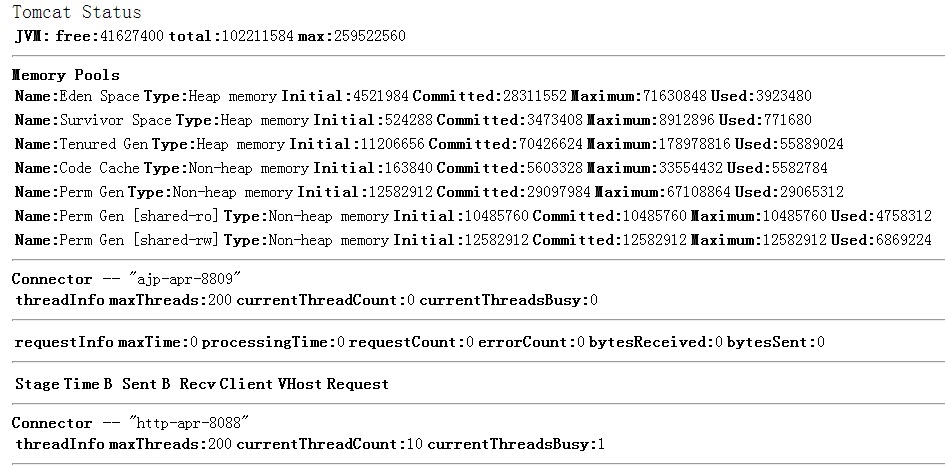
或者可以直接访问:
http://admin:tomcat[@localhost](http://my.oschina.net/u/570656) :8080/manager/status?XML=true
Java程序获取Tomcat运行状态:
根据上面的思路,可以通过URL来获取Tomcat manager返回的信息,再解析这个信息就可以了,参考cacti的监控方式中,用perl编写的监控模板也是如此,如下:
1 my $host = shift;
2 my $username = shift;
3 my $password = shift;
4 my $connector = shift or &usage;
5 my $url = "http://$username:$password"."\@$host/manager/status?XML=true";
6
7 my $xml = `GET $url`;
8
9 my $status = XMLin($xml);
因此Java也可参考此方法:
1@Test
2	public void test1() throws IOException {
3		URL url = null;
4		InputStream is = null;
5		StringBuffer resultBuffer = new StringBuffer();
6		BufferedReader breader = null;
7		try {
8			url = new URL(
9					"http://admin:tomcat@localhost:8080/manager/status?XML=true");
10			HttpURLConnection conn = (HttpURLConnection) url.openConnection();
11			is = conn.getInputStream();
12
13			breader = new BufferedReader(new InputStreamReader(is));
14			String line = "";
15			while ((line = breader.readLine()) != null) {
16				resultBuffer.append(line);
17			}
18		} catch (MalformedURLException e) {
19			e.printStackTrace();
20		} finally {
21			if (breader != null)
22				breader.close();
23			if (is != null)
24				is.close();
25		}
26		System.out.println(resultBuffer.toString());
27	}
运行时出现如下错误:
1java.io.IOException: Server returned HTTP response code: 401 for URL: http://admin:tomcat@localhost:8080/manager/status?XML=true
2	at sun.net.www.protocol.http.HttpURLConnection.getInputStream(HttpURLConnection.java:1625)
3	at com.merit.monitor.tomcat.TestTomcatStatus.test1(TestTomcatStatus.java:57)
4	at sun.reflect.NativeMethodAccessorImpl.invoke0(Native Method)
5	at sun.reflect.NativeMethodAccessorImpl.invoke(NativeMethodAccessorImpl.java:57)
6	at sun.reflect.DelegatingMethodAccessorImpl.invoke(DelegatingMethodAccessorImpl.java:43)
7	at java.lang.reflect.Method.invoke(Method.java:606)
8	at org.junit.runners.model.FrameworkMethod$1.runReflectiveCall(FrameworkMethod.java:44)
9	at org.junit.internal.runners.model.ReflectiveCallable.run(ReflectiveCallable.java:15)
10	at org.junit.runners.model.FrameworkMethod.invokeExplosively(FrameworkMethod.java:41)
11	at org.junit.internal.runners.statements.InvokeMethod.evaluate(InvokeMethod.java:20)
12	at org.junit.runners.BlockJUnit4ClassRunner.runNotIgnored(BlockJUnit4ClassRunner.java:79)
13	at org.junit.runners.BlockJUnit4ClassRunner.runChild(BlockJUnit4ClassRunner.java:71)
14	at org.junit.runners.BlockJUnit4ClassRunner.runChild(BlockJUnit4ClassRunner.java:49)
15	at org.junit.runners.ParentRunner$3.run(ParentRunner.java:193)
16	at org.junit.runners.ParentRunner$1.schedule(ParentRunner.java:52)
17	at org.junit.runners.ParentRunner.runChildren(ParentRunner.java:191)
18	at org.junit.runners.ParentRunner.access$000(ParentRunner.java:42)
19	at org.junit.runners.ParentRunner$2.evaluate(ParentRunner.java:184)
20	at org.junit.runners.ParentRunner.run(ParentRunner.java:236)
21	at org.eclipse.jdt.internal.junit4.runner.JUnit4TestReference.run(JUnit4TestReference.java:50)
22	at org.eclipse.jdt.internal.junit.runner.TestExecution.run(TestExecution.java:38)
23	at org.eclipse.jdt.internal.junit.runner.RemoteTestRunner.runTests(RemoteTestRunner.java:467)
24	at org.eclipse.jdt.internal.junit.runner.RemoteTestRunner.runTests(RemoteTestRunner.java:683)
25	at org.eclipse.jdt.internal.junit.runner.RemoteTestRunner.run(RemoteTestRunner.java:390)
26	at org.eclipse.jdt.internal.junit.runner.RemoteTestRunner.main(RemoteTestRunner.java:197)
出错原因可以去stackoverview上查看,这里直接给出正确的解决方法:
1、编写获取Tomcat状态的字符串方法:
1/**
2	  * @Description: 获取指定URL的内容
3	  * @Version1.0 2014-7-23 下午02:18:22 by xuqiang(xuqiang@merit.com)创建
4	  * @param tempurl url地址
5	  * @param username tomcat 管理用户名
6	  * @param password tomcat 管理用户密码
7	  * @return
8	  * @throws IOException
9	  */
10	public static String getHtmlContext(String tempurl, String username, String password) throws IOException {
11		URL url = null;
12		BufferedReader breader = null;
13		InputStream is = null;
14		StringBuffer resultBuffer = new StringBuffer();
15		try {
16			url = new URL(tempurl);
17			String userPassword = username + ":" + password;
18			String encoding = new sun.misc.BASE64Encoder().encode (userPassword.getBytes());//在classpath中添加rt.jar包,在%java_home%/jre/lib/rt.jar
19
20			HttpURLConnection conn = (HttpURLConnection) url.openConnection();
21			conn.setRequestProperty("Authorization", "Basic " + encoding);
22			is = conn.getInputStream();
23			breader = new BufferedReader(new InputStreamReader(is));
24			String line = "";
25			while ((line = breader.readLine()) != null) {
26				resultBuffer.append(line);
27			}
28		} catch (MalformedURLException e) {
29			e.printStackTrace();
30		} finally {
31			if(breader != null)
32				breader.close();
33			if(is != null)
34				is.close();
35		}
36		return resultBuffer.toString();
37	}
2、编写测试方法:
1@Test
2	public void test() {
3		String result = "";
4		Document document = null;//引入org.dom4j包
5		try {
6			result = GetHtmlContext.getHtmlContext("http://localhost:8080/manager/status?XML=true", "admin", "tomcat");
7			document = DocumentHelper.parseText(result);//将字符串转化为XML的Document
8		} catch (IOException e) {
9			e.printStackTrace();
10		} catch (DocumentException e) {
11			e.printStackTrace();
12		}
13		System.out.println(document.asXML());
14	}
运行junit,正常打印监控状态的XML格式内容。这样就可以解析XML Dom的值获取Tomcat的运行状态。