
模型原型:服务器的配置和运行状态信息。
设计要求:Json格式数据解析后,判断配置信息是否是新数据或者是否更新。如是新数据,则直接添加到数据库;若是数据更新,则更新数据库配置信息并更新运行状态信息;都不是则仅将运行状态添加到数据库。最后从数据库取数据并展示。
模型难点:每个服务器会搭载多个网卡和最多44个硬盘。
(1)View层如何同时展示所有硬盘和其他设备属性的信息。
(2)单服务器配多网卡多硬盘必定会设计多个表(即服务器配置表、运行状态表、网卡配置表、硬盘配置表),MVC框架下如何同时将其Model传到View层。
(3)本文程序使用PageList进行分页,通常为了程序运行速度,会在查询时进行分页,及var servers = db.Servers.OrderByDescending(e => e.ID).ToPagedList(pageNumber, 7),但本设计考虑到多Model传到View层,此方法不适用。如何使程序适应上万条数据的数据库。
Model层:


1 1 using System;
2 2 using System.Collections.Generic;
3 3 using System.ComponentModel;
4 4 using System.ComponentModel.DataAnnotations;
5 5 using System.Linq;
6 6 using System.Web;
7 7
8 8 namespace monitoring.Models
9 9 {
1010     public class Servers
1111     {
1212         public int ID { get; set; }
1313         [Required]
1414         [DisplayName("主板序列号")]
1515         public string AMDCDkey { get; set; }
1616         [Required]
1717         [DisplayName("服务器名")]
1818         public string HostName { get; set; }
1919         [Required]
2020         [DisplayName("CPU型号")]
2121         public string CPUType { get; set; }
2222         [Required]
2323         [DisplayName("CPU数量")]
2424         public int CPUNum { get; set; }
2525         [Required]
2626         [DisplayName("内存大小")]
2727         public string RAMSize { get; set; }
2828         [DisplayName("Raid卡型号")]
2929         public string RaidType { get; set; }
3030         [Required]
3131         [DisplayName("硬盘个数")]
3232         public int HDDNum { get; set; }
3333         [Required]
3434         [DisplayName("机箱型号")]
3535         public string CaseType { get; set; }
3636     }
3737 }
Servers


1 1 using System;
2 2 using System.Collections.Generic;
3 3 using System.ComponentModel;
4 4 using System.ComponentModel.DataAnnotations;
5 5 using System.Linq;
6 6 using System.Web;
7 7
8 8 namespace monitoring.Models
9 9 {
1010     public class Servers
1111     {
1212         public int ID { get; set; }
1313         [Required]
1414         [DisplayName("主板序列号")]
1515         public string AMDCDkey { get; set; }
1616         [Required]
1717         [DisplayName("服务器名")]
1818         public string HostName { get; set; }
1919         [Required]
2020         [DisplayName("CPU型号")]
2121         public string CPUType { get; set; }
2222         [Required]
2323         [DisplayName("CPU数量")]
2424         public int CPUNum { get; set; }
2525         [Required]
2626         [DisplayName("内存大小")]
2727         public string RAMSize { get; set; }
2828         [DisplayName("Raid卡型号")]
2929         public string RaidType { get; set; }
3030         [Required]
3131         [DisplayName("硬盘个数")]
3232         public int HDDNum { get; set; }
3333         [Required]
3434         [DisplayName("机箱型号")]
3535         public string CaseType { get; set; }
3636     }
3737 }
ServersUsing


1 1 using System;
2 2 using System.Collections.Generic;
3 3 using System.ComponentModel;
4 4 using System.ComponentModel.DataAnnotations;
5 5 using System.Linq;
6 6 using System.Web;
7 7
8 8 namespace monitoring.Models
9 9 {
1010     public class NIC
1111     {
1212         public int ID { get; set; }
1313         public string AMDCDkey { get; set; }
1414         [Required]
1515         [DisplayName("网卡型号")]
1616         public string NICType { get; set; }
1717         [Required]
1818         [DisplayName("网卡数量")]
1919         public int NICNum { get; set; }
2020     }
2121 }
NIC


1 1 using System;
2 2 using System.Collections.Generic;
3 3 using System.ComponentModel;
4 4 using System.ComponentModel.DataAnnotations;
5 5 using System.Linq;
6 6 using System.Web;
7 7
8 8 namespace monitoring.Models
9 9 {
1010     public class HDD
1111     {
1212         public int ID { get; set; }
1313         public string AMDCDkey { get; set; }
1414         public int RootHDD { get; set; }
1515         [Required]
1616         [DisplayName("硬盘标识")]
1717         public string HDDID { get; set; }
1818         [Required]
1919         [DisplayName("硬盘型号")]
2020         public string HDDType { get; set; }
2121         [Required]
2222         [DisplayName("硬盘容量")]
2323         public string HDDCap { get; set; }
2424     }
2525 }
HDD
为了将多Model传到View层,单独建立一个List,将多个model的信息添加到List中。


1 1 using System;
2 2 using System.Collections.Generic;
3 3 using System.Linq;
4 4 using System.Web;
5 5
6 6 namespace monitoring.Models
7 7 {
8 8     public class ViewModel
9 9     {
1010         public int ID { get; set; }
1111         public Servers SView { get; set; }
1212         public ServersUsing SUView { get; set; }
1313         public List<NIC> NICView { get; set; }
1414         public List<HDD> HDDView { get; set; }
1515     }
1616 }
ViewModel
如需实现,还要有上下文:


1 1 using System.Data.Entity;
2 2
3 3 namespace monitoring.Models
4 4 {
5 5     public class ServersContext : DbContext
6 6     {
7 7         // 您可以向此文件中添加自定义代码。更改不会被覆盖。
8 8         //
9 9         // 如果您希望只要更改模型架构,Entity Framework
1010         // 就会自动删除并重新生成数据库,则将以下
1111         // 代码添加到 Global.asax 文件中的 Application_Start 方法。
1212         // 注意: 这将在每次更改模型时销毁并重新创建数据库。
1313         //
1414         // System.Data.Entity.Database.SetInitializer(new System.Data.Entity.DropCreateDatabaseIfModelChanges<monitoring.Models.ServersContext>());
1515
1616         public ServersContext() : base("name=ServersContext")
1717         {
1818
1919         }
2020
2121         public DbSet<Servers> Servers { get; set; }
2222         public DbSet<ServersUsing> ServersUsings { get; set; }
2323         public DbSet<NIC> NICs { get; set; }
2424         public DbSet<HDD> HDDs { get; set; }
2525     }
2626 }
ServerContext
Controller层:
实现了解析Json并添加数据库的方法,实现了查询和分页功能,完成了将多Model传到View层的方法。


1  1 using System;
2  2 using System.Collections.Generic;
3  3 using System.Data;
4  4 using System.Data.Entity;
5  5 using System.Linq;
6  6 using System.Web;
7  7 using System.Web.Mvc;
8  8 using monitoring.Models;
9  9 using Newtonsoft.Json.Linq;
10 10 using Newtonsoft.Json;
11 11 using System.IO;
12 12 using monitoring.Controllers;
13 13 using System.Web.Script.Serialization;
14 14 using PagedList;
15 15
16 16 namespace monitoring.Controllers
17 17 {
18 18     public class ServersController : Controller
19 19     {
20 20         private ServersContext db = new ServersContext();
21 21         public void ParseJson(StreamReader reader)
22 22         {
23 23             // 配置信息
24 24             JToken jobject = JToken.ReadFrom(new JsonTextReader(reader));
25 25             string jsonText = jobject.ToString();
26 26             JObject roots = (JObject)JsonConvert.DeserializeObject(jsonText);
27 27             JArray servers = (JArray)roots["Servers"];
28 28             for (int i = 0; i < servers.Count; i++)
29 29             {
30 30                 JObject root = (JObject)servers[i];
31 31                 Servers newdate = new Servers();
32 32                 newdate.AMDCDkey = (string)root["AMDCDkey"];
33 33                 newdate.HostName = (string)root["HostName"];
34 34                 newdate.CPUType = (string)root["CPUType"];
35 35                 newdate.CPUNum = (int)root["CPUNum"];
36 36                 newdate.RAMSize = (string)root["RAMSize"];
37 37                 newdate.RaidType = (string)root["RaidType"];
38 38                 newdate.HDDNum = (int)root["HDDNum"];
39 39                 newdate.CaseType = (string)root["CaseType"];
40 40                 bool NewDate = false;
41 41                 try
42 42                 {
43 43                     var server = db.Servers.Single(x => x.AMDCDkey == newdate.AMDCDkey);
44 44                     if (server != newdate)
45 45                     {
46 46                         server = newdate;
47 47                         UpdateModel<Servers>(newdate);
48 48                         db.SaveChanges();
49 49                     }
50 50                 }
51 51                 catch
52 52                 {
53 53                     NewDate = true;
54 54                     db.Servers.Add(newdate);
55 55                     db.SaveChanges();
56 56                 }
57 57
58 58                 // 运行状态信息
59 59                 ServersUsing newdateusi = new ServersUsing();
60 60                 newdateusi.AMDCDkey = (string)root["AMDCDkey"];
61 61                 newdateusi.CPUUsRate = (string)root["CPUUsRate"];
62 62                 newdateusi.RAMUsRate = (string)root["RAMUsRate"];
63 63                 newdateusi.HDDUsRate = (string)root["HDDUsRate"];
64 64                 newdateusi.HDDIO = (string)root["HDDIO"];
65 65                 newdateusi.HostcomputerLoad = (string)root["HostcomputerLoad"];
66 66                 newdateusi.TheRootPartitionUsageRate = (string)root["TheRootPartitionUsageRate"];
67 67                 newdateusi.Time = DateTime.Now;
68 68                 db.ServersUsings.Add(newdateusi);
69 69                 db.SaveChanges();
70 70
71 71                 // 网卡信息
72 72                 JArray NICs = (JArray)root["NIC"];
73 73                 if (NewDate == true)
74 74                 {
75 75                     for (int b = 0; b < NICs.Count; b++)
76 76                     {
77 77                         JObject nics = (JObject)NICs[b];
78 78                         NIC newdatenic = new NIC();
79 79                         newdatenic.AMDCDkey = (string)root["AMDCDkey"];
80 80                         newdatenic.NICType = (string)nics["NICType"];
81 81                         newdatenic.NICNum = (int)nics["NICNum"];
82 82                         db.NICs.Add(newdatenic);
83 83                         db.SaveChanges();
84 84                     }
85 85                 }
86 86                 else
87 87                 {
88 88                     JavaScriptSerializer Serializer = new JavaScriptSerializer();
89 89                     List<NIC> objs = Serializer.Deserialize<List<NIC>>(NICs.ToString());
90 90                     List<NIC> nic = db.NICs.Where(x => x.AMDCDkey == newdate.AMDCDkey).ToList();
91 91                     bool b = false;
92 92                     foreach (var a in nic) { if (!objs.Contains(a)) b = true; }
93 93                     if (b && nic.Count != objs.Count)
94 94                     {
95 95                         var remove = db.NICs.Where(x => x.AMDCDkey == newdate.AMDCDkey);
96 96                         foreach (var a in remove)
97 97                         {
98 98                             db.NICs.Remove(a);
99 99                         }
100100                         for (int d = 0; d < NICs.Count; d++)
101101                         {
102102                             JObject nics = (JObject)NICs[d];
103103                             NIC newdatenic = new NIC();
104104                             newdatenic.AMDCDkey = (string)root["AMDCDkey"];
105105                             newdatenic.NICType = (string)nics["NICType"];
106106                             newdatenic.NICNum = (int)nics["NICNum"];
107107                             db.NICs.Add(newdatenic);
108108                         }
109109                         db.SaveChanges();
110110                     }
111111                 }
112112
113113                 // 硬盘信息
114114                 JArray HDDs = (JArray)root["HDD"];
115115
116116                 if (NewDate == true)
117117                 {
118118                     for (int f = 0; f < HDDs.Count; f++)
119119                     {
120120                         JObject hdds = (JObject)HDDs[f];
121121                         HDD newdatehdd = new HDD();
122122                         newdatehdd.HDDID = (string)hdds["HDDID"];
123123                         newdatehdd.RootHDD = (int)hdds["RootHDD"];
124124                         newdatehdd.AMDCDkey = (string)root["AMDCDkey"];
125125                         newdatehdd.HDDType = (string)hdds["HDDType"];
126126                         newdatehdd.HDDCap = (string)hdds["HDDCap"];
127127                         db.HDDs.Add(newdatehdd);
128128                         db.SaveChanges();
129129                     }
130130                 }
131131                 else
132132                 {
133133                     JavaScriptSerializer Serializer = new JavaScriptSerializer();
134134                     List<HDD> objs = Serializer.Deserialize<List<HDD>>(HDDs.ToString());
135135                     List<HDD> hdd = db.HDDs.Where(x => x.AMDCDkey == newdate.AMDCDkey).ToList();
136136                     bool b = false;
137137                     foreach (var a in hdd) { if (!objs.Contains(a)) b = true; }
138138                     if (b && hdd.Count != objs.Count)
139139                     {
140140                         var remove = db.HDDs.Where(x => x.AMDCDkey == newdate.AMDCDkey);
141141                         foreach (var a in remove)
142142                         {
143143                             db.HDDs.Remove(a);
144144                         }
145145                         for (int f = 0; f < HDDs.Count; f++)
146146                         {
147147                             JObject hdds = (JObject)HDDs[f];
148148                             HDD newdatehdd = new HDD();
149149                             newdatehdd.HDDID = (string)hdds["HDDID"];
150150                             newdatehdd.RootHDD = (int)hdds["RootHDD"];
151151                             newdatehdd.AMDCDkey = (string)root["AMDCDkey"];
152152                             newdatehdd.HDDType = (string)hdds["HDDType"];
153153                             newdatehdd.HDDCap = (string)hdds["HDDCap"];
154154                             db.HDDs.Add(newdatehdd);
155155                         }
156156                         db.SaveChanges();
157157                     }
158158                 }
159159             }
160160         }
161161         public ActionResult Index(string searchString, int? page)
162162         {
163163             // 遍历文件夹中的文件
164164             //string path = "C:\\Users\\edong\\Desktop\\json";
165165             //DirectoryInfo dir = new DirectoryInfo(path);
166166             //FileInfo[] fil = dir.GetFiles();
167167             //foreach (FileInfo f in fil)
168168             //{
169169             //    using (StreamReader reader = System.IO.File.OpenText("" + f.FullName + ""))
170170             //    {
171171             //        ParseJson(reader);
172172             //    }
173173             //    // 存入数据库后删除json文件
174174             //    // System.IO.File.Delete(@""+ f.FullName +"");
175175             //}
176176             int pageNumber = page ?? 1;
177177
178178             var servers = db.Servers.OrderByDescending(e => e.ID);
179179
180180             var listallview = new List<ViewModel>();
181181             foreach (var s in servers)
182182             {
183183                 listallview.Add(new ViewModel()
184184                 {
185185                     SView = s,
186186                     SUView = db.ServersUsings.Where(o => o.AMDCDkey == s.AMDCDkey).First(),
187187                     NICView = db.NICs.Where(o => o.AMDCDkey == s.AMDCDkey).ToList(),
188188                     HDDView = db.HDDs.Where(o => o.AMDCDkey == s.AMDCDkey).ToList()
189189                 });
190190             }
191191             var pagelist = listallview.OrderByDescending(e => e.ID).ToPagedList(pageNumber, 7);
192192             // 查询
193193             if (!string.IsNullOrEmpty(searchString))
194194             {
195195                 pagelist = listallview.Where(s => s.SView.HostName.Contains(searchString)).ToPagedList(pageNumber, 7);
196196             }
197197             // 服务器网卡/硬盘数量最大值
198198             int NICNum = 0;
199199             int HDDNum = 0;
200200             foreach (var item in pagelist)
201201             {
202202                 if (NICNum < item.NICView.Count)
203203                     NICNum = item.NICView.Count;
204204                 if (HDDNum < item.HDDView.Count)
205205                     HDDNum = item.HDDView.Count;
206206             }
207207             ViewBag.NICNum = NICNum;
208208             ViewBag.HDDNum = HDDNum;
209209
210210             return View(pagelist);
211211         }
212212
213213         protected override void Dispose(bool disposing)
214214         {
215215             db.Dispose();
216216             base.Dispose(disposing);
217217         }
218218     }
219219 }
ServersController
View层:
为了方便查看View和Controller中的传值等问题,先贴代码再贴图。(View中引用了Bootstrap,UI同事教了我一点,仅作排版使用。)


1  1 @using monitoring.Models;
2  2 @using PagedList.Mvc;
3  3
4  4 @model PagedList.PagedList<ViewModel>
5  5
6  6 @{
7  7     ViewBag.Title = "Index";
8  8 }
9  9 <!DOCTYPE html>
10 10 <head>
11 11     <title>服务器设备配置信息</title>
12 12     @*自动刷新,间隔10s*@
13 13     @*<meta http-equiv="REFRESH" content="10">*@
14 14     <!-- 最新版本的 Bootstrap 核心 CSS 文件 -->
15 15     <link rel="stylesheet" href="https://cdn.bootcss.com/bootstrap/3.3.7/css/bootstrap.min.css" integrity="sha384-BVYiiSIFeK1dGmJRAkycuHAHRg32OmUcww7on3RYdg4Va+PmSTsz/K68vbdEjh4u" crossorigin="anonymous">
16 16
17 17     <!-- 可选的 Bootstrap 主题文件(一般不用引入) -->
18 18     <link rel="stylesheet" href="https://cdn.bootcss.com/bootstrap/3.3.7/css/bootstrap-theme.min.css" integrity="sha384-rHyoN1iRsVXV4nD0JutlnGaslCJuC7uwjduW9SVrLvRYooPp2bWYgmgJQIXwl/Sp" crossorigin="anonymous">
19 19     <script src="https://cdn.bootcss.com/jquery/3.3.1/jquery.min.js"></script>
20 20
21 21     <!-- 最新的 Bootstrap 核心 JavaScript 文件 -->
22 22     <script src="https://cdn.bootcss.com/bootstrap/3.3.7/js/bootstrap.min.js" integrity="sha384-Tc5IQib027qvyjSMfHjOMaLkfuWVxZxUPnCJA7l2mCWNIpG9mGCD8wGNIcPD7Txa" crossorigin="anonymous"></script>
23 23 </head>
24 24 <style type="text/css">
25 25     .Menu {
26 26         float: left;
27 27         background: #ffffff;
28 28     }
29 29
30 30         .Menu li {
31 31             margin: 30px 40px 30px 0px;
32 32             list-style: none;
33 33             text-align: center;
34 34         }
35 35
36 36     .Table {
37 37         background: #4ba54b;
38 38         color: #ffffff;
39 39         border-radius: 50px;
40 40     }
41 41
42 42     .Date {
43 43         background: #ffffff;
44 44         width: 1150px;
45 45         float: left;
46 46         margin: 0px 0px 10px 20px;
47 47     }
48 48
49 49         .Date ul {
50 50             width: 160px;
51 51             float: left;
52 52         }
53 53
54 54             .Date ul li {
55 55                 margin: 30px 0px 30px 0px;
56 56                 text-align: center;
57 57                 list-style: none;
58 58             }
59 59
60 60     .Text {
61 61         width: 378px;
62 62         height: 40px;
63 63         float: left;
64 64         margin: 12px 0px 0px 5px;
65 65         background: #efefef;
66 66         padding-left: 15px;
67 67         border-radius: 42px;
68 68         border: 2px solid #efefef;
69 69         outline: none;
70 70         position: absolute;
71 71     }
72 72
73 73     .search {
74 74         position: absolute;
75 75         top: 0;
76 76         right: 0;
77 77         width: 42px;
78 78         height: 42px;
79 79         background: none;
80 80         border: none;
81 81         right: 0;
82 82         margin-top: 12px;
83 83     }
84 84 </style>
85 85 <body style="background:#efefef">
86 86     <div style="width:1500px">
87 87         <div style="margin: 30px 0px 0px 60px; box-shadow: #ff0000 0px 0px 10px; ">
88 88             <ul class="Menu">
89 89                 <li class="Table">配置</li>
90 90                 <li>主机名</li>
91 91                 <li>CPU型号</li>
92 92                 <li>CPU数量</li>
93 93                 <li>内存大小</li>
94 94                 <li>Raid卡型号</li>
95 95                 <li>硬盘个数</li>
96 96                 <li>机箱型号</li>
97 97                 <li class="Table">运行状态</li>
98 98                 <li>CPU使用率</li>
99 99                 <li>内存使用率</li>
100100                 <li>硬盘使用率</li>
101101                 <li>硬盘I/O</li>
102102                 <li>主机负载</li>
103103                 <li>根分区使用率</li>
104104                 <li>时间</li>
105105                 <li class="Table">网卡信息</li>
106106                 @for (int i = 0; i < ViewBag.NICNum; i++)
107107                 {
108108                     <li>网卡型号</li>
109109                     <li>网卡数量</li>
110110                 }
111111                 <li class="Table">硬盘信息</li>
112112                 <li>根硬盘型号</li>
113113                 <li>根硬盘容量</li>
114114                 @for (int i = 1; i < ViewBag.HDDNum; i++)
115115                 {
116116                     <li>硬盘型号</li>
117117                     <li>硬盘容量</li>
118118                 }
119119             </ul>
120120         </div>
121121         <div class="Date clearfix" style="height:65px">
122122             @using (Html.BeginForm("Index", "Servers", FormMethod.Get))
123123             {
124124                 <div class="row">
125125                     <div class="col-sm-4" style="float:left">
126126                         <form class="form">
127127                             <div class="form-group">
128128                                 @Html.TextBox("SearchString", null, new { @class = "form-control Text", placeholder = "主机名" })
129129                                 <button type="submit" class="search"><span class="glyphicon glyphicon-search"></span></button>
130130                             </div>
131131                         </form>
132132                     </div>
133133                     <div class="col-sm-8" style="float:right">@Html.PagedListPager(Model, page => Url.Action("Index", new { page }))</div>
134134                 </div>
135135             }
136136         </div>
137137         <div class="Date">
138138             @foreach (var item in Model)
139139             {
140140                 <ul>
141141                     <li style="margin: 5px 0px 30px 0px">@item.SView.HostName</li>
142142                     <li>@item.SView.CPUType</li>
143143                     <li>@item.SView.CPUNum</li>
144144                     <li>@item.SView.RAMSize</li>
145145                     <li>@item.SView.RaidType</li>
146146                     <li>@item.SView.HDDNum</li>
147147                     <li style="margin: 30px 0px 5px 0px">@item.SView.CaseType</li>
148148                 </ul>
149149             }
150150         </div>
151151         <div class="Date" style="margin:30px 0px 10px 20px;">
152152             @foreach (var item in Model)
153153             {
154154                 <ul>
155155                     <li style="margin: 25px 0px 30px 0px">@item.SUView.CPUUsRate</li>
156156                     <li>@item.SUView.RAMUsRate</li>
157157                     <li>@item.SUView.HDDUsRate</li>
158158                     <li>@item.SUView.HDDIO</li>
159159                     <li>@item.SUView.HostcomputerLoad</li>
160160                     <li>@item.SUView.TheRootPartitionUsageRate</li>
161161                     <li style="margin: 30px 0px 5px 0px">@item.SUView.Time</li>
162162                 </ul>
163163             }
164164         </div>
165165         <div class="Date" style="margin: 25px 0px 10px 20px;">
166166             @foreach (var item in Model)
167167             {
168168                 <ul>
169169                     @foreach (var item1 in @item.NICView)
170170                     {
171171                         <li>@item1.NICType</li>
172172                         <li style="margin: 30px 0px 10px 0px">@item1.NICNum</li>
173173                     }
174174                 </ul>
175175             }
176176         </div>
177177         <div class="Date" style="margin:15px 0px 10px 20px;">
178178             @foreach (var item in Model)
179179             {
180180                 <ul>
181181                     @foreach (var item2 in @item.HDDView)
182182                     {
183183                         if (item2.RootHDD == 1)
184184                         {
185185                             <li>@item2.HDDType</li>
186186                             <li>@item2.HDDCap</li>
187187                         }
188188                     }
189189                     @foreach (var item2 in @item.HDDView)
190190                     {
191191                         if (item2.RootHDD != 1)
192192                         {
193193                             <li>@item2.HDDType</li>
194194                             <li>@item2.HDDCap</li>
195195                         }
196196                     }
197197                 </ul>
198198             }
199199         </div>
200200     </div>
201201 </body>
View
再将设计老王给的图贴一下。
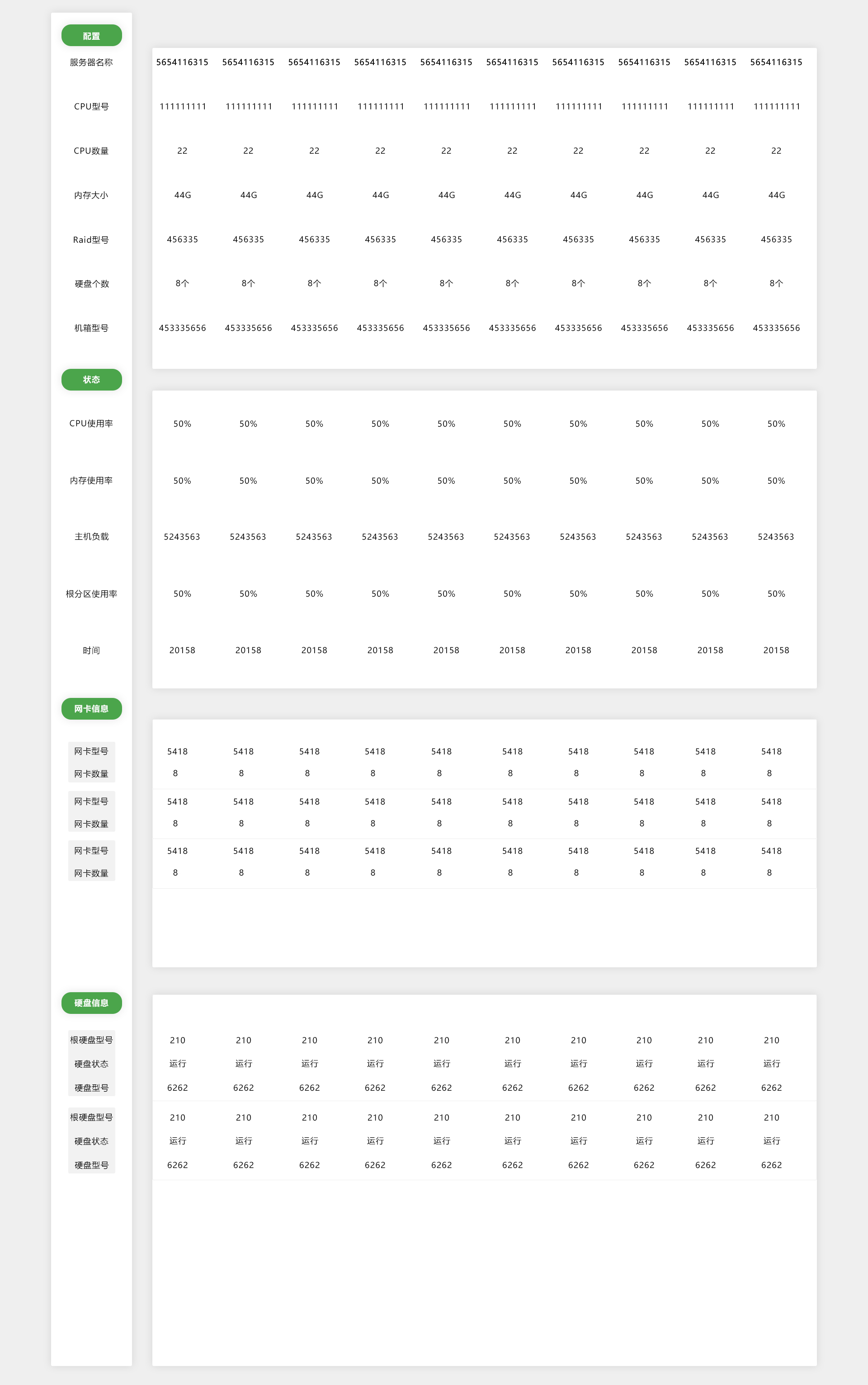
评价:竖版排版很好的解决了服务器属性过多,需要显示多条数据的问题,也解决了每个服务器需要展示多个网卡数据和硬盘数据的问题。但是并没有解决根本的问题,硬盘上限44,某个服务器可能搭载了44个硬盘,如果全部展示出来则页面太长。
View层完成图:
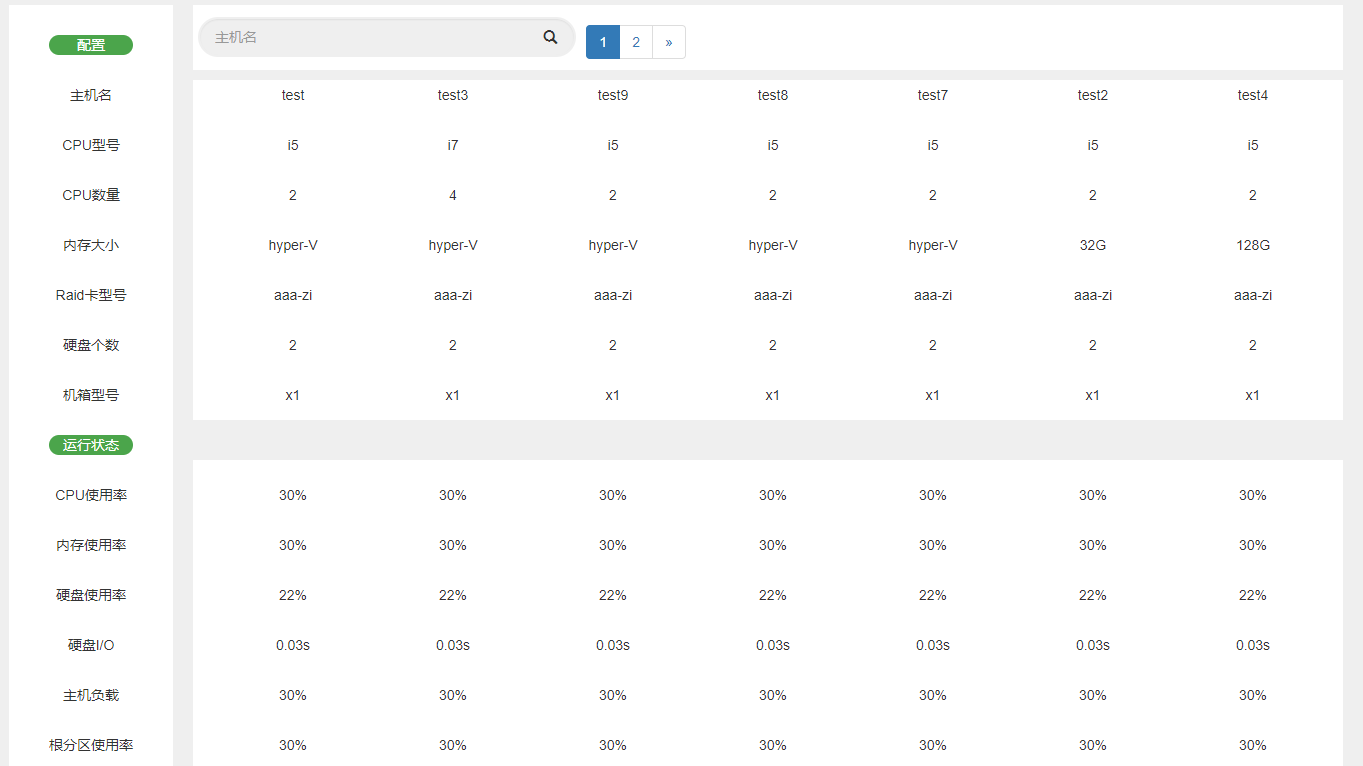
经理看后提了好多改进的方式,包括Model的命名不规范,数据库中使用无意义的主键的原则,Model中主键外键的设置。Controller中Json数据可以直接转成model中的类型。以及View界面过长改进思路的问题。
此为毕业后的第一个程序,把第一版的代码保留下来,接下来进行代码的重构。