
在Android项目开发中,为了实现需求和兼并用户体验,相信很多人都碰到滑动事件冲突的问题。在Android系统中事件分发机制是一个很重要的组成部分,由于这事件分发机制不是本文重点,故不在此多述,如果有想详细了解的可以自己搜下,网上有很多相关资料详细描述了Android事件分发机制。
一、问题场景
由于RecyclerView自身的优点,使得它已经基本取代了GridView、ListView,而且ViewPager2也是基于RecyclerView实现的,所以现在涉及到列表的基本都离不开RecyclerView。
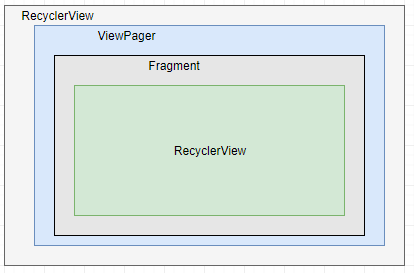
本文就就基于项目中采用RecyclerView + ViewPager + Fragment + RecyclerView这种嵌套方式出现了滑动冲突。
QQ截图20200516115700.png
二、三种解决方式
首先讲下当下的几种处理方式:
- 在父RecyclerView中的事件拦截事件中处理;
自定义父recyclerView并重写onInterceptTouchEvent()方法,代码如下:
1    public class ParentRecyclerView extends RecyclerView {
2
3      public ParentRecyclerView(@NonNull Context context) {
4          this(context,null);
5      }
6      public ParentRecyclerView(@NonNull Context context, @Nullable AttributeSet attrs) {
7          this(context, attrs,0);
8      }
9
10      public ParentRecyclerView(@NonNull Context context, @Nullable AttributeSet attrs, int defStyle) {
11          super(context, attrs, defStyle);
12      }
13
14      //不拦截,继续分发下去
15      @Override
16      public boolean onInterceptTouchEvent(MotionEvent e) {
17          //当然这里可能要根据实际场景去处理下,不仅仅是返回false就结束了。
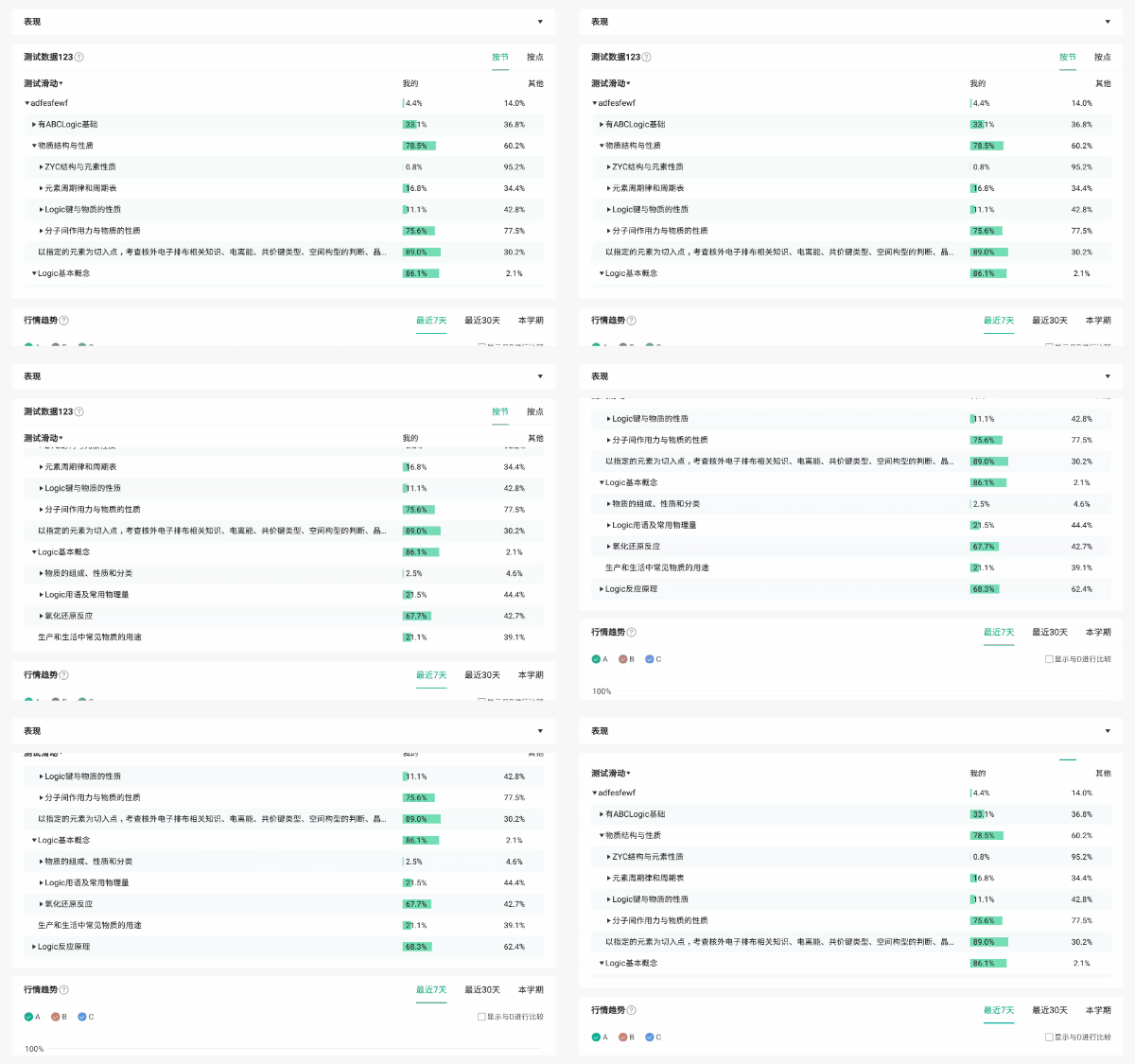
18         //todo : 实际场景处理代码
19         //---------------------------------------------------------------------------------
20          return false;
21        }
22    }
23    ```
24*   在子RecyclerView中的事件拦截事件中处理;
25    通过requestDisallowInterceptTouchEvent方法干预事件分发过程,该方法就是通知父布局要不要拦截事件
26    自定义子RecyclerView并重写dispatchTouchEvent,如下:
27
1public class ChildRecyclerView extends RecyclerView {
2
3  public ChildRecyclerView (@NonNull Context context) {
4      this(context,null);
5  }
6
7  public ChildRecyclerView (@NonNull Context context, @Nullable AttributeSet attrs) {
8      this(context, attrs,0);
9  }
10
11  public ChildRecyclerView (@NonNull Context context, @Nullable AttributeSet attrs, int defStyle) {
12      super(context, attrs, defStyle);
13  }
14
15  @Override
16  public boolean dispatchTouchEvent(MotionEvent ev) {
17      //父层ViewGroup不要拦截点击事件,true不要拦截,false拦截
18      getParent().requestDisallowInterceptTouchEvent(true);
19      return super.dispatchTouchEvent(ev);
20  }
21}
22```
- 采用优先级最高的OnTouchListener;
从事件分发机制上看,OnTouchListener优先级很高,可以通过这个来告诉父布局,不要拦截我的事件
1    recyclerView.setOnTouchListener(new View.OnTouchListener() {
2              @Override
3              public boolean onTouch(View view, MotionEvent motionEvent) {
4                  switch (motionEvent.getAction()){
5                      case MotionEvent.ACTION_DOWN:
6                      case MotionEvent.ACTION_MOVE:
7                          //这里有时要根据自己的场景去写自己的逻辑
8                          view.getParent().requestDisallowInterceptTouchEvent(true);
9                          break;
10                      case MotionEvent.ACTION_UP:
11                      case MotionEvent.ACTION_CANCEL:
12                          view.getParent().requestDisallowInterceptTouchEvent(false);
13                          break;
14                  }
15                  return true;
16              }
17          });
18    ```
19
20以上三种方式至于采用哪种要根据自己的实际场景。
21
22### 三、针对一种方式进行详解
23
24下面就针对第二种方式在自定义子RecyclerView的做事件拦截处理,因为这种方式正好适合项目解决冲突。
25
26###### 目标 :触摸子RecyclerView上下滑动时,子列表滑动,当列表滑动到顶部、底部或触摸点超出子RecyclerView上下边距时继续滑动,则父RecyclerView跟着滑动。
27
28*   MotionEvent.ACTION\_DOWN
29    按下时记录按下的x,y值,并重置标记为;
1float x = ev.getX();
2      float y = ev.getY();
3      switch (ev.getAction()) {
4          case MotionEvent.ACTION_DOWN:
5              mDownX = x;
6              mDownY = y;
7              lastY = y;
8              disallowInterceptState = 0;
9              getParent().requestDisallowInterceptTouchEvent(true);
10              break;
11```
- MotionEvent.ACTION_MOVE
手指滑动时,通过计算在x,y轴方向移动的距离,判断哪个方向先移动超过给的距离来判断移动的方向,若是x轴方向则不拦截(因为ViewPager横线滑动)次数将标记位设置为2(disallowInterceptState = 2),若y方向则告诉父View不要拦截并将标记位设置为1(disallowInterceptState = 1);
继续move时,不断检查是否到View的上下边缘和列表是否滑动到顶部或底部,当满足条件时将标记位设置为2,(disallowInterceptState = 2)告诉父View可以拦截事件了。
1    if (disallowInterceptState == 0) {
2         float absX = Math.abs(x - mDownX);
3         float absY = Math.abs(y - mDownY);
4         if ((absX > 5f || absY > 5f)) {
5           if (absX < absY) {
6              disallowInterceptState = 1;
7           } else {
8              disallowInterceptState = 2;
9            }
10        }
11     }
12    if (getParent() != null && disallowInterceptState != 0) {
13              //y坐标边界检测
14              boolean bl = y < 0 || y > getMeasuredHeight();
15              disallowInterceptState = bl ? 2 : disallowInterceptState;
16              //若滑动到顶部 && 继续下滑动,则释放拦截事件
17              if((isScrollTop() && lastY < y) || (isScrollBottom() && lastY > y)){
18                 disallowInterceptState = 2;
19              }
20           //检查滑动到底部或顶部
21           getParent().requestDisallowInterceptTouchEvent(disallowInterceptState == 1);
22       }
23    lastY = y;
24    ```
25*   MotionEvent.ACTION\_UP和MotionEvent.ACTION\_CANCEL
26    这两个事件不需要做其他处理,恢复父view可以拦截事件
1//父层ViewGroup不要拦截点击事件
2getParent().requestDisallowInterceptTouchEvent(false);
3```
完整代码ChildRecyclerView.java
1public class ChildRecyclerView extends RecyclerView {
2
3    public ChildRecyclerView(Context context, @Nullable AttributeSet attrs) {
4        super(context, attrs);
5    }
6
7    private float mDownX, mDownY,lastY;
8    private int disallowInterceptState = 0;
9
10    @Override
11    public boolean dispatchTouchEvent(MotionEvent ev) {
12        float x = ev.getX();
13        float y = ev.getY();
14        switch (ev.getAction()) {
15            case MotionEvent.ACTION_DOWN:
16                mDownX = x;
17                mDownY = y;
18                lastY = y;
19                disallowInterceptState = 0;
20                getParent().requestDisallowInterceptTouchEvent(true);
21                break;
22            case MotionEvent.ACTION_MOVE:
23                if (disallowInterceptState == 0) {
24                    float absX = Math.abs(x - mDownX);
25                    float absY = Math.abs(y - mDownY);
26                    if ((absX > 5f || absY > 5f)) {
27                        if (absX < absY) {
28                            disallowInterceptState = 1;
29                        } else {
30                            disallowInterceptState = 2;
31                        }
32                    }
33                }
34                if (getParent() != null && disallowInterceptState != 0) {
35                    //y坐标边界检测
36                    boolean bl = y < 0 || y > getMeasuredHeight();
37                    disallowInterceptState = bl ? 2 : disallowInterceptState;
38                    //若滑动到顶部 && 继续下滑动,则释放拦截事件
39                    if((isScrollTop() && lastY < y) || (isScrollBottom() && lastY > y)){
40                        disallowInterceptState = 2;
41                    }
42                    //检查滑动到底部或顶部
43                    getParent().requestDisallowInterceptTouchEvent(disallowInterceptState == 1);
44                }
45                lastY = y;
46                break;
47            case MotionEvent.ACTION_UP:
48            case MotionEvent.ACTION_CANCEL:
49                //父层ViewGroup不要拦截点击事件
50                getParent().requestDisallowInterceptTouchEvent(false);
51                break;
52        }
53
54        return super.dispatchTouchEvent(ev);
55    }
56
57
58    /**
59     * 滑动到底部检查
60     * @return true滑动到底部,false没有到底
61     */
62    private boolean isScrollBottom(){
63        return !canScrollVertically(1);
64    }
65
66    /**
67     * 滑动到顶部检查
68     * @return true滑动到顶部,false没有到顶
69     */
70    private boolean isScrollTop(){
71        return !canScrollVertically(-1);
72    }
73}
最后附上效果图
效果图.gif
希望能帮助到大家。
每日一句:要想练就绝世武功 就要忍受常人难忍受的痛。
本文转自 https://www.jianshu.com/p/2cadf44a1448,如有侵权,请联系删除。