
FastSocket是一个轻量级易扩展的c#异步socket通信库,项目开始于2011年,经过近3年不断调整与改进,目前在功能和性能上均有不错的表现。
项目地址:https://github.com/devhong/FastSocket.Net
在Nuget官方源中搜索fastsocket可快速安装引用
QQ群:257612438
FastSocket内置了命令行、二进制、thrift协议,基于此开发了Zookeeper, Redis, Thrift等c#异步客户端,接下来将会一一公开。
Requirements
.Net 4.0 or Mono 2.6
Projects using FastSocket.Net
Example Usage
1: 简单的命令行服务
新建控制台项目,添加FastSocket.SocketBase,FastSocket.Server引用
自定义服务实现MyService
1/// <summary>/// 实现自定义服务/// </summary>public class MyService : CommandSocketService<StringCommandInfo>{
2    /// <summary>
3    /// 当连接时会调用此方法
4    /// </summary>
5    /// <param name="connection"></param>
6    public override void OnConnected(IConnection connection)
7    {
8        base.OnConnected(connection);
9        Console.WriteLine(connection.RemoteEndPoint.ToString() + " connected");
10        connection.BeginSend(PacketBuilder.ToCommandLine("welcome"));
11    }
12    /// <summary>
13    /// 当连接断开时会调用此方法
14    /// </summary>
15    /// <param name="connection"></param>
16    /// <param name="ex"></param>
17    public override void OnDisconnected(IConnection connection, Exception ex)
18    {
19        base.OnDisconnected(connection, ex);
20        Console.ForegroundColor = ConsoleColor.Red;
21        Console.WriteLine(connection.RemoteEndPoint.ToString() + " disconnected");
22        Console.ForegroundColor = ConsoleColor.Gray;
23    }
24    /// <summary>
25    /// 当发生错误时会调用此方法
26    /// </summary>
27    /// <param name="connection"></param>
28    /// <param name="ex"></param>
29    public override void OnException(IConnection connection, Exception ex)
30    {
31        base.OnException(connection, ex);
32        Console.WriteLine("error: " + ex.ToString());
33    }
34    /// <summary>
35    /// 处理未知命令
36    /// </summary>
37    /// <param name="connection"></param>
38    /// <param name="commandInfo"></param>
39    protected override void HandleUnKnowCommand(IConnection connection, StringCommandInfo commandInfo)
40    {
41        commandInfo.Reply(connection, "unknow command:" + commandInfo.CmdName);
42    }}
Exit命令
1/// <summary>/// 退出命令/// </summary>public sealed class ExitCommand : ICommand<StringCommandInfo>{
2    /// <summary>
3    /// 返回命令名称
4    /// </summary>
5    public string Name
6    {
7        get { return "exit"; }
8    }
9    /// <summary>
10    /// 执行命令
11    /// </summary>
12    /// <param name="connection"></param>
13    /// <param name="commandInfo"></param>
14    public void ExecuteCommand(IConnection connection, StringCommandInfo commandInfo)
15    {
16        connection.BeginDisconnect();//断开连接
17    }}
App.config配置
1<?xml version="1.0"?><configuration>
2
3  <configSections>
4    <section name="socketServer"
5             type="Sodao.FastSocket.Server.Config.SocketServerConfig, FastSocket.Server"/>
6  </configSections>
7
8  <socketServer>
9    <servers>
10      <server name="cmdline"
11              port="8400"
12              socketBufferSize="8192"
13              messageBufferSize="8192"
14              maxMessageSize="102400"
15              maxConnections="20000"
16              serviceType="CommandLine.MyService, CommandLine"
17              protocol="commandLine"/>
18    </servers>
19  </socketServer></configuration>
初始化及启动服务
1static void Main(string[] args){
2    SocketServerManager.Init();
3    SocketServerManager.Start();
4
5    Console.ReadLine();}
启动服务,然后在cmd中运行telnet 127.0.0.1 8400, 运行截图如下:

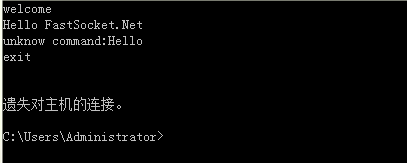
其中welcome中当连接建立时服务端发送到终端的。
connection.BeginSend(PacketBuilder.ToCommandLine("welcome"));
unknow command:Hello是因为没有对应的"Hello"命令实现由HandleUnKnowCommand输出的
1protected override void HandleUnKnowCommand(IConnection connection, StringCommandInfo commandInfo){
2    commandInfo.Reply(connection, "unknow command:" + commandInfo.CmdName);}
当在终端中键入exit时,触发了ExitCommand.ExecuteCommand方法,服务端主动断开连接,终端退出。
2: 在服务中使用自定义二进制协议
新建控制台项目,命名为Server
添加FastSocket.SocketBase,FastSocket.Server引用
Socket命令服务类: Sodao.FastSocket.Server.CommandSocketService泛型类
其中需要实现Socket连接,断开,异常,发送完回调及处理未知命令的方法
内置的二进制命令对象: Sodao.FatSocket.Server.Command.AsyncBinaryCommandInfo
由一个command name,一个唯一标识SeqId和主题内容buffer构建。
定义服务类MyService继承CommandSocketService类,
泛型类型为上述的AsyncBinanryCommandInfo
1/// <summary>/// 实现自定义服务/// </summary>public class MyService : CommandSocketService<AsyncBinaryCommandInfo>{
2    /// <summary>
3    /// 当连接时会调用此方法
4    /// </summary>
5    /// <param name="connection"></param>
6    public override void OnConnected(IConnection connection)
7    {
8        base.OnConnected(connection);
9        Console.WriteLine(connection.RemoteEndPoint.ToString() + " connected");
10    }
11    /// <summary>
12    /// 当连接断开时会调用此方法
13    /// </summary>
14    /// <param name="connection"></param>
15    /// <param name="ex"></param>
16    public override void OnDisconnected(IConnection connection, Exception ex)
17    {
18        base.OnDisconnected(connection, ex);
19        Console.ForegroundColor = ConsoleColor.Red;
20        Console.WriteLine(connection.RemoteEndPoint.ToString() + " disconnected");
21        Console.ForegroundColor = ConsoleColor.Gray;
22    }
23    /// <summary>
24    /// 当发生错误时会调用此方法
25    /// </summary>
26    /// <param name="connection"></param>
27    /// <param name="ex"></param>
28    public override void OnException(IConnection connection, Exception ex)
29    {
30        base.OnException(connection, ex);
31        Console.WriteLine("error: " + ex.ToString());
32    }
33    /// <summary>
34    /// 当服务端发送Packet完毕会调用此方法
35    /// </summary>
36    /// <param name="connection"></param>
37    /// <param name="e"></param>
38    public override void OnSendCallback(IConnection connection, SendCallbackEventArgs e)
39    {
40        base.OnSendCallback(connection, e);
41        Console.ForegroundColor = ConsoleColor.Green;
42        Console.WriteLine("send " + e.Status.ToString());
43        Console.ForegroundColor = ConsoleColor.Gray;
44    }
45    /// <summary>
46    /// 处理未知的命令
47    /// </summary>
48    /// <param name="connection"></param>
49    /// <param name="commandInfo"></param>
50    protected override void HandleUnKnowCommand(IConnection connection, AsyncBinaryCommandInfo commandInfo)
51    {
52        Console.WriteLine("unknow command: " + commandInfo.CmdName);
53    }}
实现一个命令如示例项目中的SumCommand类,命令类需要实现ICommand泛型接口
即服务中可以进行处理的服务契约
而泛型类型即上述的AsyncBinaryCommandInfo
1/// <summary>/// sum command/// 用于将一组int32数字求和并返回/// </summary>public sealed class SumCommand : ICommand<AsyncBinaryCommandInfo>{
2    /// <summary>
3    /// 返回服务名称
4    /// </summary>
5    public string Name
6    {
7        get { return "sum"; }
8    }
9    /// <summary>
10    /// 执行命令并返回结果
11    /// </summary>
12    /// <param name="connection"></param>
13    /// <param name="commandInfo"></param>
14    public void ExecuteCommand(IConnection connection, AsyncBinaryCommandInfo commandInfo)
15    {
16        if (commandInfo.Buffer == null || commandInfo.Buffer.Length == 0)
17        {
18            Console.WriteLine("sum参数为空");
19            connection.BeginDisconnect();
20            return;
21        }
22        if (commandInfo.Buffer.Length % 4 != 0)
23        {
24            Console.WriteLine("sum参数错误");
25            connection.BeginDisconnect();
26            return;
27        }
28
29        int skip = 0;
30        var arr = new int[commandInfo.Buffer.Length / 4];
31        for (int i = 0, l = arr.Length; i < l; i++)
32        {
33            arr[i] = BitConverter.ToInt32(commandInfo.Buffer, skip);
34            skip += 4;
35        }
36
37        commandInfo.Reply(connection, BitConverter.GetBytes(arr.Sum()));
38    }}
app.config
1<?xml version="1.0"?><configuration>
2
3  <configSections>
4    <section name="socketServer"
5             type="Sodao.FastSocket.Server.Config.SocketServerConfig, FastSocket.Server"/>
6  </configSections>
7
8  <socketServer>
9    <servers>
10      <server name="binary"
11              port="8401"
12              socketBufferSize="8192"
13              messageBufferSize="8192"
14              maxMessageSize="102400"
15              maxConnections="20000"
16              serviceType="Server.MyService, Server"
17              protocol="asyncBinary"/>
18    </servers>
19  </socketServer></configuration>
其中section name="socketServer" 为服务端默认读取的sectionName
type为反射自FastSocket.Server中的config类型
server配置中,name自定,serviceType为上述实现的服务类反射类型
协议名为asyncBinary
在Main函数中启动服务
1static void Main(string[] args){
2    SocketServerManager.Init();
3    SocketServerManager.Start();
4
5    Console.ReadLine();}
新建控制台应用程序,命名为Client
添加FastSocket.Client,FastSocket.SocketBase引用
客户端的代码为组织命令向服务端请求
创建一个Sodao.FastSocket.Client.AsyncBinarySocketClient的实例
并通过RegisterServerNode来注册服务端节点,需要注意name必须唯一
并且地址为我们服务端运行的地址,端口为服务端配置文件中配置的端口号
1static void Main(string[] args){
2    var client = new Sodao.FastSocket.Client.AsyncBinarySocketClient(8192, 8192, 3000, 3000);
3    //注册服务器节点,这里可注册多个(name不能重复)
4    client.RegisterServerNode("127.0.0.1:8401", new System.Net.IPEndPoint(System.Net.IPAddress.Parse("127.0.0.1"), 8401));
5    //client.RegisterServerNode("127.0.0.1:8402", new System.Net.IPEndPoint(System.Net.IPAddress.Parse("127.0.0.2"), 8401));
6
7    //组织sum参数, 格式为<<i:32-limit-endian,....N>>
8    //这里的参数其实也可以使用thrift, protobuf, bson, json等进行序列化,
9    byte[] bytes = null;
10    using (var ms = new System.IO.MemoryStream())
11    {
12        for (int i = 1; i <= 1000; i++) ms.Write(BitConverter.GetBytes(i), 0, 4);
13        bytes = ms.ToArray();
14    }
15    //发送sum命令
16    client.Send("sum", bytes, res => BitConverter.ToInt32(res.Buffer, 0)).ContinueWith(c =>
17    {
18        if (c.IsFaulted)
19        {
20            Console.WriteLine(c.Exception.ToString());
21            return;
22        }
23        Console.WriteLine(c.Result);
24    });
25
26    Console.ReadLine();}