
完成章节后练习。 ##练习 1. Adjust the vertex shader so that the triangle is upside down.
1#version 330 core
2layout (location = 0) in vec3 Pos;
3layout (location = 1) in vec3 Col;
4out vec4 Color;
5void main()
6{
7    gl_Position = vec4(Pos.x, -Pos.y, Pos.z, 1.0f);
8    Color = vec4(Col, 1.0f);
9}
2. Specify a horizontal offset via a uniform and move the triangle to the right side of the screen in the vertex shader using this offset value.
1#version 330 core
2layout (location = 0) in vec3 Pos;
3layout (location = 1) in vec3 Col;
4uniform float offset;
5out vec4 Color;
6void main()
7{
8    gl_Position = vec4(Pos.x + offset, Pos.y, Pos.z, 1.0f);
9    Color = vec4(Col, 1.0f);
10}
11
12
13ourShader.use();
14float offset = 0.5;
15int uniformlocation = glGetUniformLocation(ourShader.ID, "offset");
16glUniform1f(uniformlocation, offset);
3. Output the vertex position to the fragment shader using the out keyword and set the fragment's color equal to this vertex position (see how even the vertex position values are interpolated across the triangle). Once you managed to do this; try to answer the following question: why is the bottom-left side of our triangle black?
1#version 330 core
2layout (location = 0) in vec3 Pos;
3layout (location = 1) in vec3 Col;
4out vec3 fragPos;
5void main()
6{
7    gl_Position = vec4(Pos.x, Pos.y, Pos.z, 1.0f);
8    fragPos = Pos;
9}
10
11
12#version 330 core
13out vec4 FragColor;
14in vec3 fragPos;
15void main()
16{
17    FragColor = vec4(fragPos, 1.0f);
18}
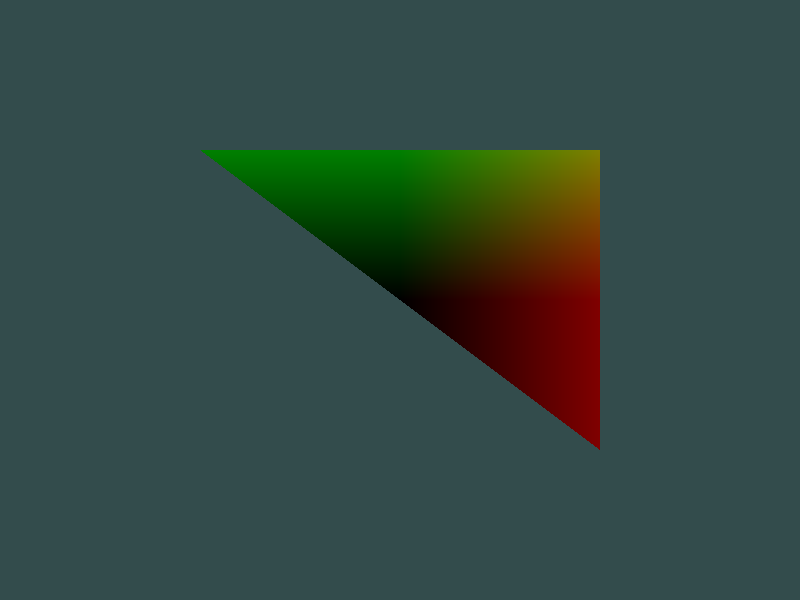 左上角顶点坐标(-0.5, 0.5, 0),右下角顶点坐标(0.5, -0.5, 0),在顶点间二分之一处插值得到的结果是(0, 0, 0),因此渲染成黑色。