
最近着手开发一个后台系统,前端采用的是AngularJs来与后台交互,对于我们这群jquery疯狂的铁粉,遇到了不少转不过弯的问题,为了更高效的开发应用,在私下的时间收集和改造了一下AngularJS的$http 服务,特此分享。
$http的post
. 请求默认的content-Type=application/json
. 提交的是json对象的字符串化数据,
. 后端无法从post中获取,
. 跨域请求是复杂请求,会发送OPTIONS的验证请求,成功后才真正发起post请求
jQuery.post
. 使用的是content-Type=application/x-www-form-urlencoded -
. 提交的是form data,
. 后端可以从post中获取,
. 简单跨域请求,直接发送
解决思路:
1.改造前端
(1)方案一:
配置$http服务的默认content-Type=application/x-www-form-urlencoded,如果是指配置这个的话,虽然提交的content-Type改了,但是提交的数据依然是个json字符串,不是我们想要的form data形式的键值对,需要实现param方法.
1angular.module('MyModule', [], function($httpProvider) {
2    // Use x-www-form-urlencoded Content-Type
3    $httpProvider.defaults.headers.post['Content-Type'] = 'application/x-www-form-urlencoded;charset=utf-8';
4
5    /**
6     * The workhorse; converts an object to x-www-form-urlencoded serialization.
7     * @param {Object} obj
8     * @return {String}
9     */
10    var param = function(obj) {
11        var query = '',
12            name, value, fullSubName, subName, subValue, innerObj, i;
13
14        for (name in obj) {
15            value = obj[name];
16
17            if (value instanceof Array) {
18                for (i = 0; i < value.length; ++i) {
19                    subValue = value[i];
20                    fullSubName = name + '[' + i + ']';
21                    innerObj = {};
22                    innerObj[fullSubName] = subValue;
23                    query += param(innerObj) + '&';
24                }
25            } else if (value instanceof Object) {
26                for (subName in value) {
27                    subValue = value[subName];
28                    fullSubName = name + '[' + subName + ']';
29                    innerObj = {};
30                    innerObj[fullSubName] = subValue;
31                    query += param(innerObj) + '&';
32                }
33            } else if (value !== undefined && value !== null)
34                query += encodeURIComponent(name) + '=' + encodeURIComponent(value) + '&';
35        }
36
37        return query.length ? query.substr(0, query.length - 1) : query;
38    };
39
40    //一个function数组,负责将请求的body,也就是post data,转换成想要的形式
41    // Override $http service's default transformRequest
42    $httpProvider.defaults.transformRequest = [function(data) {
43        return angular.isObject(data) && String(data) !== '[object File]' ? param(data) : data;
44    }];
45});
配合一点$resource的API参考,这个代码就好懂了:
https://docs.angularjs.org/api/ngResource/service/$resource

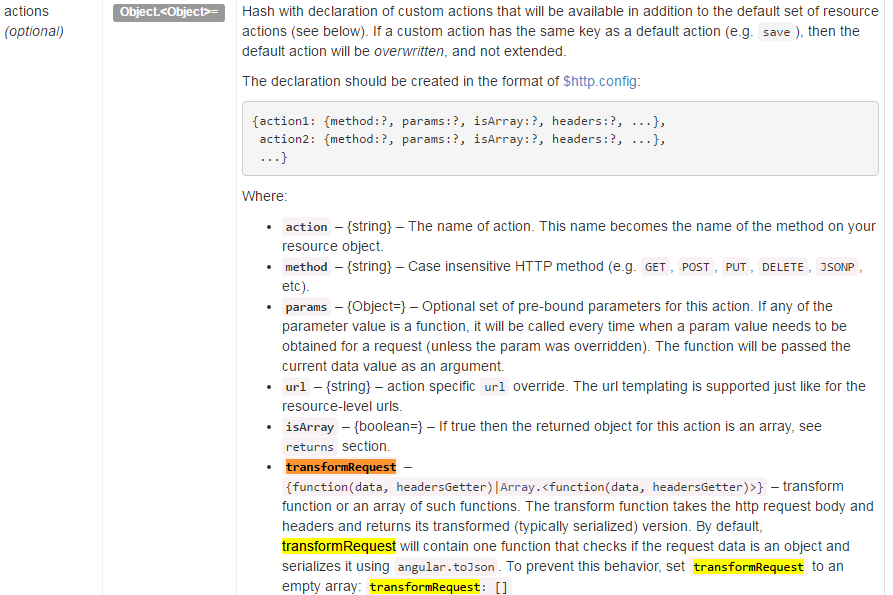
Note:
上述param方法定义的地方不要使用jQuery.param方法,因为jQuery.param方法会将要处理的对象上的function全执行一边,把返回的值当做参数的值,这是我们不期望的,我们写的这个param方法也是为了解决上面说的content-Type=x-www-form-urlencoded,但是提交的数据依然是json串的问题。
方案二:
1      $scope.formData = {};
2        $http({
3                method: 'POST',
4                url: '/user/',
5                data: $.param($scope.formData), // pass in data as strings
6                headers: { 'Content-Type': 'application/x-www-form-urlencoded' } // set the headers so angular passing info as form data (not request payload)
7            })
8            .success(function(data) {
9                console.log(data);
10
11                if (!data.success) {
12                    // if not successful, bind errors to error variables
13                    $scope.errorName = data.errors.name;
14                    $scope.errorSuperhero = data.errors.superheroAlias;
15                } else {
16                    // if successful, bind success message to message
17                    $scope.message = data.message;
18                }
19            });
参考
http://victorblog.com/2012/12/20/make-angularjs-http-service-behave-like-jquery-ajax/
2.后端使用注意:
(1)Spring MVC ajax后台方法不能加 @RequestBody ,否则会报Failed to load resource: the server responded with a status of 415 (Unsupported Media Type)错误
(2)使用Jquery 风格的写法就OK啦!
万事搞定,只欠高效开发,O(∩_∩)O哈哈~