
程序逻辑图如下:

登录模块(获取cookie):
1# encoding=utf-8
2import requests
3import re
4import sys
5#设置请求头
6headers={
7    'Accept':'text/html,application/xhtml+xml,application/xml;q=0.9,image/webp,*/*;q=0.8',
8    'Accept-Encoding':'gzip, deflate, sdch, br',
9    'Accept-Language':'zh-CN,zh;q=0.8',
10    'Connection':'keep-alive',
11    'Host':'www.zhihu.com',
12    'Origin':'https://www.zhihu.com',
13    'Referer':'https://www.zhihu.com/',
14    'User-Agent':'Mozilla/5.0 (X11; Linux x86_64) AppleWebKit/537.36 (KHTML, like Gecko) Chrome/58.0.3029.110 Safari/537.36',
15    'x-hd-token':'hello',
16}
17
18
19#下面写入账号密码
20
21post_data={
22    '_xsrf':'***',
23    'password':'****',
24    'captcha':'***',
25    'phone_num':'*****',
26}
27
28req=requests.Session()
29
30def login():
31    page=req.get(url="https://www.zhihu.com/#signin",headers=headers)
32    parser=re.compile(u'<input type="hidden" name="_xsrf" value="(.*?)"/>',re.S)
33    xsrf=re.findall(parser,page.text)[0]
34    headers['X-Xsrftoken']=xsrf
35    post_data['_xsrf']=xsrf
36    #下载验证码
37    with open("../code.jpg",'wb') as w:
38        p=req.get(url="https://www.zhihu.com/captcha.gif?r=1495546872530&type=login",headers=headers)
39        w.write(p.content)
40
41    code=input("请输入验证码:")
42    if not code:
43        sys.exit(1)
44    post_data['captcha']=code
45    res=req.post(url='https://www.zhihu.com/login/phone_num',data=post_data,headers=headers)
46    print(res.text)
47    return req
48
49cookie=login().cookies.get_dict()
50
spiders如下:这里用re(正则表达式和xpath解析网页,不懂的同学可以花时间去学习一下)
1# -*- coding: utf-8 -*-
2import scrapy
3from zhihu.items import *
4import re
5class ZhSpider(scrapy.Spider):
6    name = 'zh'
7    allowed_domains = ['zhihu.com']
8    start_urls = ['http://zhihu.com/']
9    url='http://www.zhihu.com/'
10    start_urls=['ruan-fu-zhong-tong-zhi','mu-huan-98',
11    'zeus871219','a-li-ai-di-10','dyxxg','hao-er-8',
12    'liu-miao-miao-47-17','peng-chen-xi-39','song-ling-shi-liao-63-56']
13    task_set=set(start_urls)
14    tasked_set=set()
15
16
17    def start_requests(self):
18        while len(self.task_set)>0:
19            print("**********start用户库**********")
20            print(str(self.task_set))
21            print("********************")
22            id=self.task_set.pop()
23            if id in self.tasked_set:
24                print("已经存在的数据 %s" %(id))
25                continue
26            self.tasked_set.add(id)
27
28            userinfo_url='https://www.zhihu.com/people/{}/answers'.format(id)
29            user_item=UserItem()
30            user_item['Id']=id
31            user_item['Url']=userinfo_url
32            yield scrapy.Request(
33                userinfo_url,
34                meta={"item":user_item},callback=self.User_parse,dont_filter=True
35            )
36            yield scrapy.Request(
37                'https://www.zhihu.com/people/{}/followers'.format(id),
38                callback=self.Add_user,dont_filter=True
39            )
40
41    def Add_user(self,response):
42        sel=scrapy.selector.Selector(response)
43       #<a class="UserLink-link" target="_blank" href="https://my.oschina.net/people/12321-89">12321</a>
44        #//*[@id="Profile-following"]/div[2]/div[2]/div/div/div[2]/h2/div/span/div/div/a/@href
45        #//*[@id="Popover-24089-95956-toggle"]
46        #//*[@id="Popover-24089-95956-toggle"]/a
47        #print(response.text)
48        co=sel.xpath('//*[@id="root"]/div/main/div/div/div[2]').extract_first()
49        patten=re.compile(u'<a class="UserLink-link" target="_blank" href="https://my.oschina.net/people/(.*?)">.*?</a>',re.S)
50        l=re.findall(patten,co)
51        #l=sel.xpath('//*[@id="Profile-following"]/div[2]/div[2]/div/div/div[2]/h2/div/span/div/div/a/@href')
52        for i in l:
53            if str(i) not in self.tasked_set and str(i) not in self.task_set:
54                self.task_set.add(i)
55                print("**********用户库**********")
56                print(str(self.task_set))
57                print("********************")
58
59    def User_parse(self, response):
60        item=response.meta["item"]
61        sel=scrapy.selector.Selector(response)
62        nick_name=sel.xpath('//*[@id="ProfileHeader"]/div/div[2]/div/div[2]/div[1]/h1/span[1]/text()').extract_first()
63        print(nick_name)
64        #item['Nick_name']=nick_name
65        summary=sel.xpath('//*[@id="ProfileHeader"]/div/div[2]/div/div[2]/div[1]/h1/span[2]/text()').extract_first()
66        print(summary)
67        item['Summary']=summary
68        item['Nick_name']=nick_name
69        # print(sel.xpath( '//span[@class="location item"]/@title').extract_first())
70        co=sel.xpath('//*[@id="ProfileHeader"]/div/div[2]/div/div[2]/div[2]').extract_first()
71        # print("**********************")
72        # print(co)
73        # print('**********************')
74        patten=re.compile(u'.*?</div>(.*?)<div.*?>',re.S)
75        l=re.findall(patten,co)
76        #print(str(l))
77        print("**********************")
78        print(str(l))
79        item['Content']=str(l)
80        print('**********************')
81        yield item
pipelines模块:
1# -*- coding: utf-8 -*-
2
3# Define your item pipelines here
4#
5# Don't forget to add your pipeline to the ITEM_PIPELINES setting
6# See: http://doc.scrapy.org/en/latest/topics/item-pipeline.html
7
8import pymysql
9class ZhihuPipeline(object):
10    def process_item(self, item, spider):
11        return item
12
13
14class MysqlPipeline(object):
15    def __init__(self):
16        self.conn=pymysql.connect(
17            host='localhost',   #本地127.0.0.1
18            port=3306,          #默认3306端口
19            user='root',        #mysql最高权限用户
20            passwd='****',  #root用户密码
21            db='zh',       #database name
22            charset='utf8'
23            )
24    def process_item(self,item,spider):
25        self._conditional_insert(self.conn.cursor(),item)#调用插入的方法
26       # query.addErrback(self._handle_error,item,spider)#调用异常处理方法
27        return item
28
29    def _conditional_insert(self,tx,item):
30
31        sql="insert into user(id,url,nick_name,summary,content) values(%s,%s,%s,%s,%s)"
32        params=(item["Id"],item["Url"],item['Nick_name'],item['Summary'],item['Content'])
33        tx.execute(sql,params)
34        print('已经插入一条数据!')
35        tx.close()
36        self.conn.commit()
37      #  self.conn.close()
38
39    #错误处理方法
40    def _handle_error(self, failue, item, spider):
41        print(failue)
items模块:
1# -*- coding: utf-8 -*-
2
3# Define here the models for your scraped items
4#
5# See documentation in:
6# http://doc.scrapy.org/en/latest/topics/items.html
7
8import scrapy
9from scrapy import Field
10
11class ZhihuItem(scrapy.Item):
12    # define the fields for your item here like:
13    # name = scrapy.Field()
14    pass
15
16class UserItem(scrapy.Item):
17    """
18    知乎用户的用户名,居住地,所在行业,职业经历,教育经历,个人简介
19    """
20    Id=Field()
21    Url=Field()
22    Nick_name=Field()
23    Summary=Field()
24    # Home_Position=Field()
25    # Compmany=Field()
26    # Edu=Field()
27    Content=Field()
middlewares模块:
1# -*- coding: utf-8 -*-
2
3# Define here the models for your spider middleware
4#
5# See documentation in:
6# http://doc.scrapy.org/en/latest/topics/spider-middleware.html
7from zhihu.getCookie import cookie
8from scrapy import signals
9
10class CookiesMiddleware(object):
11    """ 换Cookie """
12    def process_request(self, request, spider):
13        #cookie = random.choice(cookies)
14        request.cookies = cookie
15
16class ZhihuSpiderMiddleware(object):
17    # Not all methods need to be defined. If a method is not defined,
18    # scrapy acts as if the spider middleware does not modify the
19    # passed objects.
20
21    @classmethod
22    def from_crawler(cls, crawler):
23        # This method is used by Scrapy to create your spiders.
24        s = cls()
25        crawler.signals.connect(s.spider_opened, signal=signals.spider_opened)
26        return s
27
28    def process_spider_input(self, response, spider):
29        # Called for each response that goes through the spider
30        # middleware and into the spider.
31
32        # Should return None or raise an exception.
33        return None
34
35    def process_spider_output(self, response, result, spider):
36        # Called with the results returned from the Spider, after
37        # it has processed the response.
38
39        # Must return an iterable of Request, dict or Item objects.
40        for i in result:
41            yield i
42
43    def process_spider_exception(self, response, exception, spider):
44        # Called when a spider or process_spider_input() method
45        # (from other spider middleware) raises an exception.
46
47        # Should return either None or an iterable of Response, dict
48        # or Item objects.
49        pass
50
51    def process_start_requests(self, start_requests, spider):
52        # Called with the start requests of the spider, and works
53        # similarly to the process_spider_output() method, except
54        # that it doesn’t have a response associated.
55
56        # Must return only requests (not items).
57        for r in start_requests:
58            yield r
59
60    def spider_opened(self, spider):
61        spider.logger.info('Spider opened: %s' % spider.name)
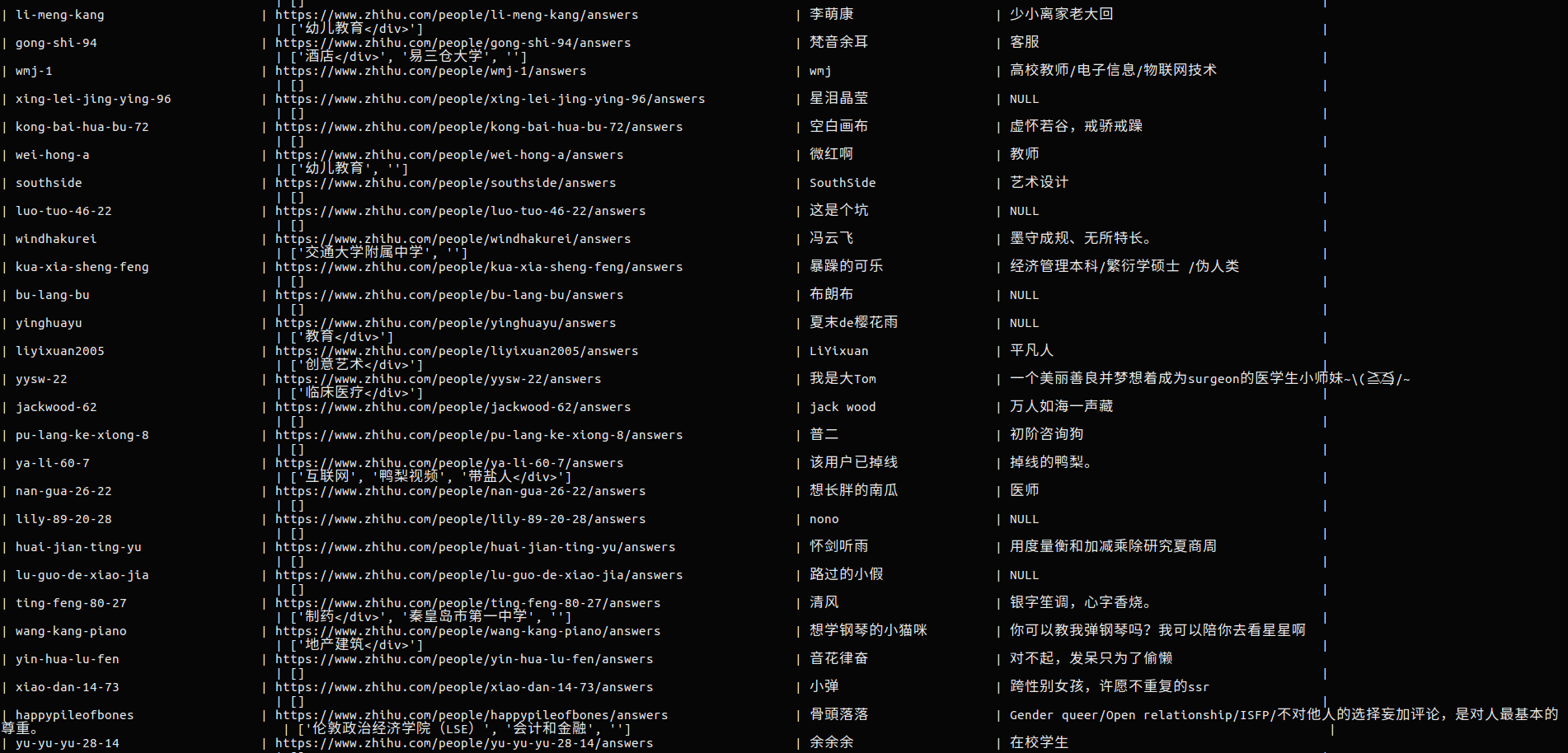
代码是单机的,操作无误的话,可以一直运行下去,理论上可以把所有用户都抓下来,我测试的时候设的俩秒比较慢,一个小时一俩万字段。爬取的数据如下
项目地址: