
Over time I've grown a habit of making a configuration file for my kettle jobs. This is especially useful if you have a reusable job, where the same work has to be done but against different conditions. A simple example where I found this useful is when you have separate development, testing and production environments: when you're done developing your job, you transfer the .kjb file (and its dependencies) to the testing environment. This is the easy part. But the job still has to run within the new environment, against different database connections, webservice urls and file system paths.
Variables
In the past, much has been written about using kettle variables, parameters and arguments. Variables are the basic features that provide the mechanism to configure the transformation steps and job entries: instead of using literal configuration values, you use a variable reference. This way, you can initialize all variables to whatever values are appropriate at that time, and for that environment. Today, I don't want to discuss variables and variable references - instead I'm just focussing on how to manage the configuration once you already used variable references inside your your jobs and transformations.
Managing configuration
To manage the configuration, I typically start the main job with a set-variables.ktr transformation. This transformation reads configuration data from a config.properties file and assigns it to the variables so any subsequent jobs and transformations can access the configration data through variable references. The main job has one parameter called ${CONFIG_DIR} which has to be set by the caller so the set-variables.ktr transformation knows where to look for its config.properties file:
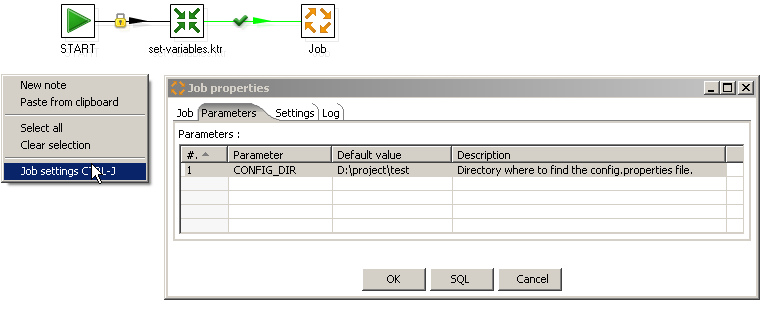
Reading configuration properties
The config.properties file is just a list of key/value pairs separated by an equals sign. Each key represents a variable name, and the value the appropriate value. The following snippet should give you an idea:
1#staging database connection
2STAGING_DATABASE=staging
3STAGING_HOST=localhost
4STAGING_PORT=3351
5STAGING_USER=staging
6STAGING_PASSWORD=$74g!n9
The set-variables.ktr transformation reads it using a "Property Input" step, and this yields a stream of key/value pairs:

Pivoting key/value pairs to use the "set variables" step
In the past, I used to set the variables using the "Set variables" step. This step works by creating a variable from selected fields in the incoming stream and assigning the field value to it. This means that you can't just feed the stream of key/value pairs from the property input step into the set variables step: the stream coming out of the property input step contains multiple rows with just two fields called "Key" and "value". Feeding it directly into the "Set variables" step would just lead to creating two variables called Key and Value, and they would be assigned values multiple times for all key/value pairs in the stream. So in order to meaningfully assign variable, I used to pivot the stream of key/value pairs into a single row having one field for each key in the stream using the "Row Denormaliser" step:
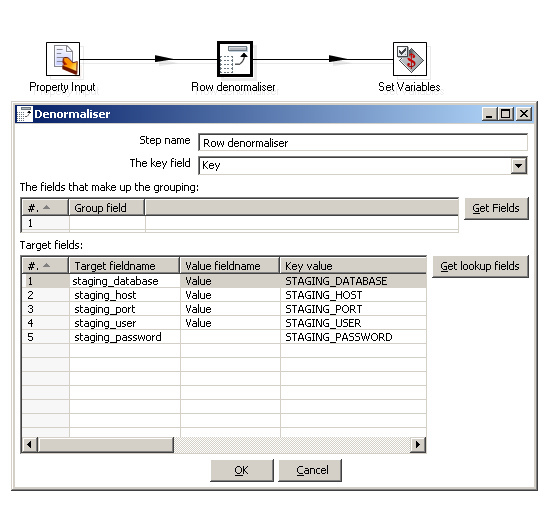
key field: the value of this field is scanned to determine in which output fields to put the corresponding value. There are no fields that make up a grouping: rather, we want all key/value pairs to end up in one big row. Or put another way, there is just one group comprising all key/value pairs. Finally, the grid below specifies for each distinct value of the "Key" field to which output field name it should be mapped, and in all cases, we want the value of the "Value" field to be stored in those fields.
Drawbacks
There are two important drawbacks to this approach:
-
The "Row Normaliser" uses the value of the keys to map the value to a new field. This means that we have to type the name of each and every variable appearing in the
config.propertiesfile. So you manually need to keep heconfig.propetiesand the "Denormaliser" synchronized, and in practice it's very easy to make mistakes here. -
Due to the fact that the "Row Denormaliser" step literally needs to know all variables, the
set-variables.ktrtransformation becomes specific for just one particular project.
Given these drawbacks, I seriously started to question the usefulness of a separate configuration file: because the set-variables.ktrtransformation has to know all variables names anyway, I was tempted to store the configration values themselves also inside the transformation (using a "generate rows" or "data grid" step or something like that), and "simply" make a new set-variables.ktrtransformation for every environment. Of course, that didn't feel right either.
Solution: Javascript
As it turns out, there is in fact a very simple solution that solves all of these problems: don't use the "set variables" step for this kind of problem! We still need to set the variables of course, but we can conveniently do this using a JavaScript step. The new set-variables.ktr transformation now looks like this:
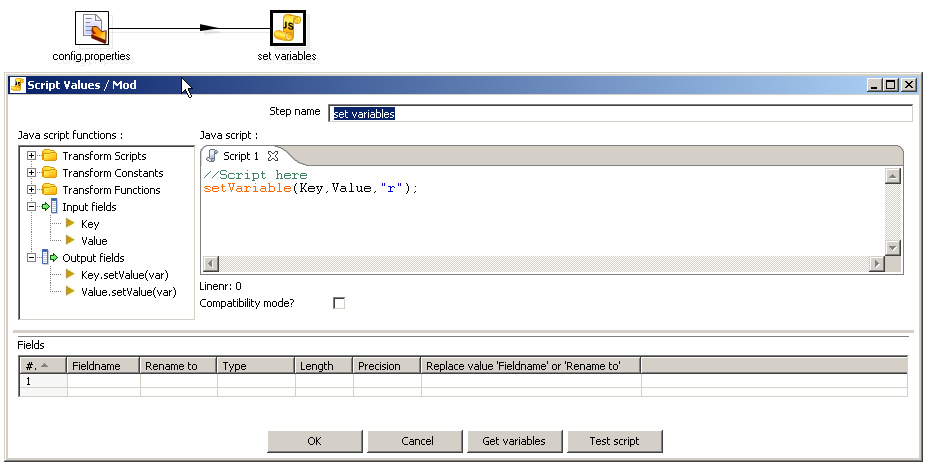
The actual variable assignemnt is done with Kettle's built-in setVariable(key, value, scope). The key and value from the incoming stream are passed as arguments to the key and value arguments of the setVariable() function. The third argument of thesetVariable() function is a string that identifies the scope of the variable, and must have one of the following values:
-
"s"- system-wide -
"r"- up to the root -
"p"- up to the parent job of this transormation -
"g"- up to the grandparent job of this transormation
For my purpose, I settle for "r".
The bonus is that this set-variables.ktr is less complex than the previous one and is now even completely independent of the content of the configuration. It has become a reusable transformation that you can use over and over.
------------------------------------------------------------------------------------------------------
There are some people argue that why not config these variables in <Kettle Installation Folder>\.kettle\kettle.properties, of course this way can achieve this goal, but this solution is not good, because when the Kettle Job(.kjb) or Kettle Transformation(.ktr) files are moved to another environment(dev, test, alpha, beta, prod..), you need to update this file, this is also need to be done when one or more properties are updated.
See also: http://wiki.pentaho.com/display/EAI/Expose+key-value+pairs+from+a+.properties+file+as+variables