
[TOC]
操作表
增
创建表语法
1创建一个表,多个字段:
2create table 表名(
3	字段名 列类型 [可选的参数],	# 记住要加逗号
4    字段名 列类型 [可选的参数]		# 最后一行不加逗号
5	...
6)charset=utf8;					# 后面加;号
列约束
说明:列约束用来保证数据的完整性和一致性,约束条件都是创建表语法的时候可选参数
-
auto_increment:表示自增加1 -
not null:标识该字段不能为空 -
``default:为该字段设置默认值`
-
foreign key:外键索引 -
unique key:标识字段的值是唯一的,字段值不能重复,可以有多个 -
primary key:主键索引,可以加快查询速度,字段值不能重复,只能有一个 -
unsigned:无符号,默认是有符号的 -
zerofill:使用0填充
例子
1# 创建表
2mysql> create table t3(
3    -> id int unsigned auto_increment primary key,
4    -> name char(10) not null default "xxx",
5    -> age int not null default 0
6    -> )charset=utf8;
7Query OK, 0 rows affected (0.03 sec)
8
9# 向表中插入数据
10mysql> insert into t3 (age) values (18);
11Query OK, 1 row affected (0.00 sec)
12
13# 查询表中数据
14mysql> select * from t3;
15+----+------+-----+
16| id | name | age |
17+----+------+-----+
18|  1 | xxx  |  18 |
19+----+------+-----+
201 row in set (0.00 sec)
21
22# 查看表结构 desc 表名
23mysql> desc t3;
24+-------+------------------+------+-----+---------+----------------+
25| Field | Type             | Null | Key | Default | Extra          |
26+-------+------------------+------+-----+---------+----------------+
27| id    | int(10) unsigned | NO   | PRI | NULL    | auto_increment |
28| name  | char(10)         | NO   |     | xxx     |                |
29| age   | int(11)          | NO   |     | 0       |                |
30+-------+------------------+------+-----+---------+----------------+
313 rows in set (0.00 sec)
列类型
列类型
说明
数字(整数)
存储年龄、等级、id等
数字(浮点数)
存储薪资、身高、体重等
字符串
存储姓名、性别等
时间日期类型
存储注册时间、入职时间等
枚举
字段的值只能在给定范围中选择
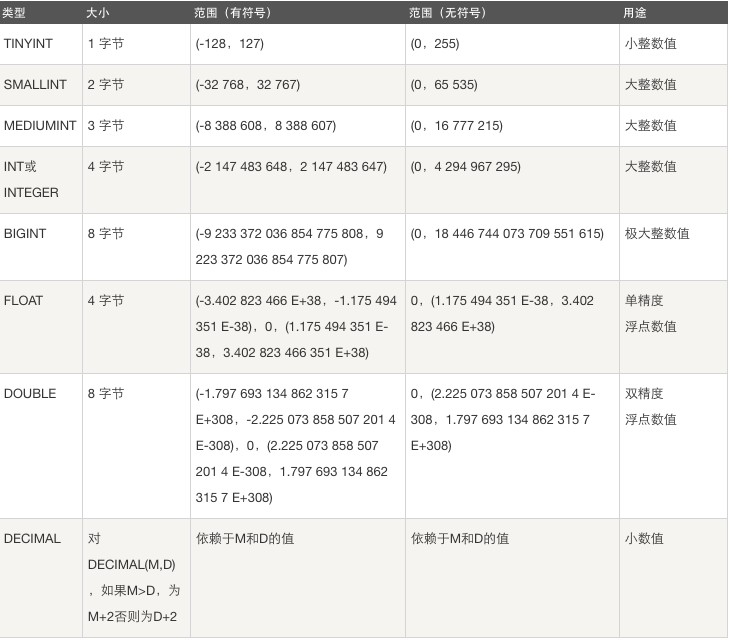
数字(整形)
- tinyint:小整数,有符号:[-128 ~ 127],无符号:[0 ~ 255]
- smallint:大整数,有符号:[-32768 ~ 32767],无符号:[0 ~ 65535]
- mediumint:大整数
- bigint:极大整数
- int (推荐使用):大整数,有符号:[-2147483648 ~ 2147483647],无符号:[0 ~ 4294967295]
unsigned 加在列类型后面,代表无符号,不能取负数,默认是有符号,可以是负数
应用场景:根据公司业务场景选择合适类型
例子:
1# 我们创建一个t4表,限制使用无符号的
2mysql> create table t4(x int unsigned);
3Query OK, 0 rows affected (0.02 sec)
4
5# 查看表结构,默认int数值长度已经设置为10位
6mysql> desc t4;
7+-------+------------------+------+-----+---------+-------+
8| Field | Type             | Null | Key | Default | Extra |
9+-------+------------------+------+-----+---------+-------+
10| x     | int(10) unsigned | YES  |     | NULL    |       |
11+-------+------------------+------+-----+---------+-------+
121 row in set (0.00 sec)
13
14# 只能插入无符号:[0 ~ 4294967295]范围值内的数字
15# 超过数字的长度也报错
16mysql> insert into t4 values (42949672955);
17ERROR 1264 (22003): Out of range value for column 'x' at row 1
18
19# 只能插入无符号:[0 ~ 4294967295]范围值内的数字
20# 超过范围即报错
21mysql> insert into t4 values (4294967296);
22ERROR 1264 (22003): Out of range value for column 'x' at row 1
23
24# 在这个范围内则成功
25mysql> insert into t4 values (4294967295);
26Query OK, 1 row affected (0.00 sec)
27
28# 查询插进去的数据,如果数据库配置是非安全模式的话,插进去的数据是这个数据类型限制的最大数值
29mysql> select * from t4;
30+------------+
31| x          |
32+------------+
33| 4294967295 |
34| 4294967295 |
35+------------+
362 rows in set (0.00 sec)
注意:那么有的同学可能不会报错,能插进去,那是因为你的mysql5.6 没有开启安全模式,mysql5.7 以后的版本默认都是安全模式
1# 查看当前数据库模式:
2mysql> show variables like "%sql_mode%";
3+---------------+--------------------------------------------+
4| Variable_name | Value                                      |
5+---------------+--------------------------------------------+
6| sql_mode      | STRICT_TRANS_TABLES,NO_ENGINE_SUBSTITUTION |
7+---------------+--------------------------------------------+
81 row in set (0.00 sec)
9
10
11sql_model=no_engine_substitution  # 非安全性,默认
12sql_model=strict_trans_tables  # 安全性
13
14# 临时设置为安全模式,服务重启后会被重置
15mysql>: set global sql_mode="strict_trans_tables";  # 在root用户登录状态下
16# 在设置后,quit断开数据库连接后(服务器不重启)就会进入安全模式,
17# 那么现在在插入超过范围内的数据就会报错
数字(浮点型)
- float:不一定精确
- decimal(m,d):存精确的数字,m是数字总个数(负号不算),d是小数点后的数字个数
例子:
1# 创建表t5 限制salary字段为decimal数据类型,num为float数据类型
2mysql> create table t5(
3    -> id int auto_increment primary key,
4    -> salary decimal(16,10),
5    -> num float
6    -> )charset=utf8;
7Query OK, 0 rows affected (0.02 sec)
8
9# 查看表结构
10mysql> desc t5;
11+--------+----------------+------+-----+---------+----------------+
12| Field  | Type           | Null | Key | Default | Extra          |
13+--------+----------------+------+-----+---------+----------------+
14| id     | int(11)        | NO   | PRI | NULL    | auto_increment |
15| salary | decimal(16,10) | YES  |     | NULL    |                |
16| num    | float          | YES  |     | NULL    |                |
17+--------+----------------+------+-----+---------+----------------+
183 rows in set (0.00 sec)
19
20# 插入数据,salary总数字长度为16,小数点后面正好为10位,插入数据
21mysql> insert into t5 (salary,num) values (500000.2312345678,5000.232423523534634);
22Query OK, 1 row affected (0.01 sec)
23
24# 查询没有问题,精确存,但是num  float类型的不精确,存两位小数点,还四舍五入了
25mysql> select * from t5;
26+----+-------------------+---------+
27| id | salary            | num     |
28+----+-------------------+---------+
29|  1 | 500000.2312345678 | 5000.23 |
30+----+-------------------+---------+
311 row in set (0.00 sec)
32
33# 插入数据,salary总数字长度为15,小数点后面小于10位,插入数据mysql> insert into t5 (salary,num) values (500000.231234567,5000.232423523534634);
34Query OK, 1 row affected (0.01 sec)
35
36# 查询,不精确,缺省的一位用0补齐,但是num  float类型的不精确,存两位小数点,还四舍五入了
37mysql> select * from t5;
38+----+-------------------+---------+
39| id | salary            | num     |
40+----+-------------------+---------+
41|  1 | 500000.2312345678 | 5000.23 |
42|  2 | 500000.2312345670 | 5000.23 |
43+----+-------------------+---------+
442 rows in set (0.00 sec)
45
46# 插入数据,salary总数字长度为17,小数点后面大于10位,插入数据
47mysql> insert into t5 (salary,num) values (500000.23123456789,5000.232423523534634);
48Query OK, 1 row affected, 1 warning (0.01 sec)
49
50# 查询,不精确,只能存指定的长度,多出来的四舍五入了,但是num  float类型的不精确,存两位小数点,还四舍五入了
51mysql> select * from t5;
52+----+-------------------+---------+
53| id | salary            | num     |
54+----+-------------------+---------+
55|  1 | 500000.2312345678 | 5000.23 |
56|  2 | 500000.2312345670 | 5000.23 |
57|  3 | 500000.2312345679 | 5000.23 |
58+----+-------------------+---------+
593 rows in set (0.00 sec)
字符串
- char:定长
- varchar:变长
两者区别:
char 定长,无论插入字符是多少个,永远固定占规定的长度,使用场景:身份证、手机号、md5加密过后的密码char(32)
varchar 变长,根据插入的字符串长度计算所占的字节数,但是总有一个字节是用来保存字符串大小的,
如果不能确定插入的数据的大小,一般建议使用varchar(255)。
Value
CHAR(4)
Storage Required
VARCHAR(4)
Storage Required
''
' '
4 bytes
''
1 byte
'ab'
'ab '
4 bytes
'ab'
3 bytes
'abcd'
'abcd'
4 bytes
'abcd'
5 bytes
'abcdefgh'
'abcd'
4 bytes
'abcd'
5 bytes
例子:
1# 创建t6表
2mysql> create table t6(
3    -> id int unsigned auto_increment primary key,
4    -> name char(10) not null default 'xxx'
5    -> )charset=utf8;
6Query OK, 0 rows affected (0.02 sec)
7
8mysql> desc t6;
9+-------+------------------+------+-----+---------+----------------+
10| Field | Type             | Null | Key | Default | Extra          |
11+-------+------------------+------+-----+---------+----------------+
12| id    | int(10) unsigned | NO   | PRI | NULL    | auto_increment |
13| name  | char(10)         | NO   |     | xxx     |                |
14+-------+------------------+------+-----+---------+----------------+
152 rows in set (0.00 sec)
16
17# 创建t7表
18mysql> create table t7(
19    -> id int unsigned auto_increment primary key,
20    -> name varchar(10) not null default 'xxx'
21    -> )charset=utf8;
22Query OK, 0 rows affected (0.03 sec)
23
24mysql> desc t7;
25+-------+------------------+------+-----+---------+----------------+
26| Field | Type             | Null | Key | Default | Extra          |
27+-------+------------------+------+-----+---------+----------------+
28| id    | int(10) unsigned | NO   | PRI | NULL    | auto_increment |
29| name  | varchar(10)      | NO   |     | xxx     |                |
30+-------+------------------+------+-----+---------+----------------+
312 rows in set (0.00 sec)
32
33mysql> insert into t6 (name) values ("hello");
34Query OK, 1 row affected (0.01 sec)
35
36mysql> insert into t7 (name) values ("hello");
37Query OK, 1 row affected (0.01 sec)
38
39mysql> select * from t6;
40+----+-------+
41| id | name  |
42+----+-------+
43|  1 | hello |
44+----+-------+
451 row in set (0.00 sec)
46
47mysql> select * from t7;
48+----+-------+
49| id | name  |
50+----+-------+
51|  1 | hello |
52+----+-------+
531 row in set (0.00 sec)
54
55mysql> insert into t6 (name) values ("hello32dwdsaffgfrthtrhtr");
56ERROR 1406 (22001): Data too long for column 'name' at row 1
57mysql> insert into t7 (name) values ("hello32dwdsaffgfrthtrhtr");
58ERROR 1406 (22001): Data too long for column 'name' at row 1
时间日期类型
- year:保存年份
- date:保存日期
- time:保存时间
- datetime:保存格式化后的时间
- timestamp:保存时间戳
例子:
1mysql> create table t8(
2    -> d date,
3    -> t time,
4    -> dt datetime
5    -> );
6Query OK, 0 rows affected (0.04 sec)
7
8mysql> desc t8;
9+-------+----------+------+-----+---------+-------+
10| Field | Type     | Null | Key | Default | Extra |
11+-------+----------+------+-----+---------+-------+
12| d     | date     | YES  |     | NULL    |       |
13| t     | time     | YES  |     | NULL    |       |
14| dt    | datetime | YES  |     | NULL    |       |
15+-------+----------+------+-----+---------+-------+
163 rows in set (0.00 sec)
17
18# now()表示当前时间
19mysql> insert into t8 values(now(),now(),now());
20Query OK, 1 row affected, 1 warning (0.00 sec)
21
22# 按照指定时间类型存时间
23mysql> select * from t8;
24+------------+----------+---------------------+
25| d          | t        | dt                  |
26+------------+----------+---------------------+
27| 2019-10-29 | 01:23:08 | 2019-10-29 01:23:08 |
28+------------+----------+---------------------+
291 row in set (0.00 sec)
枚举
列出所有选项
1mysql> create table t9(
2    -> id int auto_increment primary key,
3    -> gender enum("male","female")
4    -> )charset=utf8;
5Query OK, 0 rows affected (0.03 sec)
6
7mysql> insert into t9 (gender) values ("male");
8Query OK, 1 row affected (0.00 sec)
9
10mysql> insert into t9 (gender) values ("female");
11Query OK, 1 row affected (0.00 sec)
12
13# 只能插入枚举类型的数据
14mysql> insert into t9 (gender) values ("femal");
15ERROR 1265 (01000): Data truncated for column 'gender' at row 1
16mysql>
17mysql> select * from t9;
18+----+--------+
19| id | gender |
20+----+--------+
21|  1 | male   |
22|  2 | female |
23+----+--------+
242 rows in set (0.00 sec)
删
drop table 表名
改
修改表名
语法:
alter table 旧表名 rename 新表名
增加字段
语法:
alter table 表名 add 字段名 列类型 [可选的参数];
上面添加的列永远是添加在最后一列之后,如果需要在指定位置添加字段的话,使用下面的语法
alter table 表名 add 字段名 列类型 [可选的参数] first;
alter table 表名 add 字段名 列类型 [可选的参数] after 字段名
修改字段
alter table 表名 modify 字段名 列类型 [可选的参数]
alter table 表名 change 旧字段名 新字段名 新列类型 [可选的参数]
删除字段
alter table 表名 drop 字段名
查
show tables:查看表名
复制表结构
1、 查看被复制表的创建语句:show create table 表名,然后拷贝sql语句更换表名执行
2、 create table 旧表名 like 新表名
操作表数据
增
增加数据,语法:
insert into 表名 (列1,列2) values (值1,值2)
删
delete from 表名 where 条件 ;如果不加条件删除表中所有数据
truncate 表名;没有where条件,删除表中全部数据,速度比delete快
两者区别:
1、 delete删除之后再插入数据,自增id从上一次主键自增,truncate是从1开始
2、 delete删除是一行一行删除,truncate是全选删除,速度比delete快
改
update 表名 set 列名1=新值1 where 条件
查
语法:
select 列1,列2 from 表名 [where 条件]
select * from 表名 where id between ... and ...;between...and...取值范围是闭区间
查询去重
select distinct 列名 from 表名
四则运算
select 列表*10 from 表名
in
select * from 表名 where id in (取值范围)
like模糊查询
select * from 表名 where 列名 like 'x%'; 以x开头,%表示通配符
select * from 表名 where 列名 like '%x'; 以x结尾,%表示通配符
select * from 表名 where 列名 like '%x%' 包含x的,%表示通配符