
CSS Modules 解决 react 项目 css 样式互相影响的问题
CSS Modules 解决 react 项目 css 样式互相影响的问题
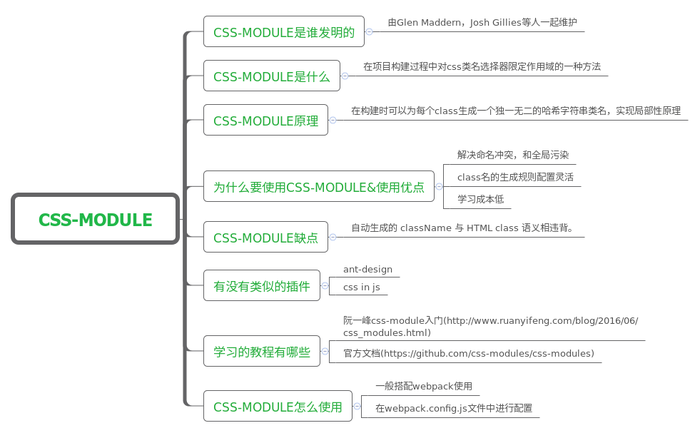
1. CSS Modules引入目的
写过CSS的人,应该都对一大长串选择器选中一个元素不陌生吧,这种方式,其实定义的就是全局样式,我们时常会因为选择器权重问题,没有把我们想要的样式加上去。
另外,每次都需要把所有的样式表都导入到程序中,如果我们可以像使用js模块一样,想用哪块就用哪块,是不是就很理想了。
CSS Modules就解决了这个问题,它自动为每一个类生成一个哈希值,可以惟一标志这个类,因此避免了我们说的第一个问题,它让我们可以像使用js模块那样,想用哪部分样式,就引入哪部分样式。下面我们来具体介绍它的使用方法。
2.CSS Modules使用方法
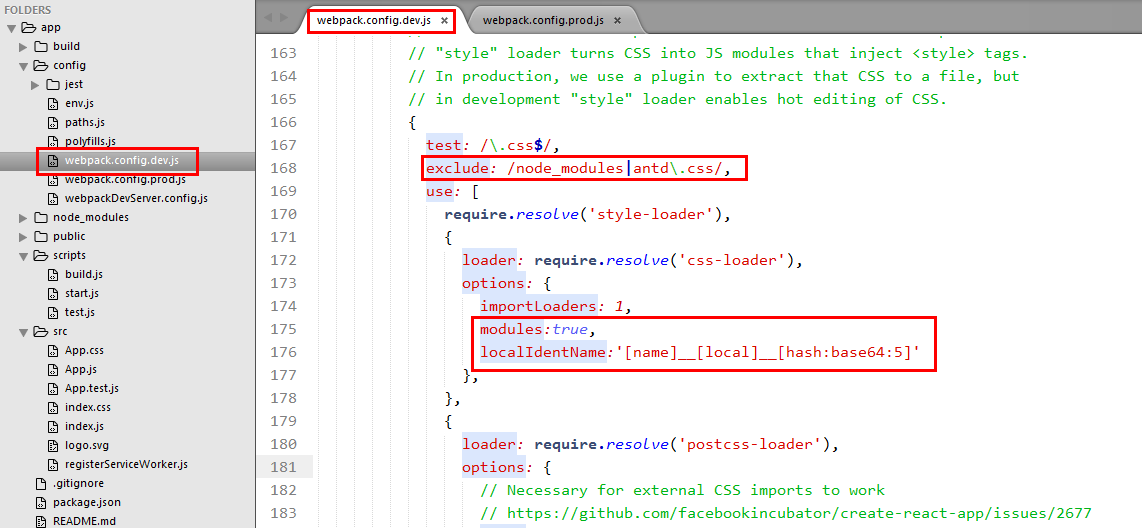
1) 如何在开启CSS Modules
create-react-app 脚手架 引入 css-modules
1modules:true,
2localIdentName:'\[name\]\_\_\[local\]\_\_\[hash:base64:5\]'
webpack.config.dev.js
1{
2  test: /.less$/,
3  exclude: /node\_modules|antd.css/,
4  use: \[
5    require.resolve('style-loader'),
6    {
7      loader: require.resolve('css-loader'),
8      options: {
9        importLoaders: 1,
10        modules:true,
11        localIdentName:'\[name\]\_\_\[local\]\_\_\[hash:base64:5\]'
12      },
13    },
14    {
15      loader: require.resolve('postcss-loader'),
16      options: {
17        // Necessary for external CSS imports to work
18        // https://github.com/facebookincubator/create-react-app/issues/2677
19        ident: 'postcss',
20        plugins: () => \[
21          require('postcss-flexbugs-fixes'),
22          autoprefixer({
23            browsers: \[
24              '>1%',
25              'last 4 versions',
26              'Firefox ESR',
27              'not ie < 9', // React doesn't support IE8 anyway
28            \],
29            flexbox: 'no-2009',
30          }),
31        \],
32      },
33    },
34    {
35      loader: require.resolve('less-loader') // compiles Less to CSS
36    }
37  \],
38},
39{
40  test: /.css$/,
41  use: \[
42    require.resolve('style-loader'),
43    {
44      loader: require.resolve('css-loader'),
45      options: {
46        importLoaders: 1,
47      },
48    },
49    {
50      loader: require.resolve('postcss-loader'),
51      options: {
52        // Necessary for external CSS imports to work
53        // https://github.com/facebookincubator/create-react-app/issues/2677
54        ident: 'postcss',
55        plugins: () => \[
56          require('postcss-flexbugs-fixes'),
57          autoprefixer({
58            browsers: \[
59              '>1%',
60              'last 4 versions',
61              'Firefox ESR',
62              'not ie < 9', // React doesn't support IE8 anyway
63            \],
64            flexbox: 'no-2009',
65          }),
66        \],
67      },
68    },
69  \],
70},
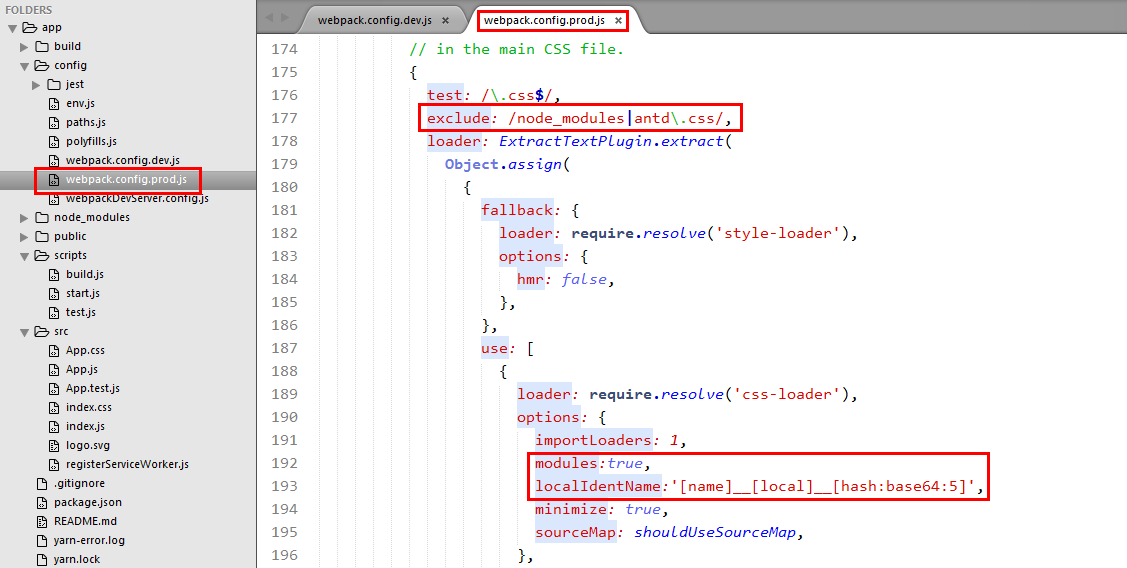
webpack.config.prod.js
1{
2  test: /.less$/,
3  exclude: /node\_modules|antd.css/,
4  loader: ExtractTextPlugin.extract(
5    Object.assign(
6      {
7        fallback: {
8          loader: require.resolve('style-loader'),
9          options: {
10            hmr: false,
11          },
12        },
13        use: \[
14          {
15            loader: require.resolve('css-loader'),
16            options: {
17              importLoaders: 1,
18              modules:true,
19              localIdentName:'\[name\]\_\_\[local\]\_\_\[hash:base64:5\]',
20              minimize: true,
21              sourceMap: shouldUseSourceMap,
22            },
23          },
24          {
25            loader: require.resolve('postcss-loader'),
26            options: {
27              // Necessary for external CSS imports to work
28              // https://github.com/facebookincubator/create-react-app/issues/2677
29              ident: 'postcss',
30              plugins: () => \[
31                require('postcss-flexbugs-fixes'),
32                autoprefixer({
33                  browsers: \[
34                    '>1%',
35                    'last 4 versions',
36                    'Firefox ESR',
37                    'not ie < 9', // React doesn't support IE8 anyway
38                  \],
39                  flexbox: 'no-2009',
40                }),
41              \],
42            },
43          },
44          {
45            loader: require.resolve('less-loader') // compiles Less to CSS
46          }
47        \],
48      },
49      extractTextPluginOptions
50    )
51  ),
52  // Note: this won't work without \`new ExtractTextPlugin()\` in \`plugins\`.
53},
54{
55  test: /.css$/,
56  loader: ExtractTextPlugin.extract(
57    Object.assign(
58      {
59        fallback: {
60          loader: require.resolve('style-loader'),
61          options: {
62            hmr: false,
63          },
64        },
65        use: \[
66          {
67            loader: require.resolve('css-loader'),
68            options: {
69              importLoaders: 1,
70              minimize: true,
71              sourceMap: shouldUseSourceMap,
72            },
73          },
74          {
75            loader: require.resolve('postcss-loader'),
76            options: {
77              // Necessary for external CSS imports to work
78              // https://github.com/facebookincubator/create-react-app/issues/2677
79              ident: 'postcss',
80              plugins: () => \[
81                require('postcss-flexbugs-fixes'),
82                autoprefixer({
83                  browsers: \[
84                    '>1%',
85                    'last 4 versions',
86                    'Firefox ESR',
87                    'not ie < 9', // React doesn't support IE8 anyway
88                  \],
89                  flexbox: 'no-2009',
90                }),
91              \],
92            },
93          },
94        \],
95      },
96      extractTextPluginOptions
97    )
98  ),
99  // Note: this won't work without \`new ExtractTextPlugin()\` in \`plugins\`.
100},
2)CSS Modules用法
1.基本使用方法
在你的项目中,添加一个CSS文件,然后你就可以像引入js模块一样,在你的js文件中引入这个文件存放到一个对象中。这个对象中是一个包含连个属性的对象,其值就是自动生成的类名。这个类名也会替换页面中的类名。
style.scss
1/\* style.scss \*/
2.bgRed {
3    background-color: #f00;
4}
5
app/app.js
1/\* app/app.js \*/
2
3import React, {Component} from 'react';
4import ReactDOM from 'react-dom';
5/\* 引入我们定义的.scss文件 \*/
6import styles from '../style/style.scss';
7
8/\* 使用无状态函数定义我们的组件\*/
9function Title() {
10    console.log(styles);
11    /\* 打印引入的styles,是一个包含连个属性的对象,其值就是自动生成的类名
12        Object {white: "\_24PAw-tvdzL8pt4nyAvnJX", bgRed: "\_2R9YNZv7rx\_o02FHxKTBzC"}
13     \*/
14    return (
15        /\* 在组件中引用 \*/
16        <h1 className={styles.bgRed}>Hello React!</h1>
17    );
18}
19
20/\* 渲染到页面中 \*/
21ReactDOM.render(<Title />, document.body );
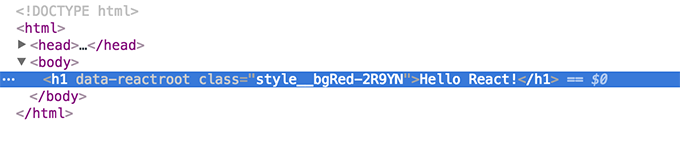
最终页面结构,如下图所示:

2. 自定义命名规则
上面生称的类名,完全是自动生成,如果自己自己规定命名规则呢,也是很简单的,只需要在上面配置modules后面添加&localIdentName=配置规则,如:
'css-loader?modules&localIdentName=[name]__[local]-[hash:base64:5]' //style__bgRed-2R9YN,local对应所在文件夹名,local对应文件名,最后是哈希值
3. 全局类名和本地类名
我们可以使用:global(className)来标识这个类是全局类名,因此CSS Modules不对其类名进行转化,:local(className)则相反,如果不用这两个包裹的话,默认是local.
style.scss
1/\* style.scss \*/
2.bgRed {
3    background-color: #f00;
4}
5
6// 添加全局bgRed
7:global(.bgRed) {
8
9}
app/app.js
1/\* app/app.js \*/
2
3import React, {Component} from 'react';
4import ReactDOM from 'react-dom';
5/\* 引入我们定义的.scss文件 \*/
6import styles from '../style/style.scss';
7
8/\* 使用无状态函数定义我们的组件\*/
9function Title() {
10    console.log(styles);
11    return (
12        /\* 在组件中全局的bgRed,此时我们可以访问到我们全局定义的bgRed,它并没有被转化 \*/
13        <h1 className="bgRed"}>Hello React!</h1>
14    );
15}
16
17/\* 渲染到页面中 \*/
18ReactDOM.render(<Title />, document.body );
4. 使用composes组合样式
我们知道,node.js中,我们可以用require引入模块,然后使用它们。CSS Modules也提供了composes来该文件中的样式规则,甚至引用其它文件中的样式规则。
style/style.scss
1/\* style/style.scss \*/
2
3.fontWhite {
4    color: #fff;
5}
6.bgRed {
7    composes: fontWhite;
8    background-color: #f00;
9}
app/app.js
1/\* app/app.js \*/
2
3import React, {Component} from 'react';
4import ReactDOM from 'react-dom';
5/\* 引入我们定义的.scss文件 \*/
6import styles from '../style/style.scss';
7
8/\* 使用无状态函数定义我们的组件\*/
9function Title() {
10    console.log(styles);
11    /\* 打印引入的styles,是一个包含连个属性的对象,其值就是自动生成的类名
12        Object {fontWhite: "style\_\_fontWhite-3jipu", bgRed: "style\_\_bgRed-2R9YN style\_\_fontWhite-3jipu"}rx\_o02FHxKTBzC"}
13     \*/
14    return (
15        /\* 在组件中引用 \*/
16        <h1 className={styles.bgRed}>Hello React!</h1>
17    );
18}
19
20/\* 渲染到页面中 \*/
21ReactDOM.render(<Title />, document.body )
此时,就是添加了两个类,html结构如下图:

引入其它文件中的样式规则,写composes: className(要引入的类名) from '引入的文件路径即可',最终效果同上,composes多少规则,就添加多少类。
最后:大家有名有发现,我一直都在类上做文章,那是因为CSS Modules只转换class名相关的样式。大家要注意啦。
在最后,给大家提供一个js库——classnames类库,给我的感觉和angular中的ng-class差不多,将值为true的类添加上。