
本文主要讲如何用Grunt打包AngularJS的模板HTML。
一 说明
AngularJS中使用单独HTML模板文件的地方非常多,例如:自定义指令、ng-include、templateUrl等。通常这些文件都是独立的html文件,AngularJS中使用这些文件都是通过文件路径地址引用的。
当用Grunt打包压缩整个项目时,如何处理这些html模板文件呢?本文讲的grunt-angular-templates插件可以解决该问题。
grunt-angular-templates插件的基本原理:
该插件实际使用的是AngularJS的$templateCache服务,将这些模板文件都缓存起来,当自定义指令、ng-include等需要对应的html文件时,AngularJS首先会去$templateCache中找对应的文件,如果找到了就不在发送XHR请求。
使用$templateCache缓存模板可以减少XHR请求数,并实现html文件打包。
同时,在AngularJS内部,第一次请求到模板HTML后,都会被缓存到 $templateCache 服务中,这样就确保一个文件只被请求一次。
下边是使用$templateCache缓存html模板的方法:
11 angular.module('app').run(["$templateCache", function($templateCache) {
22   $templateCache.put("home.html",
33     // contents for home.html ...
44   );
55   ...
66   $templateCache.put("src/app/templates/button.html",
77     // contents for button.html
88   );
99 }]);
二 安装
$ npm install grunt-angular-templates --save-dev
三 加载任务
grunt.loadNpmTasks('grunt-angular-templates');
四 配置
这里主要讲作者用到的几个常用配置:
4.1 src
要打包的模板文件路径。例如:'src/**/*.html'。
4.2 dest
输出打包好的文件地址。例如:'dist/tmp.js'。
4.3 options
各种设置都在options中,常用的有下边几个:
1)htmlmin
最小化html大小。设置了该项会去掉html的空格和换行等,可以减少压缩后文件大小。
官网推荐的设置如下:
1 1 htmlmin :{
2 2   collapseBooleanAttributes :true ,
3 3   collapseWhitespace :是的,
4 4   removeAttributeQuotes :true ,
5 5   removeComments :true ,//  仅当您不使用comment指令时!
6 6   removeEmptyAttributes :true ,
7 7   removeRedundantAttributes :true ,
8 8   removeScriptTypeAttributes :true ,
9 9   removeStyleLinkTypeAttributes :true
1010 }
2)standalone
设置是否创建新的AngularJS模块,还是使用一个现有的AngularJS模块。
设置为true时,将创建一个新的AngularJS模块,类似angular.module('app', []);
设置为false时,将使用已有的模块,类似angular.module('app')。
说明:该模块用于提供$templateCache进行模板缓存;模块名来自于下边的module属性。
3)module
设置创建的Angular模块名字,默认值为target,即Grunt配置项中ngtemplates的下一级属性名。
注意:
module和上边的standalone接口配合起来使用,如果是新创建的模块,必须在AngularJS启动模块中将该模块依赖进来,否则会导致找不到模板报错;如果是使用已有模块,就必须确保在加载打包后的html模板js之前已经定义了对应的模块,否则也会报错。
4)prefix
将模块存入到$templateCache时,对key添加的前缀。
注意1:如果设置了该属性,就要确保自定义指令、ng-include等中设置的模板地址也带有该前缀。
注意2:最终存入的存入到$templateCache的key是prefix+src后的结果,这里的src就是上边接口。
5)bootstrap(module, script)
该回调函数用于自定义模板缓存创建。
如果不定义该函数,插件会自己创建或者获取AngularJS模块,并通过run方法将所有html模板缓存到$templateCache中。
如果定义了该函数,则必须自己实现模板缓存到$templateCache,并将对应的js代码返回。最终会将返回的结果合并到输出文件中。
使用场景:将模板注册成AMD或者commonJS模块。例如:在requireJS构建的项目中。
参数说明:
module:AngularJS模块。
script:$templateCache.put()方法调用的js代码,如下:
11   $templateCache.put('/aa/src/button.html',
22     "<button type=button>{{text}}</button>"
33   );
五 实战
下边是一个实例项目:
5.1 整体项目目录如下:
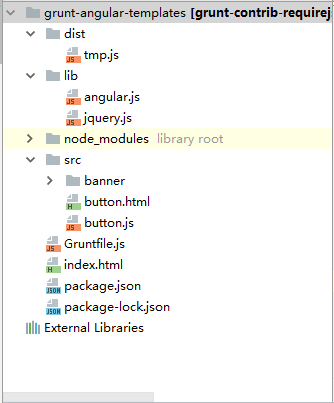
5.2 grunt配置文件如下:
1 1 module.exports = function(grunt) {
2 2     grunt.initConfig({
3 3         // 清理空文件夹
4 4         clean: {
5 5             foo1: {
6 6                 src: ['dist/*']
7 7             }
8 8         },
9 9         ngtemplates: { // 将angular中html模板通过$templateCache进行合并
1010             'angular-my-directives': {
1111                 options: {
1212                     htmlmin: {
1313                         collapseBooleanAttributes: true,
1414                         collapseWhitespace: true,
1515                         removeAttributeQuotes: true,
1616                         removeComments: true, // Only if you don't use comment directives!
1717                         removeEmptyAttributes: true,
1818                         removeRedundantAttributes: true,
1919                         removeScriptTypeAttributes: true,
2020                         removeStyleLinkTypeAttributes: true
2121                     },
2222                     standalone: true, // 是否创建新的Angular模块
2323                     module: 'temp', // 设置创建的Angular模块名字,默认值为target,即'angular-my-directives'
2424                     // bootstrap: function (module, script) {
2525                     //     console.log(script);
2626                     //     return script;
2727                     // },
2828                     prefix: '/aa/'
2929                 },
3030                 src: 'src/**/*.html', // where my view files are
3131                 dest: 'dist/tmp.js' // single file of $templateCache
3232             }
3333         },
3434     });
3535
3636     grunt.loadNpmTasks('grunt-angular-templates');
3737     grunt.loadNpmTasks('grunt-contrib-clean');
3838
3939     // 默认被执行的任务列表。
4040     grunt.registerTask('default', [
4141         'clean',
4242         'ngtemplates'
4343     ]);
4444
4545 };
5.3 button.html和banner.html是两个html模板,其中button.html是button.js中定义的mybutton指令的模板:
button.html代码如下:
<button type="button">{{text}}</button>
button.js代码如下:
1 1 var component = angular.module("component", []);
2 2
3 3 component.directive('myButton', myButton);
4 4 myButton.$inject = [];
5 5 function myButton() {
6 6     return {
7 7         restrict: 'E',
8 8         priority: 999,
9 9         scope: {
1010             text: '=',
1111         },
1212         templateUrl: '/aa/src/button.html',
1313         replace: true,
1414         link: function (scope, $element) {
1515
1616         }
1717     };
1818 }
banner.html代码如下:
<div style="width: 100%;background-color:blue;height: 70px">This is banner!</div>
5.4 执行grunt命令后,压缩好的tmp.js文件如下:
1 1 angular.module('temp', []).run(['$templateCache', function($templateCache) {
2 2   'use strict';
3 3
4 4   $templateCache.put('/aa/src/banner/banner.html',
5 5     "<div style=\"width: 100%;background-color:blue;height: 70px\">This is banner!</div>"
6 6   );
7 7
8 8   $templateCache.put('/aa/src/button.html',
9 9     "<button type=button>{{text}}</button>"
1010   );
1111
1212 }]);
5.5 测试用例index.html代码如下:
1 1 <!doctype html>
2 2 <html>
3 3 <head>
4 4     <meta charset="utf-8"/>
5 5     <title>测试</title>
6 6 </head>
7 7 <body>
8 8 <div  ng-controller="DemoCtrl">
9 9     <div ng-include="bannerTemplate"></div>
1010     <my-button text="buttonText"></my-button>
1111 </div>
1212 <!-- Load scripts. -->
1313 <script type="text/javascript" src="https://my.oschina.net//u/4344785/blog/3808496/lib/jquery.js"></script>
1414 <script type="text/javascript" src="https://my.oschina.net//u/4344785/blog/3808496/lib/angular.js"></script>
1515 <script type="text/javascript" src="https://my.oschina.net//u/4344785/blog/3808496/dist/tmp.js"></script>
1616 <script type="text/javascript" src="https://my.oschina.net//u/4344785/blog/3808496/src/button.js"></script>
1717
1818 <script type="text/javascript">
1919     var app = angular.module("test", ["component", "temp"]);
2020
2121     app.controller('DemoCtrl', function ($scope) {
2222         $scope.bannerTemplate = '/aa/src/banner/banner.html';
2323         $scope.buttonText = '确认';
2424
2525     });
2626
2727     angular.bootstrap($("html"), ["test"]);
2828 </script>
2929 </body>
3030 </html>
六 源码下载地址
https://gitee.com/bangbangwa/grunt/blob/master/grunt-angular-templates-test.rar
参考资料&内容来源
grunt官网:https://www.npmjs.com/package/grunt-angular-templates