
拓扑图
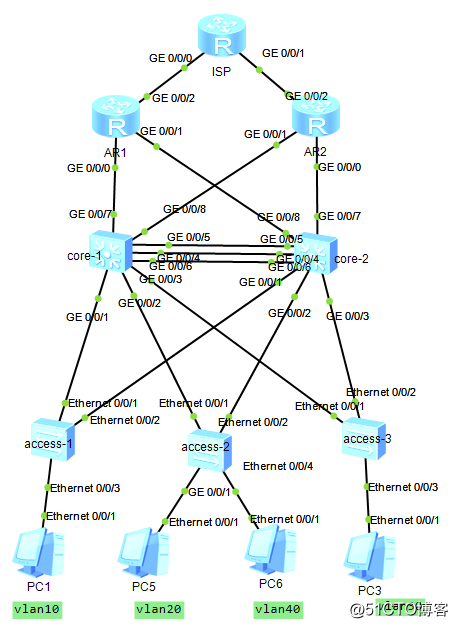
实验需求:
公司人数较多且多网络冗余和可用性要求较高,故网络中使用MSTP对不同的VLAN负载均衡,使用VRRP对网关进行负载均衡和平均流量,使用两家运营商线路对出口进行负载均衡。接入端配置边缘端口使终端快速进入转发,配置bpdu防护,保护边缘端口接收到bpdu报文后立即关闭,减少网络的震荡。两台core之间使用eth-trunk,
配置步骤:
1.access和core交换机之间的上下联启trunk并分别都创建vlan10,20,30,40,全部启用mstp和创建instance1和instance2;
2.access交换机将端口划入对应vlan并配置边缘端口和启用bpdu防护;
3.core交换机之间配置链路聚合eth-trunk10;
4.core1和core2和出口路由器AR1和AR2配置互连地址并启用ospf;
5.core1和core2配置vrrp
6.AR1和AR2启用nat,配置默认路由出口,并将默认路由引入ospf进程中,让所有内网能访问外网;
配置命令
1 所有交换机配置mstp,trunk这里没赘述了。
1vlan batch 10 20 30 40
2stp mode mstp
3stp region-configuration
4 region-name qindu
5 instance 1 vlan 10 20
6 instance 2 vlan 30 40
7 active region-configuration
core1是instance1的根桥是instance2的备份根桥,core2是instrance2的根桥是instance1的备份根桥。
core1
1stp instance 1 priority 4096
2stp instance 2 priority 8192
core2
1stp instance 1 priority 8192
2stp instance 2 priority 4096
2.access交换机将端口划入对应vlan并配置边缘端口和启用bpdu防护;
命令如下,对应的端口配置即可。
1stp bpdu-protection  //全局开启bopdu防护
2port link-type access
3 port default vlan 10  //划入vlan
4 stp edged-port enable  //边缘端口,实现快速收敛
3.core交换机之间配置链路聚合eth-trunk10;
1interface Eth-Trunk10
2 port link-type trunk
3 port trunk allow-pass vlan 2 to 4094
4 mode lacp-static
5 trunkport g0/0/4
6 trunkport g0/0/5
7 trunkport g0/0/6
4.core1和core2和出口路由器AR1和AR2配置互连地址并启用ospf;
core-1
1vlan batch 911 912
2interface Vlanif911
3 ip address 10.10.253.1 255.255.255.252
4interface Vlanif912
5 ip address 10.10.253.5 255.255.255.252
6 ospf cost 2
7
8interface GigabitEthernet0/0/7
9 port link-type access
10 port default vlan 911
11
12 interface GigabitEthernet0/0/8
13 port link-type access
14 port default vlan 912
core-2
1vlan batch 921 922
2interface Vlanif921
3 ip address 10.10.254.1 255.255.255.252
4interface Vlanif912
5 ip address 10.10.254.5 255.255.255.252
6 ospf cost 2
7
8interface GigabitEthernet0/0/7
9 port link-type access
10 port default vlan 921
11
12 interface GigabitEthernet0/0/8
13 port link-type access
14 port default vlan 922
4.core1和core2和出口路由器AR1和AR2配置互连地址并启用ospf;
core1
1ospf 1 router-id 10.0.0.3
2 area 0.0.0.0
3  network 10.10.10.0 0.0.0.255
4  network 10.10.20.0 0.0.0.255
5  network 10.10.30.0 0.0.0.255
6  network 10.10.40.0 0.0.0.255
7  network 10.10.253.4 0.0.0.3
8  network 10.10.253.0 0.0.0.3
9  network 10.0.0.3 0.0.0.0
core2
1ospf 1 router-id 10.0.0.4
2 area 0.0.0.0
3  network 10.10.10.0 0.0.0.255
4  network 10.10.20.0 0.0.0.255
5  network 10.10.30.0 0.0.0.255
6  network 10.10.40.0 0.0.0.255
7  network 10.10.254.0 0.0.0.3
8  network 10.10.254.4 0.0.0.3
9  network 10.0.0.4 0.0.0.0
AR1
1ospf 1 router-id 10.0.0.1
2 default-route-advertise
3 area 0.0.0.0
4  network 10.0.0.1 0.0.0.0
5  network 10.10.253.0 0.0.0.3
6  network 10.10.254.4 0.0.0.3
AR2
1ospf 1 router-id 10.0.0.2
2 default-route-advertise
3 area 0.0.0.0
4  network 10.0.0.2 0.0.0.0
5  network 10.10.253.4 0.0.0.3
6  network 10.10.254.0 0.0.0.3
5.core1和core2配置vrrp
core1
1interface Vlanif10
2 ip address 10.10.10.252 255.255.255.0
3 vrrp vrid 10 virtual-ip 10.10.10.254
4 vrrp vrid 10 priority 120
5 vrrp vrid 10 track interface GigabitEthernet0/0/7 reduced 21
6 ospf cost 2
7 dhcp select relay
8 dhcp relay server-ip 10.10.253.2
9#
10interface Vlanif20
11 ip address 10.10.20.252 255.255.255.0
12 vrrp vrid 20 virtual-ip 10.10.20.254
13 vrrp vrid 20 priority 120
14 vrrp vrid 20 track interface GigabitEthernet0/0/7 reduced 21
15 ospf cost 2
16 dhcp select relay
17 dhcp relay server-ip 10.10.253.2
18#
19interface Vlanif30
20 ip address 10.10.30.252 255.255.255.0
21 vrrp vrid 30 virtual-ip 10.10.30.254
22 ospf cost 2
23#
24interface Vlanif40
25 ip address 10.10.40.252 255.255.255.0
26 vrrp vrid 40 virtual-ip 10.10.40.254
27 ospf cost 2
core2
1interface Vlanif10
2 ip address 10.10.10.253 255.255.255.0
3 vrrp vrid 10 virtual-ip 10.10.10.254
4 ospf cost 2
5#
6interface Vlanif20
7 ip address 10.10.20.253 255.255.255.0
8 vrrp vrid 20 virtual-ip 10.10.20.254
9 ospf cost 2
10#
11interface Vlanif30
12 ip address 10.10.30.253 255.255.255.0
13 vrrp vrid 30 virtual-ip 10.10.30.254
14 vrrp vrid 30 priority 120
15 ospf cost 2
16 dhcp select relay
17 dhcp relay server-ip 10.10.253.2
18#
19interface Vlanif40
20 ip address 10.10.40.253 255.255.255.0
21 vrrp vrid 40 virtual-ip 10.10.40.254
22 vrrp vrid 40 priority 120
23 ospf cost 2
24 dhcp select relay
25 dhcp relay server-ip 10.10.253.2
6.AR1和AR2启用nat,配置默认路由出口,并将默认路由引入ospf进程中,让所有内网能访问外网;
AR1
1acl number 2000
2 rule 5 permit source 10.10.0.0 0.0.255.255
3
4interface GigabitEthernet0/0/2
5 ip address 202.100.1.1 255.255.255.248
6 nat outbound 2000
7
8ip route-static 0.0.0.0 0.0.0.0 202.100.1.2
9
10 引入默认路由步骤3有命令,可翻看参考
AR2
1acl number 2000
2 rule 5 permit source 10.10.0.0 0.0.255.255
3
4interface GigabitEthernet0/0/2
5 ip address 202.100.2.1 255.255.255.248
6 nat outbound 2000
7
8ip route-static 0.0.0.0 0.0.0.0 202.100.2.2
这样,一个典型的园区网,汇聚,核心,出口都有冗余和负载均衡。