
原博:http://swinex.iteye.com/blog/1131451
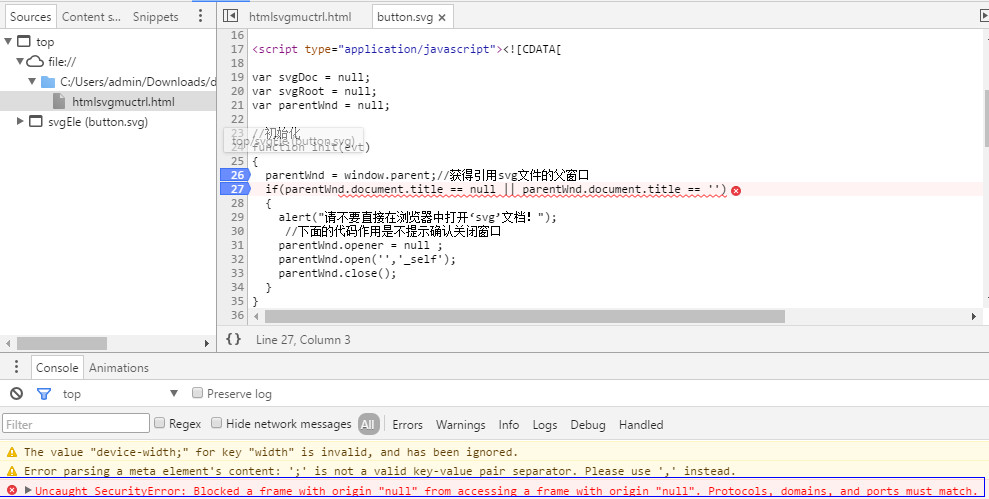
在IE上运行正常,但在谷歌浏览器运行时会报以下异常,
解决方法:放到服务器上运行即可
感谢博主大大
button.svg
1<?xml version="1.0" standalone="no"?>
2<!DOCTYPE svg PUBLIC "-//W3C//DTD SVG 1.1//EN"
3"http://www.w3.org/Graphics/SVG/1.1/DTD/svg11.dtd">
4
5<svg width="100%" height="100%" version="1.1"
6xmlns="http://www.w3.org/2000/svg"
7onload="init(evt)"
8onclick="showCurColor(evt)"
9>
10
11<style type="text/css"><![CDATA[
12
13
14]]></style>
15
16
17<script type="application/javascript"><![CDATA[
18
19var svgDoc = null;
20var svgRoot = null;
21var parentWnd = null;
22
23//初始化
24function init(evt)
25{
26  parentWnd = window.parent;//获得引用svg文件的父窗口
27  if(parentWnd.document.title == null || parentWnd.document.title == '')
28  {
29    alert("请不要直接在浏览器中打开‘svg’文档!");
30     //下面的代码作用是不提示确认关闭窗口
31    parentWnd.opener = null ;
32    parentWnd.open('','_self');
33    parentWnd.close();
34  }
35}
36
37//显示当前矩形框颜色
38function showCurColor(evt)
39  {
40    var target = evt.target;//获得当前点击的对象
41    if(target.id == "rect")//点击到的是矩形框
42    {
43      var rectStyle = target.style;
44      parentWnd.setCurColor(rectStyle.fill);//调用父窗口里面的设置颜色文本的方法
45    }
46  }
47
48]]></script>
49
50
51
52<rect id="rect" x="20" y="20" rx="20" ry="20" width="120"
53height="50" style="fill:red;stroke:black;stroke-width:5;opacity:0.5"
54/>
55
56<a transform="translate(1,30)">
57      <text
58         transform="scale(1.3,1)"
59         id="text"
60         y="60.196808"
61         x="17.778425"
62         style="font-size:21.89170647px;font-style:normal;font-weight:normal;fill:#000000;fill-opacity:1;stroke:none;font-family:Bitstream Vera Sans"
63         >click me</text>
64</a>
65
66</svg>
htmlsvgmuctrl.html
1<!DOCTYPE html> 2<html lang="en"> 3<head> 4 <meta charset="utf-8" /> 5 6 <!-- Always force latest IE rendering engine (even in intranet) & Chrome Frame 7 Remove this if you use the .htaccess --> 8 <meta http-equiv="X-UA-Compatible" content="IE=edge,chrome=1" /> 9 10 <title>htmlsvgmuctrl</title> 11 <meta name="description" content="" /> 12 <meta name="generator" content="Studio 3 http://aptana.com/" /> 13 <meta name="author" content="SwineX" /> 14 15 <meta name="viewport" content="width=device-width; initial-scale=1.0" /> 16 17 <!-- Replace favicon.ico & apple-touch-icon.png in the root of your domain and delete these references --> 18 <link rel="shortcut icon" href="https://my.oschina.net/favicon.ico" /> 19 <link rel="apple-touch-icon" href="https://my.oschina.net/apple-touch-icon.png" /> 20 21 <script> 22 23 function setCurColor(color) 24 { 25 var strColor = document.getElementById("curcolor"); 26 strColor.innerHTML = color; 27 } 28 29 function setColorOfRect(color) 30 { 31 var svgEle = document.getElementById("svgEle"); 32 var svgDoc = svgEle.getSVGDocument();//获得svg的document对象 33 var rect = svgDoc.getElementById("rect"); 34 rect.style.fill = color; 35 } 36 37 </script> 38</head> 39 40<body> 41 <div> 42 <header> 43 <h1>html与svg间的js函数相互调用</h1> 44 </header> 45 <hr /> 46 47 <embed id="svgEle" src="button.svg" width="100%" height="100%" 48 type="image/svg+xml" 49 pluginspage="http://www.adobe.com/svg/viewer/install/" /> 50 51 52 53 <button onclick="setColorOfRect('blue')">blue</button> 54 <button onclick="setColorOfRect('red')">red</button> 55 <button onclick="setColorOfRect('yellow')">yellow</button> 56 57 <p>the current color is:<span id="curcolor"></span></p> 58 59 <hr /> 60 <footer> 61 <p>© Copyright 2011 by SwineX</p> 62 </footer> 63 </div> 64</body> 65</html>