
环境
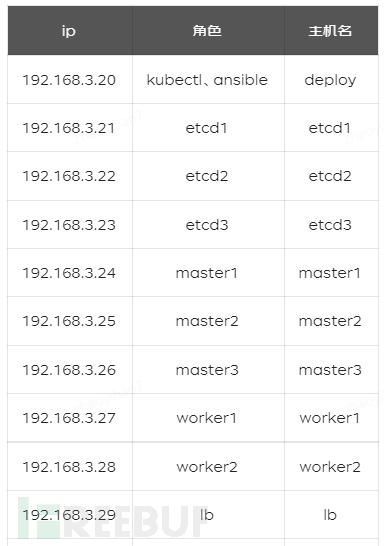
准备工作
配置ansible(deploy 主机执行)
1# ssh-keygen
2# for i in 192.168.3.{21..28}; do  ssh-copy-id  -i ~/.ssh/id_rsa.pub $i; done
1[root@deploy ~]# cat /etc/ansible/hosts
2[etcd]
3192.168.3.21
4192.168.3.22
5192.168.3.23
6[k8s-master]
7192.168.3.24
8192.168.3.25
9192.168.3.26
10[k8s-worker]
11192.168.3.27
12192.168.3.28
13
14[k8s:children]
15k8s-master
16k8s-worker
优化主机配置
关闭防火墙和selinux
1# ansible all -m shell -a "systemctl stop firewalld && systemctl disable firewalld"
2# ansible all -m shell -a "sed -i 's/^SELINUX=.*/SELINUX=disabled/g' /etc/selinux/config"
修改limit
关闭交换分区
1# swapoff -a
2# ansible  k8s  -m shell -a "yes | cp /etc/fstab /etc/fstab_bak"
3# ansible  k8s  -m shell -a "cat /etc/fstab_bak | grep -v swap > /etc/fstab"
4# ansible  k8s  -m shell -a "echo vm.swappiness = 0 >> /etc/sysctl.d/k8s.conf"
5# ansible  k8s  -m shell -a "sysctl -p /etc/sysctl.d/k8s.conf"
配置ipvs
1# cat /root/ipvs.sh
2#!/bin/bash
3yum -y install ipvsadm ipset
4####创建ipvs脚本
5
6cat > /etc/sysconfig/modules/ipvs.modules << EOF
7#!/bin/bash
8modprobe -- ip_vs
9modprobe -- ip_vs_rr
10modprobe -- ip_vs_wrr
11modprobe -- ip_vs_sh
12modprobe -- nf_conntrack_ipv4
13EOF
14
15####执行脚本,验证配置
16
17chmod 755 /etc/sysconfig/modules/ipvs.modules
18bash /etc/sysconfig/modules/ipvs.modules
19lsmod | grep -e ip_vs -e nf_conntrack_ipv4
20
21#########################
22
23# ansible k8s  -m script -a "/root/ipvs.sh"
配置网桥转发规则
1# cat sysctl.sh
2#!/bin/bash
3cat > /etc/sysctl.d/k8s.conf << EOF
4net.bridge.bridge-nf-call-ip6tables = 1
5net.bridge.bridge-nf-call-iptables = 1
6net.ipv4.ip_forward = 1
7EOF
8
9cat <<EOF | tee /etc/modules-load.d/crio.conf
10overlay
11br_netfilter
12EOF
13modprobe overlay
14modprobe br_netfilter
15sysctl --system
# ansible k8s -m script -a "/root/sysctl.sh"
配置etcd集群
生成证书(ansible 主机操作)
1# curl -o /usr/bin/cfssl https://pkg.cfssl.org/R1.2/cfssl_linux-amd64
2# curl -o /usr/bin/cfssljson https://pkg.cfssl.org/R1.2/cfssljson_linux-amd64
3# curl -o /usr/bin/cfssl-certinfo https://pkg.cfssl.org/R1.2/cfssl-certinfo_linux-amd64
4# chmod +x /usr/bin/cfssl*
创建 CA 配置文件
1# mkdir p ssl
2# cd /root/ssl
3# cat >ca-config.json <<EOF
4{
5  "signing": {
6    "default": {
7      "expiry": "876000h"
8    },
9    "profiles": {
10      "etcd": {
11        "usages": [
12            "signing",
13            "key encipherment",
14            "server auth",
15            "client auth"
16        ],
17        "expiry": "876000h"
18      }
19    }
20  }
21}
22EOF
创建 CA 证书签名请求
1# cat >ca-csr.json <<EOF
2{
3  "CN": "etcd",
4  "key": {
5    "algo": "rsa",
6    "size": 2048
7  },
8  "names": [
9    {
10      "C": "CN",
11      "ST": "beijing",
12      "L": "beijing",
13      "O": "jdt",
14      "OU": "iot"
15    }
16  ]
17}
18EOF
生成 CA 证书和私钥
# cfssl gencert -initca ca-csr.json | cfssljson -bare ca
创建etcd的TLS认证证书
1# cat > etcd-csr.json <<EOF
2{
3  "CN": "etcd",
4  "hosts": [
5    "192.168.3.21",
6    "192.168.3.22",
7    "192.168.3.23",
8    "192.168.3.24",
9    "192.168.3.23",
10    "192.168.3.26",
11    "etcd1",
12    "etcd2",
13    "etcd3",
14    "master1",
15    "master2",
16    "master3"
17  ],
18  "key": {
19    "algo": "rsa",
20    "size": 2048
21  },
22  "names": [
23    {
24      "C": "CN",
25      "ST": "beijing",
26      "L": "beijing",
27      "O": "jdt",
28      "OU": "iot"
29    }
30  ]
31EOF
生成 etcd证书和私钥并分发
1# cfssl gencert -ca=ca.pem -ca-key=ca-key.pem -config=ca-config.json -profile=etcd etcd-csr.json | cfssljson -bare etcd
2# ansible  etcd -m copy -a "src=/root/ssl/ dest=/export/Data/certs/"
ETCD安装以及配置
创建数据目录
# ansible etcd -m shell -a "mkdir -p /export/Data/etcd_data"
下载etcd并分发
1# wget https://github.com/etcd-io/etcd/releases/download/v3.5.1/etcd-v3.5.1-linux-amd64.tar.gz
2# tar xf etcd-v3.5.1-linux-amd64.tar.gz  && cd etcd-v3.5.1-linux-amd64
3# ansible etcd -m copy -a "src=etcd  dest=/usr/bin/"
4# ansible etcd -m copy -a "src=etcdutl  dest=/usr/bin/"
5# ansible etcd -m copy -a "src=etcdctl  dest=/usr/bin/"
6# ansible etcd -m shell -a "chmod +x /usr/bin/etcd*"
配置etcd
1# cat etcd_config.sh
2#!/bin/bash
3
4#PEER_NAME指定本节点的主机名称/域名,
5#PRIVATE_IP指定本节点的IP(用于后面配置文件的生成)
6#ETCD_CLUSTER群集列表,是所有节点信息(内容格式: 各节点名称=https://ip:端口  名称任意但要有标识性)
7#ETCD_INITIAL_CLUSTER_TOKEN为该etcd集群Token,同一集群token一致
8interface_name=`cat /proc/net/dev | sed -n '3,$p' | awk -F ':' {'print $1'} | grep  -E "^ " | grep -v lo | head -n1`
9ipaddr=`ip a | grep $interface_name  | awk '{print $2}' | awk -F"/"  '{print $1}' | awk -F':' '{print $NF}'`
10export PEER_NAME=`hostname`
11export PRIVATE_IP=`echo $ipaddr | tr -d '\r'`
12export ETCD_CLUSTER="etcd1=https://192.168.3.21:2380,etcd2=https://192.168.3.22:2380,etcd3=https://192.168.3.23:2380"
13export ETCD_INITIAL_CLUSTER_TOKEN="etcd-cluster-1"
14
15
16cat > /etc/systemd/system/etcd.service  <<EOF
17[Unit]
18Description=etcd
19Documentation=https://github.com/coreos/etcd
20Conflicts=etcd.service
21
22[Service]
23Type=notify
24Restart=always
25RestartSec=5s
26LimitNOFILE=65536
27TimeoutStartSec=0
28
29ExecStart=/usr/bin/etcd --name ${PEER_NAME} \
30    --data-dir /export/Data/etcd_data\
31    --listen-client-urls https://${PRIVATE_IP}:2379 \
32    --advertise-client-urls https://${PRIVATE_IP}:2379 \
33    --listen-peer-urls https://${PRIVATE_IP}:2380 \
34    --initial-advertise-peer-urls https://${PRIVATE_IP}:2380 \
35    --cert-file=/export/Data/certs/etcd.pem \
36    --key-file=/export/Data/certs/etcd-key.pem \
37    --client-cert-auth \
38    --trusted-ca-file=/export/Data/certs/ca.pem \
39    --peer-cert-file=/export/Data/certs/etcd.pem \
40    --peer-key-file=/export/Data/certs/etcd-key.pem \
41    --peer-client-cert-auth \
42    --peer-trusted-ca-file=/export/Data/certs/ca.pem \
43    --initial-cluster ${ETCD_CLUSTER} \
44    --initial-cluster-token etcd-cluster-1 \
45    --initial-cluster-state new
46
47[Install]
48WantedBy=multi-user.target
49
50EOF
# ansible etcd -m script -a "/root/etcd_config.sh"
启动ETCD
1# ansible etcd -m shell -a "systemctl daemon-reload"
2# ansible etcd -m service -a 'name=etcd  state=started'
3# ansible etcd -m shell -a "systemctl enable  etcd"
校验ETCD
注: ansible节点执行,需安装 etcdctl
1# cat check_etcd.sh
2#!/bin/bash
3
4HOST1=192.168.3.21
5HOST2=192.168.3.22
6HOST3=192.168.3.23
7ENDPOINTS=$HOST1:2379,$HOST2:2379,$HOST3:2379
8#因为开启了证书验证,因此执行命令需加上证书
9KEY="--cacert=/root/ssl/ca.pem \
10--cert=/root/ssl/etcd.pem \
11--key=/root/ssl/etcd-key.pem"
12
13
14#etcd集群健康信息
15etcdctl --endpoints=$ENDPOINTS $KEY endpoint health
16
17#etcd集群状态信息
18etcdctl --endpoints=$ENDPOINTS $KEY --write-out=table endpoint status
19
20#etcd集群成员信息
21etcdctl --endpoints=$ENDPOINTS $KEY member list -w table
1# sh check_etcd.sh
2192.168.3.22:2379 is healthy: successfully committed proposal: took = 6.670434ms
3192.168.3.23:2379 is healthy: successfully committed proposal: took = 7.021894ms
4192.168.3.21:2379 is healthy: successfully committed proposal: took = 6.938656ms
5+-------------------+------------------+---------+---------+-----------+------------+-----------+------------+--------------------+--------+
6|     ENDPOINT      |        ID        | VERSION | DB SIZE | IS LEADER | IS LEARNER | RAFT TERM | RAFT INDEX | RAFT APPLIED INDEX | ERRORS |
7+-------------------+------------------+---------+---------+-----------+------------+-----------+------------+--------------------+--------+
8| 192.168.3.21:2379 | a30c90f91c6bc0bf |   3.5.1 |   20 kB |     false |      false |         2 |         23 |                 23 |        |
9| 192.168.3.22:2379 | 877407b6419f0fed |   3.5.1 |   20 kB |      true |      false |         2 |         23 |                 23 |        |
10| 192.168.3.23:2379 | 75b3a36457698e9a |   3.5.1 |   37 kB |     false |      false |         2 |         23 |                 23 |        |
11+-------------------+------------------+---------+---------+-----------+------------+-----------+------------+--------------------+--------+
12+------------------+---------+-------+---------------------------+---------------------------+------------+
13|        ID        | STATUS  | NAME  |        PEER ADDRS         |       CLIENT ADDRS        | IS LEARNER |
14+------------------+---------+-------+---------------------------+---------------------------+------------+
15| 75b3a36457698e9a | started | etcd3 | https://192.168.3.23:2380 | https://192.168.3.23:2379 |      false |
16| 877407b6419f0fed | started | etcd2 | https://192.168.3.22:2380 | https://192.168.3.22:2379 |      false |
17| a30c90f91c6bc0bf | started | etcd1 | https://192.168.3.21:2380 | https://192.168.3.21:2379 |      false |
18+------------------+---------+-------+---------------------------+---------------------------+------------+
安装配置 CRI-O
安装CRI-O
1# cat get_cri-o.sh
2#!/bin/bash
3VERSION=1.22
4sudo curl -L -o /etc/yum.repos.d/devel:kubic:libcontainers:stable.repo https://download.opensuse.org/repositories/devel:kubic:libcontainers:stable/CentOS_7/devel:kubic:libcontainers:stable.repo
5sudo curl -L -o /etc/yum.repos.d/devel:kubic:libcontainers:stable:cri-o:${VERSION}.repo https://download.opensuse.org/repositories/devel:kubic:libcontainers:stable:cri-o:${VERSION}/CentOS_7/devel:kubic:libcontainers:stable:cri-o:${VERSION}.repo
1# ansible k8s -m  yum -a "name=cri-o,cri-tools state=latest"
2# ansible k8s -m  shell  -a "sudo systemctl enable --now crio"
修改cri-o 存储路径
# ansible k8s -m shell -a "sed -i -e 's?^graphroot =.*?graphroot = "/export/Data/containers/storage"?g' /etc/containers/storage.conf"
配置cgroup
1# cat 02-cgroup-manager.conf
2[crio.runtime]
3conmon_cgroup = "pod"
4cgroup_manager = "systemd"
5
6# ansible k8s -m copy -a "src=02-cgroup-manager.conf   dest=/etc/crio/crio.conf.d/"
配置镜像加速
1# cat images_mirr.sh
2#!/bin/bash
3cat >> /etc/containers/registries.conf << EOF
4[[registry]]
5prefix = "docker.io"
6location = "hub-mirror.c.163.com"
7
8[[registry.mirror]]
9prefix = "docker.io"
10location = "hub-mirror.c.163.com"
11EOF
1# ansible k8s  -m script -a "/root/images_mirr.sh"
2# ansible k8s  -m service -a 'name=crio  state=restarted'
配置LB
公有云使用负载均衡代替
高可用LB后续更新,暂用nginx代替
以下操作LB节点执行
1[root@lb ~]# yum -y install epel-release.noarch
2[root@lb ~]# yum -y install nginx nginx-mod-stream
nginx 配置文件中加入以下配置
1stream {
2  log_format  main  '$remote_addr [$time_local]'
3                    '$protocol $status $bytes_sent $bytes_received'
4                    '$session_time';
5  server {
6    listen 16443;
7    proxy_pass kubeapi;
8    access_log  /var/log/nginx/access.log  main;
9  }
10  upstream kubeapi {
11    server 192.168.3.24:6443;
12    server 192.168.3.25:6443;
13    server 192.168.3.26:6443;
14  }
15}
部署k8s
安装kubeadm、kubelet
1# cat kube.sh
2#!/bin/bash
3cat <<EOF | sudo tee /etc/yum.repos.d/kubernetes.repo
4[kubernetes]
5name=Kubernetes
6baseurl=https://packages.cloud.google.com/yum/repos/kubernetes-el7-\$basearch
7enabled=1
8gpgcheck=1
9repo_gpgcheck=1
10gpgkey=https://packages.cloud.google.com/yum/doc/yum-key.gpg https://packages.cloud.google.com/yum/doc/rpm-package-key.gpg
11exclude=kubelet kubeadm kubectl
12EOF
13yum install   -y kubelet-1.22.3-0  kubeadm-1.22.3-0  kubectl-1.22.3-0 --disableexcludes=kubernetes
14
15sudo systemctl enable --now kubelet
16
17
18# ansible k8s  -m script -a "/root/kube.sh"
分发etcd证书
# ansible k8s -m shell -a "mkdir -p /export/Data/certs/"
配置kubelet
1# cat  kubelet_conf.sh
2#!/bin/bash
3
4cat > /etc/sysconfig/kubelet <<EOF
5KUBELET_EXTRA_ARGS=--container-runtime=remote --cgroup-driver=systemd --container-runtime-endpoint='unix:///var/run/crio/crio.sock' --runtime-request-timeout=5m
6EOF
7
8# ansible k8s  -m script -a "/root/kubelet_conf.sh"
9# ansible k8s  -m service -a 'name=kubelet  state=restarted'
初始第一个master节点
1# cat kubeadm_config.yaml
2apiVersion: kubeadm.k8s.io/v1beta2
3kind: ClusterConfiguration
4kubernetesVersion: v1.22.3
5imageRepository: registry.aliyuncs.com/google_containers
6controlPlaneEndpoint: "192.168.3.29:16443"
7networking:
8  serviceSubnet: "10.96.0.0/16"
9  podSubnet: "172.16.0.0/16"
10  dnsDomain: "cluster.local"
11dns:
12  type: "CoreDNS"
13etcd:
14  external:
15     endpoints:
16     - https://192.168.3.21:2379
17     - https://192.168.3.22:2379
18     - https://192.168.3.23:2379
19     caFile: /export/Data/certs/ca.pem
20     certFile: /export/Data/certs/etcd.pem
21     keyFile: /export/Data/certs/etcd-key.pem
22---
23apiVersion: kubelet.config.k8s.io/v1beta1
24kind: KubeletConfiguration
25cgroupDriver: systemd
26
27---
28apiVersion: kubeproxy.config.k8s.io/v1alpha1
29kind: KubeProxyConfiguration
30mode: ipvs
1# ansible 192.168.3.24 -m copy -a "src=kubeadm_config.yaml dest=/root"
2# ansible  k8s  -m copy -a "src=/root/ssl/ dest=/export/Data/certs/"
3#  ansible 192.168.3.24 -m shell  -a "kubeadm init    --config=/root/kubeadm_config.yaml   --upload-certs"
初始化第二个master节点
注: 密钥上步获得
# ansible 192.168.3.25 -m shell -a "kubeadm join 192.168.3.29:16443 --token de4x51.d923b7l0tbi0692t --discovery-token-ca-cert-hash sha256:b1a8f00caed912ac083d10d8ecd1e92ddf6870c768f91d4e43c91c2614e24e1a --control-plane --certificate-key 0b34ca2ebd85f99ff66b2f57b80708e2ac0368880da52a802e3feb01852f2d81"
初始化第三个master节点
# ansible 192.168.3.26 -m shell -a "kubeadm join 192.168.3.29:16443 --token de4x51.d923b7l0tbi0692t --discovery-token-ca-cert-hash sha256:b1a8f00caed912ac083d10d8ecd1e92ddf6870c768f91d4e43c91c2614e24e1a --control-plane --certificate-key 0b34ca2ebd85f99ff66b2f57b80708e2ac0368880da52a802e3feb01852f2d81"
初始化worker节点
# ansible k8s-worker -m shell -a " kubeadm join 192.168.3.29:16443 --token de4x51.d923b7l0tbi0692t --discovery-token-ca-cert-hash sha256:b1a8f00caed912ac083d10d8ecd1e92ddf6870c768f91d4e43c91c2614e24e1a"
初始化kubectl
1# mkdir -p $HOME/.kube
2# scp root@192.168.3.24:/etc/kubernetes/admin.conf $HOME/.kube/config
3# scp root@192.168.3.24:/usr/bin/kubectl  /usr/bin/kubectl
验证kubelet
1[root@deploy ~]# kubectl  get node
2NAME      STATUS   ROLES                  AGE     VERSION
3master1   Ready    control-plane,master   41m     v1.22.3
4master2   Ready    control-plane,master   13m     v1.22.3
5master3   Ready    control-plane,master   12m     v1.22.3
6worker1   Ready    <none>                 9m18s   v1.22.3
7worker2   Ready    <none>                 9m19s   v1.22.3
部署网络模型
修改配置
1---
2# Source: calico/templates/calico-etcd-secrets.yaml
3# The following contains k8s Secrets for use with a TLS enabled etcd cluster.
4# For information on populating Secrets, see http://kubernetes.io/docs/user-guide/secrets/
5apiVersion: v1
6kind: Secret
7type: Opaque
8metadata:
9  name: calico-etcd-secrets
10  namespace: kube-system
11data:
12  # Populate the following with etcd TLS configuration if desired, but leave blank if
13  # not using TLS for etcd.
14  # The keys below should be uncommented and the values populated with the base64
15  # encoded contents of each file that would be associated with the TLS data.
16  # Example command for encoding a file contents: cat <file> | base64 -w 0
17  etcd-key: LS0tLS1CRUdJTiBSU0EgUFJJVkFURSBLRVktLS0tLQpNSUlFcEFJQkFBS0NBUUVBNkZJNE91OUl4WU01L2IxUVBHa2RWQUF0UHc1QzA1b0MwN1Z0WGhWaWZDUzYwWitsCjV3aFRBRGRITVpvajhzdXB3dGU2a3IyUnpOYjluM2xGb2lqb0MxMjV4LzUvd2xZcWYyOWt1WTJrQzd4RlBwUFgKdHhwUmlUMEVFV09vTGVyQ202Y3RmMVhjR1RxTHBsZXorVTBCSGNRY0FoUnc3NFFHK1ByU3pDbzV5UDhGWTFHSQo0UWhHWkxyWnZXT0JJZGcyWjFGOHpvSVdVVE1QdWxrQ0Z6WHNDeENFVXY1TXFybjZsN0RZcWJ5K2drZG5qb2U3CklhQXp0UW5CZFVOMmEvdHdXSVE4S3YvSU15TTduT0plL29POG5rdDY4d2h6V1Ftc3p2VkdpSDI1SWhwUUxub3UKcmp1TEhBRERCaS9RM1JuWXdVZWZYTGVOZ1FoTmJYZXE0eGVuT1FJREFRQUJBb0lCQVFETVNjaHlZb211VFFlSQpqWmxwbGRFWlZaSnorVGxnVXZTYmI5VTlQemE4RFp4TnlzSWJGMkhOTmM2ZjJuZ3ovMDFITFdZOXRQN3BqaisxCnBQRkxlQWNjUDQyblJLN1psK1dFNjlJNXJFaU5uVCtTbUhTKzZTQzd1bkRDVGN6TW03d0hIWW5QaUJPa0I2eFgKV0pYRTZpYktJdkd5RG9HRXpLZEk5MTYzODRXZXJKejJneEhDMEZzUGcxOEJPV0NjMmM3SkN5UmdhOXl6Sk90UQpISWw5N0svNStNRXZpSFI0emhqV3hiTXNyVW55MllMQ1hPeW9reTBzVzN0U2RLbmZBUUs2RkJueWxFN3VVQnNXCm1XK2o3Kzl6ZUJGUVdRMlBGS1J4Q1o4amtYSSt1a1NhVzBoTER6b0d6OHBweno5UWNHMWVCOURqTFE5UHFCZDYKbTFkcnovU0JBb0dCQVBqY2x3TlEvOVFFUWhMc1Q3Nkw1OFpZQnBkQ2RUZTFMbG1vVWVIeDQveStJYlYwSkQ2eQpvRmpFbGEzZm1UOHA3THJGMXFQZjlNWmsrUmtRa3VjOGcyQUlyUXp0cmtrUnQxWmVSWHBhMHIzMU53emlEdTU3ClpLNnVWamM4S0NKYlV6S3NNcGZUajdRemFLelZNSFI3aWgxdzZOUWYxS0JNdG94Q3Rtc2MrdjBwQW9HQkFPNzgKSytxd3BJbWpCd2dXZm01NitSKzFzWXkrclZOMk1kZU9QdmRFTzRyQzlHSGlWT1VaaEM0WXlNRnJNOEh4TFd5RQo0eVpsMVpvNXZYVG5ha0JFUWxHU2E4L1NnMkZkY0tJdnNyTG9RUnBMTEhWMHo4b1E0Q2JWTW1GZkgwMDBMK1dICnBYYXNYaWlBdkcrdmxxOGk2Z1U2OGRnOFc2akFUeTZTTUNQTDBZdVJBb0dBU2h4L1NIaU54MWtCU0Z0aG9EQlAKOU14d0lnbWptTlIzR2pJN09GdHQ5dTIwWWpKVlBPcTdQOVJEY3dWY3dPZStYUnpmdit2SkhIQWprcWhSNTFVcApGcWRleWJQYXJGMy9TRlJJd3BoYm5FQnpoWDJvenJLbW1ETEk4Q2dWRjY0MHg2bHFZN2FZWENUWExtbEt4ZFdvCm12M3VDSVgyTDBySkxsb0xzemh0TW9rQ2dZQjJOdUw2YW5wWll2MDljUE1GYjJyLzFuNkhJbUxXWUNiemUzZUcKRklobmNWdzFkeUdMV2YzYVY0UW11UUtYTXRmSFVFeVVWOWM3UE1pTXBWUVhpaXhMOFdQSEgxakJ0dGphUVVIaAo0YVVpZm’9EMWNOekFGV3pyaUpZdE9FSmhqQ2tOSHZZb0o4ZER2YnA0ZktESzdUaFpjZmpqZjZmUFo2RkRaa’WpOCjdDb3hJUUtCZ1FDWTRWTDM5cG5KZVFQMFhYc1dHVnhVN2Z5Szh0YVFJVnk4Y0tXeVBGdXNaYklXSVM0eU5ENW8KWFI5cHZGYjdkbmQzMnJXaFNKeWZJVm’9ZQWhMTXpyd2dBdnF5Q1J4MXdEU2NqdnRFbCs5ZUF1SWIrUFNYZEQ2NgpRMnFyWEttMjNlem0yVkpUL2MxWHlOb2FDYVExb1BPK1BBTDMxZkxiUklLdUZrUEMzVTRZSFE9PQotLS0tLUVORCBSU0EgUFJJVkFURSBLRVktLS0tLQo=
18etcd-cert: LS0tLS1CRUdJTiBDRVJUSUZJQ0FURS0tLS0tCk1JSUVLRENDQXhDZ0F3SUJBZ0lVWkRmczR0UGR0dVJGZEZGRHM0MHBRcWp0VUNjd0RRWUpLb1pJaHZjTkFRRUwKQlFBd1hERUxNQWtHQTFVRUJoTUNRMDR4RURBT0JnTlZCQWdUQjJKbGFXcHBibWN4RURBT0JnTlZCQWNUQjJKbAphV3BwYm1jeEREQUtCZ05WQkFvVEEycGtkREVNTUFvR0ExVUVDeE1EYVc5ME1RMHdDd1lEVlFRREV3UmxkR05rCk1DQVhEVEl4TVRFeE56RXhOVGd3TUZvWUR6SXhNakV4TURJME1URTFPREF3V2pCY01Rc3dDUVlEVlFRR0V3SkQKVGpFUU1BNEdBMVVFQ0JNSFltVnBhbWx1WnpFUU1BNEdBMVVFQnhNSFltVnBhbWx1WnpFTU1Bb0dBMVVFQ2hNRAphbVIwTVF3d0NnWURWUVFMRXdOcGIzUXhEVEFMQmdOVkJBTVRCR1YwWTJRd2dnRWlNQTBHQ1NxR1NJYjNEUUVCCkFRVUFBNElCRHdBd2dnRUtBb0lCQVFEb1VqZzY3MGpGZ3puOXZWQThhUjFVQUMwL0RrTFRtZ0xUdFcxZUZXSjgKSkxyUm42WG5DRk1BTjBjeG1pUHl5Nm5DMTdxU3ZaSE0xdjJmZVVXaUtPZ0xYYm5IL24vQ1ZpcC9iMlM1amFRTAp2RVUrazllM0dsR0pQUVFSWTZndDZzS2JweTEvVmR3Wk9vdW1WN1A1VFFFZHhCd0NGSER2aEFiNCt0TE1Lam5JCi93VmpVWWpoQ0Vaa3V0bTlZNEVoMkRablVYek9naFpSTXcrNldRSVhOZXdMRUlSUy9reXF1ZnFYc05pcHZMNkMKUjJlT2g3c2hvRE8xQ2NGMVEzWnIrM0JZaER3cS84Z3pJenVjNGw3K2c3eWVTM3J6Q0hOWkNhek85VWFJZmJraQpHbEF1ZWk2dU80c2NBTU1HTDlEZEdkakJSNTljdDQyQkNFMXRkNnJqRjZjNUFnTUJBQUdqZ2Q4d2dkd3dEZ1lEClZSMFBBUUgvQkFRREFnV2dNQjBHQTFVZEpRUVdNQlFHQ0NzR0FRVUZCd01CQmdnckJnRUZCUWNEQWpBTUJnTlYKSFJNQkFmOEVBakFBTUIwR0ExVWREZ1FXQkJUSGNlT1BOZm50WnUxR3hZMEtzcmttQmsyQVpUQWZCZ05WSFNNRQpHREFXZ0JUS0JxL29EV3p0TE5HSDNzcnVvY0IrckI1akp6QmRCZ05WSFJFRVZqQlVnZ1ZsZEdOa01ZSUZaWFJqClpES0NCV1YwWTJRemdnZHRZWE4wWlhJeGdnZHRZWE4wWlhJeWdnZHRZWE4wWlhJemh3VEFxQU1WaHdUQXFBTVcKaHdUQXFBTVhod1RBcUFNWWh3VEFxQU1YaHdUQXFBTWFNQTBHQ1NxR1NJYjNEUUVCQ3dVQUE0SUJBUUEvSU9NbgpIMkZYWmVqYU1DNHhlTjdVRmVoaTNGQndjbGNXcUtLU3J2VHhYT1RsMjZOVzhRd2h1SGc3RHNrQkN3UEhXL0s3ClJqdllRNHlEbVB0Q0JHbDE0K3hnMmxYcnhuY0Zzd1N0dFoxcDV1UjNWVFFlNlFDS3ZsNGMyWXNHQzZEU3d2dE4KK041SVFkVVhvalhJTVhkWXVzZS90Qk42b2xjMkdvVFJQV0lCU2FHODhBejd4em5VNThiZXZzN28vU1ZtS2pxZgpTVVA2U3FZeHlPaUtDNWs5cC9qOU42MnN0ZmJURmRxN1JYQ2p0OVl6Q3QwNWg4QW1wLzNmdStYZkhCQTRjYjN1ClJUNTdjZVlXdkIzSEtMMFFFNWNOUjRLNWlXa01LUi94YnNzZlNxSWFPTVF6Q29sWjF3dFZPendaNGZsZUkrVUUKYTFpQUF4K1IxNkNCeG4xZgotLS0tLUVORCBDRVJUSUZJQ0FURS0tLS0tCg==
19 etcd-ca: LS0tLS1CRUdJTiBDRVJUSUZJQ0FURS0tLS0tCk1JSURyRENDQXBTZ0F3SUJBZ0lVTGpLRjE2cDVteXhiWkZFRWNUMi9sSDhGTVdrd0RRWUpLb1pJaHZjTkFRRUwKQlFBd1hERUxNQWtHQTFVRUJoTUNRMDR4RURBT0JnTlZCQWdUQjJKbGFXcHBibWN4RURBT0JnTlZCQWNUQjJKbAphV3BwYm1jeEREQUtCZ05WQkFvVEEycGtkREVNTUFvR0ExVUVDeE1EYVc5ME1RMHdDd1lEVlFRREV3UmxkR05rCk1CNFhEVEl4TVRFeE56RXhOVEl3TUZvWERUSTJNVEV4TmpFeE5USXdNRm’93WERFTE1Ba0dBMVVFQmhNQ1EwNHgKRURBT0JnTlZCQWdUQjJKbGFXcHBibWN4RURBT0JnTlZCQWNUQjJKbGFXcHBibWN4RERBS0JnTlZCQW9UQTJwa’wpkREVNTUFvR0ExVUVDeE1EYVc5ME1RMHdDd1lEVlFRREV3UmxkR05rTUlJQklqQU5CZ2txaGtpRzl3MEJBUUVGCkFBT0NBUThBTUlJQkNnS0NBUUVBeXE2Zm4ycWtlVzJOS3RqREJiMmg5Q1lzZWpBWnIwTmlOWGRPZy8rL3FRNk8KbUNMR1pLU3picUlVY05NRUQvSk5tbWF4UGlPUVNLYmFBUlZscWFKS1ZMVXUxMmo2S1NPUi9KR1hOcnF5ZjM4RQpvREE0R29jdHdtWkI3Rzdrdk1PdXFRWXRMKzQxR0hJYmZsaHFXci9zQ2hEM1E3VlJyaWVMYW9CVFpFMFpEUWVDCis5KzNLcDNqYmEyeWZUNU85K3F4WlFya0xBeE5GR21KUVBzT2ZhTnJjU1p6YTVBc0sybE9MNXAveExGRm0yQU8KanVVSE8yMnBKL0NjMDBPanNveUFnVE5jdVJmaDNuNjdXbllyYVV1RXVhU0RheEZBWlk4bGlhdXFHbndlV296VAp0Q3pVcEUrbW9RTzVqL0o0UksrNm’94OTJlZWpLQm1hY3VTM1JNeTFPQVFJREFRQUJvMll3WkRBT0JnTlZIUThCCkFmOEVCQU1DQVFZd0VnWURWUjBUQVFIL0JBZ3dCZ0VCL3dJQkFqQWRCZ05WSFE0RUZnUVV5Z2F2NkExczdTelIKaDk3SzdxSEFmcXdlWXljd0h3WURWUjBqQkJnd0ZvQVV5Z2F2NkExczdTelJoOTdLN3FIQWZxd2VZeWN3RFFZSgpLb1pJaHZjTkFRRUxCUUFEZ2dFQkFEQ1huN3h0VnFjT2ptTUcvUFpHYWp5UEdVTlFsKzNwaFhnYm1vZmtQMFNoCkJlVTZXbTNkOHB4WThrR0xTT2gxSzl1MlA3RnUyTzY3M21pMkdSOEJPT3NLWS9UK0p0RmlmenlmY3VGMjQ4L3QKcFFjRkNUOGw1Wjc1bXcySTRORXZJU1pnU3piWVN0SXdPU01FcFBJZWRRNzY2QUxtVGVwZXNuVll3K2U2dGlBUgpmS0lqakJEeGcrd1B4b2tseWNxWXRCQVA5dDRKMVk4Vkt6VENNelorcllweWRNNWlIaElFK3VYTlhqSXJTMURMCmxNN3JSS2crblRnRk9ma2dPQ3FaTmlZMTFzdzNWQnJUOW4rM1BhTzB2ekZqbXcrUVNxTVpTclJUS1d1V2xaSkcKT2JiUXUvcGhKdk9hZ2NBbUVXRGorNUdaZTVwS29neXlIdUVSVW0wSzYwST0KLS0tLS1FTkQgQ0VSVElGSUNBVEUtLS0tLQo=
20---
21# Source: calico/templates/calico-config.yaml
22# This ConfigMap is usdu’lied to configure a self-hosted Calico installation.
23kind: ConfigMap
24apiVersion: v1
25metadata:
26  name: calico-config
27  namespace: kube-system
28data:
29  # Configure this with the location of your etcd cluster.
30  etcd_endpoints: "https://192.168.3.21:2379,https://192.168.3.22:2379,https://192.168.3.23:2379"
31  # If you're using TLS enabled etcd uncomment the following.
32  # You must also populate the Secret below with these files.
33  etcd_ca: "/calico-secrets/etcd-ca"   # "/calico-secrets/etcd-ca"
34  etcd_cert: "/calico-secrets/etcd-cert" # "/calico-secrets/etcd-cert"
35  etcd_key: "/calico-secrets/etcd-key"  # "/calico-secrets/etcd-key"
36  # Typha is disabled.
37  typha_service_name: "none"
38  # Configure the backend to use.
39  calico_backend: "vxlan"
40
41  # Configure the MTU to use for workload interfaces and tunnels.
42  # By default, MTU is auto-detected, and explicitly setting this field should not be required.
43  # You can override auto-detection by providing a non-zero value.
44  veth_mtu: "0"
45
46  # The CNI network configuration to install on each node. The special
47  # values in this config will be automatically populated.
48  cni_network_config: |-
49    {
50      "name": "k8s-pod-network",
51      "cniVersion": "0.3.1",
52      "plugins": [
53        {
54          "type": "calico",
55          "log_level": "info",
56          "log_file_path": "/var/log/calico/cni/cni.log",
57          "etcd_endpoints": "__ETCD_ENDPOINTS__",
58          "etcd_key_file": "__ETCD_KEY_FILE__",
59          "etcd_cert_file": "__ETCD_CERT_FILE__",
60          "etcd_ca_cert_file": "__ETCD_CA_CERT_FILE__",
61          "mtu": __CNI_MTU__,
62          "ipam": {
63              "type": "calico-ipam"
64          },
65          "policy": {
66              "type": "k8s"
67          },
68          "kubernetes": {
69              "kubeconfig": "__KUBECONFIG_FILEPATH__"
70          }
71        },
72        {
73          "type": "portmap",
74          "snat": true,
75          "capabilities": {"portMappings": true}
76        },
77        {
78          "type": "bandwidth",
79          "capabilities": {"bandwidth": true}
80        }
81      ]
82    }
83
84---
85# Source: calico/templates/calico-kube-controllers-rbac.yaml
86
87# Include a clusterrole for the kube-controllers component,
88# and bind it to the calico-kube-controllers serviceaccount.
89kind: ClusterRole
90apiVersion: rbac.authorization.k8s.io/v1
91metadata:
92  name: calico-kube-controllers
93rules:
94  # Pods are monitored for changing labels.
95  # The node controller monitors Kubernetes nodes.
96  # Namespace and serviceaccount labels are used for policy.
97  - apiGroups: [""]
98    resources:
99      - pods
100      - nodes
101      - namespaces
102      - serviceaccounts
103    verbs:
104      - watch
105      - list
106      - get
107  # Watch for changes to Kubernetes NetworkPolicies.
108  - apiGroups: ["networking.k8s.io"]
109    resources:
110      - networkpolicies
111    verbs:
112      - watch
113      - list
114---
115kind: ClusterRoleBinding
116apiVersion: rbac.authorization.k8s.io/v1
117metadata:
118  name: calico-kube-controllers
119roleRef:
120  apiGroup: rbac.authorization.k8s.io
121  kind: ClusterRole
122  name: calico-kube-controllers
123subjects:
124- kind: ServiceAccount
125  name: calico-kube-controllers
126  namespace: kube-system
127---
128
129---
130# Source: calico/templates/calico-node-rbac.yaml
131# Include a clusterrole for the calico-node DaemonSet,
132# and bind it to the calico-node serviceaccount.
133kind: ClusterRole
134apiVersion: rbac.authorization.k8s.io/v1
135metadata:
136  name: calico-node
137rules:
138  # The CNI plugin needs to get pods, nodes, and namespaces.
139  - apiGroups: [""]
140    resources:
141      - pods
142      - nodes
143      - namespaces
144    verbs:
145      - get
146  # EndpointSlices are used for Service-based network policy rule
147  # enforcement.
148  - apiGroups: ["discovery.k8s.io"]
149    resources:
150      - endpointslices
151    verbs:
152      - watch
153      - list
154  - apiGroups: [""]
155    resources:
156      - endpoints
157      - services
158    verbs:
159      # Used to discover service IPs for advertisement.
160      - watch
161      - list
162  # Pod CIDR auto-detection on kubeadm needs access to config maps.
163  - apiGroups: [""]
164    resources:
165      - configmaps
166    verbs:
167      - get
168  - apiGroups: [""]
169    resources:
170      - nodes/status
171    verbs:
172      # Needed for clearing NodeNetworkUnavailable flag.
173      - patch
174
175---
176apiVersion: rbac.authorization.k8s.io/v1
177kind: ClusterRoleBinding
178metadata:
179  name: calico-node
180roleRef:
181  apiGroup: rbac.authorization.k8s.io
182  kind: ClusterRole
183  name: calico-node
184subjects:
185- kind: ServiceAccount
186  name: calico-node
187  namespace: kube-system
188
189---
190# Source: calico/templates/calico-node.yaml
191# This manifest installs the calico-node container, as well
192# as the CNI plugins and network config on
193# each master and worker node in a Kubernetes cluster.
194kind: DaemonSet
195apiVersion: apps/v1
196metadata:
197  name: calico-node
198  namespace: kube-system
199  labels:
200    k8s-app: calico-node
201spec:
202  selector:
203    matchLabels:
204      k8s-app: calico-node
205  updateStrategy:
206    type: RollingUpdate
207    rollingUpdate:
208      maxUnavailable: 1
209  template:
210    metadata:
211      labels:
212        k8s-app: calico-node
213    spec:
214      nodeSelector:
215        kubernetes.io/os: linux
216      hostNetwork: true
217      tolerations:
218        # Make sure calico-node gets scheduled on all nodes.
219        - effect: NoSchedule
220          operator: Exists
221        # Mark the pod as a critical add-on for reschedu’ling.
222        - key: CriticalAddonsOnly
223          operator: Exists
224        - effect: NoExecute
225          operator: Exists
226      serviceAccountName: calico-node
227      # Minimize downtime during a rolling upgrade or deletion; tell Kubernetes to do a "force
228      # deletion": https://kubernetes.io/docs/concepts/workloads/pods/pod/#termination-of-pods.
229      terminationGracePeriodSeconds: 0
230      priorityClassName: system-node-critical
231      initContainers:
232        # This container installs the CNI binaries
233        # and CNI network config file on each node.
234        - name: install-cni
235          image: docker.mirrors.ustc.edu.cn/calico/cni:v3.21.0
236          command: ["/opt/cni/bin/install"]
237          envFrom:
238          - configMapRef:
239              # Allow KUBERNETES_SERVICE_HOST and KUBERNETES_SERVICE_PORT to be overridden for eBPF mode.
240              name: kubernetes-services-endpoint
241              optional: true
242          env:
243            # Name of the CNI config file to create.
244            - name: CNI_CONF_NAME
245              value: "10-calico.conflist"
246            # The CNI network config to install on each node.
247            - name: CNI_NETWORK_CONFIG
248              valueFrom:
249                configMapKeyRef:
250                  name: calico-config
251                  key: cni_network_config
252            # The location of the etcd cluster.
253            - name: ETCD_ENDPOINTS
254              valueFrom:
255                configMapKeyRef:
256                  name: calico-config
257                  key: etcd_endpoints
258            # CNI MTU Config variable
259            - name: CNI_MTU
260              valueFrom:
261                configMapKeyRef:
262                  name: calico-config
263                  key: veth_mtu
264            # Prevents the container from sleeping forever.
265            - name: SLEEP
266              value: "false"
267          volumeMounts:
268            - mountPath: /host/opt/cni/bin
269              name: cni-bin-dir
270            - mountPath: /host/etc/cni/net.d
271              name: cni-net-dir
272            - mountPath: /calico-secrets
273              name: etcd-certs
274          securityContext:
275            privileged: true
276        # Adds a Flex Volume Driver that creates a per-pod Unix Domain Socket to allow Dikastes
277        # to communicate with Felix over the Policy Sync API.
278        - name: flexvol-driver
279          image: docker.mirrors.ustc.edu.cn/calico/pod2daemon-flexvol:v3.21.0
280          volumeMounts:
281          - name: flexvol-driver-host
282            mountPath: /host/driver
283          securityContext:
284            privileged: true
285      containers:
286        # Runs calico-node container on each Kubernetes node. This
287        # container programs network policy and routes on each
288        # host.
289        - name: calico-node
290          image: docker.mirrors.ustc.edu.cn/calico/node:v3.21.0
291          envFrom:
292          - configMapRef:
293              # Allow KUBERNETES_SERVICE_HOST and KUBERNETES_SERVICE_PORT to be overridden for eBPF mode.
294              name: kubernetes-services-endpoint
295              optional: true
296          env:
297            # The location of the etcd cluster.
298            - name: ETCD_ENDPOINTS
299              valueFrom:
300                configMapKeyRef:
301                  name: calico-config
302                  key: etcd_endpoints
303            # Location of the CA certificate for etcd.
304            - name: ETCD_CA_CERT_FILE
305              valueFrom:
306                configMapKeyRef:
307                  name: calico-config
308                  key: etcd_ca
309            # Location of the client key for etcd.
310            - name: ETCD_KEY_FILE
311              valueFrom:
312                configMapKeyRef:
313                  name: calico-config
314                  key: etcd_key
315            # Location of the client certificate for etcd.
316            - name: ETCD_CERT_FILE
317              valueFrom:
318                configMapKeyRef:
319                  name: calico-config
320                  key: etcd_cert
321            # Set noderef for node controller.
322            - name: CALICO_K8S_NODE_REF
323              valueFrom:
324                fieldRef:
325                  fieldPath: spec.nodeName
326            # Choose the backend to use.
327            - name: CALICO_NETWORKING_BACKEND
328              valueFrom:
329                configMapKeyRef:
330                  name: calico-config
331                  key: calico_backend
332            # Cluster type to identify the deployment type
333            - name: CLUSTER_TYPE
334              value: "k8s,bgp"
335            # Auto-detect the BGP IP address.
336            - name: IP
337              value: "autodetect"
338            # Enable IPIP
339            - name: CALICO_IPV4POOL_IPIP
340              value: "Never"
341            # Enable or Disable VXLAN on the default IP pool.
342            - name: CALICO_IPV4POOL_VXLAN
343              value: "Always"
344            # Set MTU for tunnel device used if ipip is enabled
345            - name: FELIX_IPINIPMTU
346              valueFrom:
347                configMapKeyRef:
348                  name: calico-config
349                  key: veth_mtu
350            # Set MTU for the VXLAN tunnel device.
351            - name: FELIX_VXLANMTU
352              valueFrom:
353                configMapKeyRef:
354                  name: calico-config
355                  key: veth_mtu
356            # Set MTU for the Wireguard tunnel device.
357            - name: FELIX_WIREGUARDMTU
358              valueFrom:
359                configMapKeyRef:
360                  name: calico-config
361                  key: veth_mtu
362            # The default IPv4 pool to create on startup if none exists. Pod IPs will be
363            # chosen from this range. Changing this value after installation will have
364            # no effect. This should fall within `--cluster-cidr`.
365            - name: CALICO_IPV4POOL_CIDR
366              value: "172.16.0.0/16"
367            # Disable file logging so `kubectl logs` works.
368            - name: CALICO_DISABLE_FILE_LOGGING
369              value: "true"
370            # Set Felix endpoint to host default action to ACCEPT.
371            - name: FELIX_DEFAULTENDPOINTTOHOSTACTION
372              value: "ACCEPT"
373            # Disable IPv6 on Kubernetes.
374            - name: FELIX_IPV6SUPPORT
375              value: "false"
376            - name: FELIX_HEALTHENABLED
377              value: "true"
378          securityContext:
379            privileged: true
380          resources:
381            requests:
382              cpu: 250m
383          lifecycle:
384            preStop:
385              exec:
386                command:
387                - /bin/calico-node
388                - -shutdown
389          livenessProbe:
390            exec:
391              command:
392              - /bin/calico-node
393              - -felix-live
394              #- -bird-live
395            periodSeconds: 10
396            initialDelaySeconds: 10
397            failureThreshold: 6
398            timeoutSeconds: 10
399          readinessProbe:
400            exec:
401              command:
402              - /bin/calico-node
403              - -felix-ready
404              #- -bird-ready
405            periodSeconds: 10
406            timeoutSeconds: 10
407          volumeMounts:
408            # For maintaining CNI plugin API credentials.
409            - mountPath: /host/etc/cni/net.d
410              name: cni-net-dir
411              readOnly: false
412            - mountPath: /lib/modules
413              name: lib-modules
414              readOnly: true
415            - mountPath: /run/xtables.lock
416              name: xtables-lock
417              readOnly: false
418            - mountPath: /var/run/calico
419              name: var-run-calico
420              readOnly: false
421            - mountPath: /var/lib/calico
422              name: var-lib-calico
423              readOnly: false
424            - mountPath: /calico-secrets
425              name: etcd-certs
426            - name: policysync
427              mountPath: /var/run/nodeagent
428            # For eBPF mode, we need to be able to mount the BPF filesystem at /sys/fs/bpf so we mount in the
429            # parent directory.
430            - name: sysfs
431              mountPath: /sys/fs/
432              # Bidirectional means that, if we mount the BPF filesystem at /sys/fs/bpf it will propagate to the host.
433              # If the host is known to mount that filesystem already then Bidirectional can be omitted.
434              mountPropagation: Bidirectional
435            - name: cni-log-dir
436              mountPath: /var/log/calico/cni
437              readOnly: true
438      volumes:
439        # Used by calico-node.
440        - name: lib-modules
441          hostPath:
442            path: /lib/modules
443        - name: var-run-calico
444          hostPath:
445            path: /var/run/calico
446        - name: var-lib-calico
447          hostPath:
448            path: /var/lib/calico
449        - name: xtables-lock
450          hostPath:
451            path: /run/xtables.lock
452            type: FileOrCreate
453        - name: sysfs
454          hostPath:
455            path: /sys/fs/
456            type: DirectoryOrCreate
457        # Used to install CNI.
458        - name: cni-bin-dir
459          hostPath:
460            path: /opt/cni/bin
461        - name: cni-net-dir
462          hostPath:
463            path: /etc/cni/net.d
464        # Used to access CNI logs.
465        - name: cni-log-dir
466          hostPath:
467            path: /var/log/calico/cni
468        # Mount in the etcd TLS secrets with mode 400.
469        # See https://kubernetes.io/docs/concepts/configuration/secret/
470        - name: etcd-certs
471          secret:
472            secretName: calico-etcd-secrets
473            defaultMode: 0400
474        # Used to create per-pod Unix Domain Sockets
475        - name: policysync
476          hostPath:
477            type: DirectoryOrCreate
478            path: /var/run/nodeagent
479        # Used to install Flex Volume Driver
480        - name: flexvol-driver-host
481          hostPath:
482            type: DirectoryOrCreate
483            path: /usr/libexec/kubernetes/kubelet-plugins/volume/exec/nodeagent~uds
484---
485
486apiVersion: v1
487kind: ServiceAccount
488metadata:
489  name: calico-node
490  namespace: kube-system
491
492---
493# Source: calico/templates/calico-kube-controllers.yaml
494# See https://github.com/projectcalico/kube-controllers
495apiVersion: apps/v1
496kind: Deployment
497metadata:
498  name: calico-kube-controllers
499  namespace: kube-system
500  labels:
501    k8s-app: calico-kube-controllers
502spec:
503  # The controllers can only have a single active instance.
504  replicas: 1
505  selector:
506    matchLabels:
507      k8s-app: calico-kube-controllers
508  strategy:
509    type: Recreate
510  template:
511    metadata:
512      name: calico-kube-controllers
513      namespace: kube-system
514      labels:
515        k8s-app: calico-kube-controllers
516    spec:
517      nodeSelector:
518        kubernetes.io/os: linux
519      tolerations:
520        # Mark the pod as a critical add-on for reschedu’ling.
521        - key: CriticalAddonsOnly
522          operator: Exists
523        - key: node-role.kubernetes.io/master
524          effect: NoSchedule
525      serviceAccountName: calico-kube-controllers
526      priorityClassName: system-cluster-critical
527      # The controllers must run in the host network namespace so that
528      # it isn't governed by policy that would prevent it from working.
529      hostNetwork: true
530      containers:
531        - name: calico-kube-controllers
532          image: docker.mirrors.ustc.edu.cn/calico/kube-controllers:v3.21.0
533          env:
534            # The location of the etcd cluster.
535            - name: ETCD_ENDPOINTS
536              valueFrom:
537                configMapKeyRef:
538                  name: calico-config
539                  key: etcd_endpoints
540            # Location of the CA certificate for etcd.
541            - name: ETCD_CA_CERT_FILE
542              valueFrom:
543                configMapKeyRef:
544                  name: calico-config
545                  key: etcd_ca
546            # Location of the client key for etcd.
547            - name: ETCD_KEY_FILE
548              valueFrom:
549                configMapKeyRef:
550                  name: calico-config
551                  key: etcd_key
552            # Location of the client certificate for etcd.
553            - name: ETCD_CERT_FILE
554              valueFrom:
555                configMapKeyRef:
556                  name: calico-config
557                  key: etcd_cert
558            # Choose which controllers to run.
559            - name: ENABLED_CONTROLLERS
560              value: policy,namespace,serviceaccount,workloadendpoint,node
561          volumeMounts:
562            # Mount in the etcd TLS secrets.
563            - mountPath: /calico-secrets
564              name: etcd-certs
565          livenessProbe:
566            exec:
567              command:
568              - /usr/bin/check-status
569              - -l
570            periodSeconds: 10
571            initialDelaySeconds: 10
572            failureThreshold: 6
573            timeoutSeconds: 10
574          readinessProbe:
575            exec:
576              command:
577              - /usr/bin/check-status
578              - -r
579            periodSeconds: 10
580      volumes:
581        # Mount in the etcd TLS secrets with mode 400.
582        # See https://kubernetes.io/docs/concepts/configuration/secret/
583        - name: etcd-certs
584          secret:
585            secretName: calico-etcd-secrets
586            defaultMode: 0440
587
588---
589
590apiVersion: v1
591kind: ServiceAccount
592metadata:
593  name: calico-kube-controllers
594  namespace: kube-system
595
596---
597
598# This manifest creates a Pod Disruption Budget for Controller to allow K8s Cluster Autoscaler to evict
599
600apiVersion: policy/v1beta1
601kind: PodDisruptionBudget
602metadata:
603  name: calico-kube-controllers
604  namespace: kube-system
605  labels:
606    k8s-app: calico-kube-controllers
607spec:
608  maxUnavailable: 1
609  selector:
610    matchLabels:
611      k8s-app: calico-kube-controllers
612
613---
614# Source: calico/templates/calico-typha.yaml
615
616---
617# Source: calico/templates/configure-canal.yaml
618
619---
620# Source: calico/templates/kdd-crds.yaml
安装calico
# kubectl apply -f calico-etcd.yaml
验证集群
1[root@deploy ~]# kubectl  get  pod -n kube-system
2NAME                                      READY   STATUS    RESTARTS   AGE
3calico-kube-controllers-9767fc4b9-tk9fb   1/1     Running   0          6m56s
4calico-node-5mc9h                         1/1     Running   0          6m56s
5calico-node-dswmp                         1/1     Running   0          6m56s
6calico-node-qht2s                         1/1     Running   0          6m56s
7calico-node-sdrcg                         1/1     Running   0          6m56s
8calico-node-x58lj                         1/1     Running   0          6m56s
9coredns-7f6cbbb7b8-fc8rd                  1/1     Running   0          61m
10coredns-7f6cbbb7b8-qvw2m                  1/1     Running   0          61m
11kube-apiserver-master1                    1/1     Running   2          94m
12kube-apiserver-master2                    1/1     Running   0          66m
13kube-apiserver-master3                    1/1     Running   0          64m
14kube-controller-manager-master1           1/1     Running   2          94m
15kube-controller-manager-master2           1/1     Running   0          66m
16kube-controller-manager-master3           1/1     Running   0          64m
17kube-proxy-bscfn                          1/1     Running   0          62m
18kube-proxy-f2fpb                          1/1     Running   0          64m
19kube-proxy-kt7nl                          1/1     Running   0          66m
20kube-proxy-lzww8                          1/1     Running   0          62m
21kube-proxy-zn6gj                          1/1     Running   2          94m
22kube-scheduler-master1                    1/1     Running   2          94m
23kube-scheduler-master2                    1/1     Running   0          66m
24kube-scheduler-master3                    1/1     Running   0          64m
问题与解决
1 、 kubelet日报错 failed to get cgroup stats for " /system.slice/kubelet.service"
111月 18 09:00:42 master1 kubelet[2424]: E1118 09:00:42.948672    2424 summary_sys_containers.go:47] "Failed to get system container stats" err="failed to get cgroup stats for \"/system.slice/kubelet.service\": failed to get container info for \"/system.slice/kubelet.service\": unknown container \"/system.slice/kubelet.service\"" containerName="/system.slice/kubelet.service"
211月 18 09:00:52 master1 kubelet[2424]: E1118 09:00:52.956142    2424 summary_sys_containers.go:47] "Failed to get system container stats" err="failed to get cgroup stats for \"/system.slice/kubelet.service\": failed to get container info for \"/system.slice/kubelet.service\": unknown container \"/system.slice/kubelet.service\"" containerName="/system.slice/kubelet.service"
311月 18 09:01:02 master1 kubelet[2424]: E1118 09:01:02.961022    2424 summary_sys_containers.go:47] "Failed to get system container stats" err="failed to get cgroup stats for \"/system.slice/kubelet.service\": failed to get container info for \"/system.slice/kubelet.service\": unknown container \"/system.slice/kubelet.service\"" containerName="/system.slice/kubelet.service"
411月 18 09:01:12 master1 kubelet[2424]: E1118 09:01:12.966033    2424 summary_sys_containers.go:47] "Failed to get system container stats" err="failed to get cgroup stats for \"/system.slice/kubelet.service\": failed to get container info for \"/system.slice/kubelet.service\": unknown container \"/system.slice/kubelet.service\"" containerName="/system.slice/kubelet.service"
511月 18 09:01:22 master1 kubelet[2424]: E1118 09:01:22.970644    2424 summary_sys_containers.go:47] "Failed to get system container stats" err="failed to get cgroup stats for \"/system.slice/kubelet.service\": failed to get container info for \"/system.slice/kubelet.service\": unknown container \"/system.slice/kubelet.service\"" containerName="/system.slice/kubelet.service"
解决方案
配置文件中写入 CPUAccounting=true 与 MemoryAccounting=true
1[root@master2 ~]# cat /lib/systemd/system/kubelet.service.d/10-kubeadm.conf
2# Note: This dropin only works with kubeadm and kubelet v1.11+
3[Service]
4CPUAccounting=true
5MemoryAccounting=true
6Environment="KUBELET_KUBECONFIG_ARGS=--bootstrap-kubeconfig=/etc/kubernetes/bootstrap-kubelet.conf --kubeconfig=/etc/kubernetes/kubelet.conf"
7Environment="KUBELET_CONFIG_ARGS=--config=/var/lib/kubelet/config.yaml"
8# This is a file that "kubeadm init" and "kubeadm join" generates at runtime, populating the KUBELET_KUBEADM_ARGS variable dynamically
9EnvironmentFile=-/var/lib/kubelet/kubeadm-flags.env
10# This is a file that the user can use for overrides of the kubelet args as a last resort. Preferably, the user should use
11# the .NodeRegistration.KubeletExtraArgs object in the configuration files instead. KUBELET_EXTRA_ARGS should be sourced from this file.
12EnvironmentFile=-/etc/sysconfig/kubelet
13ExecStart=
14ExecStart=/usr/bin/kubelet $KUBELET_KUBECONFIG_ARGS $KUBELET_CONFIG_ARGS $KUBELET_KUBEADM_ARGS $KUBELET_EXTRA_ARGS
2、kubectl get cs 提示 dial tcp 127.0.0.1:10251: connect: connection refused
1[root@deploy ~]# kubectl  get cs
2Warning: v1 ComponentStatus is deprecated in v1.19+
3NAME                 STATUS      MESSAGE                                                                                       ERROR
4scheduler            Unhealthy   Get "http://127.0.0.1:10251/healthz": dial tcp 127.0.0.1:10251: connect: connection refused
5etcd-1               Healthy     {"health":"true","reason":""}
6controller-manager   Healthy     ok
7etcd-0               Healthy     {"health":"true","reason":""}
8etcd-2               Healthy     {"health":"true","reason":""}
解决方案
注释 port=0
1[root@master1 ~]# cat /etc/kubernetes/manifests/kube-scheduler.yaml
2apiVersion: v1
3kind: Pod
4metadata:
5  creationTimestamp: null
6  labels:
7    component: kube-scheduler
8    tier: control-plane
9  name: kube-scheduler
10  namespace: kube-system
11spec:
12  containers:
13  - command:
14    - kube-scheduler
15    - --authentication-kubeconfig=/etc/kubernetes/scheduler.conf
16    - --authorization-kubeconfig=/etc/kubernetes/scheduler.conf
17    - --bind-address=127.0.0.1
18    - --kubeconfig=/etc/kubernetes/scheduler.conf
19    - --leader-elect=true
20#    - --port=0
21    image: registry.aliyuncs.com/google_containers/kube-scheduler:v1.22.3
22    imagePullPolicy: IfNotPresent
1[root@deploy ~]# kubectl  get cs
2Warning: v1 ComponentStatus is deprecated in v1.19+
3NAME                 STATUS    MESSAGE                         ERROR
4scheduler            Healthy   ok
5controller-manager   Healthy   ok
6etcd-1               Healthy   {"health":"true","reason":""}
7etcd-2               Healthy   {"health":"true","reason":""}
8etcd-0               Healthy   {"health":"true","reason":""}
作者:宗庄凯