
一,外部表介绍
Greenplum 在数据加载上有一个明显的优势,就是支持数据的并发加载,gpfdisk是并发加载的工具,数据库中对应的就是外部表
所谓外部表,就是在数据库中只有表定义、没有数据,数据都存放在数据库之外的数据文件。greenplum可以对一个外部表执行正常的DML操作,当读取数据的时候,数据库从数据文件中加载数据。外部表支持在segment上并发地告诉从gpfdist导入数据,由于是从segment上导入数据,所以效率很高。
结构图:
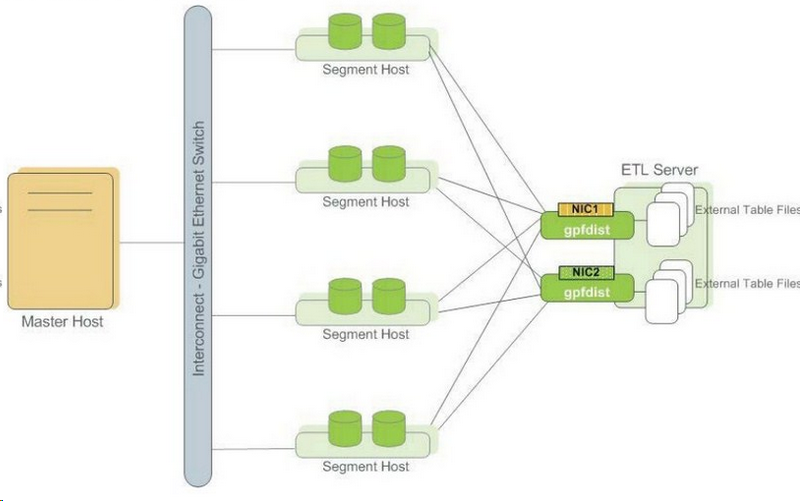
外部表需要指定gpfdist的IP和端口,还要有详细的目录地址,文件名支持通配符匹配。可以编写多个gpfdist地址,但是总数不能超过总的segment数量,否则会报错。
GPDB提供两种外部表:可读外部表用于数据装载、可写外部表用于数据卸载。外部表可基于文件、亦可基于WEB,这两种都能实现可读、可写。
当一个查询使用一个常规的外部表,该外部表被认为是可重读的,因为在该查询期间数据是静态的。而对于WEB外部表,数据是不可重读的,因为在该查询的执行期间数据可能会发生变化。
可写外部表用以从数据库表中选择记录并输出到文件、命名管道或其他可执行程序。 比如,可以从GPDB中卸载数据并发送到一个可执行程序,该程序连接到其他数据库或者ETL工具并装载数据到其他地方。 可写外部表还可以用于输出到GPDB的并行MapReduce计算。
可写外部表被定义后,数据即可从数据库表中被选择并插入到该可写外部表。 可写外部表只允许INSERT操作 – SELECT、 UPDATE、 DELETE或TRUNCATE是不允许的。可写外部表输出数据到一个可执行程序,该程序要能够接受流输入数据。
在创建外部表的时候,可以指定分隔符、err表、指定允许出错的数据条数,以及源文件的编码等信息。
二,外部表语法
1CREATE [READABLE] EXTERNAL TABLE table_name
2    ( column_name data_type [, ...] | LIKE other_table )
3      LOCATION ('file://seghost[:port]/path/file' [, ...])
4        | ('gpfdist://filehost[:port]/file_pattern[#transform]'
5        | ('gpfdists://filehost[:port]/file_pattern[#transform]'
6            [, ...])
7        | ('gphdfs://hdfs_host[:port]/path/file')
8      FORMAT 'TEXT'
9            [( [HEADER]
10               [DELIMITER [AS] 'delimiter' | 'OFF']
11               [NULL [AS] 'null string']
12               [ESCAPE [AS] 'escape' | 'OFF']
13               [NEWLINE [ AS ] 'LF' | 'CR' | 'CRLF']
14               [FILL MISSING FIELDS] )]
15           | 'CSV'
16            [( [HEADER]
17               [QUOTE [AS] 'quote']
18               [DELIMITER [AS] 'delimiter']
19               [NULL [AS] 'null string']
20               [FORCE NOT NULL column [, ...]]
21               [ESCAPE [AS] 'escape']
22               [NEWLINE [ AS ] 'LF' | 'CR' | 'CRLF']
23               [FILL MISSING FIELDS] )]
24           | 'AVRO'
25           | 'PARQUET'
26
27           | 'CUSTOM' (Formatter=<formatter specifications>)
28     [ ENCODING 'encoding' ]
29     [ [LOG ERRORS [INTO error_table]] SEGMENT REJECT LIMIT count
30       [ROWS | PERCENT] ]
31
32CREATE [READABLE] EXTERNAL WEB TABLE table_name
33   ( column_name data_type [, ...] | LIKE other_table )
34      LOCATION ('http://webhost[:port]/path/file' [, ...])
35    | EXECUTE 'command' [ON ALL
36                          | MASTER
37                          | number_of_segments
38                          | HOST ['segment_hostname']
39                          | SEGMENT segment_id ]
40      FORMAT 'TEXT'
41            [( [HEADER]
42               [DELIMITER [AS] 'delimiter' | 'OFF']
43               [NULL [AS] 'null string']
44               [ESCAPE [AS] 'escape' | 'OFF']
45               [NEWLINE [ AS ] 'LF' | 'CR' | 'CRLF']
46               [FILL MISSING FIELDS] )]
47           | 'CSV'
48            [( [HEADER]
49               [QUOTE [AS] 'quote']
50               [DELIMITER [AS] 'delimiter']
51               [NULL [AS] 'null string']
52               [FORCE NOT NULL column [, ...]]
53               [ESCAPE [AS] 'escape']
54               [NEWLINE [ AS ] 'LF' | 'CR' | 'CRLF']
55               [FILL MISSING FIELDS] )]
56           | 'CUSTOM' (Formatter=<formatter specifications>)
57     [ ENCODING 'encoding' ]
58     [ [LOG ERRORS [INTO error_table]] SEGMENT REJECT LIMIT count
59       [ROWS | PERCENT] ]
60
61CREATE WRITABLE EXTERNAL TABLE table_name
62    ( column_name data_type [, ...] | LIKE other_table )
63     LOCATION('gpfdist://outputhost[:port]/filename[#transform]'
64      | ('gpfdists://outputhost[:port]/file_pattern[#transform]'
65          [, ...])
66      | ('gphdfs://hdfs_host[:port]/path')
67      FORMAT 'TEXT'
68               [( [DELIMITER [AS] 'delimiter']
69               [NULL [AS] 'null string']
70               [ESCAPE [AS] 'escape' | 'OFF'] )]
71          | 'CSV'
72               [([QUOTE [AS] 'quote']
73               [DELIMITER [AS] 'delimiter']
74               [NULL [AS] 'null string']
75               [FORCE QUOTE column [, ...]] ]
76               [ESCAPE [AS] 'escape'] )]
77           | 'AVRO'
78           | 'PARQUET'
79
80           | 'CUSTOM' (Formatter=<formatter specifications>)
81    [ ENCODING 'write_encoding' ]
82    [ DISTRIBUTED BY (column, [ ... ] ) | DISTRIBUTED RANDOMLY ]
83
84CREATE WRITABLE EXTERNAL WEB TABLE table_name
85    ( column_name data_type [, ...] | LIKE other_table )
86    EXECUTE 'command' [ON ALL]
87    FORMAT 'TEXT'
88               [( [DELIMITER [AS] 'delimiter']
89               [NULL [AS] 'null string']
90               [ESCAPE [AS] 'escape' | 'OFF'] )]
91          | 'CSV'
92               [([QUOTE [AS] 'quote']
93               [DELIMITER [AS] 'delimiter']
94               [NULL [AS] 'null string']
95               [FORCE QUOTE column [, ...]] ]
96               [ESCAPE [AS] 'escape'] )]
97           | 'CUSTOM' (Formatter=<formatter specifications>)
98    [ ENCODING 'write_encoding' ]
99    [ DISTRIBUTED BY (column, [ ... ] ) | DISTRIBUTED RANDOMLY ]
三,创建外部表
01,语法
1gpfdist [-d directory] [-p http_port] [-l log_file] [-t timeout]
2[-S] [-w time] [-v | -V] [-s] [-m max_length] [--ssl certificate_path]
3gpfdist -? | --help
4gpfdist --version
02,启动进程
1--创建gpdist进程
2[gpadmin@greenplum02 ~]$ mkdir script
3[gpadmin@greenplum02 ~]$ nohup gpfdist -d /home/gpadmin/script/ -p 8081 -l /home/gpadmin/script/gpfdist.log &
4[1] 6904
5[gpadmin@greenplum02 ~]$ nohup: ignoring input and appending output to ‘nohup.out’
6[gpadmin@greenplum02 ~]$ ss -lntup|grep 8081
7tcp    LISTEN     0      128      :::8081                 :::*                   users:(("gpfdist",pid=6904,fd=6))
8
9---配置读取文件
10[gpadmin@greenplum02 script]$ cat test.txt
11Prague,Jan,101,4875.33
12Rome,Mar,87,1557.39
13Bangalore,May,317,8936.99
14Beijing,Jul,411,11600.67
15San Francisco,Sept,156,6846.34
16Paris,Nov,159,7134.56
17San Francisco,Jan,113,5397.89
18Prague,Dec,333,9894.77
19Bangalore,Jul,271,8320.55
20Beijing,Dec,100,4248.41
21
22q
23[gpadmin@greenplum02 script]$ pwd
24/home/gpadmin/script
25--后面的是错误信息
03,创建外部表
1create external table public.test
2(
3country varchar(128),
4name varchar(128),
5id int,
6sale varchar(128)
7)
8location ('gpfdist://192.168.0.222:8081/test.txt')
9format 'text'
10(delimiter ',' null as '' escape 'off')
11encoding 'utf8'
12log error segment reject limit 3 rows;
13
14--- location   文件所在位置,可以直接是本地路径、gpfdist地址、gpfdists地址、gphdfs地址。
15--- format     文本类型
16--- delimiter  分隔符
17--- encoding    编码
18--- log error into  错误数据表,记录错误数据,会自动创建。一般都是tablename_err格式,例如t1_err。
19--- segment reject limit  错误数据的条数/百分比(rows/percent),超过设置值会报错。最小值是2。用来确保数据的完整性。
20
21结果:postgres=# create external table public.test99(country varchar(128),name varchar(128),id int,sale varchar(128))location ('gpfdist://192.168.0.222:8081/test.txt')format 'text'(delimiter ',' null as '' escape 'off')encoding 'utf8'log errors segment reject limit 3 rows;
22CREATE EXTERNAL TABLE
23postgres=# SELECT * from public.test99
24postgres-# ;
25NOTICE:  Found 2 data formatting errors (2 or more input rows). Rejected related input data.
26    country    | name | id  |   sale
27---------------+------+-----+----------
28 Prague        | Jan  | 101 | 4875.33
29 Rome          | Mar  |  87 | 1557.39
30 Bangalore     | May  | 317 | 8936.99
31 Beijing       | Jul  | 411 | 11600.67
32 San Francisco | Sept | 156 | 6846.34
33 Paris         | Nov  | 159 | 7134.56
34 San Francisco | Jan  | 113 | 5397.89
35 Prague        | Dec  | 333 | 9894.77
36 Bangalore     | Jul  | 271 | 8320.55
37 Beijing       | Dec  | 100 | 4248.41
38(10 rows)
39
40postgres=# SELECT * from test99;
41NOTICE:  Found 2 data formatting errors (2 or more input rows). Rejected related input data.
42    country    | name | id  |   sale
43---------------+------+-----+----------
44 Prague        | Jan  | 101 | 4875.33
45 Rome          | Mar  |  87 | 1557.39
46 Bangalore     | May  | 317 | 8936.99
47 Beijing       | Jul  | 411 | 11600.67
48 San Francisco | Sept | 156 | 6846.34
49 Paris         | Nov  | 159 | 7134.56
50 San Francisco | Jan  | 113 | 5397.89
51 Prague        | Dec  | 333 | 9894.77
52 Bangalore     | Jul  | 271 | 8320.55
53 Beijing       | Dec  | 100 | 4248.41
54(10 rows)
04,数据装载
1insert into table select * from table_ext;
2
3内部表<----外部表