
1. 前言
git 对象有四种:blob (数据块), tree (目录树), commit (提交), tag (标签)。
本文通过一个示例,以blob为例来讨论对象的存储结构。示例采用的git版本为2.17 。
2. 实践讨论
2.1. 生成Blob对象文件
首先创建一个测试git仓库
1$ mkdir hello
2$ cd hello
3$ git init
然后通过创建一个文件 test,test的内容为 "hello", 可以看到test文件的字节长度为6, 是因为创建文件的时候自动在行末加上了换行符\n。对文件其执行 git add , 可以看到在.git/objects目录下面生成了一个子目录ce,ce目录下面有个文件013625030ba8dba906f756967f9e9ca394464a。
1$ echo "hello" > test
2$ du -b test
36       test
4$ git add test
5$ find .git/objects/ -type f
6.git/objects/ce/013625030ba8dba906f756967f9e9ca394464a
该文件即为git为 test 文件数据内容生成的blob对象文件,该对象的SHA值为ce013625030ba8dba906f756967f9e9ca394464a.
至此,产生两个问题:
- 对象文件的数据结构是什么样的 ?
- 对象的SHA值又是如何生成的 ?
2.2. 对象数据结构及SHA值
根据 Git-Internals-Git-Objects 文中的描述:
首先,对象文件数据结构如下图:
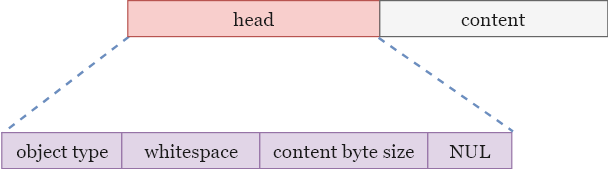
- content: 表示数据内容
- head: 对象头部信息
- object type:对象类型,可选值为 blob, tree, commit, tag
- whitespace: 一个空格字符
- content byte size:数据内容的字节数字符串
- NUL:空字符,ASCII码值为0
然后, 对象的SHA值就是对上面这个数据结构执行SHA1 hash摘要算法得到的。
2.3. 动手验证
根据2.2中的规则来编码对2.1中的test文件内容生成一个SHA值,看是否和git生成的SHA值一致?
1    // object content
2    String content = "hello\n";
3    byte[] contentBytes = content.getBytes();
4
5    ByteBuffer buf = ByteBuffer.allocate(1024);
6
7
8    buf.put("blob".getBytes()); // object type
9    buf.put((byte) ' ');        // whitespace
10    buf.put(Integer.toString(contentBytes.length).getBytes());  // content byte size numeric string
11    buf.put((byte) 0);          // NUL
12    buf.put(contentBytes);      // content
13
14    buf.flip();
15
16    // whole object bytes
17    byte[] objectBytes = new byte[buf.remaining()];
18    buf.get(objectBytes);
19
20    // Execute SHA1 hash digest
21    MessageDigest md = MessageDigest.getInstance("SHA1");
22    byte[] shaBytes = md.digest(objectBytes);
23
24    // Show in hex
25    String shaHex = Hex.encodeHexString(shaBytes);
26    System.out.println(shaHex);
上述代码输出:ce013625030ba8dba906f756967f9e9ca394464a 。 和 2.1 中git生成的SHA值一致,2.2 中数据结构和SHA值的生成得到验证。
2.4. 对象压缩
根据 Git-Internals-Git-Objects 可知git 对象文件是经过Zlib::Deflate.deflate 压缩存储的。
1$ cat .git/objects/ae/a941d707291bf3f2103c096479b068f7bed4f8
2x☺K
3cat: write error: Input/output error
可以看到通过cat命令是无法直接输出内容的。
1        InputStream is = new InflaterInputStream(new FileInputStream(
2                ".git\\objects\\ce\\013625030ba8dba906f756967f9e9ca394464a"));
3
4        ByteArrayOutputStream baos = new ByteArrayOutputStream();
5
6        int b = 0;
7        while ((b = is.read()) != -1) {
8            baos.write(b);
9        }
10
11        byte[] res = baos.toByteArray();
12        System.out.println(new String(res));
13
14        is.close();
15        baos.close();
通过如上代码可输出对象的数据结构:
blob 6hello
注其中包括不可见字符NUL和换行符。
通过git cat-file命令可以直接查看对象的数据内容:
1$ git cat-file -p ce013625030ba8dba906f756967f9e9ca394464a
2hello
3. 总结
- 对象数据结构为:
- 对象SHA值为对( 1. 对象数据结构)执行SHA1消息摘要算法生成;
- 对象存储结构为:对(1. 对象数据结构)进行deflate压缩后存储;
4. 参考资料
- Git-Internals-Git-Objects
- 《Git版本控制管理》(第2版) - 人民邮电出版社