
一、Apifox的介绍
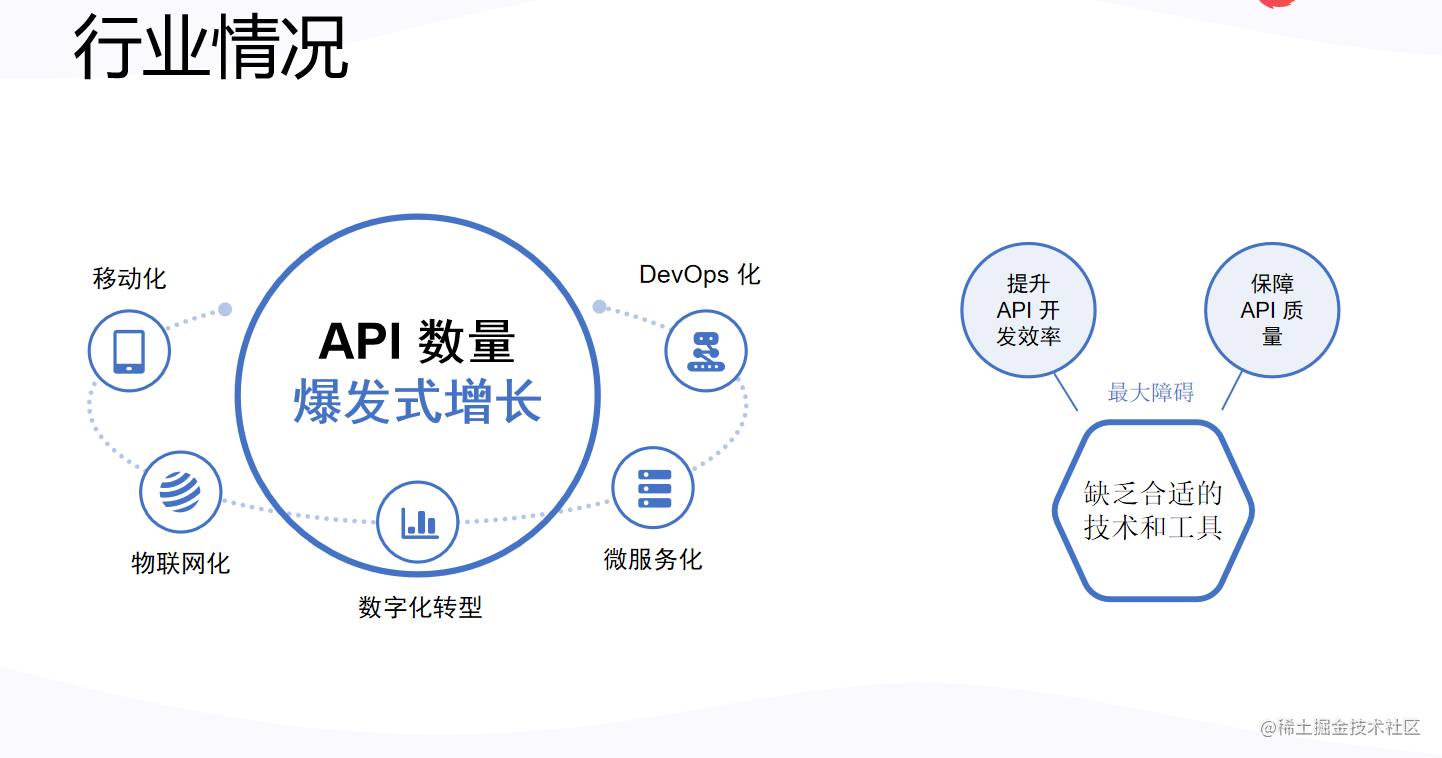
1、目前接口测试的现状
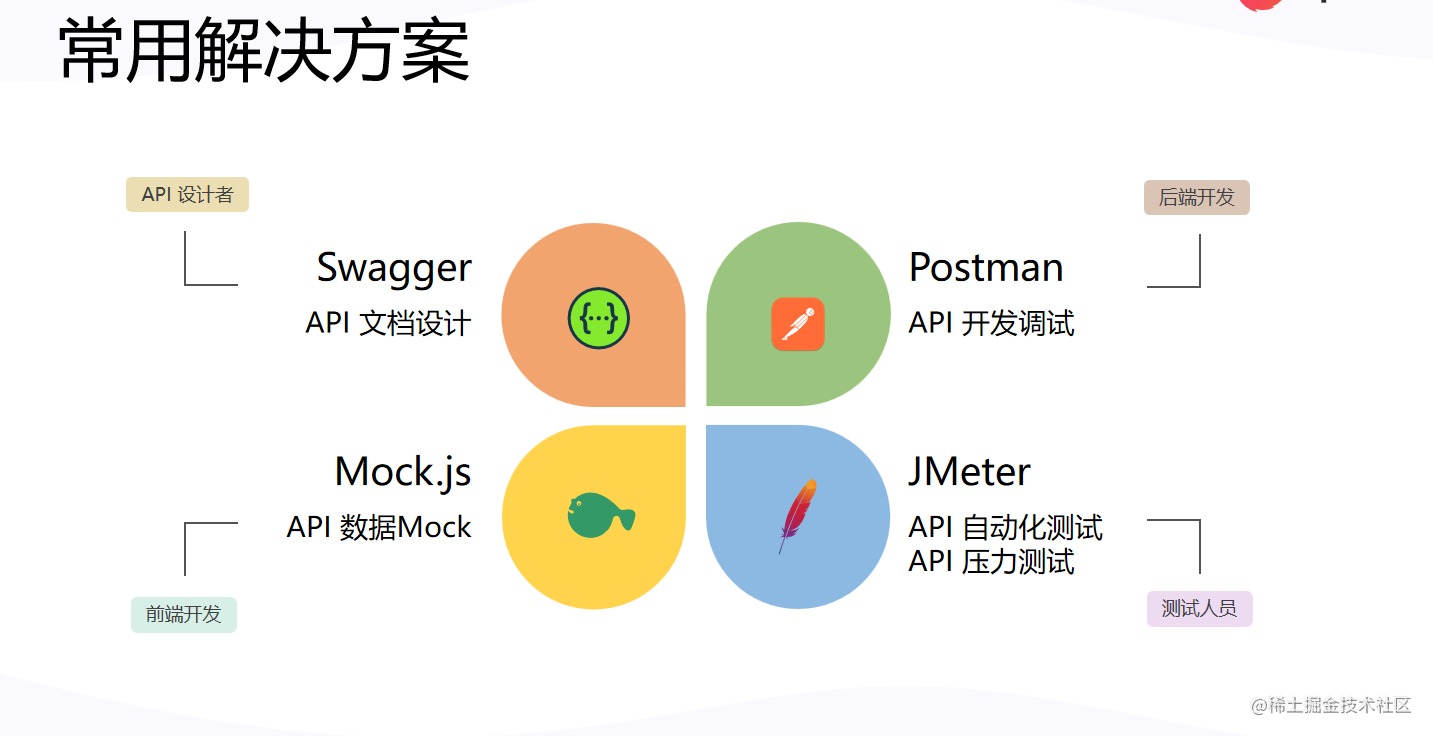
 2、常用方案
 3、存在问题
-
开发人员在 Swagger 定义好文档后,接口调试的时候还需要去 Postman 再定义一遍。
-
前端开发 Mock 数据的时候又要去 mockjs 定义一遍,还需要手动设置 Mock 规则。
-
测试人员需要去 JMeter 再定义一遍。
-
前端根据 mockjs Mock 出来的数据开发完,后端根据 Swagger 定义的接口文档开发完,各自都试测试通过了,本以为可以马上上线,结果一对接发现各种问题:
1、开发过程中接口变更了,只修改了 Swagger,但是没有及时同步修改 mockjs。
2、后端开发的接口数据类型和文档不一致,肉眼难以发现问题。
-
同样,测试在 JMeter 写好的测试用例,真正运行的时候也会发现各种不一致。
-
时间久了,各种不一致会越来越严重。
4. Apifox 神器出现
Apifox=Postman + Swagger + Mock + JMeter
官网地址:www.apifox.cn
Apifox 是 API 文档、调试、Mock、测试一体化协作平台,定位Postman + Swagger + Mock + JMeter。通过一套系统、一份数据,解决多个系统之间的数据同步问题。只要定义好 API 文档,API 调试、API 数据 Mock、API 自动化测试就可以直接使用,无需再次定义;API 文档和 API 开发调试使用同一个工具,API 调试完成后即可保证和 API 文档定义完全一致。高效、及时、准确!
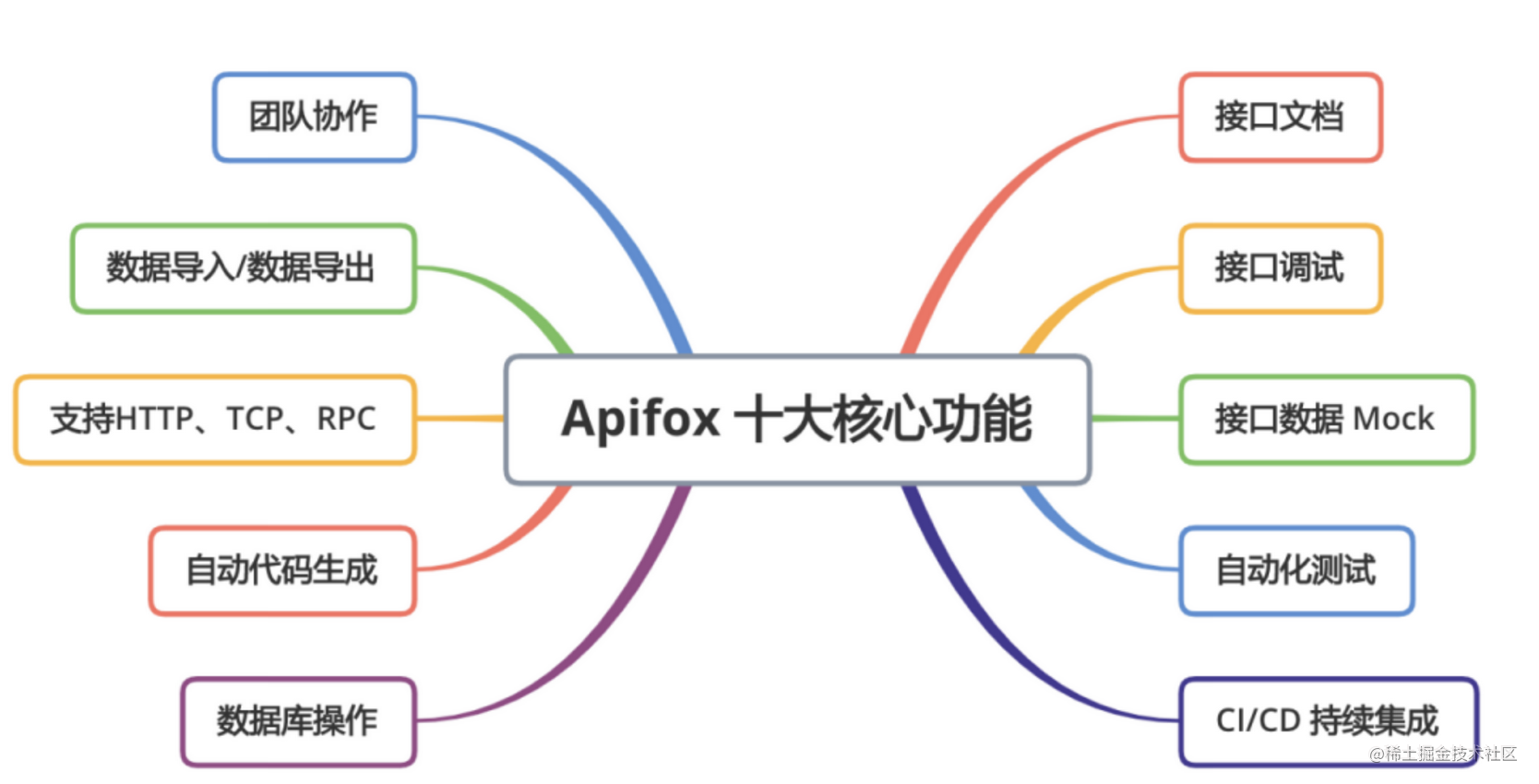
接口文档定义:Apifox 遵循 OpenApi 3.0 (原Swagger)、JSON Schema 规范的同时,提供了非常好用的可视化文档管理功能,零学习成本,非常高效。
接口调试:Postman 有的功能,比如环境变量、预执行脚本、后执行脚本、Cookie/Session 全局共享 等功能,Apifox 都有,并且和 Postman 一样高效好用。
数据 Mock:内置 Mock.js 规则引擎,非常方便 mock 出各种数据,并且可以在定义数据结构的同时写好 mock 规则。支持添加“期望”,根据请求参数返回不同 mock 数据。最重要的是 Apifox 零配置 即可 Mock 出非常人性化的数据,具体在本文后面介绍。
接口自动化测试:提供接口集合测试,可以通过选择接口(或接口用例)快速创建测试集。目前接口自动化测试更多功能还在开发中,敬请期待!目标是: JMeter 有的功能基本都会有,并且要更好用。
5、Apifox 十大核心功能
二、对比Postman
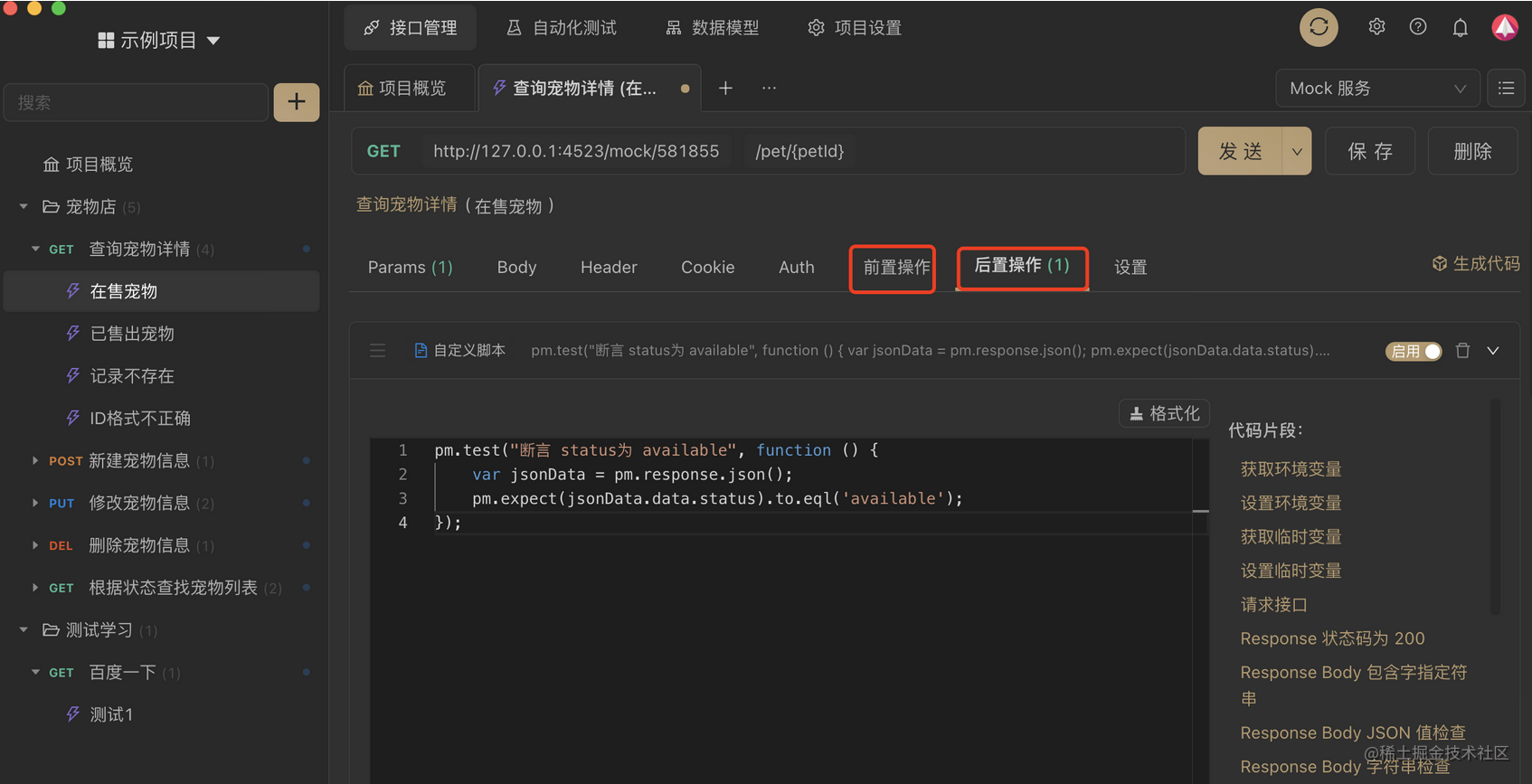
1、Apifox 脚本语法100%兼容 Postman脚本语法,Postman 脚本可以无缝迁移到 Apifox
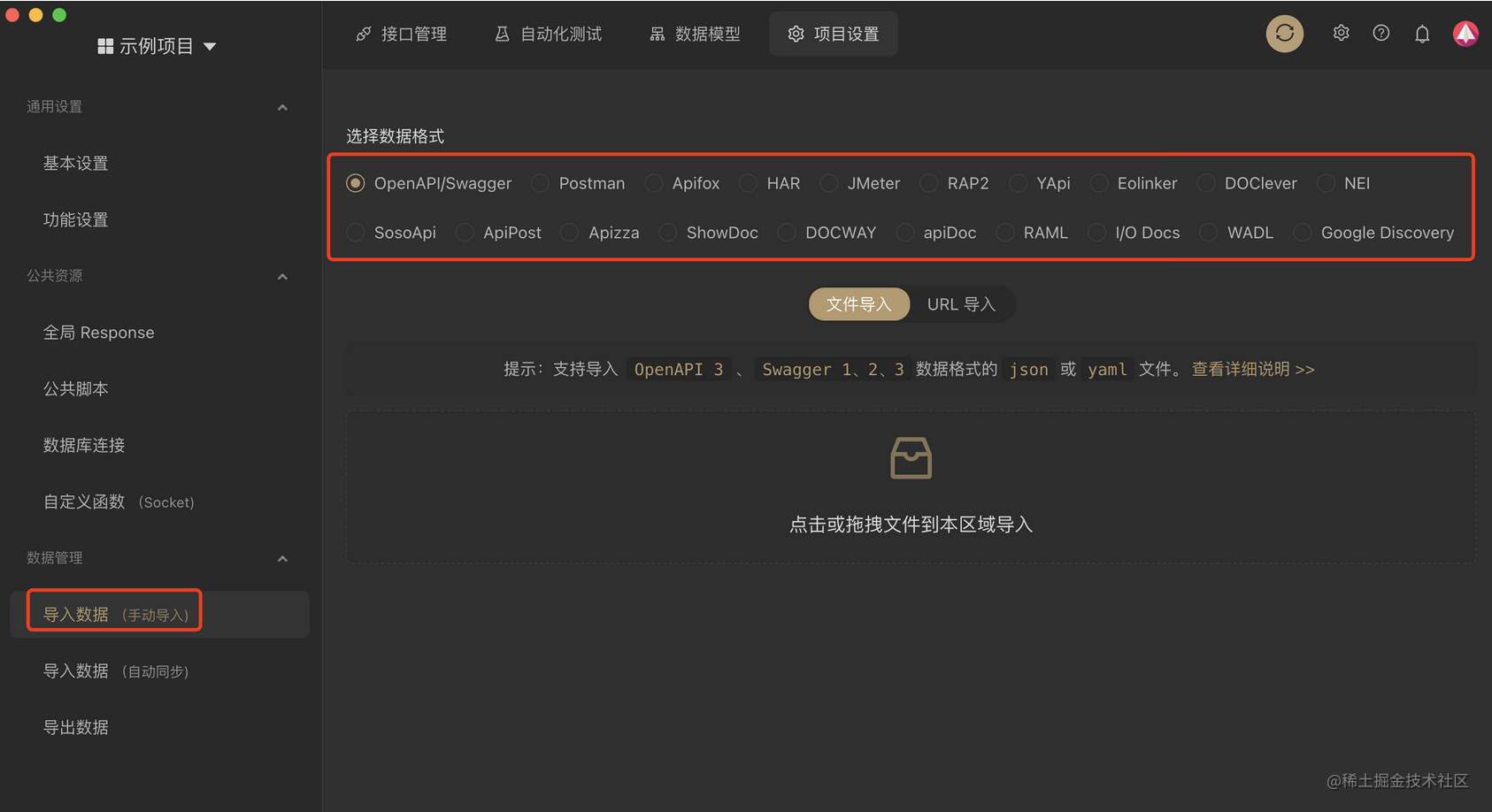 2、使用方式
2.1、以下两个环节可添加脚本:
1在将请求发送到服务器之前,使用前置脚本。
2收到响应后,使用 后置脚本(断言设置)。
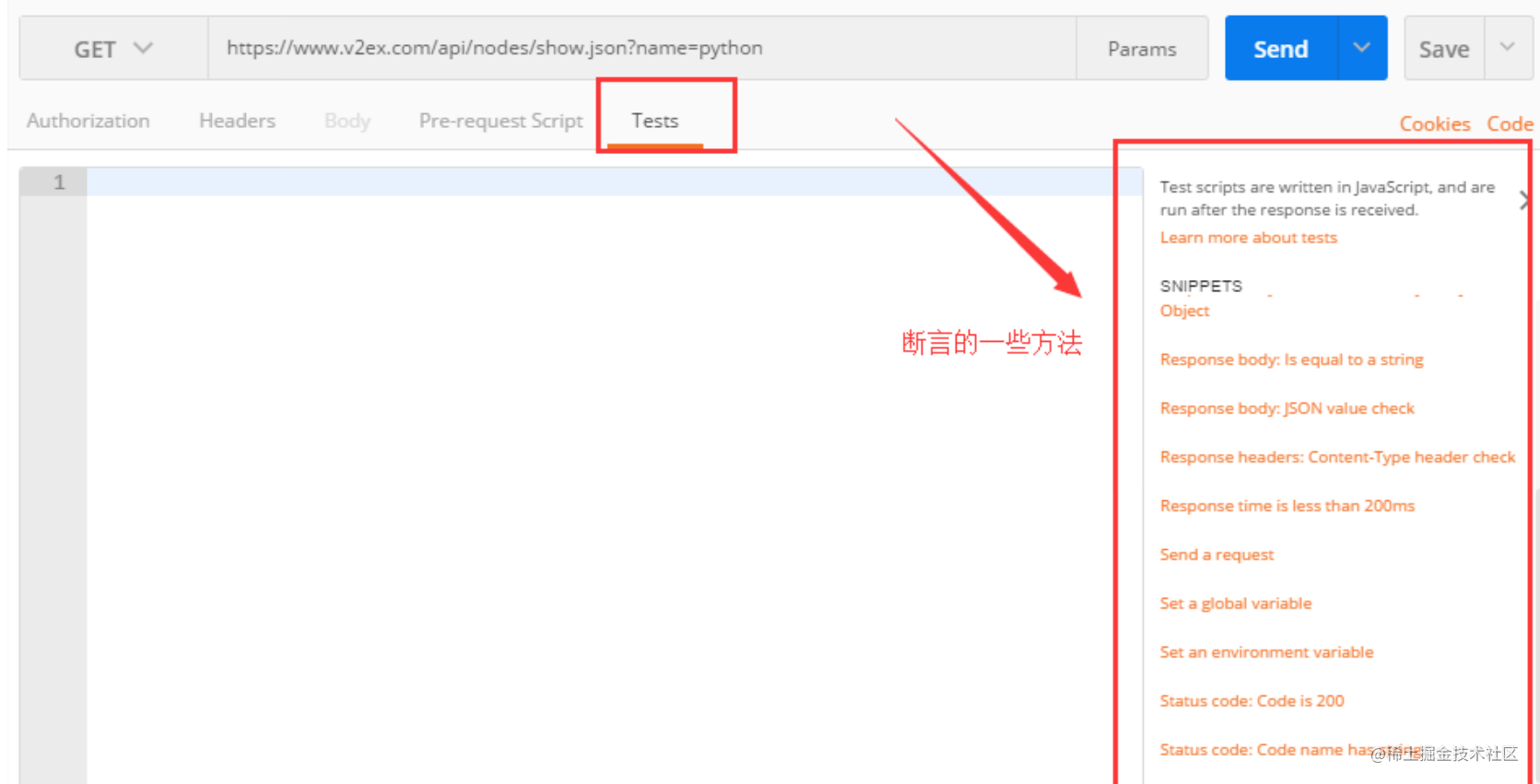
 2.2、PostMan加断言在Pre-request script和Tests
以下两个环节可添加脚本:
1在将请求发送到服务器之前,使用 Pre-request script
2收到响应后,使用 Tests
Apifox一套接口文档,接口数据格式能做到前后端开发、测试等人员同时共享,可以省去不少沟通成本,对于提高团队协作还是有一定的帮助的。Apifox是一款综合性比较强的工具,学习成本肯定是比postman高些,如果你仅仅是个人开发,对文档、测试没那么高要求的,小而美的PostMan还是比较好的选择,如果你是大型项目,多团队协作,Apifox确实是一个不错的选择.
写脚本的易用性PostMan强很多,只不过Apifox可以兼容PostMan脚本。
三、Apifox常用断言使用示例
1、断言请求返回的结果是否正确
1// pm.response.to.have
2pm.test('返回结果状态码为 200', function () {
3    pm.response.to.have.status(200);
4});
5
6// pm.expect()
7pm.test('当前为Mock环境', function () {
8  pm.expect(pm.environment.get('env')).to.equal('production');
9});
10
11
12// response assertions
13pm.test('返回结果没有错误', function () {
14    pm.response.to.not.be.error;
15    pm.response.to.have.jsonBody('');
16    pm.response.to.not.have.jsonBody('error');
17});
18
19
20// pm.response.to.be*
21pm.test('返回结果没有错', function () {
22    // assert that the status code is 200
23    pm.response.to.be.ok; // info, success, redirection, clientError,  serverError, are other variants
24    // assert that the response has a valid JSON body
25    pm.response.to.be.withBody;
26    pm.response.to.be.json; // this assertion also checks if a body  exists, so the above check is not needed
27});
2、将请求返回的结果数据写入环境变量
1// 获取 JSON 格式的请求返回数据
2var jsonData = pm.response.json();
3
4// 将 jsonData.token 的值写入环境变量
5pm.environment.set('token', jsonData.token);
3、检查 response body 是否包含某个字符串
1pm.test('Body matches string', function() {
2  pm.expect(pm.response.text()).to.include('available');
3});
4、检查 response body 是否包含等于字符串
1pm.test('Body is correct', function() {
2  pm.response.to.have.body('response_body_string');
3});
5、检查 json 值
1pm.test('Your test id', function() {
2  var jsonData = pm.response.json();
3  pm.expect(jsonData.data.id).to.eql("1");
4});
6、检查 header 是否有设置 Content-Type
1pm.test('Content-Type header is present', function() {
2  pm.response.to.have.header('Content-Type');
3});
7、检查请求响应耗时是否低于 200 毫秒
1pm.test('Response time is less than 200ms', function() {
2  pm.expect(pm.response.responseTime).to.be.below(200);
3});
8、检查 HTTP 状态码是否为 200
1pm.test('Status code is 200', function() {
2  pm.response.to.have.status(200);
3});
9、检查 HTTP 状态码名称是否包含某个字符串
1pm.test('Status code name has string', function () {
2  pm.response.to.have.status('OK');
3});
10、是否正确的 POST 请求状态码
1pm.test('Successful POST request', function() {
2  pm.expect(pm.response.code).to.be.oneOf([201, 202]);
3});
四、断言库的使用示例
Apifox 内置了ChaiJS作为断言库,以下是常用的断言测试脚本示例,但并非全部示例,更多用法请参考文档: ChaiJS expect BDD library
1、断言目标字符串包含另一个字符串
1pm.test('断言目标字符串包含另一个字符串', function() {
2  pm.expect('foobar').to.have.string('bar');
3});
2、断言目标严格等于(===)某值
1const TEN = 10;
2pm.test('Check if number is equal to 10', function() {
3  pm.expect(TEN).to.equal(10);
4});
如果设置了deep标记,则断言目标深度等于value
1pm.test('断言目标深度等于提供的 JSON', function() {
2	pm.expect(data1).to.deep.equal(data2);
});
注意:
设置deep标记,然后使用equal和property断言。该标记可以让其后的断言不是比较对象本身,而是递归比较对象的键值对。
3、断言深度等于某值,相当于deep.equal(value)的简写
1pm.test('断言目标深度等于提供的 JSON', function() {
2  pm.expect(data1).to.deep.equal(data2);
3});
4、断言当前环境
1pm.test('Check if environment is production', function() {
2  pm.expect(pm.environment.get('env')).to.equal('production');
3});
5、断言数据类型
1pm.test('Check if target is string', function() {
2  pm.expect('Postman').to.be.a('string');
3});
4pm.test('Check if target is an object', function() {
5  pm.expect({ a: 1 }).to.be.an('object');
6});
7pm.test('Check if target is undefined', function() {
8  pm.expect(undefined).to.be.an('undefined');
9});
注意:
1推荐在做其他断言前,先使用 .a 方法检查模板的数据类型。
2数据类型是大小写敏感的。
6、断言是否为空
1pm.test('Check if array is empty', function() {
2  pm.expect([]).to.be.empty;
3});
4pm.test('Check if string is empty', function() {
5  pm.expect('').to.be.empty;
6});
还可以使用 .a方法检查数据类型后,在断言是否为空。
示例:
1pm.test('Check if array is empty', function() {

2  pm.expect([]).to.be.an('array').that.is.empty;

3});
7、断言目标对象的键值
1pm.test('Check if object contains all provided keys', function() {
2  pm.expect({ a: 1, b: 2 }).to.have.all.keys('a', 'b');
3});
4pm.test('Checking if object contains any ONE of the keys', function() {
5  pm.expect({ a: 1, b: 2 }).to.have.any.keys('a', 'b');
6});
7pm.test('Check if object contains any NONE of the provided keys', function() {
8  pm.expect({ a: 1, b: 2 }).to.not.have.any.keys('c', 'd');
9});
8、断言目标对象是否包含指定属性
1pm.test('Check if object contains the property', function() {

2 pm.expect({ a: 1 }).to.have.property('a');
3
});
注意:
1目标对象必须是 object、set、array 或 map。
2如果 .keys 前面没有 .all 或 .any,则默认为 .all。
3由于只有部分数据类型的目标对象可使用 .keys 方法,建议先用 .a方法断言数据类型。
4
5pm.test('Check if object contains all the keys', function() {
6  pm.expect({ a: 1, b: 2 })
7    .to.be.an('object')
8    .that.has.all.keys('a', 'b');
9});
9、断言目标对象的 length
1pm.test('Check the length of the target', function() {
2  pm.expect('foo').to.have.lengthOf(3);
3});
4pm.test('Check the size of the target', function() {
5  pm.expect([1, 2, 3]).to.have.lengthOf(2);
6});
10、断言目标对象的成员 (members)
1pm.test('Check if the target has same members as the array set', function() {

2  pm.expect([1, 2, 3]).to.have.members([2, 1, 3]);

3});
注意:
1默认情况下, .members 使用严格比较。
2members 的顺序不会影响结果。
11、断言目标对象包含指定 item
1pm.test('Check if the target array includes the number provided', function() {
2  pm.expect([1, 2, 3]).to.include(2);
3});
4pm.test(
5  'Check if the target object includes the properties provided',
6  function() {
7    pm.expect({ a: 1, b: 2, c: 3 }).to.include({ a: 1, b: 2 });
8  },
9);
注意: 建议在 .include 前先使用 .a 方法判断数据类型。
示例:
1pm.test(
2  'Check if the target is an array that includes the number specified',
3  function() {
4    pm.expect([1, 2, 3])
5      .to.be.an('array')
6      .that.includes(2);
7  },
8);
官网下载地址:www.apifox.cn