
Sortable.js是一款轻量级的拖放排序列表的js插件(虽然体积小,但是功能很强大)
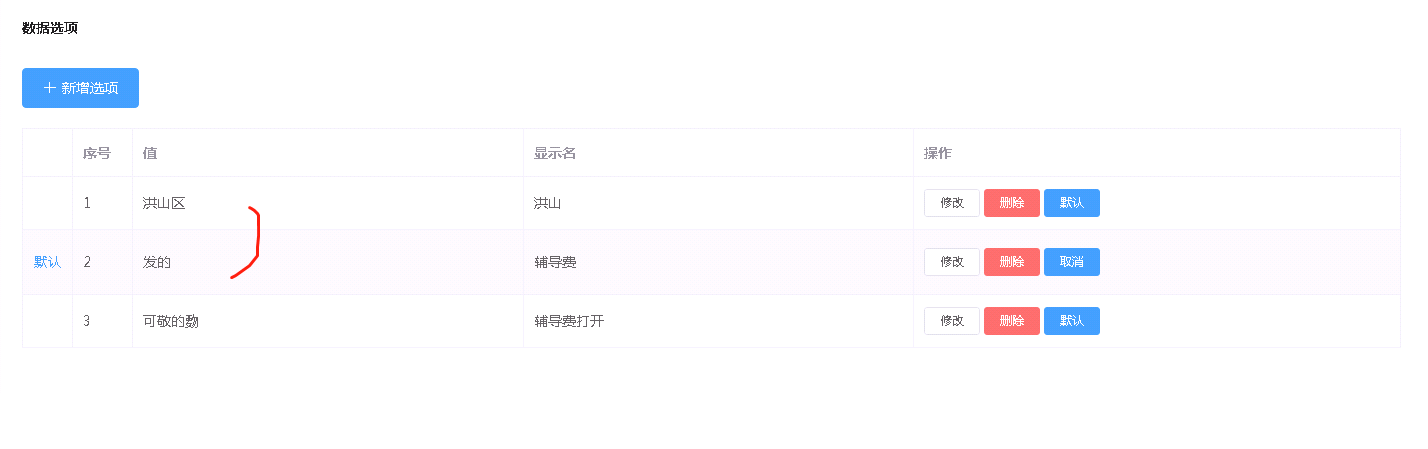
项目需求是要求能对element中 的table进行拖拽行排序
这里用到了sorttable
Sortable.js是一款轻量级的拖放排序列表的js插件(虽然体积小,但是功能很强大)
官方Demo:http://rubaxa.github.io/Sortable/
安装步骤:
npm install sortablejs --save
在.vue中的js部分(需要用到sorttable的vue文件中)引入 也可以 在main.js中引入注册到Vue的根实例中
import Sortable from 'sortablejs'
HTML 部分
1<el-table :data="tableData"
2                      border
3                      width="100%"
4                      row-key="id"
5                      align="left"
6                      v-show="showDictItem">
7                      <el-table-column width="50px">
8                          <template slot-scope="scope">
9                              <el-button type='text' v-show="scope.row.defaultValue === 1">默认</el-button>
10                          </template>
11                      </el-table-column>
12                      <el-table-column
13                          width="60px"
14                          label="序号"
15                          type="index">
16                    </el-table-column>
17                     <el-table-column v-for="(item, index) in col"
18                        :key="`col_${index}`"
19                        :prop="dropCol[index].prop"
20                        :label="item.label">
21                      </el-table-column>
22                      <el-table-column label="操作" min-width="100">
23                          <template slot-scope="scope">
24                            <el-button
25                              size="mini"
26                              @click="handleEdit(scope.$index, scope.row)">修改</el-button>
27                              <el-popover placement="top" v-model="scope.row.visible">
28                                  <p>确定要删除当前内容?</p>
29                                  <div style="text-align: right; margin: 0">
30                                    <el-button size="mini" plain @click="scope.row.visible = false">取消</el-button>
31                                    <el-button type="primary" size="mini" @click="handleDelete(scope.$index, scope.row), scope.row.visible = false">确定</el-button>
32                                  </div>
33                                  <el-button
34                                      size="mini"
35                                      type="danger"
36                                      slot="reference">删除</el-button>
37                              </el-popover>
38
39
40                              <el-button
41                              size="mini"
42                              type="primary"
43                              @click="handleDefault(scope.$index, scope.row)" v-show="scope.row.defaultValue === 0">默认</el-button>
44                              <el-button
45                              size="mini"
46                              type="primary"
47                              @click="handleDefault(scope.$index, scope.row)" v-show="scope.row.defaultValue === 1">取消</el-button>
48                          </template>
49                      </el-table-column>
50                </el-table>
data 部分
1col: [
2
3                    {
4                      label: '值',
5                      prop: 'dataKey'
6                    },
7                    {
8                      label: '显示名',
9                      prop: 'dataValue'
10                    }
11                  ],
12                  dropCol: [
13
14                    {
15                      label: '值',
16                      prop: 'dataKey'
17                    },
18                    {
19                      label: '显示名',
20                      prop: 'dataValue'
21                    }
22                  ],
23                  tableData: [],
methos
1//行拖拽
2            rowDrop() {
3              const tbody = document.querySelector('.el-table__body-wrapper tbody')
4              const _this = this
5              Sortable.create(tbody, {
6                onEnd({ newIndex, oldIndex }) {
7                  const currRow = _this.tableData.splice(oldIndex, 1)[0]
8                  _this.tableData.splice(newIndex, 0, currRow)
9                }
10              })
11            },
12            //列拖拽
13            columnDrop() {
14              const wrapperTr = document.querySelector('.el-table__header-wrapper tr')
15              this.sortable = Sortable.create(wrapperTr, {
16                animation: 180,
17                delay: 0,
18                onEnd: evt => {
19                  const oldItem = this.dropCol[evt.oldIndex]
20                  this.dropCol.splice(evt.oldIndex, 1)
21                  this.dropCol.splice(evt.newIndex, 0, oldItem)
22                }
23              })
24            },
这样就可以实现基本的行拖拽和列拖拽了